
Our Top Picks
 N-GEN GAMING Big & Tall Gaming Chair26.77 x 27.5 x 46.06 inches27.5 x 26.77 x 46.06 inches40.74 poundsCheck on Amazon
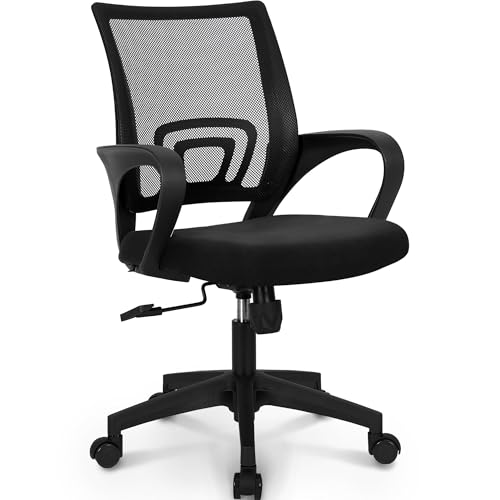 NEO CHAIR Office Computer Chair Gaming Mid-Back Mesh22.8 x 22.44 x 39.7 inches22.44 x 22.8 x 39.7 inches19.4 poundsCheck on Amazon
 N-GEN GAMING Gaming Chair with Footrest27.5 x 24.5 x 46.5 inches27.5 x 24.5 x 46.5 inches37.48 poundsCheck on Amazon
The best gaming chair for working from home is one that keeps your hips, lower back and forearms supported for eight hours, not one that looks the most aggressive in a photo. On that standard, the Secretlab Titan Evo is the best all-rounder, the Herman Miller x Logitech G Embody and Vantum are the best if the budget is flexible, the Razer Fujin Pro is the pick for hot rooms, and the Corsair TC100 Relaxed is the sensible entry point. This guide is based on published specs, maker documentation and professional reviews, and it explains how to choose between them using numbers rather than marketing.
The short answer, by situation
| Your situation | Best fit | Why | Price tier |
|---|---|---|---|
| Full-time remote, games at night | Secretlab Titan Evo | Four-way lumbar, three sizes, wide armrest range | Mid to premium |
| Sits 9+ hours, wants posture over style | Herman Miller x Logitech G Embody | Pixelated support, office-grade adjustment | Premium |
| Leans forward at the keyboard all day | Herman Miller x Logitech G Vantum | Designed around an active, forward-leaning posture | Premium |
| Warm room, no air conditioning | Razer Fujin Pro | Full mesh back, 2D lumbar, 4D armrests | Premium |
| Wants adjustable lumbar and a classic gaming look | Razer Iskur V2 | Built-in lumbar with height and depth tuning | Mid to premium |
| Tight budget, part-time work from home | Corsair TC100 Relaxed | Wide seat, fabric option, simple controls | Entry |
| Wants a calmer, less gamer-looking chair | Fractal Design Refine | Understated styling, office-friendly look | Mid |
Everything below explains how those picks were made, what each chair gives up, and how to check fit before you commit.
N-GEN GAMING Big & Tall Gaming Chair, Footrest, Lumbar Support, Dark Black | Ergonomic High-Back Chair for Adults, Padded Wide Seat with Heavy-Duty Base, Reclining Comfort for Computer, Office/Home Use
Chosen because it specifies Footrest and Lumbar Support.
View on AmazonNEO CHAIR Office Computer Chair Gaming Mid-Back Mesh Desk Chair, Black | Breathable Mesh Back with Lumbar Support, Height Adjustment, Smooth Rolling Casters for Home Office, Study or Gaming Setup
Chosen because it specifies Black and Breathable Mesh Back with Lumbar Support.
View on AmazonN-GEN GAMING Gaming Chair with Footrest, Lumbar Support, High-Back, Black-A | Reclining Backrest, Linkage Armrests, Durable PU Leather, Adjustable Comfort for Extended Computer, Desk, or Home Office Use
Chosen because it specifies Lumbar Support and High-Back.
View on AmazonWhy a work-from-home chair has to meet a harder standard than a gaming chair
A person who games for two hours a night can tolerate a chair that is slightly wrong. A person who works from home sits in the same seat for 1,800 to 2,200 hours a year, which is more than three times the time most players spend gaming. Small mismatches turn into numb legs, a sore lower back and a stiff neck by Wednesday.
Three things separate a chair that works for a job from one that only looks good on a streaming backdrop.
- Lumbar support that actually adjusts. A removable lumbar pillow strapped to the backrest is the weakest design. Built-in lumbar that moves up and down, and ideally in and out, is the minimum for a long workday.
- Seat depth that fits your thighs. You want roughly two to three fingers of gap between the front edge of the seat and the back of your knee. Very deep racing bucket seats push shorter users into slouching.
- Armrests that move in more than one direction. A keyboard and mouse setup needs armrests that sit level with the desk. Four directions (height, width, depth and angle) let them slide close to the desk edge instead of colliding with it.
Ergonomic guidance from workplace health bodies consistently points the same way: knees around 90 to 100 degrees, feet flat on the floor, elbows near 90 degrees, and a backrest that supports the natural curve of the lower spine. A chair that cannot reach those positions for your body is the wrong chair, regardless of brand.
Seven chairs that handle both the workday and the evening session
1. Secretlab Titan Evo: the best all-rounder
Spec line: Three sizes (Small, Regular, XL), NEO Hybrid Leatherette or SoftWeave Plus fabric, four-way adjustable lumbar built into the backrest, magnetic head pillow, 4D armrests, cold-cure foam. Official size guidance runs from users around 169 cm and under (Small) up to 205 cm (XL), and the XL is rated to a much higher load than the smaller sizes.
Best for: People who work and play on one chair and want a size that matches their body. Skip if: you run hot and sit in a warm room, in which case the fabric version helps but a mesh chair is better.
- Lumbar can be tuned in two axes without tools, which suits a long desk day.
- The size choice matters more than it sounds: a correctly sized seat pan reduces thigh pressure.
- Armrest tops and many other parts can be swapped, which extends life.
Cons: It is sold mainly through the maker rather than in stores, so you cannot sit in one first. The seat base is firm and bucket-shaped, and some office-chair users find it too structured.
2. Herman Miller x Logitech G Embody: the best if the budget stretches
Spec line: Adaptation of the Embody office chair with a pixelated support system in the back and seat, seat and back that move together with the sitter, a long warranty window compared with typical gaming chairs, and an office-grade recline.
Best for: People who sit more than eight hours a day and treat the chair as a work tool. Skip if: you want a racing-seat look or head and shoulder wings around your upper body.
- Distributes pressure across the back and seat rather than concentrating it.
- Built for continuous use, with warranty coverage to match the price.
- Keeps the spine close to a neutral posture when you recline slightly.
Cons: Premium price tier, and the recline range is more conservative than a racing-style chair. The mesh-like surface is firmer than a padded gaming seat, which some players dislike.
3. Herman Miller x Logitech G Vantum: the best for forward-leaning typists
Spec line: Single size with no height bands, seat height roughly 18 to 22 inches, seat about 20 inches wide and 17.5 inches deep, elastomer and polyester suspension back, glass-filled nylon frame and base, roughly 37 pounds, 12-year warranty on published terms.
Best for: Programmers, designers and competitive players who sit upright and lean toward the screen. Skip if: you spend hours reclined, since the design favours an active posture, and verify the weight rating for your region because the US and EU spec sheets list different limits.
- Lightweight for its class, which makes assembly and moving easier.
- Suspension back breathes better than foam and leatherette.
- Single-size design is simple, and the published seat dimensions suit most average builds.
Cons: No fit variants, so very tall or very short users may not match. It also looks more like an office chair than a gaming one, which is a plus or minus depending on your taste.
4. Razer Fujin Pro: the best mesh chair for warm rooms
Spec line: Mesh back made from a thermoplastic elastomer and polyester blend, synchro-tilt recline up to about 136 degrees with adjustable tension, 2D lumbar (height and depth), 4D armrests, aluminum frame, rated to roughly 300 pounds, recommended for users about 170 to 200 cm tall, five-year warranty on frame, mechanisms and armrests.
Best for: Remote workers in hot climates, or anyone who finishes the day with a sweaty back. Skip if: you are under about 170 cm, because the recommended height band starts there, or you want a thickly padded seat.
- Full mesh back lets heat and moisture escape.
- Lumbar adjusts in depth as well as height.
- Armrests move freely enough to sit at desk height.
Cons: Premium price tier, and weight figures differ between retailers, so confirm the specification before delivery if you have a narrow doorway or stairs.
5. Razer Iskur V2: the best for adjustable lumbar in a classic gaming shape
Spec line: Built-in adjustable lumbar that moves in height and depth, multi-layer synthetic leather or fabric variants depending on edition, 4D armrests, cold-cure foam, and a bucket-style backrest.
Best for: Players who want the gaming look but need lumbar that can be tuned. Skip if: your room is warm, unless you choose the version with a mesh back.
- Lumbar is integrated, so nothing slides out of place.
- Gaming styling with real adjustment range.
- Mid to premium pricing, below the office-brand collaborations.
Cons: Edition and upholstery differences matter, so read the exact variant name. Leatherette editions trap heat on long days.
6. Corsair TC100 Relaxed: the best entry-level choice
Spec line: Wider seat than most entry-level racing chairs, available in fabric and leatherette finishes, foam padding, simple tilt and height controls, and basic 2D or 3D armrests depending on version.
Best for: People who work from home a few days a week and want a comfortable upgrade from a dining chair. Skip if: you sit more than six hours a day, since lumbar and armrest adjustment are more limited than in the chairs above.
- Entry price tier with wide, forgiving seat dimensions.
- Fabric finish stays cooler than most leatherette alternatives.
- Controls are straightforward and easy to set up.
Cons: Lumbar support is basic, and the padding will compress sooner than premium foam.
7. Fractal Design Refine: the best low-key look
Spec line: Understated styling aimed at buyers who want a gaming-capable chair that does not look out of place in a video meeting background, with adjustable armrests and lumbar options in a restrained colour palette.
Best for: Remote workers who share a room and want a calmer aesthetic. Skip if: you want a large, high-profile bucket back or very wide recline.
- Looks acceptable in a living-room or bedroom workspace.
- Comfort-first approach rather than racing styling.
- Sits in the mid price tier.
Cons: Less widely stocked than the other chairs on this list, so availability and returns policy are worth checking. Colour range is narrow.
Comparison table with the numbers that matter
| Chair | Back material | Lumbar | Armrests | Approx. load rating | Price tier |
|---|---|---|---|---|---|
| Secretlab Titan Evo | Leatherette or fabric | 4-way built-in | 4D | About 130 kg (Small/Regular), about 180 kg (XL) | Mid to premium |
| Herman Miller x Logitech G Embody | Pixelated support | Built-in | Adjustable | Check maker sheet | Premium |
| Herman Miller x Logitech G Vantum | Suspension | Built-in | Adjustable | About 350 lb (US listing) | Premium |
| Razer Fujin Pro | Mesh | 2D | 4D | About 136 kg | Premium |
| Razer Iskur V2 | Leatherette, fabric or mesh variants | 2D built-in | 4D | Check maker sheet | Mid to premium |
| Corsair TC100 Relaxed | Fabric or leatherette | Basic | 2D or 3D | Check maker sheet | Entry |
| Fractal Design Refine | Fabric | Adjustable | Adjustable | Check maker sheet | Mid |
How to choose: the measurements to check before you buy
Measure these in about five minutes with a tape measure and a chair you already own.
- Desk height versus elbow height. Sit with your feet flat and your forearms level. Measure from the floor to your elbow. A desk at 72 to 76 cm suits most people near 170 to 185 cm tall. If your elbow is much higher than the desk, you need a chair that lowers far enough or a taller desk.
- Seat height range. You want a range that puts your knees at roughly 90 to 100 degrees. Most gaming chairs offer about 40 to 52 cm from floor to seat top; the Vantum publishes 18 to 22 inches (about 46 to 56 cm) as an example of an office-style range.
- Weight rating. Pick a chair rated at least 20 percent above your body weight, and note that ratings from different regions can differ for the same model.
- Doorway and box size. Boxed chairs from heavier brands can exceed 25 kg. Measure stairs and tight corners before delivery.
- Floor type. Hard floors need soft casters, and carpet needs hard ones. Chair mats prevent wear on both.
Gaming chair or office chair for work: an honest comparison
| Factor | Gaming chair | Ergonomic office chair |
|---|---|---|
| Lumbar support | Often a pillow or limited adjustment | Usually built in and adjustable |
| Recline | Wide, up to 150 to 180 degrees on many models | Moderate, typically 100 to 135 degrees |
| Breathability | Leatherette common, mesh less so | Mesh very common |
| Warranty | Typically 2 to 5 years | Often 10 to 12 years on premium models |
| Looks | Bold, colourful | Neutral, professional |
The hybrids on this list borrow from both sides. Choose a pure office chair if you rarely play. Choose a hybrid if the same chair serves both purposes and you want a warranty and lumbar support that match.
Setting up the chair for a full workday
- Set the seat height first, then the armrests, then the lumbar. Doing it in that order avoids re-adjusting.
- Tilt the seat very slightly back, about 2 to 5 degrees, if the chair allows it, to keep your hips from sliding forward.
- Place the monitor top edge at or just below eye level, roughly an arm’s length away.
- Stand up every 30 to 45 minutes. No chair compensates for sitting still for hours.
- Use a footrest if your feet do not rest flat after the seat has been raised to desk height.
Frequently asked questions
Are gaming chairs good for working from home?
The better ones are. Models with built-in adjustable lumbar, four-way armrests and the right size work well. Cheap chairs with fixed pillows and flat armrests usually do not hold up to a full workday.
Is a gaming chair better than an office chair for back pain?
Not automatically. Back pain depends on how well the chair fits your body and how often you move. A high-quality office chair is a safe choice. A well-sized hybrid with adjustable lumbar can perform similarly. Persistent pain should be discussed with a clinician.
How much should I spend?
Think in tiers. Entry-level chairs suit part-time work. Mid-range chairs suit most remote workers. Premium chairs make sense when you sit more than eight hours a day and want a long warranty.
Which is better for hot weather, mesh or fabric?
Mesh breathes best. Fabric is a good middle ground. Leatherette is the warmest.
How long should a work chair last?
Foam and upholstery typically start showing wear after three to five years of daily use on mid-range chairs. Premium chairs with long warranties are built to run for a decade.
Do I need a headrest?
Not for typing. A headrest helps when you recline for reading or video calls. If the chair includes one, treat it as a bonus rather than a reason to buy.
Final recommendation
If you only want one chair for a remote job and gaming, start with the Secretlab Titan Evo and pick the size that matches your height and weight. If you sit all day and the budget allows, the Herman Miller x Logitech G chairs are the strongest ergonomic choice. If your room runs hot, look at the Razer Fujin Pro. If money is tight, the Corsair TC100 Relaxed is a reasonable step up from a kitchen chair. Whichever you choose, confirm the exact model, size and return window with the seller before you order.
FAQ
Are gaming chairs good for working from home?
Is a gaming chair better than an office chair for back pain?
How much should I spend?
Which is better for hot weather, mesh or fabric?
How long should a work chair last?
Do I need a headrest?
More from Amazon
Programs that pair well with the guide above. Offers and eligibility are set by Amazon and may change.
Set up recurring deliveries of everyday items on eligible products. Terms and savings are set by Amazon.
Explore Subscribe & SaveFree shipping on eligible items, Prime Video and more. Eligible new members can start with a free trial.
Start a Prime free trialA Prime membership for ages 18-24 with a trial period. Eligibility is set by Amazon.
See Prime for Young AdultsAudiobooks and podcasts to listen to on the go. Eligible new members can start with a free trial.
Try Audible freeAs an Amazon Associate we earn from qualifying purchases.


