Key takeaways
- Match Wi-Fi standard to your needs: Wi-Fi 6 is plenty for most homes today, while Wi-Fi 6E and Wi-Fi 7 add future-proofing, extra bands, and lower latency for busy, device-heavy households.
- Check your internet speed: A 2.5Gbps WAN port only matters if your plan exceeds gigabit. Buying multi-gig ports future-proofs you for faster tiers.
- Coverage and home size: A single powerful router suits apartments and small homes; larger or multi-story houses benefit from a mesh system with multiple units.
- Device capacity: Count your gadgets. Look for routers rated to handle the number of devices you actually run, from smart bulbs to game consoles.
- Security and features: WPA3, VPN support, and built-in threat protection like HomeShield add real value for privacy-conscious users.
What's inside
Your router is the unsung hero of every stream, video call, and online game in your home, and an outdated one drags all of it down. With Wi-Fi 7 now mainstream, multi-gig internet plans spreading, and homes packed with dozens of connected devices, upgrading your router is one of the highest-impact tech purchases you can make.
We’ve gathered the best home routers available right now, from affordable Wi-Fi 6 workhorses to cutting-edge Wi-Fi 7 and gaming-focused models, along with mesh systems for larger homes. Here are our picks and a buying guide to help you match a router to your space and speed.
As an Amazon Associate we earn from qualifying purchases at no extra cost to you.



🎮 Get More From Your Setup — Free
Prime Gaming gives you free PC games every month, in-game loot, and a free Twitch channel sub — plus fast free shipping on all the gear above. New members get a 30-day free trial.
Watch: Best Home Router — Video Review
How to Choose a Home Router
- Match Wi-Fi standard to your needs: Wi-Fi 6 is plenty for most homes today, while Wi-Fi 6E and Wi-Fi 7 add future-proofing, extra bands, and lower latency for busy, device-heavy households.
- Check your internet speed: A 2.5Gbps WAN port only matters if your plan exceeds gigabit. Buying multi-gig ports future-proofs you for faster tiers.
- Coverage and home size: A single powerful router suits apartments and small homes; larger or multi-story houses benefit from a mesh system with multiple units.
- Device capacity: Count your gadgets. Look for routers rated to handle the number of devices you actually run, from smart bulbs to game consoles.
- Security and features: WPA3, VPN support, and built-in threat protection like HomeShield add real value for privacy-conscious users.
The Best Home Routers Reviewed
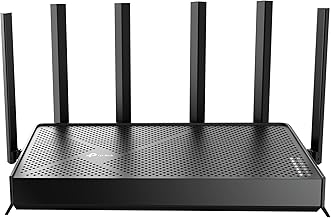
TP-Link BE6500 Wi-Fi 7 (BE400)
The BE6500 brings Wi-Fi 7 to a sensible price. With dual 2.5Gbps ports, a quad-core CPU, and coverage up to 2,400 square feet for 90 devices, it’s a forward-looking pick that handles a busy modern home with room to spare, backed by HomeShield security.
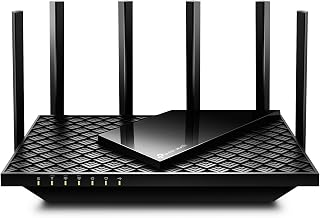
TP-Link AXE5400 Wi-Fi 6E (Archer AXE75)
A PCMag Editors’ Choice, the AXE75 adds the clean 6GHz band for congestion-free streaming and gaming. Its 2.5Gbps WAN port, OneMesh support, and WPA3 security make it a superb all-rounder for households that want performance without jumping to Wi-Fi 7.
TP-Link Archer AX55 Wi-Fi 6
The AX55 is the value champion. This AX3000 Wi-Fi 6 router covers the essentials, EasyMesh compatibility, VPN server and client support, MU-MIMO, and a USB 3.0 port, at a price that makes upgrading a no-brainer for most homes.
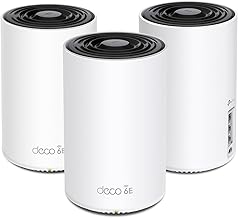
TP-Link Deco X55 Mesh (3-Pack)
For larger homes, the Deco X55 mesh system covers up to 6,500 square feet and replaces both router and extender. With three gigabit ports per unit and Ethernet backhaul support, it blankets multi-story houses in seamless, single-network coverage.
GL.iNet Flint 2 Gaming Router (GL-MT6000)
The Flint 2 is the enthusiast’s choice. With dual 2.5G ports, 8-stream Wi-Fi 6, and pre-installed OpenWrt supporting OpenVPN and WireGuard, it’s a powerhouse for gamers and tinkerers who want deep control over their network.
Frequently Asked Questions
Do I need Wi-Fi 7, or is Wi-Fi 6 enough?
Wi-Fi 6 is more than enough for most homes today. Choose Wi-Fi 6E or Wi-Fi 7 if you have a device-heavy household, multi-gig internet, or want maximum future-proofing.
When should I get a mesh system instead of a single router?
If you have a large or multi-story home with dead zones, a mesh system like the Deco X55 provides more even coverage than a single router, however powerful.
Does a 2.5Gbps port matter for my plan?
Only if your internet plan exceeds gigabit speeds. If it does, a multi-gig WAN port lets you use that full bandwidth; otherwise it’s future-proofing.
Are gaming routers worth it?
For competitive gamers, yes, models like the Flint 2 offer lower latency, quality-of-service controls, and VPN flexibility that standard routers lack.
Final Thoughts
For most homes, the TP-Link Archer AX55 delivers unbeatable value, while the Wi-Fi 7 BE6500 is the smart future-proof upgrade. Large homes should reach for the Deco X55 mesh, and gamers who love control will find a lot to like in the GL.iNet Flint 2.