Key takeaways
- Four 2.5G LAN ports plus a 2.5G WAN, unusually generous multi-gig wiring for the price
- Full Wi-Fi 7 feature set including the 6GHz band and MLO
- Strong, stable throughput on Wi-Fi 7 client devices at close range
- Clean design with internal antennas and no fan noise
What's inside
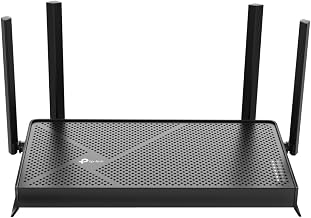
The TP-Link Archer BE550 is a tri-band Wi-Fi 7 router that tries to hit the sweet spot between future-proofing and affordability. It carries a BE9300 rating, four full 2.5-gigabit ports, and support for the 6GHz band and multi-link operation (MLO), the headline features of the Wi-Fi 7 standard, without the premium price of the flagship 10G-equipped models.
It is aimed at households upgrading from an older Wi-Fi 5 or Wi-Fi 6 router who have a multi-gigabit internet plan or plan to get one, and who want fast wired backhaul for a home office, NAS, or gaming PC. If you rent 500Mbps and own only Wi-Fi 6 devices, you will not see the ceiling of this router yet, but it gives you real headroom to grow into.
As an Amazon Associate we earn from qualifying purchases at no extra cost to you.





⚡ Save on Your Next PC — Amazon Prime
Prime members get fast free shipping on the systems above, plus early access to Prime Day & Black Friday PC deals. New members get a 30-day free trial.
Watch: TP-Link Archer BE550 Review — Video Review
Design & Build
The BE550 is a tall, upright unit with six internal antennas, so there are no external whips to position, which most people will appreciate for a cleaner look. It runs cool thanks to a vented chassis and does not need a fan. The port layout is the real selling point at this price: four 2.5G LAN ports plus a 2.5G WAN port, which is unusually generous, since many competitors give you a single 2.5G port and fall back to gigabit for the rest. There is a USB 3.0 port for basic network storage. It is a physically large device, so it needs a decent-sized shelf, and it lacks a 10G port, which is the one spec-sheet omission enthusiasts will notice.
Performance
On the 6GHz band and up close, the BE550 delivers the fast short-range throughput Wi-Fi 7 promises, and a Wi-Fi 7 laptop can saturate a multi-gig connection in the same room. The full set of 2.5G ports is where it shines for real-world use: wired devices, a NAS, or a mesh backhaul all get multi-gigabit links without a separate switch.
Coverage is rated to around 2,000 square feet and holds up well through a couple of walls, though like all 6GHz signals, that top band drops off quickly at distance, and you will lean on the 5GHz band for the far corners of a larger home. The TP-Link HomeShield security and app are straightforward, but note that the more advanced parental controls and security features sit behind a paid subscription. EasyMesh support means you can add a compatible unit later to extend coverage.
Pros & Cons
- Four 2.5G LAN ports plus a 2.5G WAN, unusually generous multi-gig wiring for the price
- Full Wi-Fi 7 feature set including the 6GHz band and MLO
- Strong, stable throughput on Wi-Fi 7 client devices at close range
- Clean design with internal antennas and no fan noise
- No 10G port, so the fastest wired ceiling is capped at 2.5Gbps
- Best features require Wi-Fi 7 client devices you may not own yet
- Advanced HomeShield security and parental controls need a paid subscription
Alternatives to Consider
If you want a faster wired ceiling, the TP-Link Archer BE550 Pro adds a 10G port and a higher BE9700 rating for heavier setups. Households on a tighter budget who still want Wi-Fi 7 can step down to the dual-band TP-Link Archer BE230, and anyone not ready to move off Wi-Fi 6 will find the TP-Link Archer AX55 a cheaper, proven option that still covers most homes comfortably.
Frequently Asked Questions
Do you need Wi-Fi 7 devices to benefit from the Archer BE550?
To get the headline 6GHz and MLO speeds, yes, you need Wi-Fi 7 client devices. Older Wi-Fi 6 and Wi-Fi 5 gear still connects and benefits from the extra bandwidth and 2.5G wired ports, but will not reach the router’s peak wireless speeds.
How many 2.5G ports does the BE550 have?
It has four 2.5G LAN ports plus a separate 2.5G WAN port, which is more multi-gig wired connectivity than most routers in its price range offer.
Does it work as a mesh system?
Yes. The BE550 supports EasyMesh, so you can pair it with a compatible TP-Link node later to extend coverage across a larger home using a single network name.
Is a subscription required to use the router?
No. The router works fully without a subscription. Only the advanced HomeShield security and parental control features require a paid plan; the core routing, Wi-Fi, and basic protections are free.
Verdict
The TP-Link Archer BE550 is one of the most sensible Wi-Fi 7 routers for mainstream buyers in 2026. The four 2.5G ports and full feature set give it real staying power, and the main compromises, the missing 10G port and the subscription-gated extras, are easy to live with unless you have enthusiast wiring needs. For a home stepping up to multi-gig internet, it is an easy recommendation.