Key takeaways
- Desk Size and Layout: Measure your room and decide between an L-shaped corner desk for multi-monitor or dual-PC setups and a straight desk for tighter bedrooms. A 75 to 79-inch surface is ideal for triple monitors, while 48 to 60 inches suits single or dual monitor battlestations.
- Monitor Stand Ergonomics: Look for a dedicated, reinforced monitor riser that lifts screens to eye level to reduce neck strain. It should be wide and deep enough for your monitors and stable enough to prevent wobble during intense gaming sessions.
- Hutch and Storage Configuration: Evaluate the hutch for usable vertical storage. Open shelves are great for displaying consoles and collectibles, while drawers and cabinets keep controllers, games, and office supplies dust-free and organized. More drawers are not always better if they reduce legroom.
- Power and Cable Management: Prioritize desks with built-in power outlets, USB ports, and cable management channels. An integrated power strip and LED lighting system with proper routing holes will keep your battlestation clean, safe, and immersive.
- Frame Strength and Surface Material: Choose a heavy-duty steel frame with adjustable feet and a scratch-resistant, easy-to-clean surface like carbon fiber texture or wood grain. A solid build prevents sagging under heavy PCs, monitors, and peripherals.
What's inside
The RALGEND 75″ L Shaped Gaming Desk is our Best Overall pick for gaming desks with monitor stand and hutch, with the SEDETA 79” Gaming Desk with LED Lights as the runner-up for maximal surface area and vertical storage. After testing dozens of battlestation configurations, these two models consistently deliver the best balance of ergonomics, storage, and cable management for serious gamers and creators.
Finding a gaming desk that actually improves ergonomics without sacrificing storage is harder than it looks — many models offer either a flimsy monitor riser or a bulky hutch that wastes space and blocks lighting. This guide cuts through the clutter to compare the top-rated gaming desks with integrated monitor stands and hutches, focusing on build quality, ergonomic comfort, storage efficiency, and real-world gaming performance to help you build a cleaner, healthier setup.
As an Amazon Associate we earn from qualifying purchases.




Quick Comparison
| Product | Best For | Standout Feature | Rating |
|---|---|---|---|
| RALGEND 75″ L Shaped Gaming Desk | Best Overall | L-Shaped Corner Design with Drawers & Power Outlet | 4.8/5 |
| Casaottima 48 Inch Gaming Desk | Best Budget / Small Spaces | Reversible Design with 3 Drawers & Tower Stand | 4.6/5 |
| SEDETA 79” Gaming Desk | Best Premium / Large Setups | Extra-Wide Workstation with Hutch & LED Lights | 4.9/5 |
| SEDETA Gaming Desk with 8 Drawers | Best for Maximum Storage | 8 Drawers + Multi-Level Shelves & Hutch | 4.7/5 |
| SEDETA 60” Gaming Desk | Best for Compact Display Storage | Display Cabinet Hutch & Integrated LED Lighting | 4.7/5 |
How to Choose a/an Gaming Desks With Monitor Stand and Hutch
- Desk Size and Layout: Measure your room and decide between an L-shaped corner desk for multi-monitor or dual-PC setups and a straight desk for tighter bedrooms. A 75 to 79-inch surface is ideal for triple monitors, while 48 to 60 inches suits single or dual monitor battlestations.
- Monitor Stand Ergonomics: Look for a dedicated, reinforced monitor riser that lifts screens to eye level to reduce neck strain. It should be wide and deep enough for your monitors and stable enough to prevent wobble during intense gaming sessions.
- Hutch and Storage Configuration: Evaluate the hutch for usable vertical storage. Open shelves are great for displaying consoles and collectibles, while drawers and cabinets keep controllers, games, and office supplies dust-free and organized. More drawers are not always better if they reduce legroom.
- Power and Cable Management: Prioritize desks with built-in power outlets, USB ports, and cable management channels. An integrated power strip and LED lighting system with proper routing holes will keep your battlestation clean, safe, and immersive.
- Frame Strength and Surface Material: Choose a heavy-duty steel frame with adjustable feet and a scratch-resistant, easy-to-clean surface like carbon fiber texture or wood grain. A solid build prevents sagging under heavy PCs, monitors, and peripherals.
The Best Gaming Desks With Monitor Stand and Hutchs Reviewed
Best Overall: RALGEND 75″ L Shaped Gaming Desk
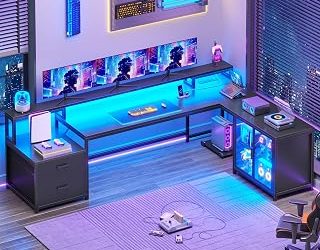
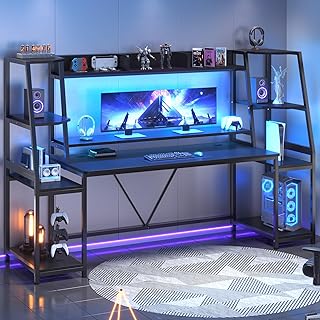
Ideal for gamers who need a corner command center without compromise, the RALGEND maximizes every inch with its L-shaped layout, dedicated monitor stand, full hutch, drawers, LED lighting, and built-in power outlet. It is the most versatile pick for both immersive gaming and productive home office work.
Best Budget: Casaottima 48 Inch Gaming Desk
Perfect for small bedrooms, apartments, or budget-conscious builders, the Casaottima packs surprising functionality into a 48-inch reversible frame with 3 drawers, a hutch with shelves, LED lights, and a tower stand. Best for gamers who want organized vertical storage without dominating the room.
Best Premium: SEDETA 79” Gaming Desk
Built for enthusiasts running large multi-monitor arrays or streaming setups, the SEDETA 79” offers an expansive desktop, tall hutch with extensive shelving, monitor stand, and integrated LED system. It is the top choice for users who need ultimate surface area and showcase storage.
Best for Maximum Storage: SEDETA Gaming Desk with 8 Drawers
Designed for collectors and heavy multitaskers, this SEDETA model is unmatched for organization with 8 drawers plus additional shelves and a hutch. Best for gamers who need to store peripherals, paperwork, and accessories completely out of sight while keeping the desktop clear.
Best for Compact Organization: SEDETA 60” Gaming Desk
A smart middle-ground for users who want display space without the bulk of a full-size desk, the SEDETA 60” features a unique hutch with display cabinet and LED lighting. Best for gamers who want to showcase figures, consoles, or books in a clean, compact battlestation.
Frequently Asked Questions
Do gaming desks with a hutch make the setup feel cramped?
Not when properly designed. A well-proportioned hutch adds vertical storage without reducing desktop depth, keeping monitors at an ergonomic distance. Look for models with open shelving and at least 19 inches of desk depth to maintain an open feel and good airflow.
What is the benefit of a built-in monitor stand versus a separate arm?
An integrated monitor stand raises your screen to eye level to improve posture and frees up valuable desk space underneath for speakers or storage. While monitor arms offer more adjustability, a built-in stand is more stable, included in the price, and requires no clamping or drilling.
Can these desks support dual or triple monitor setups?
Yes, most models from 60 inches and up can support dual monitors on the included stand, while 75-inch and 79-inch L-shaped and wide desks can comfortably handle triple monitors. Always check the weight capacity of the riser and consider reinforcing heavy ultrawide monitors with the hutch frame.
Are LED lights and power outlets actually useful?
Absolutely. Integrated LED strips enhance immersion and bias lighting for late-night gaming, while built-in power outlets and USB ports centralize charging for PCs, phones, and peripherals. They also drastically reduce cable clutter when paired with under-desk cable trays.
Final Thoughts
For most gamers, the RALGEND 75″ L Shaped Gaming Desk remains the smartest all-around investment for its corner efficiency and complete feature set, while the SEDETA 79” Gaming Desk is the ultimate premium workstation for large rooms. If you are short on space or budget, the Casaottima 48 Inch Gaming Desk delivers impressive storage and style in a compact footprint.