Key takeaways
- Width and Curvature: Look for at least 55 to 63 inches of width to fully support a 34-inch to 49-inch ultrawide without overhang. A curved front edge improves reach and keeps the entire screen within your field of view.
- Depth for Viewing Distance: Ultrawides need 28 to 32 inches of depth for comfortable eye distance and to prevent eye strain. Extra-deep desks like 32 inches also accommodate monitor arms and leave space for keyboards and peripherals.
- Monitor Mount Compatibility: Choose a desk with reinforced tops or dedicated cut-outs for clamp mounts. This ensures a heavy ultrawide, such as the Sceptre 34-Inch Curved Ultrawide WQHD Monitor, stays stable without damaging the surface.
- Cable and Stability Management: Prioritize desks with under-desk netting, grommets, or trays and a steel frame rated for 150+ lbs. Ultrawide setups often include dual screens and PCs that add significant weight and cable clutter.
- Ergonomics and Adjustability: Consider height-adjustable or standing desks if you game and work long hours. Electric sit-stand functionality with memory presets helps maintain posture and reduces fatigue during extended sessions.
The Arozzi Arena Ultrawide Curved Gaming Desk in Dark Grey is our Best Overall pick for ultrawide monitors thanks to its expansive 63-inch curved surface and integrated monitor mount cut-outs, with the Grandder 55×32 Extra-Deep Electric Standing Desk as the runner-up for its deep desktop and electric height adjustment.
Ultrawide and super-ultrawide monitors demand more width, depth, and stability than standard desks can offer, often leading to overhang, wobble, and cluttered cable management. This guide breaks down the best gaming desks built specifically for 34-inch to 49-inch ultrawide setups, comparing surface size, depth, ergonomics, and cable solutions to help you build a stable, immersive battlestation.
Our top picks




As an Amazon Associate we earn from qualifying purchases at no extra cost to you. Ratings are shown as listed on Amazon.
🛒 Best Price Today on Amazon
Prime members get fast, free shipping on everything above, plus member-only deals. New members get a 30-day free trial — cancel anytime.
Quick Comparison
| Product | Best For | Standout Feature | Rating |
|---|---|---|---|
| Arozzi Arena Ultrawide Curved Gaming Desk Dark Grey | Best Overall | 63″ Curved Surface with 3 Monitor Mount Cut-Outs | 4.9/5 |
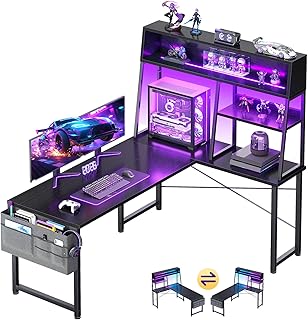
| AODK 51 Inch L Shaped Gaming Desk | Best Budget | L-Shaped Reversible Layout with Display Shelves | 4.6/5 |
| Grandder 55×32 Extra-Deep Electric Standing Desk | Best Premium | 32″ Extra-Deep Desktop with Dual Memory Presets | 4.8/5 |
| Arozzi Arena Ultrawide Curved Gaming Desk Deep Purple | Themed Setups | Full-Surface Water-Resistant Mat in Deep Purple | 4.7/5 |
| Arozzi Arena Ultrawide Curved Gaming Desk White | Minimalist Setups | Bright White Finish with Cable Management Netting | 4.7/5 |
How to Choose a/an Gaming Desks for Ultrawide Monitors
- Width and Curvature: Look for at least 55 to 63 inches of width to fully support a 34-inch to 49-inch ultrawide without overhang. A curved front edge improves reach and keeps the entire screen within your field of view.
- Depth for Viewing Distance: Ultrawides need 28 to 32 inches of depth for comfortable eye distance and to prevent eye strain. Extra-deep desks like 32 inches also accommodate monitor arms and leave space for keyboards and peripherals.
- Monitor Mount Compatibility: Choose a desk with reinforced tops or dedicated cut-outs for clamp mounts. This ensures a heavy ultrawide, such as the Sceptre 34-Inch Curved Ultrawide WQHD Monitor, stays stable without damaging the surface.
- Cable and Stability Management: Prioritize desks with under-desk netting, grommets, or trays and a steel frame rated for 150+ lbs. Ultrawide setups often include dual screens and PCs that add significant weight and cable clutter.
- Ergonomics and Adjustability: Consider height-adjustable or standing desks if you game and work long hours. Electric sit-stand functionality with memory presets helps maintain posture and reduces fatigue during extended sessions.
The Best Gaming Desks for Ultrawide Monitorss Reviewed
Best Overall: Arozzi Arena Ultrawide Curved Gaming Desk Dark Grey
Best for gamers who want a purpose-built ultrawide battlestation, the Dark Grey Arena delivers a massive, wraparound surface with a full water-resistant desk mat and three custom monitor mount cut-outs. It balances immersion, durability, and clean cable management for 34-inch and larger curved displays.
Best Budget: AODK 51 Inch L Shaped Gaming Desk
Best for budget-conscious gamers needing space for an ultrawide plus a secondary monitor or console, this L-shaped desk offers a reversible layout, display shelves, and LED accents without sacrificing legroom. It is ideal for small rooms where maximizing corner space matters.
Best Premium: Grandder 55×32 Extra-Deep Electric Standing Desk
Best for hybrid workers and serious gamers who alternate between sitting and standing, the Grandder provides a 32-inch deep desktop that easily fits a 49-inch ultrawide plus dual screens. Its electric lift, 176 lbs capacity, and anti-collision system offer premium ergonomics and stability.
Best for Color-Themed Setups: Arozzi Arena Ultrawide Curved Gaming Desk Deep Purple
Best for creators and gamers building a bold, personalized battlestation, the Deep Purple Arena offers the same proven ultrawide-ready design as the Dark Grey model with a vibrant finish. It is perfect for users who want performance and standout aesthetics.
Best for Minimalist Battlestations: Arozzi Arena Ultrawide Curved Gaming Desk White
Best for clean, modern setups where light colors and clutter-free design are priorities, the White Arena brightens the room while maintaining full surface coverage and cable netting. It suits streamers and minimalists pairing an ultrawide with a sleek, airy aesthetic.
Frequently Asked Questions
What size desk do I need for a 34-inch or 49-inch ultrawide monitor?
For a 34-inch ultrawide like the Sceptre 34-Inch Curved WQHD, aim for at least 55 inches wide and 30 inches deep. For a 49-inch super-ultrawide, a 60 to 63-inch wide desk with 32-inch depth, such as the Arozzi Arena or Grandder, provides proper support and optimal viewing distance.
Can these desks support a heavy ultrawide on a monitor arm?
Yes. The Arozzi Arena models include three reinforced monitor mount cut-outs designed for clamp mounts, protecting the desk surface while securing heavy displays. The Grandder standing desk supports up to 176 lbs and is compatible with most heavy-duty monitor arms.
Is an L-shaped or a straight curved desk better for ultrawide gaming?
A straight curved desk like the Arozzi Arena keeps the entire ultrawide centered in your field of view for immersive gaming. An L-shaped desk like the AODK is better if you need a secondary workstation, extra shelving, or want to tuck the setup into a corner.
Do I need a standing desk for an ultrawide setup?
Not required, but highly beneficial. Ultrawide gaming and productivity often involve long hours, and an electric standing desk like the Grandder allows you to change posture, reduce back strain, and fine-tune height for perfect monitor alignment with memory presets.
Final Thoughts
For most ultrawide gamers, the Arozzi Arena Ultrawide Curved Gaming Desk in Dark Grey remains the most complete, immersive solution, while the Grandder 55×32 Extra-Deep Electric Standing Desk is the smart premium alternative for ergonomic flexibility. If you need value and corner space, the AODK L Shaped Gaming Desk delivers impressive versatility on a budget.