Key takeaways
- Switch style: Choose between clicky, tactile, and linear mechanical switches, or mech-dome for a quieter, budget feel.
- Profile height: Low-profile boards like the G915 X sit sleeker and can feel faster to some players.
- Layout: Full-size, TKL, and compact options trade a numpad for extra mouse space.
- Connectivity: Decide between wired reliability and wireless or Bluetooth flexibility.
- Keycaps and build: Double-shot PBT keycaps and aluminum frames boost durability and feel.
What's inside
Logitech’s G-series keyboards have earned a reputation for polish, reliability, and thoughtful design. Whether you want a low-profile mechanical board that looks as good on a desk as it performs in a match, a tournament-ready TKL, or a dependable everyday option, Logitech has a keyboard tuned for it, all backed by the flexible G HUB software.
Because the range covers so many form factors and switch types, picking the right one takes a little guidance. Below are the standout Logitech gaming keyboards, followed by a guide to matching one to your setup and preferences.
As an Amazon Associate we earn from qualifying purchases at no extra cost to you.


🎮 Get More From Your Setup — Free
Prime Gaming gives you free PC games every month, in-game loot, and a free Twitch channel sub — plus fast free shipping on all the gear above. New members get a 30-day free trial.
Watch: Best Logitech Gaming Keyboard — Video Review
How to Choose a Logitech Gaming Keyboard
- Switch style: Choose between clicky, tactile, and linear mechanical switches, or mech-dome for a quieter, budget feel.
- Profile height: Low-profile boards like the G915 X sit sleeker and can feel faster to some players.
- Layout: Full-size, TKL, and compact options trade a numpad for extra mouse space.
- Connectivity: Decide between wired reliability and wireless or Bluetooth flexibility.
- Keycaps and build: Double-shot PBT keycaps and aluminum frames boost durability and feel.
The Best Logitech Gaming Keyboards Reviewed
Logitech G915 X (Linear)
A premium low-profile mechanical board with double-shot PBT keycaps, RGB, and an aluminum finish. It combines a sleek look with genuine mechanical performance.
Logitech G PRO Mechanical TKL
An ultra-portable tenkeyless board with clicky switches and a detachable cable, designed for competitive players who travel with their gear.
Logitech G413 SE Full-Size
A backlit full-size mechanical keyboard with an aluminum top plate and anti-ghosting. It’s a clean, durable, no-frills value pick.
Logitech G413 TKL SE
The compact version of the G413 SE, with tactile switches and cross-platform support, ideal for players who want mechanical feel in a smaller footprint.
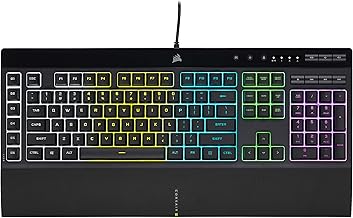
Logitech G213 Prodigy
A mech-dome board with a palm rest, media controls, and LIGHTSYNC RGB. It’s the budget-friendly entry point for gamers who want RGB without mechanical prices.
Frequently Asked Questions
Are low-profile keyboards good for gaming?
Yes. Low-profile boards like the G915 X reduce finger travel and offer a sleek desk presence. Many players find them fast and comfortable, though it comes down to preference.
What is LIGHTSYNC RGB?
LIGHTSYNC is Logitech’s lighting technology that syncs RGB effects across compatible peripherals and can react to on-screen content, all managed through G HUB software.
Is a mech-dome keyboard the same as mechanical?
No. Mech-dome switches, like those in the G213, mimic some mechanical feel using a dome membrane. They’re quieter and cheaper but lack true mechanical crispness.
Do Logitech keyboards work on Mac?
Many do. Boards like the G413 series and G915 X support both Windows and macOS, though some Windows-specific features may be limited on Mac.
Final Thoughts
For a premium experience, the low-profile Logitech G915 X is the standout, while the G PRO Mechanical TKL suits competitive travelers. Budget-conscious gamers who still want RGB and comfort should look at the G213 Prodigy.