
Key takeaways
- Choosing by thickness alone: A thick cushion can still be too narrow, too short, or too soft for a larger user.
- Ignoring compressed height: Estimate how much the pad will settle under your weight. A soft 5-inch cushion may provide less support than a firm 4-inch model.
- Measuring the chair’s outside edges: Bolsters and curved upholstery do not represent usable sitting space.
- Buying a cushion wider than the flat seat: Overhanging edges can fold, slide, or create uneven pressure.
- Raising the seat too much: If your feet cannot sit flat, the cushion may contribute to pressure behind the knees.
- Forgetting the desk setup: A thicker cushion raises your torso relative to the desk, keyboard, and monitor. Adjust the chair or desk when possible.
- Assuming “extra thick” means extra supportive: Ask whether the cushion uses supportive foam, layered foam, or mostly soft fill.
What's inside
The Short Answer
The ideal seat cushion thickness for heavy gaming chairs is usually 3 to 5 inches (7.6 to 12.7 cm). A 4-inch cushion is the best starting point for most adults because it adds meaningful pressure relief without raising the hips so high that the knees point downward or the armrests become uncomfortable.
For a larger user, a wide gaming chair, or a firm seat pan, choose a cushion measuring 4 to 5 inches thick with a supportive, high-density foam core. A 5- to 6-inch cushion can work when the original chair seat is unusually hard or shallow, but extra height is not automatically better. Soft foam may compress by an inch or more during use, so the advertised thickness is not always the same as the sitting height.
As an Amazon Associate we earn from qualifying purchases at no extra cost to you. Product prices and availability are accurate as of the date shown and are subject to change.

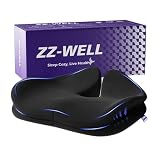


Look for a cushion that is at least as wide as the usable seat area, has a nonslip bottom, and extends from the back of the seat to near the front edge without folding upward. For 2026 shopping, typical cushion prices range from about $25 to $60. Examples in this range include the BALAPET cushion at approximately $29.99, the PAROLL pad at approximately $24.99, the ZZ-WELL XX-Large cushion at approximately $44.49, and the BlissTrends extra-thick cushion at approximately $59.99. Prices and configurations can change, so compare the listed measurements rather than relying on the product name alone.
Standard Sizes
Seat cushions are sold in flexible size categories rather than one universal standard. The table below shows useful buying benchmarks. Dimensions are listed as length from front to back, width from side to side, and cushion thickness.
| Size category | Typical dimensions in inches | Approximate dimensions in centimeters | Best fit |
|---|---|---|---|
| Compact | 16 x 14 x 3 in | 40.6 x 35.6 x 7.6 cm | Small office chairs, narrow gaming seats, and users who need modest cushioning |
| Standard | 18 x 16 x 4 in | 45.7 x 40.6 x 10.2 cm | Most racing-style gaming chairs and average-size office chairs |
| Large | 20 x 18 x 5 in | 50.8 x 45.7 x 12.7 cm | Wide gaming chairs, larger adults, and long sitting sessions |
| Extra-large | 22 x 20 x 6 in | 55.9 x 50.8 x 15.2 cm | Big-and-tall chairs with a broad, mostly flat seat pan |
For a heavy-duty gaming chair, the large 20 x 18 x 5-inch size is often the most practical balance. It offers more usable surface area than a compact cushion while avoiding the overhang that can occur with an extra-large model. Choose extra-large only if the chair’s seat is at least 1 to 2 inches wider and deeper than the cushion.
Thickness should be matched to both body weight and foam firmness. A lighter adult may be comfortable on a 3-inch cushion, while a heavier adult may compress a soft 3-inch pad enough to feel the hard seat below. A firmer 4-inch cushion generally provides more stable support than a very soft 6-inch cushion. If a product lists foam density, a medium- to high-density core is preferable for daily use, although density alone does not predict comfort.
How to Measure Your Space
- Measure the usable seat width. Measure between the side bolsters at the narrowest point where the cushion will sit. Do not measure the widest outside edge of the chair. Subtract about 1 inch total for clearance, or choose a cushion at least 1/2 inch narrower on each side.
- Measure the usable seat depth. Start at the back of the seat and measure to the front edge, excluding a raised front lip. A cushion should usually be 1 to 2 inches shorter than the flat seat depth so it does not press behind the knees.
- Check the side bolsters. Racing-style chairs often have raised edges. Measure the flat center section, not the full seat width. A cushion that bridges steep bolsters may rock or slide.
- Measure the existing seat height. Record the distance from the floor to the top of the chair seat at the lowest and highest height settings. Add the cushion’s expected compressed height. If the resulting height is excessive, your feet may not rest flat.
- Check the armrests. A thick cushion raises your hips and legs. Make sure the armrests can still support your elbows without forcing your shoulders upward. Armrests with at least 2 to 4 inches of vertical adjustment are easier to pair with a thick pad.
- Inspect the chair base and tilt. A cushion can change how your weight is distributed. Confirm that the chair remains stable, the tilt mechanism moves normally, and the cushion does not interfere with the control lever or seat pan.
- Measure the user’s sitting width. The cushion should support the buttocks and upper thighs without forcing either side onto a bolster. For many larger adults, a cushion width of 18 to 20 inches is more comfortable than a narrow 16-inch pad.
When comparing measurements, remember that rounded corners and tapered fronts reduce the usable area. A cushion advertised as 20 inches wide may be several inches narrower at the front. Product photos can also make a pad look larger than it is, so use the stated dimensions and allow for a removable cover’s seams.
By Room or Use Case
Racing-Style Gaming Chair
Use a 3- to 4-inch cushion measuring approximately 18 x 16 inches if the seat has pronounced side bolsters. A contoured or tapered front is usually better than a rectangular pad because it leaves room for your thighs. Avoid a 5- or 6-inch cushion unless the chair has a deep, relatively flat seat and enough armrest adjustment.
Heavy-Duty or Big-and-Tall Gaming Chair
Choose approximately 20 x 18 x 4 to 5 inches. The extra width helps distribute pressure, while the additional thickness protects against bottoming out on a firm seat pan. Check the chair’s actual flat seating area before choosing an XX-Large cushion. A large cushion is not useful if its edges rest on raised bolsters.
Home Office and Work-From-Home Use
A 3- to 4-inch cushion is generally easier to use for an entire workday because it preserves desk and monitor height. A wedge-shaped rear section or coccyx cutout may help some users, but it should not create a deep dip that tilts the pelvis backward. A removable, washable cover is especially practical for daily office use.
Living Room, Recliner, or Lounge Chair
For a broad, flat recliner, consider 4 to 6 inches and a size near 20 x 18 or 22 x 20 inches. Recliners have more room for a thick cushion, but verify that the footrest and reclining hinge still operate. A cushion with a strap or nonslip underside is important because the seat angle can make a loose pad move forward.
Car or Portable Use
Stay closer to 2 to 4 inches unless the vehicle has generous headroom and seat clearance. Measure the seat width between the bolsters and check that the cushion does not cover the seat-belt buckle or interfere with pedals. Extra-thick models may change driving posture more than expected.
Common Sizing Mistakes
- Choosing by thickness alone: A thick cushion can still be too narrow, too short, or too soft for a larger user.
- Ignoring compressed height: Estimate how much the pad will settle under your weight. A soft 5-inch cushion may provide less support than a firm 4-inch model.
- Measuring the chair’s outside edges: Bolsters and curved upholstery do not represent usable sitting space.
- Buying a cushion wider than the flat seat: Overhanging edges can fold, slide, or create uneven pressure.
- Raising the seat too much: If your feet cannot sit flat, the cushion may contribute to pressure behind the knees.
- Forgetting the desk setup: A thicker cushion raises your torso relative to the desk, keyboard, and monitor. Adjust the chair or desk when possible.
- Assuming “extra thick” means extra supportive: Ask whether the cushion uses supportive foam, layered foam, or mostly soft fill.
FAQ
Is a 4-inch cushion thick enough for a heavy gaming chair?
Usually, yes. A firm 4-inch cushion is a practical starting point for many heavy-duty gaming chairs. Choose 5 inches if the original seat is very firm, the chair is wide and flat, or a 4-inch pad compresses too easily. Prioritize width, foam support, and a secure bottom over thickness alone.
Is a thicker seat cushion better for heavier people?
Not necessarily. Thickness creates space between the body and the seat pan, but firmness determines how well the cushion resists compression. A supportive 4-inch pad can outperform a very soft 6-inch pad. The correct size should support the thighs and hips while keeping your feet flat.
What cushion size fits most gaming chairs?
An approximately 18 x 16 x 4-inch cushion fits many standard gaming chairs, but a 20 x 18 x 5-inch cushion is often better for a wide or big-and-tall model. Measure the chair’s flat seating area first, especially when it has side bolsters.
How high should a gaming chair seat be with a cushion?
Set the chair so your feet rest flat, your knees are near a right angle, and your elbows remain level with the desk or armrests. Add the cushion’s compressed height to the chair’s seat height before buying. If the cushion forces your knees upward or leaves your feet dangling, choose a thinner pad or lower the chair.





