Key takeaways
- A controller mod. Controlify, Controllable and MidnightControls add gamepad support directly into the game. Controlify runs on the Fabric or NeoForge mod loaders, reads controllers through the SDL3 library, shows proper button glyphs for Xbox, PlayStation, Switch and Steam Deck layouts, and adds gyro aiming, a radial menu for rarely used actions and an on-screen keyboard for chat. It also talks to DualSense and DualShock pads directly, without extra driver software.
- Steam Input. Add the Minecraft launcher to Steam as a non-Steam game and apply the keyboard-and-mouse template. Your controller then sends key presses and mouse movement. It works with any Steam-supported pad, but you get keyboard prompts instead of controller prompts, and the standalone launcher is far easier to hook into Steam than the Microsoft Store version.
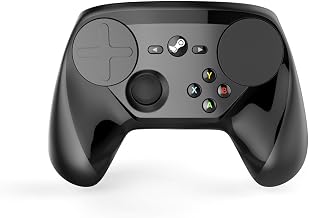
The best controller for Minecraft on PC for most players is the 8BitDo Ultimate 2, because it pairs drift-free TMR sticks with four extra buttons, a 1000Hz wireless dongle and 6-axis motion control for gyro-style aiming. If you only play Bedrock Edition, a standard Xbox Wireless Controller works natively with no setup at all, and if you want the most precise building and inventory control, Valve’s 2026 Steam Controller adds two trackpads and gyro on top of four rear grip buttons.
Start with your edition: Bedrock and Java handle controllers differently
Bedrock Edition, the version installed through the Microsoft Store or the Xbox app, has built-in controller support. An Xbox controller works the moment it is connected, with console-style menus and the correct button prompts. PlayStation pads can work as well; if one is not detected, routing it through Steam Input as an Xbox-style controller is the usual fix.

EasySMX X15 Wireless PC & Steam Gaming Controller, Hall Effect, Black
Included for 'Best Controller for Minecraft on PC: Java and Bedrock Picks' because the listing specifies Hall Effect and Black, details this guide uses to compare options.
View on Amazon
Turtle Beach Rematch Advanced Wired Gaming Controller for Xbox & PC
Included for 'Best Controller for Minecraft on PC: Java and Bedrock Picks' as a relevant option in this category; details come from the product listing.
View on Amazon
8Bitdo Ultimate 2C Wireless Controller for Windows PC and Android, with 1000 Hz Polling Rate, Hall Effect Joysticks and Triggers, and Remappable L4/R4 Bumpers (Green)
Included for 'Best Controller for Minecraft on PC: Java and Bedrock Picks' because the listing specifies with 1000 Hz Polling Rate and Hall Effect Joysticks and Triggers, details this guide uses to compare options.
View on Amazon
EasySMX X05Pro Wireless Gaming Controller for PC, Switch, Android/iOS
Included for 'Best Controller for Minecraft on PC: Java and Bedrock Picks' because the listing specifies Switch and Android/iOS, details this guide uses to compare options.
View on AmazonJava Edition is a different story. In 2026 it still has no built-in controller support, so you need one of two workarounds:
- A controller mod. Controlify, Controllable and MidnightControls add gamepad support directly into the game. Controlify runs on the Fabric or NeoForge mod loaders, reads controllers through the SDL3 library, shows proper button glyphs for Xbox, PlayStation, Switch and Steam Deck layouts, and adds gyro aiming, a radial menu for rarely used actions and an on-screen keyboard for chat. It also talks to DualSense and DualShock pads directly, without extra driver software.
- Steam Input. Add the Minecraft launcher to Steam as a non-Steam game and apply the keyboard-and-mouse template. Your controller then sends key presses and mouse movement. It works with any Steam-supported pad, but you get keyboard prompts instead of controller prompts, and the standalone launcher is far easier to hook into Steam than the Microsoft Store version.
The downside of mods is upkeep. Each new Minecraft release needs a matching mod version, so confirm your controller mod supports an update before you install it, or keep a separate profile on the older version.
| Setup | Works with | Gyro aiming | Controller prompts | Typical setup time |
|---|---|---|---|---|
| Bedrock Edition, native | Xbox controllers out of the box; others via Steam Input | No | Yes | Under 1 minute |
| Java + Controlify (Fabric or NeoForge) | Any SDL3-recognized controller | Yes, with a gyro-equipped pad | Yes, per controller model | 10–20 minutes |
| Java + Steam Input template | Any Steam-supported controller | Yes, as mouse movement | No (keyboard prompts) | 5–10 minutes |
What matters in a Minecraft controller, and what does not
Extra buttons beat raw speed
Minecraft has more actions than a standard pad has buttons: jump, sneak, sprint, inventory, drop item, swap to offhand, change perspective, chat and hotbar scrolling. Back paddles or extra bumpers let you sneak and sprint without lifting a thumb off the sticks, which matters most when you bridge over a drop or build along a cliff edge. Four extra inputs cover sneak, sprint, drop and offhand swap; two extras still cover the two you hold most, sneak and sprint.
Gyro makes building faster
Fine block placement with a thumbstick is slow because you are steering a crosshair with a spring-loaded stick. Gyro lets you nudge the crosshair by tilting the controller slightly, much like a small mouse movement, while the right stick handles big turns. PlayStation controllers and the Steam Controller pass their gyro to Controlify or Steam Input directly. The 8BitDo Ultimate 2 handles motion control itself in 2.4 GHz mode, tuned in 8BitDo’s own software. Standard Xbox controllers and the Xbox Elite Series 2 have no gyro at all.
Drift-free sticks for long sessions
Minecraft sessions run long, and stick drift shows up as a camera that slowly pans or a character that creeps while you line up a block. Hall effect and TMR sticks read position with magnets instead of a contact track that wears down, so they resist drift far better than the potentiometer sticks used in most first-party pads.
Polling rate barely matters here
A 1000Hz controller reports its state every 1 millisecond, while a 125Hz pad reports every 8 milliseconds. That gap is worth paying for in a ranked shooter. In Minecraft, where you place blocks and fight mobs rather than trade shots with other players, it is not something you will notice. Put the money toward buttons, gyro and comfort instead.
The shortlist, with the numbers
| Controller | Sticks | Gyro | Extra buttons | PC connection | Typical price |
|---|---|---|---|---|---|
| 8BitDo Ultimate 2 | TMR | Yes (6-axis) | 4 (2 back paddles + L4/R4) | 2.4 GHz and wired at 1000Hz, Bluetooth | $55–$75 |
| 8BitDo Ultimate 2C | Hall effect | No | 2 (L4/R4 bumpers) | 2.4 GHz and wired at 1000Hz | $25–$40 |
| Steam Controller (2026) | TMR with capacitive touch | Yes, plus 2 trackpads | 4 rear grip buttons | 2.4 GHz Puck, Bluetooth, USB-C | About $100 |
| Sony DualSense | Potentiometer | Yes | 0 | USB-C, Bluetooth | $65–$80 |
| Xbox Wireless Controller | Potentiometer | No | 0 | USB-C, Bluetooth, Xbox Wireless adapter | $55–$75 |
| Xbox Elite Series 2 | Potentiometer, 3 tension settings | No | 4 swappable paddles | USB-C, Bluetooth, Xbox Wireless adapter | $160–$200 |
Comfort and room fit: where you sit changes the right pick
Minecraft is often played from a couch on a living-room TV, and the distance to the PC decides which connection type is worth having.
| Where you play | Typical distance to the PC | Best connection | Why |
|---|---|---|---|
| Desk with the tower underneath | 2–4 ft | Wired USB-C or 2.4 GHz dongle | A 6–9 ft cable reaches easily and never needs charging |
| Couch facing a TV in a 10×12 ft room | 6–9 ft | 2.4 GHz dongle on a front USB port | Clear line of sight and no cable across the walkway |
| Recliner or bed across a larger room | 10–14 ft | 2.4 GHz receiver on a USB extension placed near you | Moves the receiver away from the metal case and other wireless gear |
Weight is the next thing you feel during a three-hour build. The Steam Controller weighs 292 g and the Xbox Elite Series 2 weighs 345 g, both noticeably heavier than a standard Xbox pad, so a younger player may tire of them sooner. Battery life is generous on the premium options: Valve rates the Steam Controller at about 35 hours per charge and Microsoft rates the Elite Series 2 at up to 40 hours. The 8BitDo Ultimate 2 ships with a charging dock, so it tops up between sessions, and the Elite includes a 9 ft USB-C cable that can reach a couch in a small room if you would rather play wired.
Picks by situation
| Your situation | Best pick | Reason |
|---|---|---|
| Bedrock only, want it working in a minute | Xbox Wireless Controller | Native support and correct prompts, no mods or Steam setup |
| Java builder who wants precision | 8BitDo Ultimate 2 with Controlify | Motion control, four extra buttons, TMR sticks, 1000Hz dongle |
| Java player who already owns a PlayStation pad | DualSense with Controlify | The mod reads its gyro directly; no extra software |
| Buying for a child or a second player | 8BitDo Ultimate 2C | Hall effect sticks resist drift at a low price; two bumpers for sneak and sprint |
| Playing through Steam Big Picture on a TV | Steam Controller (2026) | Trackpads move the inventory cursor like a mouse; gyro and four grip buttons |
| Already own an Elite Series 2 | Keep it | Four paddles cover sneak, sprint, drop and offhand; no gyro |
Setup tips that avoid the common problems
- If you use a controller mod and launch Minecraft through Steam, disable Steam Input for that entry. Otherwise the mod sees a virtual Xbox pad instead of your real controller and loses features such as gyro.
- Map sneak and sprint to the back buttons first. They are the two actions you hold while moving and looking at the same time.
- Put drop item, offhand swap and perspective on Controlify’s radial menu rather than on button combos, so a slip of the thumb never throws your sword into lava.
- With Hall effect or TMR sticks, lower the stick deadzone one step at a time and stop one step before the camera starts creeping with the stick at rest. Smaller deadzones make slow, precise turns easier.
- On the Steam Input route, start from the keyboard-and-mouse template, bind Left Shift (sneak) and Left Ctrl (sprint) to the paddles, and set the gyro or right trackpad to mouse output for inventory work.