Key takeaways
- Open plan, no walls between rooms: 6 GHz stays usable to roughly 40–50 ft line-of-sight.
- One interior drywall wall between router and client: expect roughly 60–70% of the open-plan range.
- Two drywall walls or one load-bearing wall: roughly 40–50% of open-plan range. A single router typically holds 6 GHz reliably across ~1,200–1,800 sq ft of interior space.
- Concrete, brick, or plaster-and-lath walls: 6 GHz may not clear a single wall usefully. In these homes, mesh with a wired backhaul or a node per room is required.
- Floor-to-floor: 6 GHz generally does not penetrate a floor plus a ceiling well. Multi-story homes need a node per floor, not one powerful router.
Best Wi-Fi 6E Router for Future-Proofing: What Actually Lasts
The best Wi-Fi 6E router for future-proofing is one that puts real throughput on the 6 GHz band, has multi-gigabit wired ports (2.5 GbE minimum, 10 GbE if you can get it), handles 60–100+ concurrent devices without queueing delays, and covers your actual floor plan from a realistic placement point — not a lab bench. Everything else is marketing. If you want the short answer before the criteria: TP-Link Deco BE85 for large homes that need mesh coverage, Asus ROG Rapture GT-AXE16000 for a single-router whole-home setup with maximum wired capacity, Netgear Nighthawk RAXE500 for a mid-size home where 6 GHz range matters more than port count, and TP-Link Archer AXE75 as the value entry point where the 6 GHz band alone justifies the upgrade.
What follows is a decision framework first, then a breakdown by product tier. The criteria are ordered by how much they affect whether the router still feels fast in 2029, not by how prominently they appear on a box.
Why Wi-Fi 6E Is the Floor, Not the Ceiling, in 2026
Wi-Fi 6E is Wi-Fi 6 extended into the 6 GHz band — roughly 1,200 MHz of new spectrum versus the congested 2.4 GHz and 5 GHz bands. The standard itself (802.11ax) is the same; what changes is that 6 GHz is almost empty in most neighborhoods. That emptiness is the future-proofing mechanism, and it is also why the band matters more than the version number.
Wi-Fi 7 (802.11be) routers now exist and are increasingly common, and they include 6 GHz support by default. So the honest framing for 2026 is: Wi-Fi 6E is the minimum that guarantees you a clean 6 GHz channel, and Wi-Fi 7 is the current top tier. If a router lacks 6 GHz entirely, it is not future-proof regardless of how many antennas it has. If it has 6 GHz, it has the single most important ingredient.
The catch is that 6 GHz range is shorter than 5 GHz, which is shorter than 2.4 GHz. Higher frequency means more capacity and less interference but worse wall penetration. A router with excellent 6 GHz radios placed badly will underperform a cheaper router placed well. Placement and band-steering behavior matter as much as the radio spec, which is why the criteria below are weighted the way they are.
Decision Criteria, Ranked by Longevity Impact
1. Wired port speed: the single most underrated spec
Your internet plan will outgrow Wi-Fi before your Wi-Fi outgrows your wired ports. In 2026, multi-gigabit residential plans (2 Gbps, 5 Gbps, even 10 Gbps in some metros) are widely available. A router with only gigabit Ethernet ports caps every wired device at ~940 Mbps regardless of how good the wireless is. This is the most common future-proofing mistake: buying an expensive tri-band router with gigabit ports.
| Port configuration | Realistic wired ceiling | Future-proof horizon | Who it suits |
|---|---|---|---|
| 1× 2.5 GbE WAN + 4× 1 GbE LAN | ~2.35 Gbps WAN, 940 Mbps per LAN device | 3–5 years on WAN, limited on LAN | Value and mid-range buyers on ≤2 Gbps plans |
| 1× 2.5 GbE WAN + 1× 2.5 GbE LAN + 3× 1 GbE | ~2.35 Gbps WAN, 2.35 Gbps on one LAN device | 5–7 years | Most households with one NAS or desktop |
| 1× 10 GbE WAN + 1× 10 GbE LAN + 4× 1 GbE | ~9.4 Gbps WAN, 9.4 Gbps on one LAN device | 7–10 years | Multi-gig plans, local NAS transfers, power users |
| 2× 10 GbE (WAN+LAN flexible) + 4× 2.5 GbE | ~9.4 Gbps WAN, 2.35 Gbps per LAN device concurrently | 7–10+ years | Homes with multiple wired high-bandwidth devices |
The practical rule: match your WAN port to the fastest plan available from your ISP in your area, plus one tier. If your area tops out at 1 Gbps today, a 2.5 GbE WAN is enough. If 2 Gbps or 5 Gbps is on the roadmap, buy 2.5 GbE at minimum and 10 GbE if the budget allows.
2. 6 GHz range and effective coverage area
Manufacturers quote “up to X,000 sq ft” numbers that assume open-plan, single-story, wood-frame construction with the router in the center of the home. Real-world 6 GHz coverage is markedly smaller. Here are working numbers that hold up across most US homes:
- Open plan, no walls between rooms: 6 GHz stays usable to roughly 40–50 ft line-of-sight.
- One interior drywall wall between router and client: expect roughly 60–70% of the open-plan range.
- Two drywall walls or one load-bearing wall: roughly 40–50% of open-plan range. A single router typically holds 6 GHz reliably across ~1,200–1,800 sq ft of interior space.
- Concrete, brick, or plaster-and-lath walls: 6 GHz may not clear a single wall usefully. In these homes, mesh with a wired backhaul or a node per room is required.
- Floor-to-floor: 6 GHz generally does not penetrate a floor plus a ceiling well. Multi-story homes need a node per floor, not one powerful router.
So before choosing a router, measure: how many walls and floors sit between the router location and where you actually use devices. A 2,000 sq ft single-story open-plan home is well served by one premium router. A 1,600 sq ft home with plaster walls and three closed rooms may not be.
3. Device capacity and concurrent load
Most current routers advertise “100+ devices.” That number is a theoretical association limit, not a performance guarantee. Performance-relevant capacity depends on how many spatial streams the 6 GHz radio has and whether the router supports MU-MIMO and OFDMA across all bands. Practical guidance:
| Household device count | Minimum radio config | Practical note |
|---|---|---|
| Under 25 | Dual-band Wi-Fi 6 is technically fine, but lacks 6 GHz | Axe-class 6E with 2×2 on 6 GHz is plenty |
| 25–50 | Tri-band 6E, 2×2 on 6 GHz minimum | Typical family home with smart home devices |
| 50–100 | Tri-band 6E with 4×4 on 5 GHz and at least 2×2 on 6 GHz | Smart-home-heavy or work-from-home with many clients |
| 100+ | Quad-band or tri-band with 4×4 across bands, or mesh with wired backhaul | Beyond ~100 active clients, mesh backhaul beats a single radio set |
4. Backhaul: how mesh nodes talk to each other
If you use mesh, the backhaul is the link between nodes. Wireless backhaul consumes airtime on the same radios your devices use. A 6 GHz backhaul is the best wireless option because it is clean and fast, but it still halves your effective per-node throughput versus a wired backhaul. If your home has coax or Ethernet runs between floors, using them is the single highest-value upgrade you can make. Many 6E mesh systems support Ethernet backhaul on at least one port per node — verify this before buying, because some entry-level mesh nodes do not.
5. Firmware support window
This is the criterion nobody puts on a spec sheet and it determines whether the hardware is still secure in five years. Routers from vendors with a documented, ongoing firmware cadence last longer than routers with identical silicon and an abandoned support page. Before buying any router, check the vendor’s support site for how recently the model received firmware updates and whether the vendor advertises a support commitment. A router with great specs and no updates is a security liability by year three.
Picks by Situation
Large home (2,500+ sq ft) or multi-story: TP-Link Deco BE85
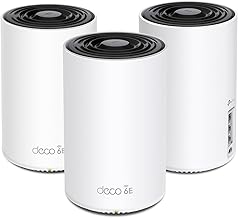
The Deco BE85 is a tri-band Wi-Fi 7 mesh system that includes full 6 GHz support, which means it clears the Wi-Fi 6E bar comfortably while adding Wi-Fi 7 for devices that support it. It carries multi-gigabit Ethernet ports on each unit — a 10 GbE port plus 2.5 GbE ports — so wired backhaul between nodes runs at multi-gig speeds and leaves gigabit-era bottlenecks behind. For a large home, this is the configuration that matters: each node has the wired capacity to actually deliver the wireless capacity it advertises.
Why it fits large homes: multi-node mesh with wired backhaul is the only reliable way to cover a two- or three-story house with useful 6 GHz. A single router, however powerful, cannot push 6 GHz through floors. In practice, budget one node per floor plus one for any far wing, and plan to run Ethernet or use existing coax with MoCA adapters if possible. The Deco line supports Ethernet backhaul, so a wired backbone is achievable. Expect the three-pack to land in the roughly $700–$1,100 range depending on configuration and sales, with two-packs around $500–$750. That is premium pricing, and it is justified only if you actually have the square footage and the multi-gig plan to use it.
Single-router whole-home setup: Asus ROG Rapture GT-AXE16000
The GT-AXE16000 is a quad-band Wi-Fi 6E router — it dedicates two separate 5 GHz radios plus a 6 GHz radio plus 2.4 GHz. That radio count is the point: with two 5 GHz bands, the router can steer legacy and mid-range devices off the band your high-priority devices use, which reduces congestion without needing a mesh. It also carries dual 10 GbE ports and multiple 2.5 GbE ports, putting it at the top of the port-speed table above.
Who it suits: a large single-story home or an open-plan layout where one well-placed router genuinely reaches everything, plus a household with wired devices that need real bandwidth — a NAS, a desktop doing large local transfers, or a multi-gig internet plan. It is not the right answer for a multi-story home with closed rooms, because no amount of radio power fixes floor and wall attenuation. Price typically falls in the roughly $400–$550 range. At that price, the future-proofing case rests on the 10 GbE ports and the quad-band radio count, both of which stay useful for the longest of any configuration here.
Best 6 GHz range for a mid-size home: Netgear Nighthawk RAXE500
The RAXE500 is a tri-band Wi-Fi 6E router with a strong 6 GHz implementation and, notably, a 2.5 GbE WAN port plus gigabit LAN. It is the pick when your priority is getting the most usable 6 GHz coverage out of a single unit in a mid-size home (roughly 1,500–2,200 sq ft, conventional construction, router centrally placed). The 2.5 GbE WAN handles current multi-gig plans up to ~2.35 Gbps, and the 6 GHz radio is tuned for range rather than raw peak throughput.
Trade-off to be honest about: the LAN ports are gigabit. Wired devices cap at ~940 Mbps. If you have a NAS and want multi-gig local transfers, the GT-AXE16000 above is the better buy despite the higher price. If your wired needs are modest and your priority is wireless coverage and throughput in a single-story home, the RAXE500 is the more balanced choice. Expect roughly $300–$500.
Value entry point: TP-Link Archer AXE75
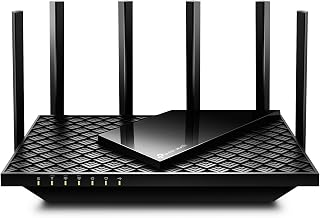
The Archer AXE75 is a tri-band Wi-Fi 6E router that delivers a usable 6 GHz band at a mid-range price. It is the correct recommendation when the goal is “get onto the clean 6 GHz spectrum without overpaying.” It includes a 2.5 GbE port, which is unusual at this price point and meaningfully extends its useful life against gigabit-only competitors.
What it is not: a high-device-count router. Its radios are 2×2 across bands, which is fine for households under roughly 50 devices and fine for typical usage, but it will show its limits if you are running a smart-home-dense household with heavy concurrent 4K streaming and gaming. For a household already counting 60+ active clients, step up to a 4×4 configuration. Price sits in the roughly $130–$200 range, which makes it the lowest-risk way to add 6 GHz to a home that does not yet have it.
Alternatives worth naming by type
Beyond the four above, the category splits into recognizable types rather than specific winners:
- Wi-Fi 7 mesh with 6 GHz (multiple vendors now offer these): the current highest tier. If your budget stretches and you plan to keep the system 5+ years, buying Wi-Fi 7 with 6 GHz is strictly better than Wi-Fi 6E with 6 GHz, because it costs little more and adds Multi-Link Operation and 320 MHz channels where supported. Both features use the 6 GHz band.
- Wi-Fi 6E mesh, dual-node: the sweet spot for apartments and smaller homes that still want a second node for a dead zone. Look for Ethernet backhaul support on each node and at least one 2.5 GbE port per node.
- Wi-Fi 6E single router with a 2.5 GbE WAN: the minimum future-proof configuration. Anything without multi-gig WAN and without 6 GHz does not belong on a future-proofing shortlist in 2026.
How to Match Coverage to Room Size Without Guessing
Manufacturer coverage claims are optimistic. Here is a working method instead of a spec-sheet number.
Sketch your floor plan and mark where the router will sit. For every room where you care about speed, count the walls between it and the router, then apply the ranges above. As a rough mapping:
- Small apartment or studio (under 900 sq ft, open or few walls): a single Wi-Fi 6E router is sufficient, including 6 GHz. Do not pay for mesh.
- Mid-size home (900–1,800 sq ft, conventional drywall, single story): a single high-quality Wi-Fi 6E router, centrally placed, is usually enough for 6 GHz in all main rooms. Two nodes if the router must sit at one end of the home.
- Large home (1,800–2,800 sq ft, single story): a single quad-band router placed centrally, or a two-node mesh if placement is constrained. 6 GHz will not reach the far corners from a corner placement.
- Multi-story (any size): one node per floor. 6 GHz does not reliably cross floors. This is non-negotiable and it is the single most common cause of “my new router is slow upstairs.”
- Plaster, brick, or concrete construction: treat the above sizes as roughly 60% of stated. Plan for more nodes.
A cheap 6 GHz router well-placed will beat an expensive one stuffed in a closet or a corner behind a TV. Placement is free; budget for a longer Ethernet run to the router location rather than an extra tier of hardware.
Assembly, Setup, and What Actually Wears Out
Routers have few moving parts, but a few practical realities determine how the purchase ages.
- Setup time: a single router setup via app takes roughly 10–20 minutes including firmware update. A mesh system with wired backhaul takes longer — plan an hour or two if you are running cable, and be realistic about whether you can. Wireless mesh backhaul sets up in 20–30 minutes per node.
- Firmware update on first power-on: always complete this before judging performance. Several of the routers here ship with firmware that materially improves 6 GHz stability and band steering. Skipping it produces a worse first impression than the hardware deserves.
- What wears first: the power adapter is the most common point of failure — the brick, then the barrel or USB-C connector. After that, the flash storage and radio chips fail from heat. Give the router airflow: do not stack it on a receiver, and do not enclose it in a cabinet. Heat is the main driver of premature death in routers, and it is entirely avoidable.
- Cable quality matters at multi-gig: Cat5e is officially rated to 2.5 GbE for typical residential runs and is fine for 2.5 Gb. For 10 GbE, use Cat6a or better, and keep individual runs under roughly 100 meters. Replacing a marginal old cable is cheaper than replacing a router that people incorrectly blame for slow wired speeds.
- Power backup: at high throughput, these routers draw 15–30 W. A modest UPS keeps your network up through brief outages and smooths power events that can degrade the adapter.
- Physical space: premium routers are large — some quad-band units are roughly 10–12 inches wide with four to eight antennas. Confirm shelf or wall-mount space, and keep at least a few inches of clearance around vents.
What Separates a Router That Lasts from One That Doesn’t
| Attribute | Future-proof choice | Looks fine, ages badly | Why it matters |
|---|---|---|---|
| 6 GHz band | Present, 2×2 minimum, 4×4 preferred | Absent (Wi-Fi 6 only) | Only clean spectrum; cannot be added later |
| WAN port | 2.5 GbE minimum, 10 GbE preferred | 1 GbE | Caps every future multi-gig plan |
| LAN ports | At least one multi-gig LAN | All gigabit | Caps NAS and wired desktop transfers |
| Backhaul | Wired Ethernet or MoCA supported on each node | Wireless-only backhaul | Wireless backhaul halves per-node throughput |
| Firmware support | Active update cadence, documented commitment | Abandoned support page | Security and stability over 5+ years |
| Radios | 4×4 on 5 GHz, 2×2+ on 6 GHz | 2×2 across all bands | Concurrent device performance and MU-MIMO benefit |
Situation-to-Choice Matrix
| Your situation | Best configuration | Concrete pick by type | Budget guidance |
|---|---|---|---|
| Small apartment, under 900 sq ft | Single tri-band 6E router | TP-Link Archer AXE75 class | ~$130–$200 |
| Mid-size single-story home, 6 GHz range priority | Single tri-band 6E router, central placement | Netgear Nighthawk RAXE500 class | ~$300–$500 |
| Large single-story home + multi-gig plan | Quad-band 6E router with 10 GbE | Asus ROG Rapture GT-AXE16000 class | ~$400–$550 |
| Multi-story home | Mesh, one node per floor, wired backhaul if possible | TP-Link Deco BE85 class (or Wi-Fi 7 equivalent) | ~$500–$1,100 |
| Heavy smart-home device count (100+) | Quad-band router or mesh with wired backhaul | GT-AXE16000 or high-end mesh system | ~$400–$1,100 |
| Renting / cannot run cable | Mesh with wireless 6 GHz backhaul, two nodes | Any current 6E/7 mesh with good wireless backhaul | ~$250–$500 |
| Budget-constrained, want 6 GHz only | Entry tri-band 6E with 2.5 GbE WAN | TP-Link Archer AXE75 class | ~$130–$200 |
Common Mistakes That Undo Future-Proofing
- Buying gigabit-only ports. The single biggest wasted dollar. A router that caps wired at 940 Mbps cannot be fixed later.
- Placing the router in a corner, closet, or behind furniture. Free to fix, and worth more than a hardware upgrade. Central, elevated, unobstructed.
- Expecting 6 GHz through floors. It will not. One node per floor.
- Enabling every band under one SSID without checking band steering. Some routers leave devices clinging to 2.4 GHz. Verify your high-priority devices land on 6 GHz; some setups benefit from a separate 6 GHz SSID.
- Ignoring firmware. The first update after purchase often changes the performance of the 6 GHz radio meaningfully.
- Overbuying mesh for a small home. A single well-placed 6E router beats a two-node mesh in an 800 sq ft apartment, at lower cost and complexity.
Frequently Asked Questions
Is Wi-Fi 6E still worth buying in 2026, or should I go straight to Wi-Fi 7?
Both are defensible. Wi-Fi 7 routers include 6 GHz by default and are becoming the default top tier, so if the price difference is small in the model you are considering, Wi-Fi 7 is the better long-term buy. Wi-Fi 6E remains worth buying when the price gap is meaningful, because the 6 GHz band — the part that actually future-proofs you — is present in both. The version number above 6E is a bonus, not the core decision. What is not defensible is buying a router without 6 GHz at all.
How much does 6 GHz range actually differ from 5 GHz?
In practice, expect roughly 20–35% less usable range at 6 GHz than at 5 GHz in a typical home with drywall walls, and a phone or laptop will often see 6 GHz disappear two to three rooms sooner than 5 GHz. That is normal and expected — it is the price of the clean spectrum. It is also why mesh with a node per floor or per far wing is the correct answer in anything larger than a mid-size single-story home.
Do I need 10 GbE ports, or is 2.5 GbE enough?
For almost everyone, 2.5 GbE WAN is enough, because residential plans above 2.5 Gbps are still uncommon in most areas. 10 GbE justifies itself in two cases: you have a multi-gig plan above 2.5 Gbps available, or you do large local transfers between wired devices (NAS backups, video editing over the network). If neither applies, 2.5 GbE and a strong 6 GHz radio is the better allocation of budget.
Will more antennas or external antennas give better 6 GHz range?
Antenna count affects spatial streams (throughput and concurrency) more than raw range. Range at 6 GHz is governed by the radio’s transmit power and the physics of the band, both of which are constrained by regulation and are broadly similar across vendors. Placement — central, elevated, unobstructed — will change your real-world 6 GHz coverage more than any antenna spec on the box.
Can I mix a Wi-Fi 6E router with Wi-Fi 6 mesh nodes?
You can, but a mixed system usually falls back to the weakest common capability for roaming and band steering, which erodes the benefit of the 6E router. If you are adding nodes, match the standard where you can. If you cannot, keep the 6E unit as the route to your high-priority devices and let the older nodes serve lower-priority rooms.
What is the realistic lifespan of a router bought in 2026?
With active firmware support, expect five to seven years of good service before something — a faster internet plan, a new standard, or end of support — makes replacement worthwhile. The three things that most often cut that short are a gigabit-only port configuration, neglected firmware, and heat. Address all three and a well-chosen Wi-Fi 6E router bought in 2026 will still be a sensible part of a network in the early 2030s.
The Short Version
Pick by your situation, not by the highest spec sheet number. Small apartment: a single tri-band Wi-Fi 6E router is all you need, roughly $130–$200. Mid-size single-story home where 6 GHz coverage is the priority: a range-focused tri-band 6E router in the $300–$500 range. Large single-story home with a multi-gig plan: a quad-band 6E router with 10 GbE ports, around $400–$550. Multi-story home: a mesh system with one node per floor and, if at all possible, wired backhaul, in the $500–$1,100 range. In every case, the non-negotiables for lasting value are the 6 GHz band, a multi-gig WAN port, at least one multi-gig LAN port, wired backhaul support on mesh nodes, and a vendor with an active firmware cadence. Buy around those five things and the router will be useful for years; buy around the marketing and you will be replacing it while the 6 GHz band still has plenty of capacity to spare.