Key takeaways
- Deep-cushioned keys deliver quiet, comfortable typing.
- Integrated wrist rest on select versions supports long sessions.
- Flexible connectivity via Bluetooth or Logi Bolt receiver.
- Full-size layout with numpad and multimedia keys.
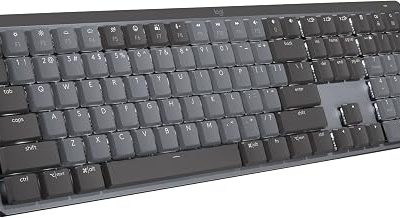
The Logitech Signature K650 is a full-size wireless keyboard built around one central promise: all-day typing comfort. With deep-cushioned keys, an integrated wrist rest on select versions, and Logitech’s reliable dual-connectivity, it targets professionals, writers, and anyone who spends hours at a desk and wants their hands to feel good doing it.
In a market crowded with flashy mechanical boards, the K650 takes a quieter, comfort-first approach. This review examines how it feels in daily use, how well it performs across devices, and whether its focus on ergonomics and value makes it the right everyday keyboard for your workspace.
Our top picks


As an Amazon Associate we earn from qualifying purchases at no extra cost to you. Ratings are shown as listed on Amazon.
🎮 Get More From Your Setup — Free
Prime Gaming gives you free PC games every month, in-game loot, and a free Twitch channel sub — plus fast free shipping on all the gear above. New members get a 30-day free trial.
Watch: Logitech Signature k650 Wireless Keyboard — Video Review
Design & Build
The K650 is a full-size board with a numeric keypad, available in Off White and Graphite finishes. Its defining feature is comfort: the keys are deep-cushioned for a soft, quiet landing, and versions with a built-in wrist rest provide welcome support during long sessions. The design is clean and understated, blending into home and office setups rather than shouting for attention. Build quality is solid for the price, with a stable base and a low-profile layout that keeps your hands in a natural, relaxed position throughout the day.
Performance
Typing on the K650 is its main event, and it delivers a comfortable, cushioned feel that reduces fatigue over hours of use. Connectivity is flexible, offering BLE Bluetooth or the Logi Bolt USB receiver, so you can pair with a PC, Mac, or other systems and enjoy a stable, secure connection. The integrated numpad suits data entry and spreadsheet work, while multimedia keys handle playback on the fly. It is not a mechanical or gaming keyboard, and it makes no such claims, but for productivity, writing, and everyday computing, its quiet comfort and dependable wireless performance are exactly what many users want.
Pros & Cons
- Deep-cushioned keys deliver quiet, comfortable typing.
- Integrated wrist rest on select versions supports long sessions.
- Flexible connectivity via Bluetooth or Logi Bolt receiver.
- Full-size layout with numpad and multimedia keys.
- Not mechanical, so tactile-switch fans may want more feedback.
- No backlighting, which limits use in dark rooms.
Alternatives to Consider
If you want the same comfort-first design with a matching mouse, the Logitech Signature MK650 combo pairs the keyboard with a mouse for a complete set. Those who prefer a sleeker, thinner profile should look at the Logitech Signature Slim K950, which offers device switching in a more compact body. Budget shoppers who simply need a reliable full-size wireless board can consider the Logitech K270, while the Logitech MK335 combo offers a quiet keyboard and mouse together. For most comfort-focused buyers, though, the K650 in Off White or Graphite is the sweet spot.
Frequently Asked Questions
Does the K650 come with a wrist rest?
Select versions of the K650 include an integrated wrist rest for added support during long typing sessions. Check the specific listing, as availability of the wrist rest varies by configuration.
How does it connect?
The K650 offers dual connectivity through BLE Bluetooth or the included Logi Bolt USB receiver, letting you pair with PCs, Macs, and other compatible devices with a stable connection.
Is the K650 a mechanical keyboard?
No. It uses deep-cushioned membrane-style keys designed for quiet, comfortable typing rather than the tactile feedback of mechanical switches, making it ideal for shared or office environments.
Is it compatible with Mac?
Yes. The K650 works with most operating systems including Windows and Mac, so you can use it comfortably across your devices via Bluetooth or the Bolt receiver.
Verdict
The Logitech Signature K650 is an excellent everyday wireless keyboard for anyone who prioritizes comfort and quiet operation over mechanical feedback or gaming features. Its cushioned keys, optional wrist rest, and flexible connectivity make it a superb productivity companion. If you want a matching mouse, the MK650 combo is the natural upgrade, and those wanting a slimmer profile should look at the K950. For comfort-focused typing, the K650 is an easy recommendation.