Key takeaways
- Compact mechanical keyboard with a wireless mouse: Logitech G413 TKL SE + G305.
- Boxed keyboard-and-mouse set: MSI VIGOR GK30 COMBO.
- Full-size keyboard with media controls: Logitech G213 Prodigy + G203 LIGHTSYNC.
- Lower-profile membrane keyboard and right-handed mouse: Razer Ornata V3 X + DeathAdder Essential.
- Keyboard, mouse, headset, and mousepad together: CORSAIR 4-in-1 Gaming Bundle, SKU CH-9226J65-NA.
The best gaming keyboard and mouse combo should give you a keyboard layout you can use comfortably and a mouse that suits your grip—not simply matching lights. Start with the Logitech G413 TKL SE and G305 if you want a mechanical keyboard, more mouse space, and a wireless mouse. For a boxed keyboard-and-mouse set, consider the MSI VIGOR GK30 COMBO. The other options below suit full-size layouts, lower-profile keys, or a complete peripheral starter package. This shortlist distinguishes manufacturer bundles from separately purchased pairings and compares verified features without claiming detailed research or a measured performance winner.
Quick picks: best gaming keyboard and mouse combo
Our starting recommendation is the Logitech G413 TKL SE plus G305, purchased separately. The keyboard’s tenkeyless layout removes the number pad while retaining dedicated arrow keys, and the mouse provides wireless operation. That combination addresses two practical gaming priorities: room for mouse movement and freedom from mouse-cable drag.
It is a fit-based recommendation, not a claim that the pairing has the lowest latency or lowest total price.
Choose according to your actual requirements:
- Compact mechanical keyboard with a wireless mouse: Logitech G413 TKL SE + G305.
- Boxed keyboard-and-mouse set: MSI VIGOR GK30 COMBO.
- Full-size keyboard with media controls: Logitech G213 Prodigy + G203 LIGHTSYNC.
- Lower-profile membrane keyboard and right-handed mouse: Razer Ornata V3 X + DeathAdder Essential.
- Keyboard, mouse, headset, and mousepad together: CORSAIR 4-in-1 Gaming Bundle, SKU CH-9226J65-NA.
Quick comparison
“Best fit” below identifies the use case supported by each option’s features. It does not indicate measured superiority over every competing product.
| Combo or pairing | Purchase format | Best fit | Keyboard characteristics | Mouse characteristics | Main trade-off |
|---|---|---|---|---|---|
| Logitech G413 TKL SE + G305 | Two separate products | More mouse space with mechanical keys | Tenkeyless; tactile mechanical switches; PBT keycaps | LIGHTSPEED wireless; AA-powered | Keyboard remains wired; no number pad |
| MSI VIGOR GK30 COMBO | Manufacturer keyboard-and-mouse bundle | A matching wired set | Full-size layout; plunger switches; six-key rollover | CLUTCH GM11; six buttons; adjustable polling rate | Keyboard is mechanical-like rather than a conventional mechanical model |
| Logitech G213 Prodigy + G203 LIGHTSYNC | Two separate products | Gaming and everyday work on a full-size layout | Mech-Dome membrane construction; integrated palm rest; media controls | Wired; six-button design; adjustable sensitivity | Larger keyboard footprint and two device cables |
| Razer Ornata V3 X + DeathAdder Essential | Two separate products | Lower-profile keys and a right-handed mouse shape | Membrane switches; low-profile keys; included wrist rest | Wired; right-handed design | Neither device provides wireless operation |
| CORSAIR 4-in-1 Gaming Bundle, CH-9226J65-NA | Manufacturer four-device bundle | Starting a setup without existing peripherals | K55 CORE membrane keyboard; wired USB | HARPOON RGB PRO; six programmable buttons | Extra headset and mousepad may duplicate equipment you own |
How we selected these options
This shortlist focuses on practical PC gaming setups rather than treating every matching keyboard-and-mouse package as equally suitable. Selection criteria included keyboard construction, layout, mouse connectivity, identifiable components, and the ability to explain a distinct use case.
Manufacturer product pages and specifications establish the features discussed here. U.S. pages were checked where available. No products were physically tested for this article, and no measured latency, tracking, acoustic, or durability ranking is assigned.
Five options are included instead of padding the list with unavailable legacy bundles or listings with unresolved component conflicts. Exact prices are omitted because a consistent, directly comparable purchase total was not established across all five options. None receives a “best budget” or “best value” award.
The keyboard and mouse combinations to consider
Logitech G413 TKL SE + G305: for mechanical keys and more mouse space
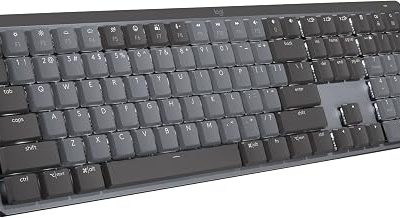
The G413 TKL SE combines a tenkeyless layout, tactile mechanical switches, PBT keycaps, and LED backlighting. Pairing it with the G305 adds Logitech’s LIGHTSPEED wireless mouse connection and replaceable AA-battery power.
The practical advantage begins with the keyboard layout. Removing the number pad leaves more room beside the keyboard for mouse movement. That can be useful for players who make broad mouse movements or work on a narrow desk. The wireless mouse also removes a cable from that movement area.
This pairing makes more sense than the full-size G213 combination when desk space and mechanical key feel matter more than a number pad or dedicated media controls. However, tactile switches are a preference, not an automatic gaming advantage. Their feel may be less appealing if you prefer a softer membrane keypress.
Buy the two products separately unless a retailer explicitly identifies a combined offer. A shared brand does not establish a shared receiver: the keyboard is wired, and the mouse uses its wireless receiver.
Buy if: You want a conventional mechanical keyboard, dedicated arrow keys, and a mouse without a cable.
Skip if: You need a number pad, want an entirely wireless setup, or dislike tactile switches.
MSI VIGOR GK30 COMBO: for a boxed wired set
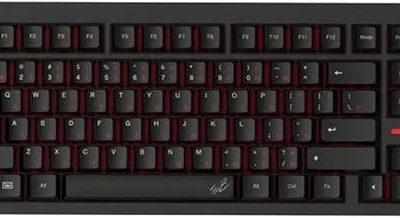
The VIGOR GK30 COMBO includes the GK30 keyboard and CLUTCH GM11 mouse. MSI specifies plunger switches for the keyboard, six-key rollover, and a defined group of anti-ghosting keys. The GM11 uses a PMW-3325 optical sensor, six buttons, and selectable polling rates up to 1,000Hz.
Its main attraction is purchasing a clearly identified pair in one package. Both devices use wired USB connections, avoiding receiver management and battery replacement. Buyers who want a matching set without comparing two separate shopping carts may appreciate that simplicity.
The keyboard construction is the important qualification. MSI describes its switches as mechanical-like; that should not be interpreted as confirmation of conventional mechanical switches, hot-swappable sockets, or interchangeable switch options.
The manufacturer’s keyboard dimensions convert to approximately 17.2 inches wide and 6.2 inches deep. Measure the remaining mouse area rather than assuming that a full-size board fits simply because it fits on the desk.
Buy if: You specifically want a boxed keyboard-and-mouse set with wired connections and identified components.
Skip if: Mechanical switches, extensive simultaneous-key support, or a compact layout are requirements.
MSI’s U.S. store lists a one-year limited warranty for the offer; purchase conditions and coverage should be checked with the actual seller.
Logitech G213 Prodigy + G203 LIGHTSYNC: for a full-size work-and-play setup
The G213 offers Mech-Dome membrane construction, an integrated palm rest, dedicated media controls, and customizable lighting. The G203 adds a wired six-button mouse with adjustable sensitivity and Logitech G HUB customization.
This is a sensible configuration for someone who uses the same desk for games, spreadsheets, browsing, and media. The number pad and media controls provide functions that the G413 TKL SE deliberately leaves out. Both products also provide lighting options through Logitech’s software ecosystem.
The cost of those conveniences is space. The integrated palm-rest area extends the keyboard’s footprint, and the full-size layout places the mouse farther to the side than a narrower keyboard would. Check that arrangement against your natural playing position.
The G213 is not a conventional mechanical keyboard despite the “Mech-Dome” name. Likewise, the G203’s maximum sensitivity setting does not establish better tracking or aiming than another mouse. Shape, button reach, and your preferred sensitivity deserve greater attention.
Buy if: You want a full-size wired setup with media controls and coordinated customization.
Skip if: You need a detachable palm rest, mechanical switches, or more room for broad mouse movements.
Razer Ornata V3 X + DeathAdder Essential: for lower-profile keys
The Ornata V3 X uses low-profile keys and membrane switches and includes a wrist rest. The DeathAdder Essential supplies a wired, right-handed mouse design. These are separately purchased products rather than a manufacturer-confirmed two-device package.
The reason to consider this pairing is physical preference. A lower-profile keyboard may suit someone who dislikes the height of traditional full-height keys. The DeathAdder offers a different shape direction from the more compact, rounded appearance of the Logitech mice in this shortlist.
Neither feature guarantees comfort. The mouse must fit your hand and grip, while the keyboard’s wrist rest must work with your desk height and playing position. Manufacturer descriptions of quiet switches are also not a substitute for comparable acoustic measurements.
Check the exact names carefully. The Ornata V3 X should not inherit specifications from another Ornata model, and the DeathAdder Essential should not be treated as equivalent to newer DeathAdder variants.
Buy if: You prefer lower-profile membrane keys and want to try a right-handed mouse shape.
Skip if: You require mechanical key switches, a wireless mouse, or a compact keyboard.
CORSAIR 4-in-1 Gaming Bundle: for a complete starter setup
The verified CH-9226J65-NA package contains the K55 CORE keyboard, HARPOON RGB PRO mouse, HS35 v3 headset, and MM Medium anti-fray mousepad.
It belongs here because some buyers need the supporting equipment as much as the keyboard and mouse. Starting from an empty desk, one identified package reduces the number of separate product decisions. The K55 CORE uses membrane keys, while the HARPOON RGB PRO provides a contoured shape and six programmable buttons.
The limitation is equally practical: four included products do not create savings if two will remain unused. Someone with a suitable headset and mousepad should compare a keyboard-and-mouse purchase instead. The headset’s inclusion also does not establish that its sound or microphone performance suits your needs.
Use the SKU when comparing listings. CORSAIR has sold different bundles under similar names, and the contents of an older package should not be applied to this one.
Buy if: You need all four categories of equipment and accept the listed keyboard and mouse.
Skip if: You already own suitable audio equipment or want a mechanical keyboard.
How to choose the right combination
Finding the best gaming keyboard and mouse combo for your grip
Start with the mouse if you primarily play games requiring frequent aiming. A keyboard with attractive lighting cannot compensate for a mouse that forces awkward finger placement or makes side buttons difficult to reach.
Consider your grip, how much of your palm contacts the shell, and whether you lift the mouse frequently. Product dimensions help narrow the field, but they cannot fully describe the hump, side contours, or button tension.
If possible, handle the mouse before purchasing. Otherwise, prioritize clear return conditions and test it during ordinary play. A short desktop cursor test may not reveal discomfort that appears during repeated aiming movements.
Choose keyboard width before lighting effects
A full-size keyboard provides a number pad, but it consumes horizontal space. Tenkeyless removes that section while preserving navigation keys; smaller layouts make additional compromises.
For illustration, imagine a desk that technically accommodates a full-size board but leaves little room beside it. Replacing the board with a narrower layout could be more useful than adding elaborate lighting or extra macro keys.
Measure your actual mouse movement area with the keyboard in a comfortable position. Include the palm rest where one is integrated or required. The useful measurement is the space left for your movements, not simply the desk’s advertised width.
Treat switch construction and noise as separate questions
Membrane and mechanical keyboards provide different designs and upgrade possibilities, but neither category alone determines suitability. Key force, travel, stabilization, and bottom-out behavior all influence the experience.
Do not assume that a membrane keyboard is silent or a mechanical keyboard must be loud. Without comparable sound testing, noise claims should remain qualified.
Also distinguish mechanical switches from “mechanical-like” branding. Buyers who specifically want replaceable switches or a particular switch design should verify those features directly rather than inferring them from gaming terminology.
Check rollover and configuration limits
Anti-ghosting language can describe a selected group of keys rather than unrestricted simultaneous input across the entire keyboard. Check whether the combinations you use are covered, particularly for games involving several held keys.
Software introduces another distinction. A device may support basic typing and pointing without offering its full lighting, remapping, or macro features on every operating system. Shared branding does not mean that every device has identical configuration support.
For macros, verify the game’s rules before using automation features. Their presence is a convenience option, not permission to use them in every multiplayer environment.
Compare complete prices rather than bundle claims
For a boxed set, compare its current total with the cost of the exact included products. For a separate pairing, add both items, shipping, taxes, batteries where relevant, and any required adapter.
Count extras only when they solve a real need. A bundle can be convenient without being the cheapest option, and buying separately can improve fit without costing less.
Finally, inspect the seller and return policy. Separate purchases may have different return deadlines, while a packaged set may require returning all components together. Confirm those conditions before relying on an easy partial return.
Checks to make after delivery
Use the return window to test both devices together:
- Confirm that the delivered model numbers match the order.
- Test your normal simultaneous-key combinations.
- Check mouse grip and side-button reach in representative games.
- Verify receiver or cable placement during broad movements.
- Try the software features you intend to use.
- Assess the complete desk arrangement over several sessions.
Avoid changing sensitivity, keyboard angle, and multiple software settings at once. A consistent baseline makes it easier to identify whether the hardware suits you.
Frequently asked questions
Do the keyboard and mouse need to be the same brand?
No. A compatible keyboard and mouse can come from different brands. Matching brands may simplify lighting or software management, but physical fit and required features matter more than visual coordination.
Is a boxed bundle better than buying separately?
A boxed bundle simplifies purchasing and identifies a fixed set of components. Buying separately lets you select each device around your needs. Compare exact contents and total prices rather than assuming either format is inherently better.
Can these combinations be used on a console?
Console and game support must be verified separately. USB connectivity alone does not establish that a console game accepts keyboard-and-mouse input or supports configuration software. This shortlist is intended for PC setups.
Final verdict
Start with the Logitech G413 TKL SE and G305 when mechanical keys, a narrower layout, and a wireless mouse match your priorities. Choose the MSI VIGOR GK30 COMBO when a boxed wired pair matters more. The G213 and G203 suit a full-size work-and-play desk, while the Razer pairing addresses lower-profile keyboard preferences. CORSAIR’s four-device bundle makes the most sense when you need its extras. Compare final prices and return terms before ordering, and let mouse fit and keyboard layout decide the purchase before lighting or headline specifications.