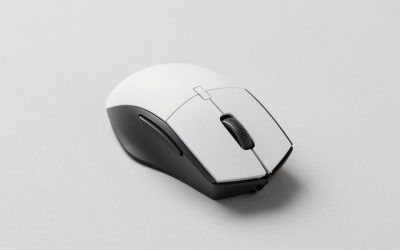
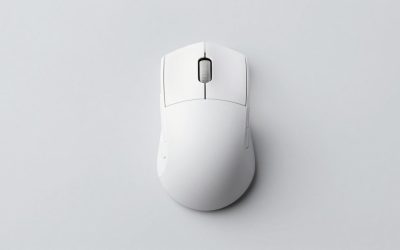
Finding the best gaming mice for under $850 is less about spending your entire budget and more about choosing the right shape and controls. That ceiling comfortably covers premium gaming mice, so there is little reason to pay extra for a collector’s edition unless you specifically want its appearance. This shortlist covers lightweight competitive options, right-handed ergonomic designs, an MMO specialist, and a genuinely ambidextrous alternative. Start with the Razer Viper V4 Pro for a lightweight competitive setup, then consider the other picks if you need more hand support, additional commands, or buttons positioned for left-handed use.
Quick verdict: Best gaming mice for under $850
The Razer Viper V4 Pro is the lead recommendation for competitive players who prioritize low weight and a streamlined control layout. That recommendation reflects its feature set and intended use, rather than a claim that it fits every hand or wins every independent benchmark.
Choose the Razer DeathAdder V4 Pro if a right-handed ergonomic shape matters more than achieving the lowest listed weight. The Logitech G PRO X SUPERLIGHT 2 DEX provides another lightweight right-handed option with a different shell shape.
For command-heavy games, the Corsair SCIMITAR ELITE WIRELESS SE earns its place through its adjustable thumb-button panel. The Razer Basilisk V3 Pro 35K suits players who also want versatile scrolling for everyday computer work. Left-handed buyers should start with the Logitech G PRO 2 LIGHTSPEED, whose configurable side buttons distinguish it from mice that merely look symmetrical.
Quick comparison
Prices below are U.S. manufacturer-page snapshots checked on October 31, 2026, before tax and shipping. Prices, selected colors, and availability can change. Manufacturer specifications are not independent test results.
| Razer Viper V4 Pro, black | Lightweight competitive play | Approximately 49 g; up to 8,000 Hz wireless polling; optical scroll wheel | Streamlined esports focus does not replace an MMO button panel | $159.99 |
| Razer DeathAdder V4 Pro, black | Right-handed ergonomic FPS setups | Approximately 56 g; six programmable buttons; up to 8,000 Hz polling | Right-handed shell; no tilt-scroll function | $169.99 |
| Logitech G PRO X SUPERLIGHT 2 DEX, black | Lightweight right-handed alternative | Approximately 60 g; asymmetrical shell; HERO 2 sensor and LIGHTFORCE switches | Shape remains a personal fit decision | $159.99 |
| Corsair SCIMITAR ELITE WIRELESS SE, black/yellow | MMO command access | 16 customizable buttons; adjustable 12-button thumb panel; 33K sensor | Dense side controls require practice | $99.99 sale price |
| Razer Basilisk V3 Pro 35K, black, mouse only | Gaming and everyday scrolling | Configurable tilt wheel; tactile and free-spin scrolling; 35K sensor | Added scrolling features have limited relevance to pure FPS play | $159.99 |
| Logitech G PRO 2 LIGHTSPEED, magenta | Left-handed or ambidextrous setups | Symmetrical body; switchable magnetic side buttons; four to eight programmable buttons | Checked color was temporarily sold out; optional receiver needed for up to 8 kHz | $59.99 displayed sale price |
The PRO 2 LIGHTSPEED price is a reference from a temporarily unavailable color, rather than an immediately purchasable offer. It is included for its relevant design, with availability requiring another check before ordering.
How we selected these gaming mice
Selection focused on differences that change the buying decision: shell shape, handedness, weight where verified, control layout, scrolling functions, and the distinction between standard features and optional upgrades.
Official U.S. manufacturer pages supplied the model information and price snapshots. Manufacturer support documentation clarified the DeathAdder V4 Pro’s controls, polling support, and battery-life conditions. These sources establish advertised specifications; they do not establish how a mouse will feel in your hand.
No detailed research was performed for this roundup. The recommendations therefore avoid measured latency rankings, subjective click-feel claims, and promises about coating durability. “Best for” describes the clearest use case within this shortlist.
The selection also deliberately avoids filling the budget with cosmetic upgrades. A special edition can be enjoyable to own, but its appearance is a separate purchase decision from grip suitability or useful controls.
The six recommended picks
Razer Viper V4 Pro: Lead pick for lightweight competitive play
The Viper V4 Pro is the first model to consider when your priorities are a light mouse and a competitive gaming feature set. Razer lists the black version at approximately 49 g, with support for up to 8,000 Hz wireless polling and an optical scroll wheel.
Those specifications make it a logical starting point for players who frequently lift and reposition their mouse. However, low weight alone does not establish better control. If you squeeze an unfamiliar shell to keep it stable, a small weight advantage may matter less than a shape that lets your fingers rest naturally.
Compared with the DeathAdder V4 Pro, the buying question is whether you prefer the Viper’s shape or a more explicitly right-handed ergonomic design. Compared with the SCIMITAR, the distinction is simpler: prioritize streamlined aiming or immediate access to a much larger thumb-command layout.
Buy if: You want a lightweight competitive mouse and do not need a dense side-button array.
Skip if: Your main requirement is MMO command access or a particular ergonomic shape you already know suits you.
Limitation: The recommendation does not establish that its advertised polling capability produces a noticeable advantage in your games.
Razer DeathAdder V4 Pro: Best for right-handed ergonomic FPS setups
The DeathAdder V4 Pro combines a right-handed ergonomic shell with a manufacturer-listed weight of approximately 56 g for the black version. It offers six programmable buttons and supports up to 8,000 Hz polling in wired and wireless modes. Its wheel does not provide tilt scrolling.
It belongs on the shortlist because a supported grip can matter more than removing the final few grams. Consider it when flatter or differently contoured mice make you adjust your hand repeatedly during play. The shell still needs a personal fit check; “ergonomic” identifies the design approach rather than guaranteeing comfort.
Battery expectations also require context. Razer advertises up to 150 hours at 1,000 Hz and up to 22 hours at 8,000 Hz. These are manufacturer estimates, but they clearly illustrate why the highest polling setting is a choice with a charging trade-off.
Buy if: You want a lightweight right-handed design with relatively straightforward controls.
Skip if: You need left-handed use, wheel tilt, or an MMO thumb grid.
Limitation: Neither its ergonomic description nor its battery rating guarantees your individual experience.
Logitech G PRO X SUPERLIGHT 2 DEX: Best lightweight ergonomic alternative
The PRO X SUPERLIGHT 2 DEX offers a 60 g asymmetrical, right-handed design with Logitech’s HERO 2 sensor and LIGHTFORCE switches. Its role here is to provide another shell option for buyers who want lightweight hardware without assuming that the DeathAdder’s contours are the right match.
Choose between these ergonomic candidates by examining where your hand contacts the shell. Your thumb should reach its controls without forcing your index finger away from the main button. During small corrections, your fingers should have enough freedom to move without constantly repositioning your palm.
The DEX makes the most sense when its shape is the reason to buy it. Already using Logitech software can make setup more familiar, but software familiarity should remain secondary to physical fit.
Buy if: You want a lightweight right-handed mouse and prefer the DEX shell after comparing shapes.
Skip if: You need a genuinely ambidextrous layout or extensive thumb controls.
Limitation: This roundup does not rank its click feel, coating, or measured wireless latency against the Razer alternatives.
Corsair SCIMITAR ELITE WIRELESS SE: Best for MMO command access
The SCIMITAR ELITE WIRELESS SE addresses a different problem from the lightweight FPS picks: placing more commands under your thumb. Corsair specifies 16 customizable buttons, including a repositionable 12-button Key Slider panel.
The adjustable panel is the deciding feature. With a fixed grid, a player may comfortably reach one row while stretching for another. Moving the panel creates an opportunity to improve reach, although it cannot guarantee that every button will suit every hand.
This design is most useful when your game benefits from numerous accessible bindings. It is less compelling when you mainly need two side buttons and want to avoid a crowded thumb area. Compared with the Basilisk, its advantage is command density rather than versatile scrolling.
Build familiarity gradually. Assign a few easy-to-identify actions first, then expand once you can distinguish the buttons without looking. Check the game’s rules before assigning automated sequences.
Buy if: Your MMO setup would benefit from a dedicated thumb-command panel.
Skip if: You prefer sparse controls or rarely use additional bindings.
Limitation: More buttons create potential convenience, not automatic improvements in execution.
Razer Basilisk V3 Pro 35K: Best for gaming and everyday scrolling
The Basilisk V3 Pro 35K is the practical alternative when the same mouse handles gaming, browsing, and document work. Its distinguishing feature is the configurable HyperScroll Tilt Wheel, which supports tactile scrolling, free-spin scrolling, and Smart-Reel switching between them.
That versatility matters when your workflow includes both discrete selections and long pages. Tactile steps can help you navigate item-by-item, while free-spin scrolling offers a different way to move through lengthy content. Wheel tilt also provides another configurable input.
Its position in this roundup depends on those functions. If you spend almost all your time in an FPS and barely use scrolling outside weapon selection, the Viper or DeathAdder has a clearer purpose. If you want to avoid changing mice between work and games, the Basilisk’s scrolling options become more relevant.
Buy if: A configurable wheel would serve both your games and everyday tasks.
Skip if: Your priority is a minimalist competitive setup.
Limitation: This recommendation applies specifically to the V3 Pro 35K; it does not imply that this is the newest Basilisk model.
Logitech G PRO 2 LIGHTSPEED: Best for left-handed flexibility
The PRO 2 LIGHTSPEED is the most relevant option here for buyers who need usable side controls on their preferred side. Logitech combines a symmetrical body with switchable magnetic side buttons and a configurable four-to-eight-button arrangement.
That distinction matters because a symmetrical outline alone does not make a mouse equally useful in either hand. A left-handed player can still find the side buttons inaccessible if they sit only on the left flank. Configurable button placement addresses that purchasing issue directly.
The main reservation is practical availability. The checked magenta page displayed a sale price but marked the color temporarily sold out. Do not plan a purchase around that price until an available variant is confirmed. Logitech also states that reaching up to an 8 kHz report rate requires a separately sold PRO LIGHTSPEED receiver.
Buy if: Left-handed button access or an adaptable ambidextrous layout is essential.
Skip if: You want the DEX’s right-handed contours or expect optional receiver capabilities in the standard purchase.
Limitation: Stock and the total cost of any receiver upgrade need confirmation before checkout.
How to choose the right mouse
Choosing the best gaming mice for under $850 by fit
Start with your existing mouse, even if you dislike it. Identify the specific problem: insufficient palm support, difficult side-button reach, an awkward flare, or too little room for fingertip adjustments. This produces a more useful shortlist than choosing a grip label and assuming every mouse marketed for it will fit.
Hand measurements provide context, but overall length and width do not describe the entire shape. Two similarly sized mice can feel different because their humps, side slopes, and button positions differ. Use measurements to flag obvious size mismatches, then assess the actual contours.
If possible, compare candidates through a retailer with clear return terms. Keep packaging intact and test normal tasks as well as gaming. A shape that feels secure during a short aiming drill may reveal an inconvenient side-button position during a longer session.
Match the controls to the games you actually play
Write down the commands you want on the mouse before buying a model with more buttons. If that list contains only push-to-talk and one game action, a twelve-button thumb panel is unlikely to solve a meaningful problem.
For an MMO, consider whether moving selected commands from the keyboard would reduce awkward combinations. For mixed gaming and work, consider whether wheel tilt or free-spin scrolling would be useful every day. These are different requirements, so the SCIMITAR and Basilisk should not be treated as interchangeable feature-heavy choices.
Also consider accidental activation. A reachable button is useful only if you can distinguish it from neighboring controls while maintaining your normal grip. More controls are worthwhile when they make your inputs clearer and easier to execute.
Treat polling rate as a setting to evaluate
Polling rate describes how frequently a mouse can report information to the computer. A 1,000 Hz rate corresponds to a nominal one-millisecond reporting interval; 8,000 Hz corresponds to 0.125 milliseconds. Those intervals are not complete measurements of click-to-display latency.
Use a higher setting only after checking your actual games. Keep sensitivity unchanged, play comparable sessions, and watch for inconsistent behavior or a charging schedule you find inconvenient. A maximum specification should give you another option rather than dictate your settings.
The DeathAdder’s published battery estimates demonstrate why conditions matter. Comparing an “up to” battery figure at one polling rate with another model’s figure at a different setting can produce a misleading conclusion.
Spend on a complete, suitable setup
The $850 ceiling does not require an $850 mouse purchase. Once a model provides the right fit and controls, the remaining budget can stay unspent.
Before adding accessories, identify their purpose. A charging dock may offer convenience, but it does not resolve an unsuitable grip. A receiver upgrade may unlock an additional setting, but it is only relevant if you intend to use that setting. Replacement feet also change an existing setup rather than automatically improving it.
Prioritize a suitable surface and enough room for your normal movements. Then purchase accessories to address a specific inconvenience you have observed.
Check software, seller, and return conditions
Basic pointer operation and full feature configuration are different compatibility questions. If you need remapping, macros, advanced sensor settings, or firmware updates, confirm that the required software supports your operating system.
For a managed work computer, check whether installation is permitted. For console use, verify the individual game’s mouse support instead of assuming that a USB connection guarantees compatibility.
Finally, confirm the exact model, color, included receiver, seller identity, return window, and applicable warranty terms. Similar product names and bundles can conceal meaningful differences. The mouse-only Basilisk listing, for example, should not be confused with a dock bundle.
Frequently asked questions
Is an $850 budget necessary for a premium gaming mouse?
No. The checked manufacturer prices for this shortlist were far below that ceiling. A larger allowance gives you flexibility, but it does not establish that a more expensive edition will fit better or provide useful additional controls. Choose the model first, then evaluate optional accessories separately.
Which pick should a left-handed player consider first?
The Logitech G PRO 2 LIGHTSPEED is the starting point because its magnetic side buttons can be configured for either side. Verify that the available package includes the required button pieces. The DEX and DeathAdder are right-handed designs, so they serve a different need.
Should you replace a mouse that already feels comfortable?
Only when you can identify a meaningful limitation. Examples include unreliable operation, missing controls, or a connection arrangement that no longer suits your setup. A higher sensor specification alone is a weak reason to replace hardware that already supports your play comfortably and consistently.
Can an MMO mouse work for FPS games?
It can, but decide whether its control layout helps your particular setup. A dense thumb panel offers little advantage if those buttons go unused. If you switch genres frequently, compare the convenience of one versatile mouse with keeping separate devices for different games.
Final verdict
Start with the Razer Viper V4 Pro if low weight and competitive gaming are your priorities. Choose the DeathAdder V4 Pro or Logitech G PRO X SUPERLIGHT 2 DEX when a right-handed ergonomic shell better matches your grip. The Corsair SCIMITAR ELITE WIRELESS SE serves MMO players who need accessible commands, while the Basilisk V3 Pro 35K adds versatile scrolling for mixed use. Left-handed buyers should investigate the PRO 2 LIGHTSPEED and confirm an available variant. None requires approaching the full budget: buy for fit, useful controls, and clear purchase terms.