Our Top Picks
 Korfile 66'' L Shaped Gaming Desk with StorageLarge: 66 inches42.5 x 65.4 x 36.5 InchesCheck on Amazon
 Aheaplus 59" L Shaped Desk Gaming Desk with59 Inch18.9 x 59 x 59.13 inches45.2 poundsCheck on Amazon
The best gaming desk for multiple monitors is the one whose stated length matches the row of screens you want, with enough depth to sit about an arm’s length away. Three 27-inch monitors need roughly 71 inches of straight width before bezels, which is why the 79-inch SEDETA and the 71-inch U-shaped Pamray lead this list, while L-shaped models spread screens around a corner. Ten listings follow, with notes on what each title states, what it leaves out and who each one suits. Prices change often, so use the product cards for the current figure. A desk is also a bulky purchase, so read the return terms before you commit.
At a glance
Korfile 66'' L Shaped Gaming Desk with Storage Drawers, Power Outlets, LED | Large Reversible Computer Desk for Multiple Monitors, Black Corner with CPU Stand for Gaming, Work, Home Office, Bedroom
One of the home product options compared in this guide.
View on Amazon
Pamray 58 Inch Gaming Computer Desk with Monitor Stand Drawers and Shelves
One of the home product options compared in this guide.
View on Amazon
Aheaplus L Shaped Gaming Desk with Power Outlets & LED Lights, Black | Small L- Shaped Desk Computer Corner Desk with Monitor Stand & Shelf, Home Office Desk Writing Desk with Storage Bag & Hooks
One of the home product options compared in this guide.
View on Amazon
Korfile 40 Inch Gaming Desk with Power Outlet, LED, Carbon Fiber Black | L Shaped Computer Gaming Table, Corner Gamer Table, with 3 Tiers Storage Shelves, with Moniter Stand, for Small Space
One of the home product options compared in this guide.
View on AmazonAheaplus 59" L Shaped Desk Gaming Desk with LED Light & Power Outlet, Black | Reversible L Shaped Computer Desk, Home Office Desk Corner Gamer Desks with Shelves & Storage Bag & Hooks, Corner PC Desk
One of the home product options compared in this guide.
View on Amazon
Pamray 71 Inch Large Gaming Desk with Power Outlets U Shaped Computer Desk | Spacious Workspace with USB Charging Ports & Pegboard & Headphone Hooks Suitable for PC Gaming Office Work Study and Writing
One of the home product options compared in this guide.
View on Amazon
SEDETA 79" Gaming Desk with Fabric Drawers Storage, LED Light & Power Strip | Carbon Fiber Black Long Computer Desk with Monitor Stand, Keyboard Tray, CPU Shelf, CUP Holder, Hooks for Work, Writing
One of the home product options compared in this guide.
View on Amazon
AODK Gaming Desk w/PC Showcase Stand, 59" Reversible, RGB LED | For compact pc tower Triple drawers hide cables, controllers, clutter
One of the home product options compared in this guide.
View on Amazon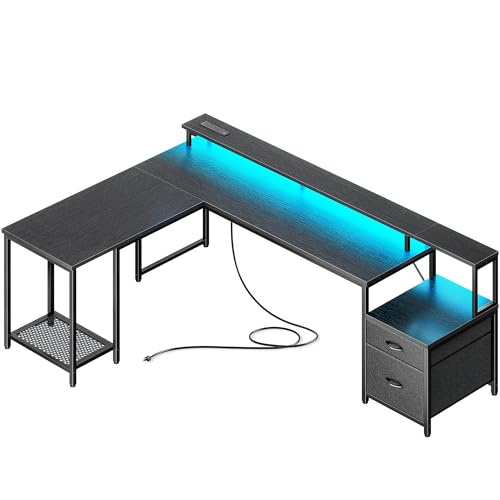
PRAISUN 66" L Shaped Gaming Desk with LED Lights & Power Outlets | Computer Desk with Fabric Drawers and Print Stand, Corner Office Desk, Monitor Stand, Mesh CPU Stand, Black
One of the home product options compared in this guide.
View on Amazon
AODK L Shaped Desk Gaming Desk with LED Light & Power Outlet | 53 Inch Black Reversible L Shaped Computer Table with Shelf & Storage Bag & Hook for Home Office
One of the home product options compared in this guide.
View on Amazon- SEDETA 79-inch – best for a long straight row of three screens
- Pamray 71-inch U-shaped – best for a wraparound layout
- Korfile 66-inch L-shaped – best for a big corner setup with drawers
- PRAISUN 66-inch L-shaped – best for a corner desk with fabric drawers and a CPU stand
- Aheaplus 59-inch L-shaped – best for a mid-size corner with shelves
- AODK 59-inch with showcase stand – best for a compact PC tower on display
- Pamray 58-inch – best for a straight desk with a monitor stand and drawers
- AODK 53-inch L-shaped – best for a smaller corner
- Aheaplus small L-shaped – best for a modest footprint (size not stated)
- Korfile 40-inch L-shaped – runner-up for small spaces, too small for three screens
| Model | Type | Key specs as stated in the title | Best for |
|---|---|---|---|
| SEDETA 79″ | Straight | Fabric drawers, LED, power strip, monitor stand, keyboard tray, CPU shelf, cup holder | Three-screen row |
| Pamray 71″ | U-shaped | Power outlets, USB charging, pegboard, headphone hooks | Wraparound |
| Korfile 66″ | L-shaped, reversible | Storage drawers, power outlets, LED, CPU stand | Large corner |
| PRAISUN 66″ | L-shaped | LED, outlets, fabric drawers, print stand, monitor stand, mesh CPU stand | Storage-heavy |
| Aheaplus 59″ | L-shaped, reversible | LED, outlet, shelves, storage bag, hooks | Mid corner |
| AODK 59″ | Reversible | PC showcase stand, RGB LED, triple drawers | Compact PC display |
| Pamray 58″ | Straight | Monitor stand, drawers, shelves | Simple layout |
| AODK 53″ | L-shaped, reversible | LED, outlet, shelf, storage bag, hook | Smaller corner |
| Aheaplus small L | L-shaped | Outlets, LED, monitor stand, shelf; size not stated | Small footprint |
| Korfile 40″ | L-shaped | Outlet, LED, 3-tier shelves, monitor stand | Small spaces |
Desk by desk
SEDETA 79-inch Gaming Desk
The longest desk in the group. The title lists fabric drawers, LED light, a power strip, a carbon fiber black finish, a monitor stand, a keyboard tray, a CPU shelf, a cup holder and hooks. Seventy-nine inches is enough to fit three 27-inch monitors in a row in principle, but the monitor stand may take up part of the width, so check how wide it is and what weight it holds. The listing does not state depth or load rating in the title. The keyboard tray is a useful extra for tight setups, because it frees tabletop depth, but it can limit knee room, so check its width and height range. A long single surface also makes cable routing easier than on corner desks, since everything runs along one edge.
Pros
- Most length of any listing here
- Keyboard tray and CPU shelf named
- Power strip built in per the title
Cons
- Depth and load rating are not in the title
- Fabric drawers may feel less sturdy than rigid ones
Who it’s for: people who want a straight row of screens. Who should skip it: small rooms, since 79 inches takes a whole wall.
Pamray 71-inch U-Shaped Gaming Desk
A large U-shaped desk with power outlets, USB charging ports, a pegboard and headphone hooks. The U-shape can place one screen in front of you and one on each side, which reduces neck turning compared with a long row. At 71 inches it matches the width of three 27-inch screens, but the title does not tell you how much of that is usable on the main section. Confirm the dimensions on each wing before ordering. The pegboard is a handy place for a headset or controller, though it also means you must leave a gap at the back for it, so measure the wall space you actually have.
Pros
- Wraparound layout
- Pegboard and hooks for accessories
- USB and AC outlets named
Cons
- Big floor footprint
- Wing dimensions are not in the title
Who it’s for: large rooms and streaming desks. Who should skip it: small bedrooms.
Korfile 66-inch L-Shaped Gaming Desk
The title lists storage drawers, power outlets, LED lights, a reversible corner, a CPU stand and use for multiple monitors. Reversible means you can set the long arm on the left or right, which helps in awkward rooms. Sixty-six inches suggests the longer side, but check the listing for both leg lengths and depth. The corner shape gives you two edges for monitors, so two on the main side and one on the return is a sensible plan. The CPU stand lifts a tower off the floor, which can help with dust, but check that your case fits the stand’s stated opening before you buy.
Pros
- Reversible layout
- Drawers and CPU stand named
- Multiple monitors in the title
Cons
- No load rating in the title
- Needs a corner of the room
Who it’s for: a corner setup with storage. Who should skip it: those without a free corner.
PRAISUN 66-inch L-Shaped Gaming Desk
The PRAISUN title lists LED lights, power outlets, fabric drawers, a print stand, a monitor stand and a mesh CPU stand in black. It is similar in size and layout to the Korfile 66-inch listing, so the choice comes down to the extras. The print stand suggests a place for a printer, which suits a home office. As with other desks, look at the weight rating and depth. Fabric drawers fold flat and are light, which helps with shipping and assembly, but they hold less weight than rigid boxes, so keep them for cables, controllers and small items.
Pros
- Print stand adds office use
- Mesh CPU stand for airflow
- Monitor stand included
Cons
- Fabric drawers rather than rigid storage
- No dimensions beyond the 66-inch figure
Who it’s for: work and gaming combos. Who should skip it: people who want hard drawers.
Aheaplus 59-inch L-Shaped Gaming Desk
A reversible 59-inch L-shaped desk with LED light, a power outlet, shelves, a storage bag and hooks. A power outlet singular suggests a modest number of sockets, so plan a separate strip for a multi-monitor setup. Fifty-nine inches is wide enough for two 27-inch screens with some margin, but three 27-inch screens in a row would not fit on one edge. Use the return leg for a third. The storage bag and hooks are small extras that tidy headphones and cables but do not change the core size, and the reversible design means you can pick the side that matches your wall.
Pros
- Reversible corner
- Shelves and hooks
- Mid-size footprint
Cons
- One outlet only per the title
- Tight for three screens on one edge
Who it’s for: dual monitors plus a third on the return. Who should skip it: triple-screen row fans.
AODK 59-inch Gaming Desk with PC Showcase Stand
This reversible 59-inch desk has RGB LED lighting, a PC showcase stand for a compact tower and three drawers that hide cables, controllers and clutter. The showcase stand suits a small tower you want to show, but airflow and size limits matter, so check the maximum case dimensions and whether there is room for airflow around the tower. Unlike the L-shaped desks, it is a single straight surface, so two 27-inch monitors fit but three would be tight.
Pros
- Visible PC stand
- Triple drawers named
- RGB lighting
Cons
- Only for compact towers
- Straight 59 inches limits triple setups
Who it’s for: small-tower builds and dual screens. Who should skip it: large PC cases.
Pamray 58-inch Gaming Computer Desk
The title is brief: 58-inch gaming computer desk with a monitor stand, drawers and shelves. It does not mention lighting, outlets or the shape, so check the listing. The monitor stand can raise screens, which helps when you also want a keyboard underneath. At 58 inches it is comparable to the 59-inch listings, so it fits two screens comfortably. If you want outlets or lighting, you will need to add a separate power strip and light bar, which adds cost and cables that the other listings already include.
Pros
- Drawers and shelves included
- Monitor stand named
Cons
- No outlets or lighting in the title
- Shape is not stated
Who it’s for: dual-monitor desks. Who should skip it: buyers who need built-in outlets.
AODK 53-inch L-Shaped Gaming Desk
A 53-inch reversible L-shaped desk with LED light, a power outlet, a shelf, a storage bag and a hook, aimed at home office use. It is shorter than the other L-shaped listings, so it works for two monitors with a laptop on the side. For a third screen, consider an arm or the return leg. It shares many features with the Aheaplus 59-inch, so the main difference is size and brand. Its shorter length also means less room to spread your arms on a keyboard and mouse once two monitors are in place, so a compact keyboard may help.
Pros
- Smaller corner footprint
- Reversible
Cons
- Short for three screens
- Single outlet per the title
Who it’s for: modest dual-screen setups. Who should skip it: triple-screen buyers.
Aheaplus Small L-Shaped Gaming Desk
The title says “Small L-shaped desk” with power outlets, LED lights, a monitor stand, a shelf, a storage bag and hooks, but never gives a length. This is the vaguest sizing in the group. Plan on two compact monitors at most, and check the listing for dimensions. It may share a design with other Aheaplus listings, so treat them as related. Because the listing does not state a length, ask yourself whether you can tolerate an unknown size, since returns on large furniture can be awkward and costly.
Pros
- Compact corner shape
- Monitor stand and shelf named
Cons
- No size in the title
- Limited surface for multiple monitors
Who it’s for: small rooms. Who should skip it: people who need a large surface.
Korfile 40-inch L-Shaped Gaming Desk (runner-up)
This listing says 40 inches, carbon fiber black, with an outlet, LED, three-tier shelves and a monitor stand, for small spaces. At 40 inches it will hold one or two small monitors, not a multi-monitor setup, so it is a labeled runner-up. It is here for readers who want an L-shape in a tight room and plan to expand later with an arm or riser. Its three shelf tiers will take speakers and small items, but the stack adds height behind the screens, so it works best when the monitors are modest in size.
Pros
- Small footprint
- Three-tier shelves
Cons
- Too short for three screens
- Little room for a keyboard and mouse beside two screens
Who it’s for: compact rooms with one or two screens. Who should skip it: any real multi-monitor user.
How we picked these
We worked from the listing titles, published specifications, manufacturer documentation and buyer reviews, then sorted the ten desks by stated length, shape and extras. Nobody on the team used or measured these units. Titles often leave out depth, load ratings and assembly details, so we marked those as items to confirm on the listing. We kept a small 40-inch desk as a runner-up and flagged the Aheaplus listing that gives no size at all.
What to look for in a desk for multiple monitors
Width, from the monitors outward
Start with the screens, not the desk. The table below shows approximate widths of 16:9 monitors by diagonal, before bezels and stand feet. Add a few inches of margin on each end and room for speakers.
| Monitor size | Approx. width each | Two in a row | Three in a row |
|---|---|---|---|
| 24-inch | about 21 in | about 42 in | about 63 in |
| 27-inch | about 23.5 in | about 47 in | about 71 in |
| 32-inch | about 28 in | about 56 in | about 84 in |
Worked example: three 27-inch screens need around 71 inches, so only the 79-inch SEDETA and the 71-inch Pamray U-shape come close. A 59-inch desk takes two 27-inch screens with about 12 inches to spare. A single 34-inch ultrawide is roughly 31 inches wide.
Depth and viewing distance
Depth decides how far your eyes sit from the screens. Many people prefer roughly an arm’s length, around 24 to 30 inches for 24 to 27 inch panels, so a shallow desk with a built-in monitor stand can crowd you. The title often omits depth, so check the listing. Corner desks give more depth where the two arms meet.
Shape: straight, L or U
Straight desks keep all screens in one line, which suits symmetrical setups. L-shaped desks give a second surface for a laptop or third screen. U-shapes surround you. Reversible models let you choose the side. For deeper background on large layouts, see our guide to large gaming desks for multiple PCs.
Load rating and stability
Weight limits are rarely in the title. Add the weight of monitors, arms, a PC tower and speakers, then compare with the rating on the listing. Our note on choosing a desk frame weight limit covers how to think about this. Wobble often comes from leg joints and feet, so buyer feedback matters.
Surface, finish and assembly
Most budget gaming desks use a particleboard or engineered-wood top with a metal frame, often in carbon fiber black. That finish hides fingerprints but can scratch, and a mouse pad covering the working area protects it. Thicker tabletops hold monitor arm clamps better, so look for a stated thickness if you plan to use arms. Assembly for L-shaped and U-shaped desks takes longer and usually needs a second person, so plan for that and keep every screw until the desk is stable.
A quick checklist before you order
Use this list on any listing. Write down the monitors you own, their widths and their weights without the stand. Note the desk’s stated length, depth and each leg of an L or U. Check the load rating, the tabletop thickness if you plan to clamp arms, and the clearance for your PC tower. Then confirm assembly time and return terms. If the title leaves out any of these, look in the description or ask the seller before purchase.
Outlets, cables and extras
Built-in outlets, USB ports and LED strips are convenient, but check surge protection and total power load. Shelves, hooks and CPU stands help organize, but they also take width. A monitor stand shelf is useful as a riser, though the weight it can hold is often unstated. If you may switch to a sit-stand setup later, read about standing gaming desk frames.
Mistakes buyers make
- Buying by length alone. A 66-inch L-shaped desk does not give 66 inches on a single edge, so check each leg.
- Ignoring depth. Monitors too close to your eyes cause strain, even if the width is fine.
- Trusting shelves to hold arms. A shelf or stand rated for a light monitor may not take a heavy panel.
- Overloading outlets. A PC, three monitors, speakers and chargers can exceed a small strip.
- Forgetting cable routing. Three monitors and a tower create a lot of cables, and a desk without grommets or a tray makes them hard to manage.
- Skipping the room measurement. L-shaped and U-shaped desks need clear floor space, including space to pull the chair back.
Verdict
For a straight row of three monitors, the SEDETA 79-inch has the most length. For a wraparound layout, the Pamray 71-inch U-shaped desk is the standout. If you prefer a corner, the Korfile and PRAISUN 66-inch models offer the most stated surface among L-shaped options. The AODK 59-inch and 53-inch, the Aheaplus pair and the Pamray 58-inch suit one or two screens, while the Korfile 40-inch only suits tiny rooms. Compare the listing dimensions with the width chart above before you commit.
Related guides
Frequently asked questions
How wide should a desk be for three monitors?
Three 27-inch 16:9 monitors side by side span roughly 71 inches before bezels and stand feet, and three 24-inch screens span roughly 63 inches. That is why the longer listings, such as the 79-inch SEDETA, make more sense for a straight row. L-shaped and U-shaped desks can split the screens across two edges instead.
Is an L-shaped desk better than a straight desk for multiple monitors?
An L-shaped desk lets you angle screens around you, which cuts neck turning compared with a long straight row. It also takes more floor space. A straight desk is simpler and cheaper, but only works if it is long enough for the whole row, so compare the stated length with the width chart in this guide.
Can the monitor stand or shelf on a gaming desk hold three screens?
Titles mention monitor stands and shelves, but few state weight limits. Treat any shelf as a riser for one or two lighter monitors until you confirm the rated load on the listing. Heavy panels or arms are safer on a desk surface or a clamp that the maker rates for the tabletop thickness.
Do built-in power outlets replace a surge protector?
Not necessarily. Several titles list power outlets, a power strip or USB ports, which tidy cable runs, but the listing may not describe surge protection. Check for a rating or certification, and plan your total load before plugging in a PC, three monitors, speakers and chargers into one strip.
Are the cheap desks sturdy enough for a heavy gaming setup?
Titles rarely list weight limits or frame materials, so check the listing for a load rating before you buy. Budget desks can suit monitors, a keyboard and a mouse well, but a tower, speakers and extra screens can add up quickly. Read buyer feedback on wobble and assembly quality too.