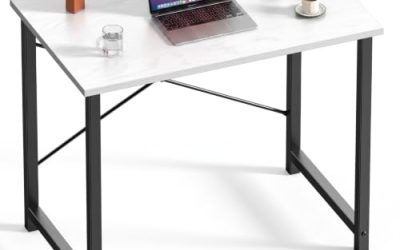
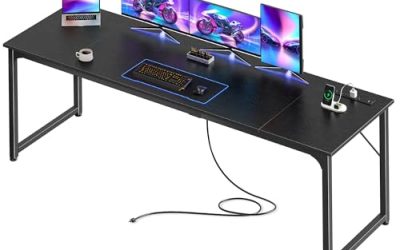
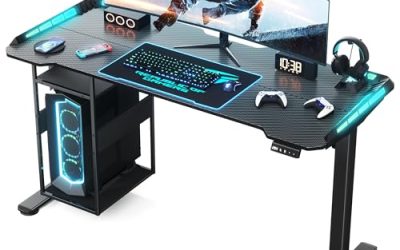
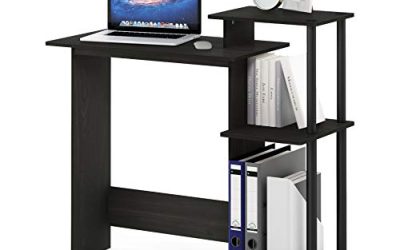
The best gaming desks for under $700 should solve a specific problem: an unsuitable working height, crowded controls, limited storage, or an awkward room layout. Our overall pick is the IKEA UTMANING electric sit-stand desk in its 63-inch configuration, provided you will use powered adjustment. For seated gaming, the less expensive UTESPELARE is a sensible alternative. Other selections prioritize streaming accessories, shelving, and corner space. These recommendations use manufacturer documentation and checked U.S. prices, without claiming detailed research. The price ceiling covers the complete desk as listed; delivery, tax, and optional accessories can take the final purchase above $700.
Compare the best gaming desks for under $700
Prices were checked on October 31, 2026, for the configurations below. They may change, particularly where a sale determines eligibility.
Dimensions describe the desktop or overall footprint as indicated. They do not establish unobstructed mouse space, chair clearance, or monitor-arm compatibility.
| Desk and configuration | Best for | Checked price | Size or footprint | Decisive features | Main trade-off |
|---|---|---|---|---|---|
| IKEA UTMANING electric/black, 63-inch | Best overall for mixed sitting and standing | $649.99 | 63 × 31½ inches | Powered adjustment; deep surface; included MITTZON underframe | Limited room for delivery and tax |
| IKEA UTESPELARE, black | Best lower-cost seated option | $279.99 | 63 × 31½ inches | Manual seated-height adjustment; rear mesh; cable net | No powered standing adjustment |
| Eureka Aero Wing-Shaped Studio Desk, black, 72-inch | Best accessory bundle for streaming | $319 | 71.93 × 29.92 inches overall | Monitor shelves with RGB; keyboard tray; full-surface pad | Shaped surface requires careful layout planning |
| IKEA FREDDE, black | Best integrated shelving | $379.99 | Up to 72⅞ inches wide; 29⅛ inches deep | Upper and side shelves; contoured front; cup holders | Shelving limits display-layout flexibility |
| Eureka GTG-L60, Black Geometric Mesh/right return | Best illuminated corner setup | $499 sale price | 60 × 40¼ inches overall | Tempered-glass top; RGB; accessory holders | Glass requires special care with mounts |
| Eureka L60, black/left return | Best straightforward corner workspace | $249 sale price | 61.06 × 43.86 inches overall | L-shaped layout; cable-routing features; engineered-wood surface | Return orientation and room clearance need verification |
The two L-shaped desks use different designs. Their overall depth includes the return rather than describing a uniformly deep rectangular surface.
How we selected these desks
We compared complete desk configurations with documented U.S. prices below $700. Priorities included usable dimensions, working-height flexibility, equipment organization, and features that address distinct setups.
“Best overall” favors the combination of a deep desktop and powered position changes. It does not mean the UTMANING is the best purchase for someone who will always remain seated. The category picks identify alternatives that serve narrower requirements.
No physical stability, assembly-time, surface-wear, or gaming-performance tests were performed. Manufacturer capacity figures were not independently measured, and no desk receives a promise of being wobble-free.
What the shortlist covers
This is a focused comparison of six documented configurations from IKEA and Eureka Ergonomic, rather than an exhaustive ranking of every desk below the budget.
We excluded frame-only pricing and avoided counting multiple sizes of the same desk as separate recommendations. Several selections cost substantially less than $700 because spending the full allowance is unnecessary when a simpler desk meets the requirement.
The useful question is what the extra money changes. Powered adjustment can justify a higher price when you need it. Decorative lighting or additional shelves should earn their place through your preferences and equipment layout.
IKEA UTMANING electric: Best overall for sitting and standing
The 63-inch UTMANING combines a deep surface with an electric MITTZON underframe. It is our overall choice for buyers who want one desk for seated gaming and standing tasks.
The reviewed combination includes the tabletop and frame. That matters when comparing it with configurable standing desks whose introductory prices may cover only the base.
Its chief advantage over the UTESPELARE is convenient position changes during the day. You are paying for that capability rather than simply obtaining a larger working area.
Buy if: You expect to use both seated and standing positions and have space for a deep desk.
Skip if: You want a fixed workstation or $700 must cover substantial accessories and delivery.
Main limitation: Check the assembled working-height range against your measurements. The underframe’s published range is not the same measurement as finished tabletop height, and stability at your intended height was not independently researched.
IKEA UTESPELARE: Best lower-cost seated option
The UTESPELARE provides the same nominal width and depth as the larger UTMANING selection while using manual seated-height adjustment. Its rear mesh and cable-management net make it relevant to an equipment-heavy seated setup.
Choose it when you want to set an appropriate height during installation and leave it there. Moving regularly between sitting and standing calls for a different design.
IKEA states that the rear mesh can accept monitor-arm clamps. That is useful documentation, but the proposed arm and display still require their own compatibility check.
Buy if: You want a roomy seated surface and prefer to preserve money for other equipment.
Skip if: Powered height changes are a central requirement.
Main limitation: Manual adjustment is a setup task, not a convenient substitute for a sit-stand mechanism. Establish the working height before loading the desk.
Eureka Aero 72-inch: Best accessory bundle for streaming
The Aero is the strongest choice here when you want a wide workstation with several accessories supplied together. The reviewed 72-inch version includes a keyboard tray, full-desktop mouse pad, cable-management tray, and additional holders.
Its monitor shelves incorporate RGB lighting. Compared with a plain rectangle, this creates more defined locations for equipment, which can suit a streaming or mixed-use setup.
That structure is also the compromise. The shaped front and shelves determine where controls and displays can go, so map out your equipment before buying.
Buy if: You will use the included accessories and have room for the wide footprint.
Skip if: You prefer an unobstructed rectangular top or already own accessories you want to retain.
Main limitation: Confirm the 72-inch package. The 63-inch version has a different accessory list. The manufacturer page also contains conflicting capacity claims, so this recommendation does not rely on a particular load rating.
IKEA FREDDE: Best integrated shelving
The FREDDE suits a buyer who wants shelving built into the workstation rather than added separately. Its side shelves can be positioned inside or outside the panels, creating different equipment arrangements.
Compared with the open IKEA options, it provides more vertical organization but less freedom around the display. The relevant measurement is the space inside the structure, not simply its maximum outside width.
IKEA describes accommodating a 32-inch monitor by removing the shelf above the tabletop. Check your screen’s actual dimensions and stand rather than treating its diagonal size as the only requirement.
Buy if: You want designated places for smaller equipment and accessories.
Skip if: You use a large ultrawide, frequently rearrange displays, or need unrestricted mounting access.
Main limitation: Plan around shelf and frame interference. This is a workstation structure, not a plain desktop with unlimited clearance above and behind it.
Eureka GTG-L60: Best illuminated corner setup
The GTG-L60 is the appearance-focused corner option. The reviewed Black Geometric Mesh/right-return selection combines a tempered-glass surface with integrated lighting and accessory holders.
Its appeal is the combination rather than any demonstrated performance advantage. Choose it when the illuminated desktop is part of the setup you want, and the L-shaped footprint fits your room.
Compared with the regular L60, more of the purchasing decision centers on surface design and electronics. Neither lighting nor glass establishes better gaming results.
Buy if: You want an illuminated corner workstation and are satisfied with its mounting arrangements.
Skip if: Your planned equipment depends on clamps whose suitability for this top is uncertain.
Main limitation: Obtain explicit compatibility guidance for the exact mount. A general accessory-compatibility statement does not establish that every clamp is safe for glass. Also confirm the selected SKU’s lighting controls; the page describes different control methods across versions.
Eureka L60: Best straightforward corner workspace
The regular L60 is a more practical starting point when your main goal is a side work area. Its return can separate secondary equipment from the keyboard-and-mouse position.
The selected listing used a black desk with a left return. Verify orientation before ordering; do not assume the delivered parts can be reversed during assembly.
Compared with the Aero, this layout makes more sense when you need workspace beside you rather than a broad arrangement centered around one seat. The trade-off is the additional floor depth.
Buy if: You have a suitable corner and a defined purpose for the return.
Skip if: Your priority is a deep, continuous surface directly ahead.
Main limitation: The manufacturer page contains inconsistent descriptive copy. Use the dimension drawing and exact selected configuration, then confirm any detail that determines whether it will fit.
Choose by your setup before comparing accessories
Start with the constraint that your present desk fails to address. If the problem is working height, extra shelves will not solve it. If the problem is equipment crowding, lighting is unlikely to help.
Use your existing keyboard, mouse pad, monitor stands, and speakers to create a mock layout. Measure the arrangement while allowing your usual mouse movements.
| Your main requirement | Start with | Check before ordering |
|---|---|---|
| Regular position changes | UTMANING electric | Finished height range, cable slack, and clearance |
| Roomy seated gaming | UTESPELARE | Manual-height fit and monitor-arm arrangement |
| A wide accessory-equipped station | Aero 72-inch | Shelf positions, keyboard tray, and included package |
| Vertical equipment organization | FREDDE | Internal openings and shelf interference |
| An illuminated corner layout | GTG-L60 | Glass-safe mounting and return orientation |
| A separate side activity area | Regular L60 | Full footprint and chair access |
Measure usable depth and screen placement together
Depth becomes important when a monitor stand extends forward or when you keep controls well away from the rear edge. A wide desk can still feel crowded if the screen and keyboard compete for the same front-to-back space.
A monitor arm may help, but it introduces a mounting requirement. Verify how far it can position the screen, the space it needs behind the desk, and its compatibility with the proposed surface.
Raised shelves also deserve a fit check. They can organize equipment effectively, but the resulting screen height may not suit your seated position.
Check working height with your chair and keyboard
Set your chair into a supported position, then establish the height where you can use the keyboard with relaxed shoulders and approximately straight wrists. Compare that measurement with the finished desk surface.
For powered desks, repeat the measurement while standing. Confirm that both positions fall within the range, allowing for the keyboard’s thickness.
OSHA’s general guidance treats the chair, desk, and controls as an arrangement that should be adjusted together. A motorized frame provides options; it does not guarantee a suitable position without setup.
Treat stability and capacity as separate questions
A weight limit describes a manufacturer-specified loading condition. It does not tell you how much the screen will move during typing, or how an extended monitor arm will behave.
Where possible, inspect the desk at your intended height. For online comparisons, favor independent testing that identifies the exact frame, top size, load, and flooring.
After assembly, check leveling and fasteners according to the instructions. Do not use a higher capacity number to infer unlimited clamp strength or immunity from movement.
Budget for the complete installation
The product-price ceiling is only one part of the purchase:
Desk + delivery + applicable tax + required accessories + selected services = total purchase cost
The UTMANING leaves less room for those charges than the other selections. If $700 is an absolute checkout limit, calculate the full amount before choosing it.
Do not assume everything visible in a product photograph is included. Confirm monitor arms, power strips, lighting accessories, and any computer holder separately.
Check delivery, returns, and component coverage
Measure the delivery route and plan how you will handle the packaged parts. A desk fitting the room does not establish that a large box will pass through every stairwell or doorway.
Eureka’s reviewed direct-purchase return policy specifies buyer-paid return shipping and a 20% restocking fee within its stated return conditions. That makes accurate measurement especially valuable. Third-party retailers may apply different terms.
Its warranty distinguishes frame coverage from electronics and other components. Check what applies to lighting and controls rather than assuming every part receives the longest advertised period.
For IKEA purchases, read the applicable return and warranty documents for the exact product and order. Keep packaging until the desk has been inspected and evaluated.
Frequently asked questions
Which of the best gaming desks for under $700 suits a large ultrawide?
Begin with the display’s weight, outside dimensions, stand footprint, and intended mount. The open UTMANING and UTESPELARE layouts are useful starting points because they avoid an overhead shelf structure.
That does not establish compatibility with every ultrawide. Confirm desk and mount requirements together, particularly when the display has substantial depth or sits on an extended arm.
Should you spend the full $700?
Only when the extra cost buys something you will use. Powered adjustment is a meaningful difference for someone who changes position regularly.
For a seated setup, a less expensive desk may already provide the necessary dimensions and organization. Leave the remaining budget available for other priorities rather than treating the ceiling as a target.
Is a gaming desk necessary for gaming?
No. An office or general-purpose desk can work when its dimensions, working height, construction, and mounting arrangements meet your requirements.
Gaming features should be evaluated individually. A cable tray may solve a real problem, while another integrated accessory may simply occupy space you would rather keep clear.
Can you install a steering wheel on these desks?
Check the wheelbase manufacturer’s mounting requirements and the desk’s construction before deciding. Clamp clearance, underside hardware, surface shape, and loading conditions matter.
No steering-wheel compatibility testing was performed for these selections. Do not infer suitability from tabletop size or total load capacity alone.
Final verdict
Choose the IKEA UTMANING electric when you want a deep desk for both sitting and standing. For seated gaming, the UTESPELARE provides a simpler and much less expensive alternative. The Aero and FREDDE serve buyers who want integrated organization, while the two L-shaped Eureka models address different corner-layout preferences. Before ordering, verify the exact configuration, working height, equipment clearances, and delivered total. These picks reflect documented features and stated use cases; the best choice is the one that resolves your setup’s actual limitations without adding features that get in the way.