Key takeaways
- A specification-based review of Flycity’s 55 x 24 electric gaming desk, examining height adjustment, PC storage, cable routing and ergonomic fit.
This review analyzes published product information. We have not performed detailed research of this unit.
As an Amazon Associate, we earn from qualifying purchases.
A gaming desk built around moving the whole setup
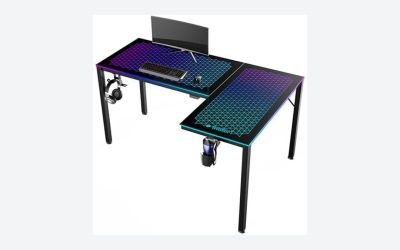
The Flycity 55 x 24-inch Electric Gaming Standing Desk combines a height-adjustable work surface, RGB lighting and an enclosed PC host shelf. Its most useful distinction is not the lighting: it is the attempt to keep the computer and cable-management hardware with the desk as it rises. For a gaming setup with several connected devices, that arrangement could make height changes easier to accommodate than a tower left on the floor.
This review analyzes the supplied retailer specifications rather than detailed research. It covers the 55 x 24-inch version in the listing’s Black Black 3d Carbon Fiber option. The available information supports a useful fit assessment, but it leaves important questions about tower clearance, monitor positioning and the construction of the desktop surface unanswered.
Specifications that matter before planning your layout
| Item | Listed specification |
|---|---|
| Desktop size | 55 x 24 inches |
| Height adjustment | Electric; 28.3–47.2 inches |
| Structure | CARB-certified panels claimed; steel frame with T-shaped supports |
| Surface and edge | Described as carbon fiber, with curved ergonomic edges |
| Listed load limits | 176 lb dynamic; 330 lb static |
| Underdesk storage | Management tray, magnetic cable slot and enclosed moving host shelf |
| Lighting | 7 RGB colors, 210 dynamic modes and 255 voice-activated modes claimed |
| Lighting controls | Remote and app control |
| Conflicting dimensions field | 7.87 x 56.7 x 13.4 inches; purpose not identified |
The separate dimensions field does not match the advertised desktop size or height range. It should not be treated as the assembled footprint, nor assumed to describe packaging. Use the stated 55 x 24-inch size for preliminary desktop planning, but confirm the full assembled dimensions before committing to a tight space.
Height range: check your seated position first
The stated 28.3–47.2-inch adjustment range gives this desk both seated and standing positions, but that does not establish a suitable fit for every user. The lower endpoint deserves particular attention. If your comfortable keyboard height is below 28.3 inches, the electric lift cannot compensate by lowering further. Raising your chair may help align your arms, but then supported foot placement becomes another consideration.
At the other end, compare the 47.2-inch maximum with your own comfortable standing input height. Keyboard position and screen position are separate decisions: lifting the desk raises both together, but does not independently correct a monitor that sits too low relative to your eyes. The listing does not establish monitor-arm compatibility, so do not assume a clamp-mounted arm will fit the desktop and its underdesk hardware.
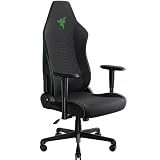
Flycity describes a controller for height adjustment, but the supplied evidence does not specify memory presets or collision detection. Those features should remain unconfirmed. For chair selection alongside the desk, our gaming desk chair guide provides a separate starting point; assess seat and armrest adjustment against your intended desk height.
The 24-inch depth is the layout constraint to test
The advertised 55-inch width provides a defined span for arranging peripherals, while the 24-inch depth makes front-to-back planning especially important. A monitor stand, keyboard and desired viewing distance must all work within that depth. Before choosing this configuration, map out your actual monitor base and input devices rather than judging suitability from screen size alone.
The curved edge is intended to let you sit closer to the work surface. That may appeal if you prefer a close keyboard position, but the listing supplies no curve dimensions. It therefore cannot establish the exact usable depth at the center or how comfortably your forearms will rest. Similarly, the underdesk tray and host shelf could compete with knees, chair arms or leg movement depending on their placement. Their clearance dimensions are not supplied.
A moving tower shelf helps routing, but fit remains unresolved
The enclosed host shelf is described as moving with the desk. In principle, keeping the tower and desktop peripherals at the same relative height can reduce changes in cable distance between them. It does not eliminate cable planning: connections to a wall outlet or other stationary equipment still need enough slack for the full lift range.
The management tray is intended for items such as plugs and routers, while the magnetic cable slot organizes cable direction. These are practical provisions for clearing loose equipment from the top. However, neither the shelf’s internal dimensions nor its separate weight allowance is given. Ventilation details are also absent. Check tower size, connector access and ventilation clearance before treating the shelf as suitable for your PC.
Construction claims need careful interpretation
Flycity lists panel construction and a steel frame, while also describing the desktop as solid wooden and its surface as carbon fiber. Those descriptions do not establish the exact substrate or surface layering. In particular, this evidence is insufficient to identify the top as structural carbon-fiber composite. Treat the surface description as listing terminology, not proof of a particular material build.
The distinction between the claimed 176-pound dynamic load and 330-pound static load matters more for everyday planning. A setup intended to rise and lower should be planned around the dynamic figure, not the larger stationary figure. These are seller-stated limits rather than independently verified capacities, and the evidence does not clarify how the host shelf contributes to the total.
The RGB system adds remote and app control plus numerous advertised lighting modes. It is a relevant convenience for an illuminated setup, but supported app platforms and integration with other lighting systems are not specified. Lighting breadth should not outweigh unresolved physical fit.
Verdict: useful integration, conditional compatibility
This Flycity configuration is worth considering when you want a 55 x 24-inch electric desk with integrated cable storage and a tower shelf that travels with the surface. Its strongest buying argument is that coordinated arrangement. Confirm the minimum seated height, tower compartment dimensions and actual monitor layout first. If those checks fail, the lighting and storage features will not make the desk ergonomically suitable.
Sources: Supplied retailer listing for the Flycity 55 x 24-inch desk.
Check the exact product and current offer on Amazon