Our Top Picks
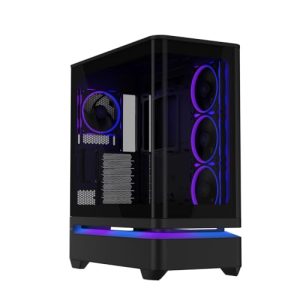
 STORMCRAFT Skyhawk PRO Gaming PC RTX 5070 Ti9 x 18.5 x 16.9 inches18.5 x 9 x 16.9 inchesCheck on Amazon
The fastest fix for a game that crashes to desktop is to do a clean graphics driver install, confirm the game files, and turn off any overclock including a memory XMP or EXPO profile; if it still crashes, Windows Event Viewer will usually show which module failed. Crashes with no error message are almost always one of four things: graphics driver, heat or power, unstable memory settings, or corrupt game files.
Step 1: read what Windows recorded
Before changing settings, look at the evidence. Press the Windows key plus R, type eventvwr.msc and open Windows Logs, then Application. Find the Error entry at the crash time. The faulting application is the game executable, and the faulting module tells you what component failed. A graphics driver module points to the GPU driver. A game’s own module points to the game files or a mod. The exception code 0xc0000005 is a memory access violation, and guides list corrupt files, a bad driver, faulty RAM or an unstable overclock as possible causes.

kowgical Capybara Balance Game Toy for Adult, Two-Player Balance Tree Game | Interactive Balance Tree Desktop Board Game for Halloween, Christmas, Birthday Party Gifts
Chosen because it specifies Two-Player Balance Tree Game and Interactive Balance Tree Desktop Board Game for Halloween.
View on Amazon
Astronaut Balance Game, Two-Player Balance Tree Board Game | Interactive Family Balance Tree Desktop Game for Halloween, Christmas, Birthday Party Gifts
Chosen because it specifies Two-Player Balance Tree Board Game and Interactive Family Balance Tree Desktop Game for Halloween.
View on Amazon
Dinosaur Balance Tree Game, Two-Player Balance Board Game | Balance Game Tree Interactive Desktop Game for Halloween, Christmas, Holiday Party Gifts
Chosen because it specifies Two-Player Balance Board Game and Balance Game Tree Interactive Desktop Game for Halloween.
View on AmazonSTORMCRAFT Skyhawk PRO Gaming PC RTX 5070 Ti R7 9800X3D 32GB DDR5 2TB SSD | AMD Ryzen 7 CPU 5.2GHz,16GB GDDR7 VGA,RGB 6000MHz RAM,B850 Chipset,360mm AIO,850W Gold PSU,Win11 Home Prebuilt Desktop Gamer
Chosen because it specifies AMD Ryzen 7 CPU 5.2GHz and 16GB GDDR7 VGA.
View on AmazonIn the System log, look for Kernel-Power event 41. This indicates the PC lost power or restarted without a clean shutdown, which points toward a power supply, thermal or hardware problem rather than a simple game bug. If the whole PC restarts rather than the game closing, skip ahead to the heat and power sections.
Symptom, cause, fix
| Symptom | Common cause | First fix |
|---|---|---|
| Game closes with no message | Graphics driver fault or corrupt game files | Clean driver install, then run the launcher file check in the launcher |
| Crash after a few minutes of load | Heat on the GPU or CPU | Monitor temperatures, clean dust, improve airflow |
| Crash only in one game | Game files, mods, overlay conflict | Repair the game, disable mods and overlays |
| Crashes in many games | Driver, RAM or power instability | Clean driver install, test memory, remove overclocks |
| Whole PC reboots | Power supply or severe thermal event | Check temperatures and cabling; contact a technician if it repeats |
| Crash after a recent update | New driver or Windows update | Roll back or clean-install a previous stable driver |
| Memory error message | Low virtual memory or faulty RAM | Close apps, check page file, run a memory test |
Step 2: reinstall the graphics driver cleanly
Technical guides rank graphics drivers as the most frequent cause of game crashes, and a clean install matters more than simply updating over the top. Download the driver from the GPU maker (NVIDIA, AMD or Intel) rather than relying on Windows Update. Many guides suggest using Display Driver Uninstaller from Safe Mode to remove the old driver fully, then installing the new package. If the crashes began right after a driver update, try the previous release, since a newest driver is not always the most stable one for every game.
Keep Windows itself up to date too, as new games can rely on current system components. Also ensure the chipset driver from your motherboard or CPU maker is current.
Step 3: repair the game
Corrupt or partially updated files are a classic cause. Use the file-integrity or repair function in the launcher (Steam, Epic, Battle.net and the Xbox app each have one). Then try these in order:
- Disable mods and custom shaders and see if the crash stops.
- Turn off overlays from Discord, Steam, Xbox Game Bar and GPU software, which can inject into the game.
- Delete or reset the game’s config file, following the developer’s support page.
- Run the game from a local drive rather than a failing or disconnected drive.
- Check the developer’s support page for known crash issues and patches.
Step 4: rule out overheating
Use a monitoring tool such as HWiNFO or MSI Afterburner to watch GPU and CPU temperatures while playing. Guides give rough guideposts such as keeping the GPU below the mid-80s and the CPU below about 90 degrees Celsius, but the correct limits depend on the specific chip, so consult the maker’s specification page. Steps that commonly help:
- Power the PC off and unplug it before opening the case, then remove dust from filters, fans and heatsinks with compressed air.
- Check that all case fans spin and that airflow runs front to back or bottom to top as designed.
- Give a laptop clear vents and a hard surface.
- If temperatures climb rapidly, check that the CPU cooler is seated and the fan header is connected. If you are unsure, contact a technician or the cooler maker.
Step 5: check memory and overclocks
RAM running at XMP or EXPO speeds is technically an overclock beyond the processor’s base specification. If crashes started after enabling a profile, turn it off in the BIOS and test. The menu names vary by motherboard maker, so consult the manual. Changing BIOS settings can cause instability and may affect warranty terms, so keep changes conservative and note the original values first.
To test memory, Windows includes Windows Memory Diagnostic (run mdsched.exe and restart). MemTest86 is a more thorough option that runs from a USB stick and is often left for at least a full pass. Reported errors suggest a faulty module or an unstable setting; reseat the modules with the PC unplugged, or test one stick at a time.
The same logic applies to GPU and CPU overclocks, including factory-overclocked graphics cards. Reset to default clocks and see if the crash disappears.
Step 6: repair Windows and consider power
Run Command Prompt as administrator and execute sfc /scannow. If it finds problems it cannot fix, run DISM /Online /Cleanup-Image /RestoreHealth and then the scan again. Also check that the storage drive is healthy, and that Windows has enough free space and virtual memory.
Power problems show up as crashes at the heaviest moments. Make sure all GPU power cables are fully seated, and use the supplied cables for the power supply model. For cards using the 12VHPWR or 12V-2×6 connector, follow the GPU and power supply makers’ guidance on seating and cable bending, and stop using the card if you see heat damage or melted plastic. Never open a power supply; contact the maker or a technician if you suspect it is failing.
Common mistakes
- Changing five things at once, so you never learn which one fixed it.
- Ignoring Event Viewer and guessing.
- Leaving an aggressive overclock on while troubleshooting.
- Downloading drivers from third-party sites instead of the hardware maker.
- Assuming the newest driver is always the best.
When to get help
If the crashes continue after a clean driver install, default clocks, a repaired game and a memory test, check the developer’s support channels and the GPU or PC maker’s warranty options. A recurring Kernel-Power 41 event, burning smells, or heavy fan noise alongside crashes is a good reason to stop and contact a technician.
Frequently Asked Questions
Why does my game crash to desktop with no error?
A silent crash is commonly a graphics driver fault, corrupt game files or an unstable overclock. Windows Event Viewer will often have an Application log entry showing the faulting module.
Can a bad power supply make a game crash?
Yes. If the supply cannot deliver stable power under load, the game or the whole PC may shut down, which often appears as Kernel-Power event 41. Do not open the unit; contact the maker or a technician.
Does turning off XMP or EXPO help with crashes?
It can. These profiles run memory beyond its base specification, and some combinations are unstable. If the crashes stop at default memory speed, the profile or a particular kit was the cause.
Should I reinstall Windows?
Not as a first step. Work through drivers, game files, temperatures and memory first. A reinstall makes sense only when system file repair fails or many applications crash.
Why does only one game crash?
That points to the game itself: corrupt files, an incompatible mod, an overlay conflict or a bug fixed in a later patch. Check the developer’s support page and the launcher’s repair tool.
FAQ
Why does my game crash to desktop with no error?
Can a bad power supply make a game crash?
Does turning off XMP or EXPO help with crashes?
Should I reinstall Windows?
Why does only one game crash?
More from Amazon
Programs that pair well with the guide above. Offers and eligibility are set by Amazon and may change.
Set up recurring deliveries of everyday items on eligible products. Terms and savings are set by Amazon.
Explore Subscribe & SaveFree shipping on eligible items, Prime Video and more. Eligible new members can start with a free trial.
Start a Prime free trialA Prime membership for ages 18-24 with a trial period. Eligibility is set by Amazon.
See Prime for Young AdultsAudiobooks and podcasts to listen to on the go. Eligible new members can start with a free trial.
Try Audible freeAs an Amazon Associate we earn from qualifying purchases.