Key takeaways
- Measuring width but ignoring depth: A narrow desk can still block a walking path if it is too deep.
- Forgetting chair clearance: Include the chair’s full pull-out distance, not just the space under the desktop.
- Counting a monitor shelf as desktop space: A shelf raises the monitor but may reduce room for speakers, books, or decorations.
- Choosing based on the advertised width alone: Legs, side shelves, cable trays, and corner sections can increase the actual footprint.
- Overlooking knee and legroom: Drawers and CPU holders can make a compact desk uncomfortable even when its top is large enough.
- Using an oversized chair: A wide racing-style chair may need more clearance than a compact office chair.
- Ignoring power access: Built-in outlets are convenient, but confirm the wattage rating and keep cords away from walkways.
Choosing a gaming desk for a small bedroom is mainly a width-and-clearance problem. A desk can fit against a wall yet still make the room feel cramped if the chair, drawers, closet, or bed has no usable space. The best setup leaves enough room for your monitor and keyboard while preserving a comfortable path through the room.
The Short Answer
For most small bedrooms, the best gaming desk width is 31 to 40 inches (79 to 102 cm). A 31- to 34-inch desk works for a laptop, one compact monitor, or a console setup. Choose 36 to 40 inches if you need a full-size monitor, keyboard, mouse, speakers, and some writing space.
Our top picks
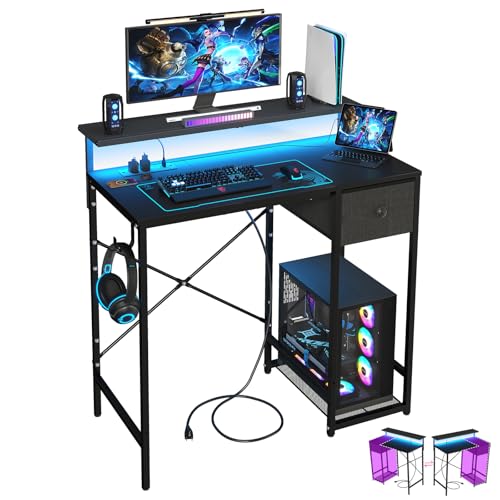 X-cosrack 33.5" Small Gaming Desk with LED
- [ All-in-One Compact Gaming Desk ]: 33.5 inch…
- [ Remote Control LED Light ]: The Gaming…
- [ Smart Power Outlets for Multi-Device Charging ]:…
 DUMOS 32 Inch Small Computer Desk
- X-Shaped Reinforcement Structure: Unlike flimsy desks, DUMOS computer…
- Premium Material: Our home office desk features a…
- Thick Square Tube Support: Rest easy knowing our…
 DUMOS 31" Small Computer Desk Home Office
- Simple Desk: You will receive a side storage…
- Spacious Desktop: You can choose from six widths
- Versatile Use: This desk meets a variety of…
| Product | Key specs | |
|---|---|---|
| X-cosrack 33.5" Small Gaming Desk with LED | [ All-in-One Compact Gaming Desk ]: 33.5 inch… [ Remote Control LED Light ]: The Gaming… [ Smart Power Outlets for Multi-Device Charging ]:… | Check price |
| DUMOS 32 Inch Small Computer Desk | X-Shaped Reinforcement Structure: Unlike flimsy desks, DUMOS computer… Premium Material: Our home office desk features a… Thick Square Tube Support: Rest easy knowing our… | Check price |
| DUMOS 31" Small Computer Desk Home Office | Simple Desk: You will receive a side storage… Spacious Desktop: You can choose from six widths Versatile Use: This desk meets a variety of… | Check price |
 YATINEY Computer Desk with LED Light and YATINEY Computer Desk with LED Light and | Multifunctional Use: Featuring a dual-layer design and a… Charging Station & LED Light Strip: This small… Sturdy Structure: Made of quality particleboard and 0.7''… | Check price |
As an Amazon Associate we earn from qualifying purchases at no extra cost to you.
Allow at least 30 inches (76 cm) of clear space in front of the desk for a chair. If the desk sits beside a bed or wall, aim for 24 to 30 inches (61 to 76 cm) of walking clearance. A depth of 18 to 24 inches (46 to 61 cm) is usually sufficient for a small gaming setup. Desks deeper than 24 inches may provide more comfort, but they take noticeably more floor space.
For a very tight bedroom, measure the desk width, depth, desktop height, chair clearance, and cable route together. A compact desk with a raised monitor shelf can provide more usable surface without increasing the footprint.
Standard Sizes
Desk dimensions vary by design, but the following ranges are useful when comparing compact gaming desks. Width refers to the side-to-side measurement; depth runs from the front edge to the wall.
| Desk size category | Typical width | Typical depth | Typical height | Best for |
|---|---|---|---|---|
| Ultra-compact | 27–30 in (69–76 cm) | 16–20 in (41–51 cm) | 28–30 in (71–76 cm) | Laptops, handheld gaming, or a single small monitor |
| Small gaming desk | 31–34 in (79–86 cm) | 18–22 in (46–56 cm) | 28–30 in (71–76 cm) | One monitor, keyboard, mouse, and speakers |
| Compact standard | 36–40 in (91–102 cm) | 20–24 in (51–61 cm) | 28–30 in (71–76 cm) | One large monitor or two compact monitors |
| Full gaming desk | 47–55 in (119–140 cm) | 23–30 in (58–76 cm) | 28–30 in (71–76 cm) | Multiple monitors, large accessories, and extended play |
Many desks marketed for small bedrooms are approximately 31 to 34 inches wide. Examples in this category include 31-inch, 32-inch, and 33.5-inch designs. At this width, prioritize a simple rectangular top or a narrow monitor shelf rather than bulky side storage. A corner or L-shaped desk may offer more surface area, but its total wall-to-wall measurements can be much larger than its advertised main width.
Desktop height is usually close to 29 inches (74 cm), which suits many standard office chairs. Look for adjustable feet if your floor is uneven. A monitor shelf may add 4 to 8 inches (10 to 20 cm) above the desktop, so check whether it will block a window, shelves, or wall art.
Weight capacity matters when using a desktop computer, monitor arm, speakers, and accessories. For a compact setup, look for a stated capacity of at least 100 pounds (45 kg), with the monitor arm attached only where the manufacturer allows it. Built-in power outlets commonly support a total load in the range of 1,200 to 1,875 watts, but the exact rating varies. Do not assume that a desk-mounted outlet can safely power every device at once; check its label and instructions.
How to Measure Your Space
- Measure the available wall width. Measure from baseboard to baseboard, not just between the corners. Subtract at least 1 inch (2.5 cm) from the available width so the desk is not wedged tightly into place.
- Measure usable depth. Start at the wall and measure toward the bed, dresser, or opposite wall. Subtract the space needed for walking and chair movement. A 20-inch-deep desk needs roughly 30 inches of additional room in front for a comfortable chair zone.
- Mark the footprint on the floor. Use painter’s tape to outline the proposed width and depth. Sit in your gaming chair inside the outline and pull the chair back as you would when standing.
- Check doors, drawers, and windows. Open the bedroom door, closet door, and nearby drawers fully. A desk that fits when everything is closed may block daily access.
- Measure outlet and cable locations. Keep the desk close enough to reach an outlet without an extension cord stretched across a walkway. Leave room behind the desk for plugs, surge protectors, and ventilation.
- Check the vertical space. Measure from the desktop to shelves, windowsills, and wall cabinets. Add the height of a monitor stand, monitor arm, or raised shelf before deciding where the desk will go.
- Measure the delivery route. Check the door opening, stairway, elevator, and sharp hallway turns. A boxed desk can be wider and heavier than the assembled desktop.
By Room or Use Case
Bedroom Along a Long Wall
A 31- to 40-inch-wide desk is usually the easiest fit along a bedroom wall. Choose 18 to 22 inches of depth if the bed is nearby. Keep at least 24 inches of walking space between the desk edge and the bed, and more if that path is the main route to the closet. A simple black desk in the $25 to $75 range can be practical here, especially when the design includes cable management or a raised monitor shelf.
Bedroom Corner
A corner placement can make use of an otherwise awkward area, but measure both walls. A desk advertised as 33 inches wide may still need 33 inches along each side, depending on its shape. For a tight corner, choose a straight desk between 31 and 34 inches wide, or select a compact corner model only after mapping both dimensions. Leave a few inches from each wall for cords and cleaning.
Laptop or Console Gaming
Laptop users can often work comfortably with a 27- to 32-inch desk. A depth of 16 to 20 inches is enough for a laptop, controller, mouse, and small lamp. Console players may need extra depth for a monitor or television stand, so 20 to 24 inches is safer. Keep the console vents unobstructed and avoid placing it directly against a wall.
One-Monitor PC Setup
For one monitor and a full-size keyboard, target at least 31 inches of width and 20 inches of depth. A 33.5-inch desk is a useful middle ground: it is compact but can hold a monitor, keyboard, mouse, and a few small accessories. If you use a large monitor, speakers, or a desk mat, move up to 36 to 40 inches when the room allows.
Two Monitors or a Monitor Arm
Two monitors generally need 40 to 48 inches of usable width, depending on screen size and angle. A dual-monitor arm can save desktop space, but it requires a stable attachment point and enough clearance behind the desk. Avoid clamping an arm to a thin edge or a shelf unless the instructions specifically permit it. For small bedrooms, a wall-mounted monitor or one vertical display may be a better space-saving solution.
Study and Gaming Combination
If the desk must also hold notebooks, textbooks, or craft supplies, choose 36 to 40 inches of width and at least 22 inches of depth. A drawer or under-desk shelf can reduce clutter, but check that it does not interfere with your knees. Compact desks with LED lighting and built-in outlets may cost approximately $50 to $75, while basic small desks often fall around $25 to $35. Prices change, so treat these as shopping ranges rather than fixed values for 2026.
Common Sizing Mistakes
- Measuring width but ignoring depth: A narrow desk can still block a walking path if it is too deep.
- Forgetting chair clearance: Include the chair’s full pull-out distance, not just the space under the desktop.
- Counting a monitor shelf as desktop space: A shelf raises the monitor but may reduce room for speakers, books, or decorations.
- Choosing based on the advertised width alone: Legs, side shelves, cable trays, and corner sections can increase the actual footprint.
- Overlooking knee and legroom: Drawers and CPU holders can make a compact desk uncomfortable even when its top is large enough.
- Using an oversized chair: A wide racing-style chair may need more clearance than a compact office chair.
- Ignoring power access: Built-in outlets are convenient, but confirm the wattage rating and keep cords away from walkways.
FAQ
Is a 31-inch desk wide enough for gaming?
Yes, for a laptop or one compact monitor. A 31-inch desk can hold a keyboard and mouse, but it may feel crowded with large speakers, a wide monitor stand, or a full-size desk mat. Choose at least 20 inches of depth when possible.
What is the best desk width for a small bedroom?
A width of 31 to 36 inches is the most versatile range. Choose 31 to 34 inches for a very tight room and 36 inches or more if you need extra writing space or a larger monitor.
How much space should be behind a gaming desk?
Leave about 2 to 4 inches (5 to 10 cm) behind the desk for plugs, cable bends, and airflow. You may need more room if the desk has a rear power strip, cable tray, or a monitor arm clamp.
Can a gaming desk fit beside a bed?
Usually, yes. Measure for a desk depth of 18 to 22 inches and preserve at least 24 inches of walking clearance beside it. If the desk is on the main route through the room, 30 inches of clearance will feel more comfortable.