Our Top Picks
 msi Gaming RTX 3050 Ventus 2X 6G OC1.7" x 4.3" x 7.4"7.4 x 4.3 x 0.1 inches1.3 poundsCheck on Amazon
 ASUS Dual NVIDIA GeForce RTX 5060 8GB GDDR7RTX5060|8GB|OC9 x 4.8 x 2 inches1.4 poundsCheck on Amazon
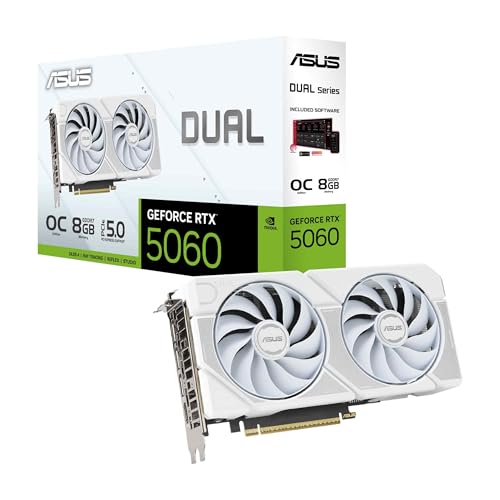 ASUS Dual GeForce RTX 5060 8GB GDDR7 WhiteRTX5060|8GB|OC9 x 4.8 x 0.1 inches2.4 poundsCheck on Amazon
Thinking about playing Homeworld: Deserts of Kharak on PC and wondering what hardware you actually need? Released on January 20, 2016, Blackbird Interactive’s ground-based RTS prequel to the classic Homeworld games puts you in command of a fleet crossing the shifting sands of Kharak — and it is a light, well-behaved game by modern standards. The official recommended spec tops out at a GeForce GTX 770 and 8 GB of RAM, hardware from 2013 and earlier, which means most PCs built in the last decade can run it without changes, and even modest laptops and handhelds cope. This guide covers the official system requirements, what different GPU tiers actually buy you at 1080p, 1440p and 4K, and the parts worth considering if you also play newer, heavier games.
How Demanding Is Homeworld: Deserts of Kharak?
Not very. Deserts of Kharak is a 2016 strategy title and its requirements reflect that: the official recommended processor is an Intel Core i7-950 (a 2009 quad-core) or an AMD FX-4300, paired with 8 GB of RAM and either a GeForce GTX 770 or a Radeon HD 7770. The minimum tier is lower still — a Core i3-2100 or A10-5800K, 3 GB of RAM, and a GeForce GT 440 or Radeon HD 4890. Any card from a GTX 1050 Ti or RX 570 upward clears the recommended bar with room to spare, and integrated graphics in a recent Ryzen or Intel laptop chip can usually handle the game at reduced resolution and settings.
It is also worth noting what kind of strategy game this is. Deserts of Kharak is a contained real-time strategy campaign rather than a large-scale simulation, so it does not lean on the CPU the way grand-strategy or massive-multiplayer titles do, and it does not need a fast SSD or a large memory pool. A quad-core processor from the last several years and 8–16 GB of RAM are more than enough. Both official tiers also list a broadband internet connection, and the install is small: 8 GB at minimum, 12 GB at the recommended spec.
msi Gaming RTX 3050 Ventus 2X 6G OC Graphics Card (NVIDIA RTX 3050, 96-Bit, Boost Clock: 1492 MHz, 6GB GDDR6 14 Gbps, HDMI/DP, Ampere Architecture)
Chosen because it specifies 96-Bit and Boost Clock: 1492 MHz.
View on AmazonASUS Dual NVIDIA GeForce RTX 5060 8GB GDDR7 OC Edition (PCIe 5.0, 8GB GDDR7, DLSS 4, HDMI 2.1b, DisplayPort 2.1b, 2.5-Slot Design, Axial-tech Fan Design, 0dB Technology), 3 Year Warranty
Chosen because it specifies 8GB GDDR7 and DLSS 4.
View on AmazonASUS Dual GeForce RTX 5060 8GB GDDR7 White OC Edition Gaming Graphics Card | PCIe 5.0, HDMI 2.1b, DisplayPort 2.1b, 2.5-slot design, Axial-tech Fans, 0dB Technology
Picked as a relevant option in this category.
View on Amazon
msi Gaming GeForce RTX 3050, Desktop, 6G Graphics Card (Nvidia, 96-Bit, Boost Clock: 1507 MHz, 6GB GDDR6 14 Gbps, HDMI/DP, Ampere Architecture)
Chosen because it specifies Desktop and 6G Graphics Card (Nvidia.
View on AmazonHomeworld: Deserts of Kharak Official PC System Requirements
| Component | Minimum (official) | Recommended (official) |
|---|---|---|
| OS | Windows 7/8/10 | Windows 7/8/10 (64-bit) |
| Processor | Intel Core i3-2100 (3.1 GHz) / AMD A10 5800k (3.8 GHz) | Intel Core i7-950 (3.0 GHz) / AMD FX-4300 (3.8 GHz) |
| Memory | 3 GB RAM | 8 GB RAM |
| Graphics | GeForce GT 440 (1024 MB) / Radeon HD 4890 (1024 MB) | GeForce GTX 770 (2048 MB) / Radeon HD 7770 (1024 MB) |
| Storage | 8 GB available space | 12 GB available space |
Source: the official Homeworld: Deserts of Kharak Steam store listing (app 281610), checked October 2026. Publishers can update these specs after patches.
The gap between the two tiers is unusually small. Moving from minimum to recommended means stepping up from a dual-core i3-2100 or an A10-5800K to a Core i7-950 or FX-4300, from 3 GB of RAM to 8 GB, and from a GeForce GT 440 / Radeon HD 4890 to a GeForce GTX 770 / Radeon HD 7770. Both tiers target Windows 7, 8 or 10 (the recommended tier specifies 64-bit), both list a broadband internet connection, and the storage requirement is tiny at 8 GB and 12 GB respectively. If your PC was built at any point in the last decade, you are almost certainly already past the recommended specification.
Best GPU for Homeworld: Deserts of Kharak by Resolution
1080p
At 1080p the official recommended card — a GeForce GTX 770 — is effectively the floor, and any modern GPU clears it. The AMD Radeon RX 7600 is far beyond what Deserts of Kharak needs at this resolution and will run the game at maximum settings with headroom left over. If this game is your only target you can spend much less: a GTX 1050 Ti, GTX 1650, RX 570 or RX 6400 all meet or beat the recommended spec. A current-generation card such as an RTX 5060 or RX 9060 XT is overkill here, though it makes sense if you also play newer releases.
1440p
1440p adds load, but not much for a game of this vintage. The NVIDIA GeForce RTX 4070 SUPER drives Deserts of Kharak at 1440p without effort, and considerably cheaper cards do the job as well — an RTX 3060, RX 6600 or GTX 1660 Super already exceeds the official recommended spec at this resolution. Current-generation options such as the RTX 5060 or RX 9060 XT are more than sufficient, and an RTX 5070 or RX 9070 is well past anything this game can use.
4K
Even at 4K, Deserts of Kharak is not a heavy title — it is a 2016 RTS with modest texture and effects budgets, so the load is mostly raw pixel count rather than complex rendering. The NVIDIA GeForce RTX 4070 Ti SUPER handles it comfortably, and cards a tier or two below it (an RTX 4070 or RX 7800 XT) will as well. You do not need a flagship for this game; a mid-range current-generation card such as the RTX 5070 or RX 9070 leaves plenty of headroom for other titles.
CPU, RAM and Storage for Homeworld: Deserts of Kharak
On the processor side, the official recommended CPUs — an Intel Core i7-950 or AMD FX-4300 — date from 2009 and 2012 respectively, and the minimum is a dual-core i3-2100. Any modern quad-core beats them comfortably, so a CPU upgrade is rarely the answer for this game unless you are running something very old. If you are building a system that will also handle current releases, the AMD Ryzen 5 7600 is excellent value for gaming, while the AMD Ryzen 7 7800X3D is the fastest mainstream gaming CPU if you want maximum frame rates elsewhere. Intel fans can opt for the Intel Core i5-14600K. None of them will be stressed by Deserts of Kharak.
Memory is similarly forgiving: the official recommendation is 8 GB, so 16 GB is already comfortable headroom for a modern build. A kit such as the Corsair Vengeance DDR5 32GB is far more than this game will ever use, but it is a sensible amount if you play newer titles as well. Storage requirements are tiny — 8 GB minimum, 12 GB recommended — so the game fits almost anywhere. An SSD is not required, but it will shorten load times; the Samsung 990 Pro 2TB NVMe SSD is far larger and faster than this game needs, and a small SATA SSD is plenty for Deserts of Kharak on its own.
Recommended PC Builds for Homeworld: Deserts of Kharak
All three builds below are general-purpose modern gaming systems. Any of them will run Homeworld: Deserts of Kharak at maximum settings and high resolution with performance to spare — the point of the tiers is what they do for newer, heavier games, not for this one.
1080p budget build: AMD Radeon RX 7600 + AMD Ryzen 5 7600 + 16 GB DDR5 — far more than Deserts of Kharak needs at 1080p, and a solid all-round budget setup for newer titles.
1440p sweet-spot build: NVIDIA GeForce RTX 4070 SUPER + AMD Ryzen 7 7800X3D + 32 GB DDR5 + 2TB NVMe SSD — the setup most players should aim for, though for this game specifically a much cheaper system would do the same job.
4K high-end build: NVIDIA GeForce RTX 4070 Ti SUPER + AMD Ryzen 7 7800X3D + 32 GB DDR5 + fast NVMe SSD — comfortably handles Deserts of Kharak at 4K while leaving headroom for demanding modern games.
If Deserts of Kharak really is your main target, you can spend a fraction of these budgets: a used desktop with a GTX 1050 Ti or GTX 1650, a quad-core processor and 8 GB of RAM already meets the recommended specification.
Is It Worth Upgrading Your PC for Homeworld: Deserts of Kharak?
If you only play Homeworld: Deserts of Kharak, probably not. It is a light 2016 game whose recommended graphics card is a GeForce GTX 770, and most PCs already exceed that. This is a game worth upgrading for only if you are also playing newer titles, or if your current machine falls below the official minimum — a GeForce GT 440 / Radeon HD 4890-class GPU, a Core i3-2100 or A10-5800K, and 3 GB of RAM. If you are below that line, almost any modern budget component will get you over it.
If you are upgrading, the graphics card usually delivers the biggest jump for modern gaming, but for this game specifically a CPU, memory or storage upgrade matters far less: any quad-core from the last several years clears the recommended processor, and 8 GB of RAM is the official target. Moving the game to an SSD is a cheap quality-of-life improvement for load times, and it is worth checking you have 12 GB of free space before installing.
Can You Play Homeworld: Deserts of Kharak on a Laptop or Handheld?
Very likely, yes. The recommended GPU is a 2013 desktop card, so any gaming laptop with a dedicated GPU from the last several years — an RTX 3050, RTX 4060 or their AMD equivalents — will run Deserts of Kharak comfortably at 1080p, though expect shorter battery life and more heat than a desktop. Even laptops relying on modern integrated graphics can often manage it at reduced resolution and settings.
On handhelds, the Steam Deck and devices like the ROG Ally handle a game of this weight easily, and the small 8–12 GB install means it fits comfortably alongside other games. If portability matters, prioritise a device with a decent GPU, and keep in mind that Deserts of Kharak is a Windows title, so handheld play depends on your device’s Windows support or compatibility layer.
How to Boost FPS in Homeworld: Deserts of Kharak
Deserts of Kharak predates DLSS, FSR and frame generation, so you will not find those options in its settings menu — the upscaling available to you is whatever your graphics driver offers. On a modern card, driver-level upscaling or simply lowering the render resolution is the quickest way to raise frame rates if you need to.
Otherwise, standard advice applies: drop the overall quality preset first, then reduce the most expensive individual options, which in a strategy game are usually shadows, effects and anti-aliasing. Keep your GPU drivers up to date, close background applications, and install the game on an SSD if you have one. Given how light the game is, most players will not need to change anything at all.
Frequently Asked Questions
Can my PC run Homeworld: Deserts of Kharak?
Almost certainly. The official minimum is an Intel Core i3-2100 or AMD A10-5800K, 3 GB of RAM and a GeForce GT 440 or Radeon HD 4890 — hardware from roughly 2010 to 2013. Anything newer than that, including integrated graphics in a recent laptop, will run the game. For a comfortable experience at higher resolutions and settings, the recommended spec (Core i7-950 / FX-4300, 8 GB RAM, GTX 770 / HD 7770) is the target, and any modern mid-range card clears it by a wide margin.
Is Homeworld: Deserts of Kharak demanding on PC?
No. It is a 2016 real-time strategy game with modest requirements: the recommended GPU is a GeForce GTX 770 from 2013 and the recommended memory figure is 8 GB. Modern integrated graphics and older mid-range cards handle it well.
What GPU do I need for Homeworld: Deserts of Kharak at 1440p 60fps?
Anything at or above the recommended GeForce GTX 770 / Radeon HD 7770 is the baseline, and modern cards clear that easily — an RTX 3060, RX 6600 or newer is plenty. A NVIDIA GeForce RTX 4070 SUPER-class graphics card is far more than this game needs at 1440p, but it gives you comfortable headroom for future titles too.
How much RAM does Homeworld: Deserts of Kharak need?
The official minimum is 3 GB and the recommended figure is 8 GB, so 8 GB is genuinely enough for this game. 16 GB is the sensible target for a modern gaming PC in general, but it is headroom rather than a requirement here.
Do I need an SSD for Homeworld: Deserts of Kharak?
No. The official requirements list 8 GB of storage for the minimum spec and 12 GB for the recommended one, with no SSD requirement. An SSD will shorten load times, and a drive like the Samsung 990 Pro is a fine choice for a modern build, but a mechanical drive will run the game.