Our Top Picks
 Intel® Core™ i9-14900KF New Gaming Desktop Processor 241.0 x 4.6 x 1.9 inches4.6 x 1.9 x 3.9 inches0.2 poundsCheck on Amazon
The Core i9-14900K and Core i9-14900KF share the same unlocked cores, the same clock speeds and the same power limits. The K model has integrated Intel UHD Graphics 770 and the KF does not, so the choice comes down to whether you want a display output from the processor itself. For a gaming PC with a dedicated graphics card, either one performs the same, and the KF is the one to buy when it costs less.
Specs side by side
Both processors are 14th-generation Raptor Lake Refresh chips for the LGA1700 socket. The maker lists 24 cores split into 8 performance cores and 16 efficiency cores, with 32 threads and 36 MB of L3 cache. Third-party database sites report the same cache, thread count and boost behavior for both, differing only in the graphics line.
Intel® Core™ i9-14900KF New Gaming Desktop Processor 24 cores (8 P-cores + 16 E-cores) - Unlocked
Chosen because it specifies Unlocked.
View on Amazon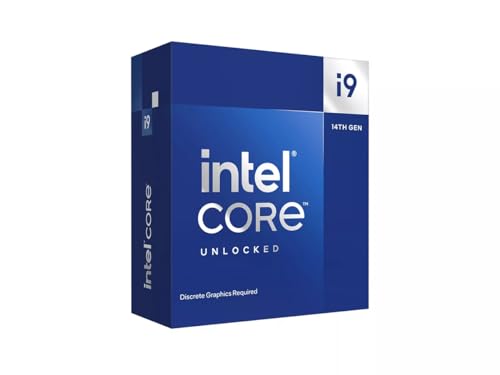
Intel CPU Core i9-14900KF 14th Generation Raptor Lake-S Refresh LGA1700 BX8071514900KF Box 3 Year Warranty + SilverStone SST-TF01 Grease
Picked as a relevant option in this category.
View on Amazon| Spec | Core i9-14900K | Core i9-14900KF |
|---|---|---|
| Socket | LGA1700 | LGA1700 |
| Cores / threads | 24 / 32 | 24 / 32 |
| Performance-core base clock | 3.2 GHz | 3.2 GHz |
| Performance-core top boost | Up to 6.0 GHz | Up to 6.0 GHz |
| Efficiency-core base / boost | 2.4 GHz / 4.4 GHz | 2.4 GHz / 4.4 GHz |
| L3 cache | 36 MB | 36 MB |
| Processor base power | 125 W | 125 W |
| Maximum turbo power | 253 W | 253 W |
| Integrated graphics | UHD Graphics 770 | None |
| Multiplier unlocked | Yes | Yes |
The 6.0 GHz figure applies to the best cores under favorable temperature and power conditions, using Intel’s Thermal Velocity Boost behavior. Most chips will not hold that speed on every core, and it depends on cooling and the motherboard’s power settings.
What is different, and what is not
The only change between the two is the F suffix. On the KF, the integrated graphics block is disabled, which also removes Quick Sync Video, Intel’s media engine. Everything that affects game frame rates, such as core count, cache, memory support and boost clocks, matches between the two chips. Reviewers who compared them note that any small gap in a benchmark table falls within normal variation between runs and between samples.
The integrated graphics are modest, with 32 execution units. They are not used for gaming when a graphics card is present. They do provide three practical benefits: a display output for setup, a backup if the graphics card fails, and hardware video encoding that some editing and streaming software can use.
Choosing by use case
| If you… | Choose | Why |
|---|---|---|
| Play games with a dedicated card and nothing else | 14900KF | Same gaming behavior; no need for the graphics block |
| Edit video or stream using Quick Sync | 14900K | Media engine is only on the K |
| Want a spare display output for troubleshooting | 14900K | Motherboard ports keep working |
| Are building in stages and want to boot early | 14900K | Works before the graphics card arrives |
| Plan a lasting, fixed gaming build | 14900KF | Same chip for most users, often cheaper |
Cooling and power: the part that matters more than the suffix
Both chips are among the more demanding desktop processors Intel has released for this socket. The maker lists a 125 W base power and a 253 W maximum turbo power. Under a sustained all-core load, such as rendering, the chip can draw close to its turbo limit and produce a lot of heat. Reviewers commonly pair this class of processor with a large 360 mm liquid cooler or a top-end dual-tower air cooler, and the power supply should have enough capacity for the processor plus the graphics card. The graphics card maker’s recommended power supply wattage is a good starting point, with extra margin for the CPU.
Gaming loads usually draw far less than the maximum, because few games load all 24 cores. Even so, the chip will boost aggressively and temperatures can climb quickly with a weak cooler. Motherboards often ship with generous power limits enabled by default, so it is worth opening the BIOS and selecting an Intel default or recommended profile if you want the behavior described in the maker’s documentation.
Stability guidance for 13th and 14th generation chips
Intel acknowledged an instability issue affecting some 13th and 14th generation desktop processors, which it attributed to elevated voltage requests, and released microcode updates through motherboard BIOS updates. Intel also extended the warranty period on affected boxed processors. The practical advice from the maker and from board vendors is to run a current BIOS, use the Intel default power settings, and contact Intel support if a processor shows repeated crashes. Overclocking or raising power limits beyond the defaults can void the warranty and may cause instability, so keep any changes conservative.
Platform and compatibility checklist
- Motherboard: LGA1700 with a Z790, Z690, B760, B660 or similar chipset. Z-series boards are needed for the full overclocking menu. Older boards may need a BIOS update first.
- Memory: DDR5 or DDR4, depending on the board. DDR5 boards are common in newer builds. The maker lists officially supported speeds; faster kits run as memory overclocks on many boards.
- Graphics card: The KF needs one from the first boot. The K can use the board’s video port.
- Storage and lanes: The processors provide PCIe 5.0 lanes for the graphics card and PCIe 4.0 lanes for storage, and the board decides how they are routed.
- Cooler mounting: LGA1700 has its own cooler mounting hole pattern, and some older sockets do not match.
Where they sit for gaming in 2026
For high-refresh 1080p and 1440p, both chips are high-tier. They also handle heavy multitasking well, thanks to the efficiency cores. At 4K, the graphics card tends to set the frame rate, so the processor matters less. Reviewers have often shown AMD’s X3D processors, including the Ryzen 7 9800X3D, ahead of Intel’s 14th-generation flagship in many games, and Intel’s newer Core Ultra 200S series uses a different socket. If the goal is the best gaming result on a new platform, those newer options are worth comparing. If you already own an LGA1700 board, a 14900K or 14900KF is the top of that platform.
Common mistakes to avoid
- Buying the KF without a graphics card on hand, then finding the PC will not display anything.
- Paying more for the K when no media encoding or backup display is needed.
- Pairing the chip with a modest cooler and a low-end board, which can lead to throttling.
- Leaving the BIOS outdated, missing stability and compatibility fixes.
- Assuming 6.0 GHz applies to all cores. It is a peak for the best cores.
Frequently Asked Questions
Is the 14900KF faster than the 14900K in games?
No. The two have the same cores, cache and boost clocks, so game performance with a discrete card should match. Differences shown in some comparison tables are small run-to-run variation, not a real capability gap.
Can I use the 14900KF without a graphics card?
No, it has no integrated graphics, so no picture will appear without a discrete card. The 14900K can drive a monitor from the motherboard port.
Does the KF overclock differently?
Both have unlocked multipliers. The overclocking potential comes from the individual chip, cooling and board, not the suffix. Overclocking can void the warranty and reduce stability.
What cooler should I use?
The maker lists a 253 W maximum turbo power, so a strong cooler is wise. Many reviewers pair this chip with a 360 mm liquid cooler or a high-end dual-tower air cooler. A smaller cooler may still run the chip but with lower sustained boost.
Does the K have any advantage for streaming?
Quick Sync Video on the K can accelerate encoding in software that supports it. Streamers who encode with a graphics card, such as through NVENC, will not see a benefit from it.
Should I buy this or a newer platform?
If you already have an LGA1700 board, either chip is an easy top-end drop-in. For a brand new build, compare newer Intel and AMD options, as the socket will not receive further Intel upgrades.
FAQ
Is the 14900KF faster than the 14900K in games?
Can I use the 14900KF without a graphics card?
Does the KF overclock differently?
What cooler should I use?
Does the K have any advantage for streaming?
Should I buy this or a newer platform?
More from Amazon
Programs that pair well with the guide above. Offers and eligibility are set by Amazon and may change.
Set up recurring deliveries of everyday items on eligible products. Terms and savings are set by Amazon.
Explore Subscribe & SaveFree shipping on eligible items, Prime Video and more. Eligible new members can start with a free trial.
Start a Prime free trialA Prime membership for ages 18-24 with a trial period. Eligibility is set by Amazon.
See Prime for Young AdultsAudiobooks and podcasts to listen to on the go. Eligible new members can start with a free trial.
Try Audible freeAs an Amazon Associate we earn from qualifying purchases.