Key takeaways
- Sharp Full HD image: A dramatic step up from built-in laptop cameras.
- True plug and play: USB connection means no drivers or fuss on Windows and Mac.
- Privacy covers included: Several models add a physical shutter for peace of mind.
- Affordable: You get most of the quality of a premium cam for far less.
What's inside
A 1080p webcam remains the sweet spot for most people who spend time on video calls, teach online, or stream a few nights a week. It delivers crisp, natural-looking Full HD footage without the price tag or bandwidth demands of a 4K rig, and modern sensors handle everyday office lighting far better than the grainy cameras built into older laptops. If you have been squinting at your own washed-out image during meetings, a dedicated 1080p camera is the single easiest upgrade you can make.
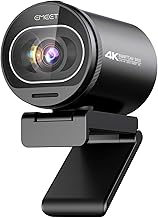
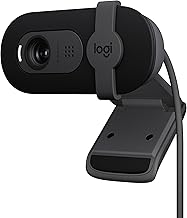
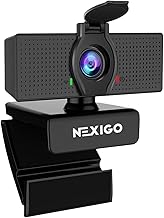
This review looks at a spread of popular Full HD options, from budget plug-and-play models to name-brand cameras like the Logitech Brio 101 and the ever-reliable Logitech C920x, alongside feature-rich picks such as the NexiGo N60 and the EMEET C960. The goal is to help you figure out which trade-offs actually matter for the way you work.
As an Amazon Associate we earn from qualifying purchases at no extra cost to you.


🎮 Get More From Your Setup — Free
Prime Gaming gives you free PC games every month, in-game loot, and a free Twitch channel sub — plus fast free shipping on all the gear above. New members get a 30-day free trial.
Watch: 1080p Webcam: Review & Buyer’s Guide — Video Review
Design & Build
Physically, these cameras are more alike than different. Most use a hinged clip that grips the top of a monitor or laptop lid and folds down onto a tripod thread for arm mounting. The NexiGo N60 and the compact Acer 1080p model both include a manual privacy cover, which is a genuinely useful touch for anyone who dislikes the idea of an always-open lens staring back at them. The Logitech Brio 101 keeps things clean and modern with a built-in shutter, while the C920x sticks to Logitech’s proven, no-nonsense chassis. Build quality across the board is plastic but reassuringly solid, and the generic 1080P HD models with wide-angle lenses feel surprisingly sturdy for their weight.
Performance
Full HD at 30fps is the common baseline here, and in good light every one of these cameras produces a clean, sharp image that flatters you far more than an integrated laptop cam. Where they separate is in auto-exposure and low-light handling. The Logitech C920x and Brio 101 lead on automatic light correction, keeping your face evenly lit when a bright window sits behind you. The EMEET C960 counters with a wider 90-degree field of view and dual microphones, making it a strong choice if you want more of the room in frame or share the camera in a small huddle space. Fixed-focus models like the C960 stay reliably sharp at typical desk distance, while budget wide-angle cameras can look a touch soft at the edges. Microphone quality is serviceable on all of them, though a dedicated headset still wins for critical calls.
Pros & Cons
- Sharp Full HD image: A dramatic step up from built-in laptop cameras.
- True plug and play: USB connection means no drivers or fuss on Windows and Mac.
- Privacy covers included: Several models add a physical shutter for peace of mind.
- Affordable: You get most of the quality of a premium cam for far less.
- Low-light limits: Cheaper sensors get noisy in dim rooms.
- Basic audio: On-board mics work but rarely impress.
- Fixed focus on some: Less flexible if you move around a lot.
Alternatives to Consider
If you routinely stream or record content and want future headroom, stepping up to a 4K camera makes sense, since it lets you crop into a 1080p frame while staying sharp. For pure video calls, though, that resolution is overkill and eats bandwidth. Within this Full HD group, the Logitech C920x is the safe all-rounder, the EMEET C960 suits wider framing, and the plug-and-play budget models are ideal for a quick, cheap fix on a secondary machine.
Frequently Asked Questions
Is a 1080p webcam good enough for streaming?
For most Twitch and YouTube creators, yes. Viewers watch in a small window, so 1080p at 30fps looks great and keeps your upload bandwidth manageable. Only jump to 4K if you crop heavily or want extra sharpness.
Do these webcams work with Zoom and Teams?
All of them do. They are standard USB video devices, so Zoom, Microsoft Teams, Google Meet, Skype, and virtually every other app detect them automatically with no extra setup.
Will a 1080p webcam improve my lighting?
Models with automatic light correction, like the Logitech options, adjust exposure to brighten your face. A camera alone will not fix a very dark room, though, so pairing it with a simple desk light gives the best result.
Do I need to install software?
No. Every camera here is plug and play over USB. Optional apps from NexiGo or Logitech unlock extras like framing and presets, but the camera works fully without them.
Verdict
A quality 1080p webcam is one of the highest-value upgrades for anyone who lives on video calls. For dependable, well-lit Full HD footage the Logitech pair is hard to beat, while EMEET and NexiGo give you wider framing and privacy covers at friendly prices. Match the field of view and low-light needs to your desk, and any of these will make you look far more professional on screen.