Key takeaways
- Switch type: Mechanical switches feel far better than membrane for gaming, and hot-swappable sockets let you change the feel later without soldering, making them the smart long-term choice.
- Layout and size: Full-size boards keep the number pad, while 60 to 75 percent layouts free up desk space for mouse movement, so match the size to how you play and your desk.
- Connectivity: Wired guarantees the lowest latency for competitive play, while wireless models with a 2.4GHz dongle now offer near-wired responsiveness plus a tidier desk.
- Keycap quality: PBT keycaps resist the shine and wear that quickly affects cheaper ABS caps, so they are worth looking for even on a budget board.
- Anti-ghosting and extras: Reliable anti-ghosting ensures every simultaneous keypress registers, and touches like a control knob, dedicated hotkeys, or software support add genuine convenience.
The keyboard is where your intentions become actions, so it is strange how often gamers spend big on a GPU and then settle for whatever board came free with the PC. In 2026 there is no excuse, because the budget mechanical market has exploded with hot-swappable switches, RGB lighting, and compact layouts that were premium features only a couple of years ago.
The catch is that “cheap mechanical” now spans everything from genuinely great boards to corner-cutting duds. This roundup explains what separates a satisfying budget keyboard from a mushy disappointment, then reviews five options that deliver a responsive, durable typing and gaming experience without the flagship price tag.
Our top picks


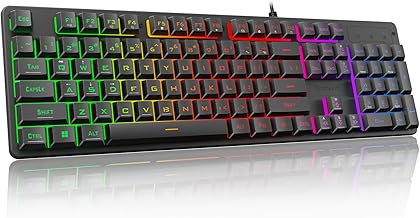
As an Amazon Associate we earn from qualifying purchases at no extra cost to you. Ratings are shown as listed on Amazon.
⚡ Save on Your Next PC — Amazon Prime
Prime members get fast free shipping on the systems above, plus early access to Prime Day & Black Friday PC deals. New members get a 30-day free trial.
Watch: Best Budget Gaming Keyboards 2026 — Video Review
How to Choose a Budget Gaming Keyboard
- Switch type: Mechanical switches feel far better than membrane for gaming, and hot-swappable sockets let you change the feel later without soldering, making them the smart long-term choice.
- Layout and size: Full-size boards keep the number pad, while 60 to 75 percent layouts free up desk space for mouse movement, so match the size to how you play and your desk.
- Connectivity: Wired guarantees the lowest latency for competitive play, while wireless models with a 2.4GHz dongle now offer near-wired responsiveness plus a tidier desk.
- Keycap quality: PBT keycaps resist the shine and wear that quickly affects cheaper ABS caps, so they are worth looking for even on a budget board.
- Anti-ghosting and extras: Reliable anti-ghosting ensures every simultaneous keypress registers, and touches like a control knob, dedicated hotkeys, or software support add genuine convenience.
The Best Budget Gaming Keyboards Reviewed
AULA F75 Pro Wireless
The AULA F75 Pro is the standout value pick, packing a 75 percent hot-swappable layout, a control knob, RGB backlighting, and pre-lubed Reaper switches under side-printed PBT keycaps. Its triple connectivity, 2.4GHz, USB-C, and Bluetooth 5.0, means it works across multiple devices, making it feel far more premium than its budget price suggests.
Redragon K668 Hot-Swap Wired
For those who want a full-size board with extras, the Redragon K668 offers 108 keys, four dedicated hotkeys, and hot-swappable switches with cushioned sound dampening for a satisfying thock. The shortcut keys for mute, calculator, and desktop are genuinely handy, and Redragon’s PRO software adds customization rarely found this cheap.
Redragon K617 60% Compact
The Redragon K617 is the pick for players who want more desk room to swing their mouse. Its 60 percent, 61-key layout is compact and hot-swap ready, with vibrant 20-mode RGB lighting and software support. It is an ideal, affordable entry into the small-form-factor world that competitive shooter players increasingly favor.
AULA WIN68 Hall Effect
Bringing performance tech to a budget price, the AULA WIN68 uses Hall Effect magnetic switches with adjustable actuation and a fast trigger mode, plus an 8000Hz polling rate. This lets you tune how far you press before a key registers, a feature prized in competitive play and rarely seen at this level, all in a compact 60 percent RGB board.
Logitech G213 Prodigy
Not everyone wants mechanical, and the Logitech G213 Prodigy makes the case for a reliable membrane board. It brings mech-dome keys, a palm rest, dedicated media controls, and LIGHTSYNC RGB in a spill-resistant, full-size package. For players who prefer a quieter, softer feel from a trusted brand, it remains a dependable budget staple.
Frequently Asked Questions
Is a mechanical keyboard really better for gaming?
For most players, yes. Mechanical switches offer a crisper, more consistent feel and register presses reliably, which helps in fast games. Membrane boards like the Logitech G213 are quieter and cheaper, so the best choice comes down to your feel preference and budget.
What does hot-swappable mean and why does it matter?
Hot-swappable boards let you pull out and replace switches by hand, with no soldering. It matters because you can change the feel of your keyboard later or replace a failed switch cheaply, which extends the life and flexibility of a budget board considerably.
Should I get a full-size or compact keyboard?
Full-size keeps the number pad for productivity, while 60 to 75 percent layouts free up desk space so you have more room for wide mouse movements. Competitive players often prefer compact boards; if you use the number pad regularly, stick with full-size.
Do I need wireless, or is wired better?
Wired offers the lowest possible latency and never needs charging, which is why many competitive players prefer it. Modern 2.4GHz wireless boards like the AULA F75 Pro are now fast enough for the vast majority of gamers and give you a cleaner desk.
Final Thoughts
A great gaming keyboard no longer costs a fortune. The AULA F75 Pro is the all-round value champion, the Redragon K617 suits compact-layout fans, and the AULA WIN68 brings Hall Effect performance to a budget price. Decide whether switch feel, size, or wireless freedom matters most to you, pick the board that fits, and enjoy an upgrade that you will feel with every single keystroke.