Key takeaways
- Form factor first: Desktops use M.2 2280, but the Steam Deck and ROG Ally need the shorter 2230 drives; buy the wrong length and it won’t fit.
- Capacity vs budget: 2TB is the current sweet spot for cost per gigabyte; go 4TB only if your library regularly exceeds a dozen large installs.
- PCIe generation: Gen4 drives hit 5,000-7,000MB/s, but games rarely saturate that; a good Gen4 QLC drive is fine, and even Gen3 loads most titles quickly.
- DRAM vs DRAM-less: DRAM-less QLC drives are cheaper and fine for game storage; DRAM helps sustained writes if you also edit video.
- Portable option: A USB-C 10-20Gbps external SSD lets you park rarely-played games off your main drive and swap them back when needed.
Modern games are enormous. A single AAA install can swallow 150-200GB, so a serious Steam library outgrows a 1TB drive fast. The good news is that NVMe prices keep falling, and whether you’re expanding a desktop, a Steam Deck or a ROG Ally, you can now add multiple terabytes of fast storage without breaking the bank. The trick is matching the drive’s form factor and speed to your machine.
We looked at 2230 drives built for handhelds like the SABRENT Rocket Q4 and WD SN740, portable USB-C SSDs for offloading your backlog, and desktop-class options. Below is a buying guide covering form factor, PCIe generation and DRAM, followed by our top picks so your library loads in seconds instead of minutes.
Our top picks
![SABRENT Rocket Q4 2230 NVMe SSD 2TB – PCIe Gen4 M.2 Internal SSD for Steam Deck, ROG Ally, Surface Pro, Mini PCs – DRAM-Less QLC, Up to 5GB/s, Single-Sided, Compact Form Factor [SB-213Q-2TB]](https://m.media-amazon.com/images/I/41QldUwQDlL._SL500_.jpg)


As an Amazon Associate we earn from qualifying purchases at no extra cost to you. Ratings are shown as listed on Amazon.
⚡ Save on Your Next PC — Amazon Prime
Prime members get fast free shipping on the systems above, plus early access to Prime Day & Black Friday PC deals. New members get a 30-day free trial.
Watch: Best SSD for a Large Steam Library — Video Review
How to Choose
- Form factor first: Desktops use M.2 2280, but the Steam Deck and ROG Ally need the shorter 2230 drives; buy the wrong length and it won’t fit.
- Capacity vs budget: 2TB is the current sweet spot for cost per gigabyte; go 4TB only if your library regularly exceeds a dozen large installs.
- PCIe generation: Gen4 drives hit 5,000-7,000MB/s, but games rarely saturate that; a good Gen4 QLC drive is fine, and even Gen3 loads most titles quickly.
- DRAM vs DRAM-less: DRAM-less QLC drives are cheaper and fine for game storage; DRAM helps sustained writes if you also edit video.
- Portable option: A USB-C 10-20Gbps external SSD lets you park rarely-played games off your main drive and swap them back when needed.
The Best Picks Reviewed
SABRENT Rocket Q4 2230 2TB (Best for Handhelds)
A single-sided PCIe Gen4 2230 drive built for the Steam Deck, ROG Ally and Surface, hitting up to 5GB/s. The compact form factor and 2TB capacity turn a cramped handheld into a proper library machine.
Silicon Power UD90 2230 2TB (Best Handheld Value)
Another Steam Deck-friendly 2230 Gen4 drive rated around 5,000MB/s read, usually a touch cheaper than the SABRENT. It’s the smart budget upgrade for handheld owners who want 2TB without overspending.
WD SN740 512GB 2230 (Best Compact OEM)
An OEM single-sided TLC 2230 drive that’s ideal if you want reliable, cool-running storage in a handheld or ultrabook. TLC gives it better sustained performance than QLC rivals at smaller capacities.
Transcend ESD420 1TB (Best Portable)
A rugged magnetic external SSD up to 2000MB/s over USB 3.2 Gen2x2 with MagSafe compatibility. Park your backlog here and reconnect over USB-C when you want to reinstall, saving your internal drive for active games.
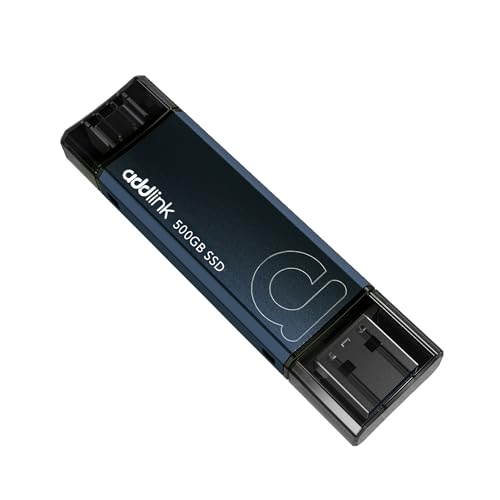
Addlink P50 500GB (Best Pocket Stick)
A thumb-drive-style SSD at up to 1050MB/s with dual Type-C and Type-A connectors. It’s the grab-and-go option for moving installs between a PC, Steam Deck and PS5 without cables.
Frequently Asked Questions
What size SSD does the Steam Deck use?
The Steam Deck and ROG Ally use M.2 2230 drives, which are shorter than the standard 2280 desktop size. Always confirm 2230 before buying.
Is Gen4 worth it over Gen3 for gaming?
Marginally. Gen4 helps DirectStorage titles slightly, but most games load nearly as fast on a good Gen3 drive. Capacity usually matters more than raw speed.
Is QLC bad for a game library?
No. Games are read-heavy, and QLC handles reads well. QLC only shows weakness during large sustained writes, which game storage rarely involves.
Can I store Steam games on an external SSD?
Yes. Steam lets you add a library folder on any drive, so a fast USB-C SSD is a great place to keep games you don’t play every week.
Final Thoughts
Handheld owners should start with the SABRENT Rocket Q4 2230 2TB for the best mix of capacity and fit, or the Silicon Power UD90 to save a little money. If you’d rather offload games than replace a drive, the Transcend ESD420 portable SSD is the cleanest solution. Match the form factor first, and everything else falls into place.