Key takeaways
- Peak Brightness: True HDR impact needs at least 400-600 nits of peak brightness; anything lower will struggle to make highlights feel noticeably brighter than SDR content.
- Refresh Rate: Competitive shooters benefit from 165Hz or higher, while 120-144Hz is plenty for single-player and story-driven titles.
- Panel Type: Fast IPS panels give the best color accuracy and viewing angles, while VA panels offer deeper blacks and higher contrast, which pairs well with HDR content.
- Resolution and Size: Match resolution to screen size — 1080p suits 24-27″ displays, while QHD (1440p) is the sweet spot for 27-32″ monitors without needing a high-end GPU.
- Adaptive Sync: Confirm FreeSync Premium or G-SYNC Compatible support matches your GPU brand to eliminate screen tearing and stuttering during fast motion.
What's inside
Shopping for a new display often means wading through a swamp of marketing terms — HDR10, VRR, FreeSync Premium, nits, response time — without a clear sense of which specs actually matter for real gameplay. Many buyers end up overpaying for features they’ll never use, or worse, choosing a “HDR” monitor so dim and washed out that highlights never truly pop and shadows lose all detail.
This guide breaks down what genuinely improves your gaming experience versus what’s just a checkbox on a spec sheet, then reviews six standout HDR gaming monitors across different sizes, resolutions, and price points so you can match a screen to your setup and budget.
As an Amazon Associate we earn from qualifying purchases at no extra cost to you.




🎮 Get More From Your Setup — Free
Prime Gaming gives you free PC games every month, in-game loot, and a free Twitch channel sub — plus fast free shipping on all the gear above. New members get a 30-day free trial.
Watch: Best Hdr Gaming Monitor: Top Picks Reviewed — Video Review
How to Choose a HDR Gaming Monitor
- Peak Brightness: True HDR impact needs at least 400-600 nits of peak brightness; anything lower will struggle to make highlights feel noticeably brighter than SDR content.
- Refresh Rate: Competitive shooters benefit from 165Hz or higher, while 120-144Hz is plenty for single-player and story-driven titles.
- Panel Type: Fast IPS panels give the best color accuracy and viewing angles, while VA panels offer deeper blacks and higher contrast, which pairs well with HDR content.
- Resolution and Size: Match resolution to screen size — 1080p suits 24-27″ displays, while QHD (1440p) is the sweet spot for 27-32″ monitors without needing a high-end GPU.
- Adaptive Sync: Confirm FreeSync Premium or G-SYNC Compatible support matches your GPU brand to eliminate screen tearing and stuttering during fast motion.
The Best HDR Gaming Monitors Reviewed
Samsung 32″ Odyssey G55C
The curved 1000R panel wraps your peripheral vision for genuine immersion, and 165Hz combined with 1ms MPRT response keeps fast-paced action smooth. HDR10 support and AMD FreeSync make this a strong all-rounder for gamers who want size and curve without stepping up to ultrawide.
ASUS TUF Gaming VG27AQ3A
This 27″ QHD Fast IPS panel hits 180Hz with excellent color coverage at 130% sRGB, making it equally capable for competitive play and content creation. Built-in speakers and both FreeSync Premium and G-SYNC Compatible certification give it flexibility across AMD and NVIDIA setups.
SANSUI 32-Inch Curved Gaming Monitor
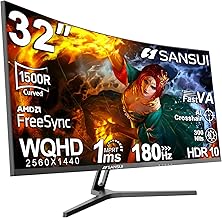
With a 1500R curve, 180Hz refresh, and DCI-P3 95% coverage, this Fast VA panel delivers rich, punchy colors and deep contrast that HDR content thrives on. The dual DisplayPort and dual HDMI inputs, plus an included DP cable, make it an easy value pick for a larger curved setup.
Samsung 27″ Odyssey G5
The G5’s Black Equalizer and Virtual Aim Point features are tailored for competitive shooters, while 180Hz and 1ms response keep tracking crisp. A height-adjustable stand and HDR10 support round out a monitor that balances ergonomics with genuine performance.
MSI MAG 274CF X24
For pure speed at 1080p, the 240Hz refresh rate and 0.5ms response time on this MAG 274CF X24 make it a favorite for fast-twitch competitive titles. HDR Ready certification and FreeSync Premium support add polish without pushing the price into premium territory.
Frequently Asked Questions
Do I need a powerful GPU to use HDR on a gaming monitor?
You’ll get the best HDR results with a mid-range or higher GPU capable of driving your monitor’s native resolution and refresh rate simultaneously, since HDR processing adds a modest performance overhead compared to SDR.
What’s the difference between HDR10 and HDR Ready?
HDR10 indicates a monitor decodes and displays HDR10 metadata with a baseline brightness and color standard, while “HDR Ready” typically means the panel accepts an HDR signal but may not hit the brightness or color volume needed for a dramatic HDR effect.
Is a curved monitor better for gaming than a flat one?
Curved monitors, especially at 1500R or 1000R curvature, increase immersion and reduce eye travel across wide fields of view, but flat panels are generally preferred for precision esports titles and multi-monitor setups.
Should I prioritize refresh rate or resolution for HDR gaming?
For competitive gaming, prioritize refresh rate (165Hz+) even at 1080p or 1440p, while single-player and cinematic gamers should lean toward higher resolution since HDR detail is more noticeable at QHD and above.
Final Thoughts
If you want the best all-around balance of immersion and performance, the ASUS TUF Gaming VG27AQ3A and Samsung 32″ Odyssey G55C are our top picks, while the MSI MAG 274CF X24 is the clear choice for gamers who prioritize raw speed over resolution.