
Key takeaways
- Buying for the monitor alone: Measure the entire setup, including stands, speakers, mouse movement, and cable clearance.
- Ignoring depth: A wide but shallow desk may leave your monitor too close to your eyes and your keyboard near the front edge.
- Forgetting the frame: The desktop may be 55 inches wide, but the lifting columns and crossbar can reduce legroom underneath.
- Overloading the surface: Add the weight of monitors, a computer, speakers, and accessories. Never exceed the desk’s stated lifting capacity, and remember that capacity can differ while moving versus remaining stationary.
- Leaving no walking clearance: Keep roughly 30 inches (76.2 cm) of clear passage where people need to walk. A desk that fits wall-to-wall may still make the room uncomfortable.
- Assuming more width solves everything: A 63-inch desk cannot compensate for poor monitor placement, insufficient depth, or an unsuitable minimum height.
- Skipping cable planning: Standing desks move. Leave enough slack for every cable and secure cords so they do not catch on the frame.
What's inside
The Short Answer
For most gaming setups, a standing desk should be 55 to 63 inches wide (139.7 to 160 cm). That range gives you room for a gaming monitor or two, a full-size keyboard, mouse movement, speakers, and a few accessories without making the desktop feel crowded.
A 47.2-inch desk (119.9 cm) can work for a compact setup with one monitor and a laptop or small PC tower. Choose a desk at least 48 inches wide if you have limited space, but aim for 55 inches if you use a large monitor, dual screens, or a wide gaming keyboard and mouse pad.
As an Amazon Associate we earn from qualifying purchases at no extra cost to you. Product prices and availability are accurate as of the date shown and are subject to change.


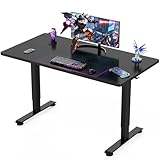

Depth matters almost as much as width. A desktop measuring 28 to 30 inches deep (71.1 to 76.2 cm) is comfortable for gaming because it allows you to position the monitor at a healthy viewing distance while leaving space for your keyboard and mouse. A 24-inch-deep desk can work, but it may feel cramped with a large display.
As a practical 2026 buying guide, think of 55 inches wide by 28 inches deep as the best all-around size. Go to 63 inches when you want two monitors, a desktop PC, speakers, and room to work. Downsize to 47.2 inches only when the room requires it.
Standard Sizes
Standing gaming desks typically fall into three useful size categories. The best choice depends on your equipment, available floor space, and how much open surface you want around your controls.
| Desk size | Dimensions in centimeters | Best for | Typical setup |
|---|---|---|---|
| 47.2" W x 24" D | 119.9 x 61.0 cm | Small rooms and simple setups | One monitor, keyboard, mouse, and laptop or compact PC |
| 55" W x 24" to 28" D | 139.7 x 61.0 to 71.1 cm | Most gamers | One large monitor or two standard monitors, speakers, and accessories |
| 63" W x 28" D | 160.0 x 71.1 cm | Multi-monitor and work-and-play setups | Two or three monitors, desktop tower, speakers, and writing space |
Width determines how many items fit side by side. Depth determines how comfortably you can arrange them front to back. For example, a 34-inch ultrawide monitor can fit on a 47.2-inch desk, but the remaining space may disappear quickly once you add a keyboard, mouse pad, speakers, and a microphone arm.
Height adjustability also affects usability. Look for a desk that lowers enough for seated gaming and rises high enough for your elbows to remain near a 90-degree angle while standing. The correct height varies by person, but many electric desks cover approximately 28 to 48 inches (71.1 to 121.9 cm). Check the manufacturer’s adjustment range rather than assuming every standing desk moves through the same heights.
Product prices in this category commonly range from about $90 to $170 for basic electric gaming desks. For reference, a 47.2-inch model may sell for around $89.99, 55-inch models may range from $109.99 to $149.99, and a wider 63-inch by 28-inch model may cost about $169.99. Prices can change by finish, promotion, and included features.
How to Measure Your Space
- Measure the wall or open area. Record the usable width, not merely the wall width. Subtract space for baseboards, trim, doors, and nearby furniture.
- Leave clearance on both sides. Keep at least 2 to 4 inches (5.1 to 10.2 cm) between the desktop and a wall or neighboring furniture. This makes installation easier and prevents the top from rubbing as the desk moves.
- Measure front-to-back clearance. A 28-inch-deep desk needs at least 30 to 34 inches of clear floor depth if you want a chair or standing position in front of it. Add more room for a chair to roll back.
- Check outlet and cable locations. Make sure the power cord can reach an outlet at both the lowest and highest desk positions. Avoid stretching cables across a walking path.
- Map the monitor footprint. Measure the width and depth of each monitor stand, or measure the clamp span of a monitor arm. A monitor arm can save surface space, but the desktop must be thick and sturdy enough for the clamp.
- Plan for the computer tower. A tower on the desktop uses valuable depth and may block the display. If it goes on the floor, leave ventilation space around it and confirm that the desk frame does not interfere.
- Check the lowest height. If you will sit at the desk, compare the minimum desk height with your chair, arm position, and keyboard height. A desk that only works while standing is not a practical gaming desk for most people.
By Room or Use Case
Small bedroom or apartment
Choose a desk about 47.2 to 55 inches wide and 24 to 28 inches deep. A 47.2-inch model is suitable for one monitor and a compact keyboard-and-mouse setup. If the room permits, the 55-inch option is more flexible and gives you room to add speakers or a second display later.
Single-monitor gaming setup
A 48- to 55-inch desk is usually enough. A 24- to 27-inch monitor, full-size keyboard, mouse pad, headset stand, and small speakers can fit comfortably. Choose 28 inches of depth if you sit farther from the screen or use a large mouse pad.
Dual monitors or an ultrawide
Start with 55 inches wide, then move to 63 inches if the monitors have large stands. Two 27-inch displays can span roughly 48 to 50 inches before accounting for stands and side clearance. A 63-inch surface provides more usable space and makes it easier to center the screens over the keyboard.
Gaming and homework or office work
Choose 63 inches wide by 28 inches deep when the desk must handle gaming and everyday work. The extra width creates separate zones for monitors, writing, notebooks, or a laptop. It also reduces the need to constantly rearrange your setup when switching activities.
Console gaming
A 47.2- to 55-inch desk generally works for a console, monitor or television, controller, speakers, and charging dock. Confirm that the desk can support the console safely and that ventilation openings will not be blocked. If you use a large TV instead of a monitor, measure its stand width before choosing the desktop.
Streaming and content creation
Choose at least 55 inches wide, with 63 inches preferred. A microphone arm, camera, lighting controls, stream deck, audio interface, and multiple monitors quickly consume space. A deeper top also helps keep the microphone and monitor at comfortable distances.
Common Sizing Mistakes
- Buying for the monitor alone: Measure the entire setup, including stands, speakers, mouse movement, and cable clearance.
- Ignoring depth: A wide but shallow desk may leave your monitor too close to your eyes and your keyboard near the front edge.
- Forgetting the frame: The desktop may be 55 inches wide, but the lifting columns and crossbar can reduce legroom underneath.
- Overloading the surface: Add the weight of monitors, a computer, speakers, and accessories. Never exceed the desk’s stated lifting capacity, and remember that capacity can differ while moving versus remaining stationary.
- Leaving no walking clearance: Keep roughly 30 inches (76.2 cm) of clear passage where people need to walk. A desk that fits wall-to-wall may still make the room uncomfortable.
- Assuming more width solves everything: A 63-inch desk cannot compensate for poor monitor placement, insufficient depth, or an unsuitable minimum height.
- Skipping cable planning: Standing desks move. Leave enough slack for every cable and secure cords so they do not catch on the frame.
FAQ
Is 47 inches wide enough for a gaming desk?
Yes, for one monitor and a compact setup. A 47.2-inch desk can hold a 24- or 27-inch display, keyboard, mouse, and basic accessories. It is less suitable for dual monitors, a large ultrawide, or a desktop tower on the surface.
Is a 55-inch standing desk good for gaming?
Yes. A 55-inch desk is the best middle-ground size for most players. It can accommodate one large monitor or two smaller displays, while a 28-inch depth provides useful room for a keyboard and mouse.
Do I need a 63-inch desk for two monitors?
Not always. Two compact monitors can fit on a 55-inch desk, especially with a monitor arm. Choose 63 inches if the displays have wide stands, you want speakers and a microphone on the desktop, or you also need space for office work.
How deep should a standing gaming desk be?
Aim for 28 to 30 inches (71.1 to 76.2 cm). This depth supports comfortable monitor positioning and generous mouse space. A 24-inch depth is acceptable for a small room, but measure your monitor stand and preferred viewing distance before buying.





