
Key takeaways
- Buying by width alone: A desk can be wide enough for two monitors but too shallow for a natural viewing distance and supported forearms.
- Measuring the desktop without the monitor stand: The stand may consume a third of a shallow desk’s usable depth.
- Putting the keyboard at the very front: This leaves no space for your hands and forearms. Move it back only until your elbows remain relaxed.
- Using a deep desk and reaching too far: Extra surface area is not automatically ergonomic. Keep frequently used controls within easy reach.
- Ignoring the front edge: A sharp edge can press into your forearms. Look for a rounded edge or use a properly fitted padded support.
- Overlooking desk height: A deep desk will not solve discomfort caused by elevated shoulders, unsupported feet, or a chair that cannot adjust low enough.
What's inside
Choosing the proper desk depth for comfortable arm support while gaming affects more than how much room your keyboard needs. A desk that is too shallow can force your monitor close to your face and leave your forearms hanging off the edge. A desk that is too deep may encourage reaching, slouching, or excessive mouse movement. For most gaming setups, the best starting point is a desk that is 28 to 32 inches deep, with enough surface space for your keyboard, mouse, monitor stand, and supported forearms.
The Short Answer
For comfortable gaming arm support, choose a desk that is at least 24 inches deep and preferably 28 to 32 inches deep. A 24- to 26-inch desk can work with a monitor arm and a compact keyboard-and-mouse setup. A 28- to 30-inch depth is more comfortable for most players because it provides room for the display, keyboard, mouse, and part of both forearms.
As an Amazon Associate we earn from qualifying purchases at no extra cost to you. Product prices and availability are accurate as of the date shown and are subject to change.


Choose 32 to 36 inches if you use a large monitor, a deep monitor stand, speakers, a microphone, or multiple displays. Depth beyond 36 inches is rarely necessary for a single-player gaming station unless the desk also serves as a workbench.
Arm support should begin near the desk edge and continue beneath your forearms without forcing your elbows outward. Ideally, your elbows remain near a 90- to 110-degree angle, your shoulders stay relaxed, and your wrists remain relatively straight. Desk height is also important: a typical 28- to 30-inch desk may be too tall for some users, so an adjustable chair and a footrest can be just as valuable as extra depth.
Standard Sizes
| Desk depth | Desk depth in centimeters | Best for | Arm-support outlook |
|---|---|---|---|
| 20-23 inches | 51-58 cm | Very compact stations, laptops, or wall-mounted monitors | Limited; usually requires a monitor arm and compact peripherals |
| 24-26 inches | 61-66 cm | Small bedrooms and single-monitor gaming | Acceptable for keyboard and mouse support, but forearm room is modest |
| 28-30 inches | 71-76 cm | Most single-monitor and general gaming setups | Good balance of viewing distance and comfortable arm support |
| 32-36 inches | 81-91 cm | Large monitors, dual displays, microphones, and speakers | Very good, provided the rear of the desk does not encourage reaching |
| 38-42 inches | 97-107 cm | Wide workstations, streaming, and multi-purpose use | May be excessive for gaming unless accessories are positioned carefully |
Surface width matters as well. A single-monitor setup generally needs 42 to 48 inches of width (107 to 122 cm). A more flexible gaming desk is 55 to 63 inches wide (140 to 160 cm). Dual monitors, a full-size tower on the desktop, or a large mousepad may require 60 inches or more.
For arm support, leave approximately 8 to 12 inches (20 to 30 cm) of usable surface between the front edge of the keyboard and the desk edge. This area supports the heel of your hand and part of your forearm. If your keyboard is 6 to 10 inches deep, that amount of clearance usually favors a desk depth of 28 inches or more.
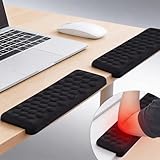
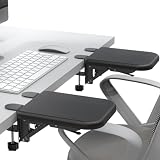
Desk-edge armrests can add usable support when the desktop is shallow. Examples include long 26.5-inch supports, L-shaped forearm and elbow rests, and shorter 8.9-inch foldable supports. Current example prices range from about $16.99 for a two-pack of adjustable pads to approximately $78.99-$79.99 for larger, padded desk extenders. Treat these accessories as ways to improve a constrained setup, not as substitutes for correct desk depth.
How to Measure Your Space
- Measure the available wall-to-wall depth. Use a tape measure from the wall or rear obstruction to the front edge of the intended desk area. Subtract at least 1 inch (2.5 cm) for cable clearance if the desk will sit against a wall.
- Measure your monitor setup. Record the front-to-back depth of the monitor stand, not just the screen. Many stock stands use 8 to 12 inches (20 to 30 cm) of desk space. A monitor arm can reduce that requirement significantly.
- Measure your keyboard and mouse area. A full-size keyboard is commonly about 18 inches (46 cm) wide and 7 to 8 inches (18 to 20 cm) deep. Add room for a mousepad, mouse movement, and a 8- to 12-inch forearm-support zone.
- Test elbow position. Sit in your chair with your feet supported and your shoulders relaxed. Place your hands as if typing. Your elbows should remain close to your sides rather than reaching forward. If your wrists hang over the edge, the desk is too shallow or needs an arm-support accessory.
- Check chair and legroom. Allow approximately 24 to 27 inches (61 to 69 cm) of clear knee width. Keep at least 24 inches (61 cm) of unobstructed knee depth beneath the desk, avoiding drawers, crossbars, and computer towers.
- Account for edge accessories. If you plan to clamp on a desk extender or elbow rest, measure the desk thickness and edge clearance. Many clamp-style supports need a usable edge and may not fit desks with thick aprons, bevels, cable trays, or rounded fronts.
- Mark the setup with painter’s tape. Tape the proposed monitor, keyboard, and mouse positions on the floor or an existing surface. Sit for 10 to 15 minutes and check whether you naturally lean forward or reach for the mouse.
By Room or Use Case
Small Bedroom or Apartment
Choose a 24- to 28-inch-deep desk when floor space is limited. A monitor arm is especially useful because it moves the display base off the desktop. Select a desk at least 42 inches wide for one monitor, and keep the computer tower on the floor or on a side stand. If the desk is only 20 to 23 inches deep, a padded edge support can provide forearm contact, but keep the keyboard close enough that your shoulders do not round forward.
Standard Single-Monitor Gaming
A 28- to 30-inch depth is the safest all-purpose choice. It accommodates a 24- to 32-inch monitor, a full-size keyboard, a generous mousepad, and comfortable forearm support. A 47- to 55-inch width is usually adequate. Center the monitor directly in front of you and place the mouse so your elbow stays near your torso rather than drifting outward.
Ultrawide or Dual-Monitor Setup
Choose 30 to 36 inches of depth and at least 55 to 63 inches of width. Larger screens often use deeper stands, while multiple displays can crowd the front half of the desk. A monitor arm can preserve 8 to 12 inches of usable depth for your forearms. Keep the primary display centered and angle secondary screens inward instead of pushing them toward the rear corners.
Streaming and Content Creation
Streaming setups benefit from 32 to 36 inches of depth and 60 inches or more of width. Microphones, audio interfaces, lighting controls, and camera equipment can consume substantial space. Use a boom arm for the microphone where possible, but confirm that its clamp does not interfere with a desk-edge armrest. If you frequently switch between keyboard and controller, leave at least 12 inches of clear front-edge space.
Standing or Sit-Stand Desk
A sit-stand desk should generally be at least 28 inches deep. Confirm that the frame remains stable at your intended height and that the desktop does not flex under monitor arms. When standing, keep the keyboard high enough for relaxed shoulders and position the mouse close to the keyboard. An anti-fatigue mat does not replace proper arm support, but it can make longer sessions more comfortable.
Common Sizing Mistakes
- Buying by width alone: A desk can be wide enough for two monitors but too shallow for a natural viewing distance and supported forearms.
- Measuring the desktop without the monitor stand: The stand may consume a third of a shallow desk’s usable depth.
- Putting the keyboard at the very front: This leaves no space for your hands and forearms. Move it back only until your elbows remain relaxed.
- Using a deep desk and reaching too far: Extra surface area is not automatically ergonomic. Keep frequently used controls within easy reach.
- Ignoring the front edge: A sharp edge can press into your forearms. Look for a rounded edge or use a properly fitted padded support.
- Overlooking desk height: A deep desk will not solve discomfort caused by elevated shoulders, unsupported feet, or a chair that cannot adjust low enough.
FAQ
Is a 24-inch-deep desk enough for gaming?
Yes, for a single-monitor setup if you use a compact keyboard, a monitor arm, and a modest mousepad. It is less forgiving than a 28- to 32-inch desk, so you may have limited room for forearm support and accessories.
How much desk depth do my forearms need?
Most users benefit from approximately 8 to 12 inches (20 to 30 cm) of clear surface in front of the keyboard. This does not mean your entire forearm must lie flat; light support under the heel of the hand and lower forearm is usually sufficient.
Are desk-edge armrests good for gaming?
They can help with shallow desks or users who need more padded contact at the edge. Check the support’s length, clamp compatibility, padding thickness, and clearance for your chair. It should support your arms without raising your shoulders or restricting mouse movement.
What is the best desk depth for most gamers in 2026?
For most players, 28 to 32 inches (71 to 81 cm) is the best range. It provides practical monitor distance, keyboard and mouse room, and a comfortable front-edge zone for arm support without taking unnecessary floor space.





