Key takeaways
- 10×12 ft bedroom (120 sq ft): A scorpion cockpit will consume roughly 30% of the floor space. You can fit it, but only if it is the primary piece of furniture. You will have room for a small dresser or desk, but not a full-size bed and cockpit together without blocking closet doors. Ideal placement is in a corner with the open side facing the center of the room.
- 12×12 ft spare room or home office: This is the sweet spot. You can place the cockpit along one wall and still have 5 to 6 feet of open floor for an office chair, storage, or movement. This size allows you to keep the 30-inch entry clearance without blocking windows.
- Small apartment or dorm (under 100 sq ft): Not recommended. The cockpit’s fixed footprint makes the room difficult to reconfigure, and renters may struggle with maneuvering it out when moving. A standard ergonomic chair with a separate desk and monitor arm is far more flexible.
- Open living area or garage setup: Works well if you have a dedicated gaming zone. The heavy steel frame is stable on carpet, hardwood, and concrete, but use felt pads under the feet to prevent scratching on hard floors.
What's inside
A scorpion gaming chair only makes sense if you have at least a 6 x 6 foot clear floor area, a doorway wider than 29 inches for moving it, and a ceiling height of 7.5 feet or more – otherwise the cockpit frame will dominate your room and block movement. If you can meet those space requirements, it offers unmatched immersion for racing and flight simulators, but it sacrifices flexibility, portability, and small-room practicality compared to a standard ergonomic gaming chair.
How Big Is a Scorpion Cockpit Really?
Unlike product listings that quote only the chair’s width, a scorpion gaming chair is a full reclining cockpit. The frame, monitor arch, and leg rest extend far beyond a typical office chair footprint. Most popular models, such as the Cluvens Scorpion, share similar dimensions even when branded slightly differently.

Imperatorworks CLUVENS Manticore Model Zero Gravity Gaming Chair Cockpit Gaming Workstation Executive seat (Black) Support 3 Monitors 1 * 49"/57" Monitor can Extend to 5 Monitors
Included for 'Scorpion Gaming Chair Review: Cockpit Chair Pros, Cons and Room Fit' as a relevant option in this category; details come from the product listing.
View on Amazon
Imperatorworks EASECOMFY T2 Throne Computer Cockpit, Zero Gravity Chair Workstation,can Extend for 5 Monitors Support ultrawide 1 * 49" Option with Massage Function
Included for 'Scorpion Gaming Chair Review: Cockpit Chair Pros, Cons and Room Fit' because the listing specifies Zero Gravity Chair Workstation, details this guide uses to compare options.
View on Amazon
Imperator Works EASECOMFY Cluvens Manticore Zero Gravity Chair Cockpit Computer Workstation Leather seat with Memory Foam Massage Black Support 3 Monitors, Can Extend to Support up to 5 Monitors
Included for 'Scorpion Gaming Chair Review: Cockpit Chair Pros, Cons and Room Fit' because the listing specifies Can Extend to Support up to 5 Monitors, details this guide uses to compare options.
View on Amazon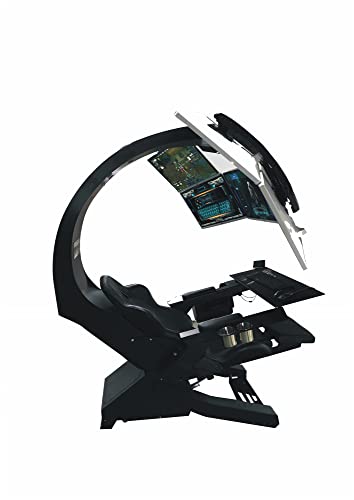
Imperatorworks IW 320 Brand Racing Gaming Chair, Computer Chair for Office and Home; Regular for 3 Screens or Upto 5 Monitors with Vibration massasge
Included for 'Scorpion Gaming Chair Review: Cockpit Chair Pros, Cons and Room Fit' as a relevant option in this category; details come from the product listing.
View on Amazon| Measurement | Typical Scorpion Cockpit Spec | Standard Gaming Chair for Comparison |
|---|---|---|
| Overall Footprint (L x W) | 68 – 75 inches x 40 – 43 inches (173 x 102 cm) | 28 x 28 inches |
| Overall Height | 75 – 85 inches (190 – 215 cm) with monitor arch | 50 – 53 inches |
| Seat Height from Floor | 14 – 18 inches (low, reclined position) | 18 – 22 inches (adjustable) |
| Seat Width | 21 – 23 inches | 20 – 22 inches |
| Weight Capacity | 280 – 350 lbs (127 – 159 kg) | 250 – 330 lbs |
| Total Unit Weight | 95 – 130 lbs (43 – 59 kg) | 45 – 60 lbs |
| Box Dimensions (Shipped) | 2 boxes, largest approx. 48 x 36 x 24 inches | 1 box, approx. 34 x 26 x 14 inches |
The key number is not just the floor footprint. You need at least 24 to 30 inches of clearance on the entry side to recline the seat and swing in and out comfortably. Behind the chair, leave 6 to 12 inches for the recline mechanism and cable management. The monitor arch adds significant vertical presence, which makes the chair feel much larger in person than photos suggest.
Will It Fit Through Your Door and In Your Room?
This is where most buyers miscalculate. A scorpion gaming chair is not moved assembled. Even disassembled, the main base frame is wide and heavy.
Doorway and Hallway Clearance
Standard interior doors in the US are 28, 30, or 32 inches wide. The assembled scorpion cockpit is over 40 inches wide and will not fit through any interior door. You must assemble it inside the room where it will be used. The largest single component, the base or the reclining shell, is typically 30 to 33 inches wide, so it will just clear a 30-inch doorframe if carried vertically. Measure your narrowest hallway turn and doorway before ordering. Stairwells with a tight 90-degree turn are a common failure point.
Ceiling height also matters. With the monitor mount at its highest position, the top bar sits at 75 to 85 inches. In a room with a 7-foot (84-inch) ceiling, you will have almost no clearance. Low ceiling fans or pendant lights must be considered. For rooms with 8-foot ceilings, the fit is comfortable.
Room-Size Fit: Real-World Examples
- 10×12 ft bedroom (120 sq ft): A scorpion cockpit will consume roughly 30% of the floor space. You can fit it, but only if it is the primary piece of furniture. You will have room for a small dresser or desk, but not a full-size bed and cockpit together without blocking closet doors. Ideal placement is in a corner with the open side facing the center of the room.
- 12×12 ft spare room or home office: This is the sweet spot. You can place the cockpit along one wall and still have 5 to 6 feet of open floor for an office chair, storage, or movement. This size allows you to keep the 30-inch entry clearance without blocking windows.
- Small apartment or dorm (under 100 sq ft): Not recommended. The cockpit’s fixed footprint makes the room difficult to reconfigure, and renters may struggle with maneuvering it out when moving. A standard ergonomic chair with a separate desk and monitor arm is far more flexible.
- Open living area or garage setup: Works well if you have a dedicated gaming zone. The heavy steel frame is stable on carpet, hardwood, and concrete, but use felt pads under the feet to prevent scratching on hard floors.
Scorpion Cockpit Pros and Cons
The appeal is not just aesthetics. The zero-gravity recline and integrated mounts change how you game, but the trade-offs are significant for everyday use.
Pros:
- True ergonomic recline: Weight is distributed across your back and legs at 130 to 170 degrees, which reduces pressure on the lower spine during long sessions compared to upright racing-style chairs.
- Integrated workstation: Built-in frame for 1 to 3 monitors, keyboard tray, and sometimes a foot pedal plate eliminates the need for a separate desk.
- Immersion for simulators: The enclosed position and close monitor distance are ideal for sim racing, flight sims, and space games where peripheral vision matters.
- Sturdy construction: Heavy-gauge steel tubing and a fiberglass or ABS shell typically last longer than the PU leather and foam on budget gaming chairs.
Cons:
- Extremely large and heavy: Once assembled, it is not portable. Moving homes requires partial disassembly and at least two people.
- Limited adjustability for desk work: Seat height is low and fixed. It is uncomfortable for typing at a standard 29 to 30-inch high desk. It is a dedicated gaming chair, not a work chair.
- Heat retention: The bucket-style shell with synthetic leather and dense foam traps heat. It is less breathable than mesh ergonomic chairs.
- Cable and accessory management: Power and display cables must be routed through the frame. Without planning, cables can snag on the recline mechanism.
Assembly Steps and Durability Realities
Expect 90 to 150 minutes for assembly with two adults. The process is more like building flat-pack gym equipment than an office chair. You will need your own socket wrench and Phillips screwdriver, as included tools are typically minimal.
Typical assembly sequence:
- Step 1: Assemble the base frame and level the feet. This is the heaviest part, usually 40 to 60 lbs alone. Do this in the final room.
- Step 2: Mount the lower shell rail and recline mechanism. Tighten all bolts loosely first, then fully tighten once aligned to avoid frame stress.
- Step 3: Attach the seat shell and backrest cushion. Check that the recline lever moves freely before adding weight.
- Step 4: Install the overhead monitor arch. This requires holding the arch upright while securing four to six bolts. A second person is essential here.
- Step 5: Mount the monitor bracket(s), keyboard tray, and cable clips. Route cables before mounting monitors.
What wears first: The faux leather on the armrests and seat edges shows cracking after 2 to 3 years in warm rooms, and the gas spring or recline hinge may loosen with daily heavy reclining. The steel frame itself rarely fails. Foam density is usually 50 to 60 kg/m3, which holds shape longer than the 40 kg/m3 foam in budget chairs, but the fixed shape means you cannot replace the cushion as easily as on a standard chair. Box weight often exceeds 100 lbs total, so curbside delivery may require help to bring boxes inside.
Monitor-Mount Compatibility
The overhead arch is designed for VESA mounts, but compatibility is not universal. Most scorpion chairs support a single ultrawide (34 to 49 inches) or triple 24 to 32-inch monitors.
- VESA pattern: Commonly supports 75x75mm and 100x100mm. Larger monitors requiring 200x100mm will need an adapter plate not always included.
- Weight limit per mount: Usually 15 to 22 lbs per arm. A 49-inch super ultrawide can weigh 25 to 30 lbs and may exceed the limit or cause the arch to flex.
- Curved monitors: Supported, but triple-curved setups need precise angle adjustment to avoid bezel gaps. Check that the arch allows independent tilt for each mount.
- Height adjustment: Look for 4 to 6 inches of vertical slide on the monitor bracket. Without it, shorter users may find the screen too high when reclined.
- Cable length: You will need DisplayPort or HDMI cables at least 10 feet long to route cleanly from the PC on the floor up the frame to the overhead position.
If you plan to use a single 27-inch monitor, the scorpion frame is overkill. A heavy-duty monitor arm on a desk provides the same viewing distance with far less space commitment.
Should You Buy a Scorpion Gaming Chair? A Decision Matrix
| Your Situation | Scorpion Cockpit is a Good Fit If… | Better Alternative |
|---|---|---|
| Small apartment or renter who moves often | Never – too heavy and large to move frequently | Ergonomic mesh chair + standing desk |
| Dedicated sim racer / flight sim enthusiast | You have a 12×12 ft or larger dedicated room | Scorpion cockpit with triple mount and pedal plate |
| Back pain, need upright work support | Only if you want reclined gaming separately from work | Ergonomic office chair with lumbar adjustment |
| Kids and pets at home | Pets may scratch faux leather; kids may climb frame | Fabric-upholstered chair with metal base, enclosed recliner |
| Streaming or immersive gaming | You want a visual centerpiece and close monitor immersion | Scorpion cockpit with single 49-inch ultrawide |
Material and Construction Trade-Offs
Most cockpits use a steel tube frame, an ABS or fiberglass shell, and high-density foam with PU leather. This combination is stable and visually striking but prioritizes rigidity over breathability. Mesh ergonomic chairs offer better airflow and lighter weight but cannot provide the fixed recline and integrated mounts. Real leather or fabric options are rare in this category due to the molded shell design. If durability in a hot environment is a priority, look for models offering fabric inserts on contact points.
Bottom Line for Room Fit
Measure your space before you order. Tape out a rectangle 72 x 42 inches on the floor where you plan to place the chair, then mark 30 inches of open space on one side and 80 inches of vertical clearance. If you can walk around the taped area without moving other furniture, a scorpion gaming chair can work. In general market terms, these cockpits usually fall in the $500 to $1,800 range depending on whether they include monitor mounts and how elaborate the shell is. If your room cannot pass the tape test, a high-back ergonomic gaming chair with a separate monitor arm will give you 80% of the comfort with a fraction of the space and moving hassle.
Frequently Asked Questions
Can a scorpion gaming chair fit in a 10×10 foot room?
Technically yes, but it will leave little room for anything else. You will have about 3 feet of walkway around it, and the door may not open fully. It is practical only if the room is dedicated solely to gaming.
Do you need to bolt a scorpion chair to the floor?
No. The wide base and weight keep it stable on flat floors. Bolting is not required or recommended for residential use.
Can you use a scorpion chair without mounting monitors to it?
Yes, but you lose the main advantage. Without the arch-mounted screens, you are sitting reclined and far from a wall-mounted TV or desk monitor, which can cause neck strain. If you do not plan to use integrated mounts, a standard recliner or gaming chair is more efficient.