Key takeaways
- Buying the look before the fit. A beautiful desk that is too shallow or too high will be uncomfortable every day.
- Placing the monitor too low. Laptop screens and short stands force you to look down. Use a riser, arm or laptop stand.
- Ignoring cable management until the end. Plan cable routes before mounting anything, especially on standing desks.
- Relying on overhead light only. Ceiling lights cause glare and shadows. Add a task light near the screen.
- Overdoing RGB. Too many colors and bright LEDs in your eyeline look messy and cause strain. Stick to two or three colors and indirect light.
- Filling every surface. Clear space is part of the design. If you have not used something in a week, store it.
The best desk setup ideas in 2026 all start the same way: pick one centerpiece, set the ergonomics right, then build the look around it. A great setup is not about buying everything at once. It is about a desk that fits your room, a screen at the right height, a chair that supports you, and lighting and cable management that make the space feel calm instead of cluttered.
Below are 15 desk setup ideas, from minimal white workspaces and cozy wood desks to RGB battlestations, standing desk builds and compact corner setups. Each idea lists the key pieces, who it suits and what it typically costs as a tier, so you can copy the parts that fit your room and budget. After the ideas, you will find a quick planning checklist, ergonomic measurements and answers to common questions.
Disclosure: We may earn a commission from qualifying purchases made through links on this page, at no extra cost to you.
Desk Setup Ideas at a Glance
| Idea | Style | Best For | Key Piece | Budget Tier |
|---|---|---|---|---|
| 1. Minimal white | Clean, bright | Work-from-home, small rooms | White desk + one monitor on an arm | Budget to mid |
| 2. Dark and moody | Black, low light | Night gaming, focus | Black desk mat + bias lighting | Budget to mid |
| 3. RGB battlestation | Synced color lighting | Gamers, streamers | RGB light strips + gaming monitor | Mid to premium |
| 4. Cozy warm wood | Natural, soft | Reading, writing, creative work | Wood desktop + warm lamp | Mid-range |
| 5. Standing desk productivity | Functional | Long workdays | Electric standing desk | Mid-range |
| 6. Dual monitor workstation | Wide workspace | Coders, traders, multitaskers | Dual monitor arm | Mid-range |
| 7. Ultrawide centerpiece | Immersive | Sim racing, editing | 34-inch or larger ultrawide | Upper-mid to premium |
| 8. L-shaped corner command center | Maximum surface | Work + gaming in one space | L-shaped desk | Mid-range |
| 9. Laptop-only minimal | Light, portable | Students, hybrid workers | Laptop stand + external keyboard | Budget |
| 10. Console and PC hybrid | Versatile | Players who use both | Monitor with HDMI 2.1 + controller stand | Mid-range |
| 11. Pegboard maker desk | Organized, modular | Hobbyists, small spaces | Clamp-on desk pegboard | Budget to mid |
| 12. Streamer hub | On-camera ready | Content creators | Key light + mic arm + camera | Upper-mid |
| 13. Quiet luxury executive | Walnut, leather | Professionals | Walnut desk + leather desk mat | Premium |
| 14. Small-space wall desk | Space-saving | Apartments, dorms | Wall-mounted or compact desk | Budget |
| 15. Budget starter build | Simple | First setups | Basic tabletop + essentials | Budget |
1. Minimal White Desk Setup
Key pieces: white desktop, one monitor on an arm, light-colored keyboard and mouse, a single plant, hidden cables.
The minimal white desk is still the most copied look online, and for good reason: it makes a room feel bigger and brighter, and it photographs well. The trick is subtraction. Keep only what you use daily on the desk surface, mount the monitor on an arm so the stand does not eat space, and route every cable underneath. A white or light-gray desk mat ties it together while protecting the surface.
Because white shows every cable, cable management is not optional here. An under-desk tray hides power strips and adapters, and a few adhesive clips guide cables down a desk leg. Add one plant or a small piece of art for warmth, and resist the urge to fill the space.
Best for: home offices, small bedrooms and anyone who finds clutter distracting.

Univivi No Drill Under Desk Cable Management Tray, 36 inch Cable Management
Included for 'Best Desk Setup Ideas (2026): 15 Looks for Gaming and Work' because the listing lists an explicit depth/thickness, which is the attribute this article compares.
View on Amazon2. Dark and Moody Setup
Key pieces: black or dark walnut desk, dark felt desk mat, matte black peripherals, warm bias lighting behind the monitor.
A dark setup feels focused and cinematic, especially for night gaming and late work sessions. Start with a black desk or a dark wood top, then add a large dark felt or leather desk mat that covers the area under your keyboard and mouse. Matte black peripherals avoid fingerprints and glare.
The key to making dark setups work is light placement. A light strip or lamp behind the monitor (bias lighting) reduces the contrast between a bright screen and a dark room, which eases eye strain. Keep the color warm or neutral rather than saturated if you want a moody rather than gamer look.
Best for: night owls, film fans and players who game with the lights off.

DAWNTREES Large Felt Desk Mat, 47.2"x 23.6", Desk Pad for Office and Home
Included for 'Best Desk Setup Ideas (2026): 15 Looks for Gaming and Work' as a representative home product in this roundup; selection reflects the product set returned for this topic.
View on Amazon3. RGB Battlestation
Key pieces: gaming monitor, RGB keyboard and mouse, LED or neon light strips, RGB PC case, software to sync lighting.
The RGB battlestation is the classic gaming look, and 2026 setups take it further by syncing lighting across devices. Using a single ecosystem’s software, your keyboard, mouse, case fans and wall lights can share color schemes or react to in-game events. Even if you mix brands, app-controlled light strips let you match colors across the room.
To keep it looking intentional rather than chaotic, pick two or three colors and stick with them. Run neon rope lights along the back edge of the desk or behind shelves, keep the light indirect, and avoid aiming LEDs straight at your eyes.
Best for: PC gamers, streamers and anyone who wants the room to feel like part of the game.

Govee RGBIC LED Neon Rope Lights, 10ft Gaming Lights for Gaming Desks
Included for 'Best Desk Setup Ideas (2026): 15 Looks for Gaming and Work' as a representative home product in this roundup; selection reflects the product set returned for this topic.
View on Amazon4. Cozy Warm Wood Setup
Key pieces: oak, walnut or bamboo desktop, warm white lamp, fabric or felt desk mat, books, plants.
A cozy setup trades sharp tech aesthetics for warmth. Natural wood tones set the mood, and warm white lighting (around 2700K to 3000K) makes the space feel inviting in the evening. Add a few meaningful objects, such as books, a small speaker or a framed print, but keep the work area clear.
This style works especially well for writing, reading, journaling and creative hobbies, and it blends into living rooms and bedrooms better than a gaming setup. A wood monitor riser with a storage shelf keeps the screen at the right height while adding to the natural look.
Best for: writers, students and anyone whose desk sits in a shared living space.

WESTREE Dual Monitor Stand Riser, Wood and Steel Multi-Purpose Desktop Storage Stand for 2 Monitors for Computer, Laptop, Printer, TV, Rustic Brown
Included for 'Best Desk Setup Ideas (2026): 15 Looks for Gaming and Work' as a representative gaming desktop pc in this roundup; selection reflects the product set returned for this topic.
View on Amazon5. Standing Desk Productivity Setup
Key pieces: electric standing desk with memory presets, monitor arm, anti-fatigue mat, cable management that moves with the desk.
A standing desk is one of the most practical upgrades for long workdays because it lets you change position throughout the day. Electric models with memory presets make switching effortless, which means you will actually use the feature. Look for a stable frame and a weight capacity that comfortably covers your monitors and accessories.
Plan cables carefully: they must be long enough to reach the highest position without pulling. A tray mounted under the desktop moves with it, and a single cable bundle running to the floor keeps everything tidy. Add a monitor arm so you can fine-tune screen height in both sitting and standing positions.
Best for: remote workers, programmers and anyone who sits for more than six hours a day.
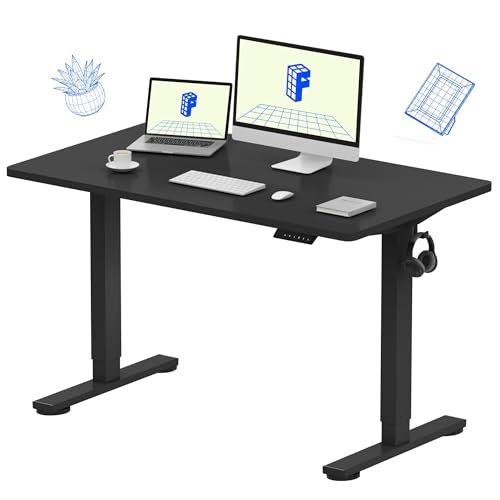
FLEXISPOT EN1 One-Piece Standing Desk, Electric Adjustable with 4 Memory Presets, 176 LBS Capacity, Stable & Quiet, Seamless Desktop for Home Office & Dual Monitors, 48"x24" Black
Included for 'Best Desk Setup Ideas (2026): 15 Looks for Gaming and Work' as a representative gaming desktop pc in this roundup; selection reflects the product set returned for this topic.
View on Amazon6. Dual Monitor Workstation
Key pieces: two matching monitors, dual monitor arm, laptop stand or dock, wide desk mat.
Two screens remain the most productive desk upgrade for many people. Coders keep documentation on one side, traders watch charts and news, and gamers keep a stream or guide open while they play. Matching monitors in size and resolution look cleaner and make moving windows between them easier.
A dual monitor arm frees desk space, lets you align both screens at the same height and angle, and makes it easy to rotate one into portrait for documents or code. Place your main screen directly in front of you and the second angled to one side, or center the seam between two equal screens if you use both equally.
Best for: developers, analysts, editors and multitaskers.

VIVO Dual Monitor Stand, Fully Adjustable Arms for 17 to 32 inch Screens, Mechanical Articulating Desk Mount, Gaming and Office Setups, VESA 75x75, 100x100, Max 19.8 lbs, Classic, Black, STAND-V002O
Included for 'Best Desk Setup Ideas (2026): 15 Looks for Gaming and Work' because the listing lists an explicit depth/thickness, which is the attribute this article compares.
View on Amazon7. Ultrawide Centerpiece Setup
Key pieces: 34-inch or larger ultrawide monitor, deep desk, monitor light bar, minimal accessories.
An ultrawide monitor replaces a dual-screen setup with one seamless display and becomes an instant centerpiece. It is excellent for sim racing, flight sims, video editing timelines and side-by-side documents. Many 2026 setups build around a large curved OLED ultrawide and keep everything else minimal so the screen stands out.
Make sure your desk is deep enough: aim for at least 60cm (about 24 inches) so you can sit a comfortable distance from a wide curved screen. A monitor light bar lights the desk without glare on the panel; if your screen is curved, confirm the clamp fits before buying.
Best for: sim racers, video editors and immersive single-player gamers.

Quntis Monitor Light Bar with Remote, Eye-Care No Glare Computer Light Bar
Included for 'Best Desk Setup Ideas (2026): 15 Looks for Gaming and Work' as a representative gaming desktop pc in this roundup; selection reflects the product set returned for this topic.
View on Amazon8. L-Shaped Corner Command Center
Key pieces: L-shaped desk, separate zones for work and gaming, built-in shelves or pegboard, power outlets.
An L-shaped desk turns an unused corner into a full workstation. The extra surface lets you split the desk into zones: one side for a work laptop and notebooks, the other for a gaming PC and monitor. That separation helps you switch mindsets between work and play without leaving the room.
Many L-shaped gaming desks now include built-in power outlets, LED lighting and pegboards for headsets and controllers, which saves you buying those separately. Measure both walls before ordering, and check whether the desk is reversible so you can place the long side where you need it.
Best for: people who work and game in the same room, and anyone with a spare corner.

SEDETA 67" L Shaped Gaming Desk with Pegboard LED Lights and Power Outlet
Included for 'Best Desk Setup Ideas (2026): 15 Looks for Gaming and Work' as a representative home product in this roundup; selection reflects the product set returned for this topic.
View on Amazon9. Laptop-Only Minimal Setup
Key pieces: laptop stand, external keyboard and mouse, single USB-C hub, small desk lamp.
You do not need a desktop PC or big monitor for a good setup. Raising a laptop on a stand brings the screen closer to eye level, and an external keyboard and mouse let you keep your arms in a comfortable position. A single USB-C hub connects everything with one cable, so you can grab the laptop and go.
This setup is perfect for students and hybrid workers who move between home and office. If you later want more screen space, adding a portable or desktop monitor is a simple next step.
Best for: students, hybrid workers and small apartments.
10. Console and PC Hybrid Desk
Key pieces: monitor with multiple HDMI 2.1 inputs, console on a stand or shelf, controller and headset stand, comfortable chair.
Many players now keep a console at their desk alongside a PC. A monitor with two HDMI 2.1 ports plus DisplayPort lets you switch inputs without swapping cables, and current consoles can run 4K at 120Hz over HDMI 2.1. Store the console vertically on a shelf or stand to save surface space.
Give controllers and headsets a home so they do not clutter the desk. A combined headphone and controller stand keeps both in reach. Because you will sit back with a controller, choose a chair with good armrest support for your elbows.
Best for: players who use both PC and console in the same space.

UPERGO Solid Wood Headphone Stand with Controller Holder for Desk
Included for 'Best Desk Setup Ideas (2026): 15 Looks for Gaming and Work' as a representative home product in this roundup; selection reflects the product set returned for this topic.
View on Amazon11. Pegboard Maker Desk
Key pieces: clamp-on desk pegboard, hooks and shelves, small storage bins, task lighting.
A pegboard turns the wall behind your desk into flexible storage. Hang headphones, cables, tools, controllers and small shelves, and rearrange them whenever your needs change. Clamp-on pegboards attach to the back edge of the desk, so you do not need to drill into the wall, which is ideal for renters.
This style suits hobbyists who build keyboards, paint miniatures or tinker with electronics, but it also works for gamers who want headsets and accessories off the desk. Keep it organized by grouping items by use.
Best for: renters, makers and anyone short on drawer space.

VIVO Black Clamp-on 30 x 24 inch Desk Pegboard, PP-DK30B-1
Included for 'Best Desk Setup Ideas (2026): 15 Looks for Gaming and Work' because the listing lists an explicit depth/thickness, which is the attribute this article compares.
View on Amazon12. Streamer and Creator Hub
Key pieces: key light, microphone on a boom arm, webcam or camera, acoustic panels, second monitor for chat.
A streaming setup has to look good on camera and sound good on mic. Place a soft key light at about 45 degrees to your face, mount the mic on a boom arm so it stays out of frame, and use a second monitor for chat and stream controls. Acoustic panels or soft furnishings reduce echo, which matters more for audio quality than an expensive microphone.
Think about what appears behind you. A tidy shelf, subtle LED accents and a plant make a better backdrop than a bare wall or an unmade bed.
Best for: streamers, YouTubers and anyone who spends a lot of time on video calls.
13. Quiet Luxury Executive Desk
Key pieces: solid walnut desk, genuine or premium leather desk mat, matte black or brass accessories, high-end ergonomic chair.
One of the bigger trends in 2026 is the quiet luxury desk: no RGB, no gamer branding, just rich wood, leather and carefully chosen accessories. A walnut slab desk or premium standing desk pairs with a leather desk mat, a heavy metal lamp and a top-tier ergonomic chair.
The appeal is longevity. Neutral, high-quality materials age well and do not look dated after a year. Keep tech discreet: wireless peripherals, hidden cables and a single high-quality monitor.
Best for: professionals, executives and anyone who wants a timeless look.
14. Small-Space Wall Desk
Key pieces: wall-mounted or compact desk, wall shelves above, foldable chair or stool, monitor arm or wall mount.
If you are short on floor space, go vertical. A wall-mounted or drop-leaf desk frees the floor, and shelves above it hold books, speakers and decor. A monitor arm or wall mount keeps the desktop clear. Alternatively, a narrow console table can double as a compact standing or sitting desk.
Light colors and a single strip light under the shelf make a small corner feel open. Keep only what fits on the shelves and desk, and store the rest elsewhere.
Best for: studio apartments, dorm rooms and shared bedrooms.
15. Budget Starter Build
Key pieces: basic tabletop on simple legs, 24-inch monitor, affordable mechanical keyboard, wired mouse, desk mat.
A good first setup does not need to be expensive. A simple tabletop on basic legs, a 24-inch monitor, a budget mechanical keyboard and a decent mouse cover the essentials. Add a desk mat and a cable tray, and you already have a tidy, comfortable workspace.
The smartest approach is to build gradually. Upgrade one item at a time, starting with whatever you touch or look at most: usually the chair, then the monitor. Neutral colors such as black, gray and white tend to age better than trend colors, so early purchases still fit as the setup grows.
Best for: students, first apartments and anyone on a tight budget.
How to Plan Your Desk Setup in 6 Steps
- Measure the space. Note wall width, desk depth and where outlets and windows are. A depth of 60 to 75cm (about 24 to 30 inches) suits most single-monitor setups; ultrawides and dual monitors benefit from the deeper end.
- Choose your centerpiece. Decide what the setup is built around: an ultrawide monitor, a standing desk, a gaming PC or a wood desk. Everything else should support it.
- Set ergonomics first. Position the chair, desk height, keyboard and monitor together, not one at a time.
- Plan power and cables. Map power strips and cable routes before mounting monitors. Mount a tray under the desk and run one bundle to the outlet.
- Layer the lighting. Combine room light, a task light such as a monitor light bar, and optional accent or bias lighting.
- Add personality last. Plants, art, figures and a desk mat come after function. Edit regularly to keep it clean.
Desk Ergonomics: The Numbers That Matter
| Element | Target | Why It Matters |
|---|---|---|
| Monitor height | Top edge at or slightly below eye level | Keeps your neck neutral |
| Monitor distance | About an arm’s length (50 to 75cm) | Reduces eye strain; go farther for large screens |
| Elbow angle | About 90 degrees, shoulders relaxed | Prevents shoulder and wrist fatigue |
| Wrists | Straight, not bent up or down | Lowers strain during long typing sessions |
| Feet | Flat on the floor or a footrest | Supports good posture and circulation |
| Lighting | Light from the side, no glare on screen | Avoids reflections and squinting |
Your chair is as important as the desk. A gaming or office chair with adjustable height, lumbar support and armrests that reach your elbows makes every one of these targets easier to hit.
Desk Setup Mistakes to Avoid
- Buying the look before the fit. A beautiful desk that is too shallow or too high will be uncomfortable every day.
- Placing the monitor too low. Laptop screens and short stands force you to look down. Use a riser, arm or laptop stand.
- Ignoring cable management until the end. Plan cable routes before mounting anything, especially on standing desks.
- Relying on overhead light only. Ceiling lights cause glare and shadows. Add a task light near the screen.
- Overdoing RGB. Too many colors and bright LEDs in your eyeline look messy and cause strain. Stick to two or three colors and indirect light.
- Filling every surface. Clear space is part of the design. If you have not used something in a week, store it.
FAQ
What makes a desk setup look good?
A good desk setup looks intentional: one clear centerpiece, a limited color palette, hidden cables and layered lighting. Keeping the surface mostly clear and choosing accessories that match in tone matters more than how much you spend.
How much does a good desk setup cost?
A basic starter setup with a simple desk, 24-inch monitor, keyboard and mouse can stay in the budget tier, while full builds with a standing desk, quality chair and larger monitor move into the mid to premium range. Building gradually spreads the cost.
What is the most popular desk setup style in 2026?
Minimal white setups remain the most copied style, while quiet luxury desks with walnut, leather and matte black accessories are a fast-growing trend. RGB battlestations stay popular with gamers, often with lighting synced across devices.
How do I hide cables on my desk?
Mount a cable tray under the desk to hold the power strip and adapters, run cables down one desk leg with clips or a sleeve, and use a monitor arm with built-in cable channels. Wireless peripherals reduce cables further.
Is a standing desk worth it for a gaming setup?
A standing desk is worth it if you also work at the same desk for long hours, because changing position helps comfort. For gaming alone, a fixed desk at the right height and a good chair are usually enough.
What size desk do I need for two monitors?
For two 27-inch monitors side by side, aim for a desk at least 140cm (about 55 inches) wide and 60cm (about 24 inches) deep. A dual monitor arm can reduce the depth you need by mounting screens closer to the back edge.
Where should I put my desk in a room?
Place the desk so windows are to your side rather than directly behind or in front of the monitor, which avoids glare and backlighting. Facing a wall saves space, while facing into the room works well for video calls.
Which Desk Setup Idea Should You Choose?
- You want calm and clean: Minimal white or quiet luxury.
- You game at night: Dark and moody or RGB battlestation.
- You work long hours: Standing desk productivity or dual monitor workstation.
- You want immersion: Ultrawide centerpiece.
- You work and game in one room: L-shaped corner or console and PC hybrid.
- You are short on space or budget: Small-space wall desk, laptop-only or budget starter.
Whichever idea you pick, start with ergonomics and cable management, then add style one piece at a time. That is how the setups people admire most were built.
Last updated: October 10, 2026