Our Top Picks
A 1000W power supply is the right answer to a specific problem: you are building around a power-hungry graphics card, and you want the supply to run in its comfortable middle range instead of at its limit. It is not the right answer to a vague wish for “future proofing.” Buy 1000W because your parts need it, or because the headroom keeps the fan quiet, and you will be happy. Buy it because the number looks big, and you pay for capacity that sits idle.
This guide covers eight fully modular 1000W units, all listing the newer ATX 3.1 or compatible connectors and a native 12V-2×6 cable for current graphics cards. They differ in efficiency tier, fan behavior, and the extras each maker puts in the title. Every note below comes from the listing text, so confirm cable counts, dimensions, and warranty on the maker page before you order in 2026. A 1000W unit is a long-lived part, which makes those details worth ten minutes of reading. Cost is described in plain tiers: budget-friendly, mid-range, and premium.
Quick Picks

be quiet! Pure Power 13 M 1000W Power Supply, 80+ Gold, Cybenetics Platinum | PCIe 5.1, ATX 3.1, Fully Modular PSU, LLC Topology, Semi-Passive Fan, Single-Rail, For Overclocked GPUs, 10 Year Warranty
One of the consumer electronics options compared in this guide.
View on Amazon
CORSAIR RM1000x ATX 3.1 PCIe 5.1 1000W Power Supply – Black | Native 12V-2x6 Connector, Fully Modular, Low-Noise, Cybenetics Gold, NA
One of the consumer electronics options compared in this guide.
View on Amazon
Auotac 1000W Fully Modular Power Supply, 80+ Gold PSU, ATX 3.1 & PCIe 5.1 Ready, Native Dual-Color 12V-2x6 Cable, RGB Low-Noise Smart Fan, 105°C-Rated Capacitors, Black
One of the consumer electronics options compared in this guide.
View on Amazon
ASUS ROG Strix 1000W Platinum (Fully Modular Power Supply, 80 Plus Platinum Certified, ATX 3.1, Cybenetics Lambda A+, GaN MOSFET, GPU-First Intelligent Voltage Stabilizer, 10-Year Warranty)
One of the consumer electronics options compared in this guide.
View on Amazon
Rosewill VMG 1000W 80+ Gold, ATX 3.0 & 3.1 Compatible, Full Modular Low-Noise Power Supply, PCIe 5.1 12V-2x6 Connector, 100% Japanese Electrolytic Capacitor, 120mm FDB Silent Fan - 5 Year Warranty
One of the consumer electronics options compared in this guide.
View on Amazon
1000W Fully Modular Power Supply, 80+ Gold Certified PSU | ATX 3.1 & PCIe 5.1 Ready | 12V-2x6 Connector | 140mm Low-Noise Fan | 105℃ Japanese Capacitors | Black PSU
One of the consumer electronics options compared in this guide.
View on Amazon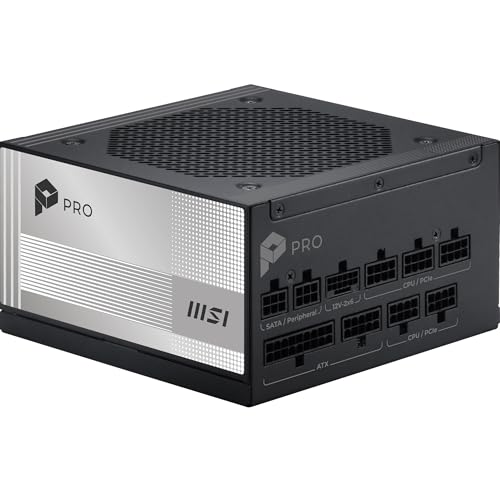
MSI PRO A1000PL PCIE5, Fully Modular Gaming 1000W Power Supply, 80+ Platinum, 12V-2x6 Cables, Server-Grade Capacitor, ATX 3.1 & PCIe 5.1 Ready, Low-Noise, Embossed Jacket Cables, 7 Year Warranty
One of the consumer electronics options compared in this guide.
View on Amazon
NZXT C1000 Gold ATX 3.1 - 1000W Fully Modular Power Supply | 1000W 80 PLUS Gold ATX 3.1 PSU, fully modular and quiet. PCIe 5 ready for modern GPUs, backed by a 10-year warranty.
One of the consumer electronics options compared in this guide.
View on Amazon| Product | Best for | Key spec from the title |
|---|---|---|
| be quiet! Pure Power 13 M | Quiet builds that need a Gold unit | 80+ Gold, Cybenetics Platinum, semi-passive fan, fully modular |
| CORSAIR RM1000x | A well-known fully modular Gold unit | ATX 3.1, PCIe 5.1, native 12V-2×6, Cybenetics Gold |
| Auotac 1000W | Lit builds with a lower-cost unit | 80+ Gold, native dual-color 12V-2×6 cable, RGB fan |
| ASUS ROG Strix 1000W Platinum | High-efficiency, premium builds | 80 Plus Platinum, Cybenetics Lambda A+, GaN MOSFET |
| Rosewill VMG 1000W | Budget-minded Gold with ATX 3.0 and 3.1 | 80+ Gold, Japanese electrolytic capacitors, PCIe 5.1 |
| MSI PRO A1000PL PCIE5 | A Platinum unit with server-grade parts | 80+ Platinum, 12V-2×6 cables, server-grade capacitors |
| NZXT C1000 Gold | Clean look, simple Gold build | 80 PLUS Gold, ATX 3.1, fully modular |
| be quiet! Power Zone 2 | Platinum with a zero RPM fan mode | 80+ Platinum, Pure Wings 3 140mm fan, 90° 12V-2×6 connector |
The 8 Best Options
be quiet! Pure Power 13 M 1000W
This is the pick for a builder who wants a quiet Gold-class unit with an unusually strong efficiency note. The title lists 80+ Gold alongside a Cybenetics Platinum result, PCIe 5.1 and ATX 3.1 support, a fully modular design, LLC topology, and a semi-passive fan. The semi-passive fan means the fan can stay off at light loads, which suits a PC that spends most of its day browsing and light work.
The Cybenetics Platinum note beside the Gold label is the interesting detail: it points to efficiency results that sit above the basic Gold requirement, though the label itself remains Gold. The LLC topology named in the title is a common design for stable output, and it is the sort of line a builder can look up on the maker page. For a PC that idles often, such as a workstation that also games, the semi-passive fan is the feature that earns its place.
- Fully modular cables keep a clean build with only the connectors you need.
- The semi-passive fan is designed for silence at low load.
- ATX 3.1 and PCIe 5.1 match current graphics cards.
- The title is cut off, so check the maker page for the cable list.
- Gold on the 80+ label is a step below Platinum on efficiency.
Skip it if you want a Platinum label on the box, or if you need the exact cable count confirmed in the title. Compared with the CORSAIR RM1000x next, the Pure Power 13 M leans on quiet operation, while the Corsair leans on a long-running product name.
CORSAIR RM1000x
The RM1000x is a familiar name for a fully modular Gold-class unit. The listing shows ATX 3.1 and PCIe 5.1, a native 12V-2×6 connector, fully modular cabling, low-noise operation, and a Cybenetics Gold result, in black. It is the conventional choice for a high-end gaming build that wants a straightforward and recognized power supply. The unit also fits a builder who plans to carry the supply across two or three builds, since the connector and standard support are current.
Buyers often choose this model line because it is easy to find build guides, cable tips, and compatibility notes written around it. The title keeps the claims modest: ATX 3.1, PCIe 5.1, native 12V-2×6, low noise, and a Gold result. For someone building a first high-end PC, that mix of plain facts and a familiar name lowers the risk of a surprise at install time.
- A native 12V-2×6 connector avoids an adapter for modern graphics cards.
- Fully modular cables make for neat routing.
- A Cybenetics Gold result is stated in the title.
- It does not claim Platinum efficiency.
- The title gives no fan size or warranty length.
Skip it if you want a lit unit or a Platinum label. It is also not the pick for a buyer who wants the fan speed behavior spelled out in the title. Next to the Auotac, the Corsair is the brand-first option, while the Auotac is the feature-heavy, lower-key alternative.
Auotac 1000W Fully Modular
The Auotac targets buyers who want a lit, feature-heavy Gold unit from a lesser-known brand. The title lists 80+ Gold, ATX 3.1 and PCIe 5.1 ready, a native dual-color 12V-2×6 cable, an RGB low-noise smart fan, and 105°C-rated components. The dual-color cable is a styling detail that shows through a glass panel.
The smart fan in the title suggests the speed adjusts with load, though the listing does not give the exact curve. The dual-color cable and the lit fan are the points of difference from the plainer units in this guide. In a case with a power supply shroud, those touches may be hidden, which is why the Auotac suits an open or glass-bottom build better than a closed one.
- A native 12V-2×6 cable is included, so a new graphics card connects without an adapter.
- The RGB fan and cable add a lit look inside the case.
- A 105°C rating is stated for the internal parts.
- The brand is less established, so check the warranty and support details.
- Lighting on a power supply is mostly hidden in many cases.
Skip it if brand reputation matters to you more than a feature list. A cautious buyer should read the warranty terms twice, since a lesser-known brand has a shorter public track record. Against the ASUS ROG Strix, the Auotac is the lower-key lit choice, while the ROG Strix is the premium one.
ASUS ROG Strix 1000W Platinum
This is the premium unit in the group. The title lists a fully modular design, 80 Plus Platinum, ATX 3.1, a Cybenetics Lambda A+ noise result, GaN MOSFET technology, and a GPU-first design. Platinum efficiency and a quiet-class noise result make it the choice for a high-end build. It is the unit for a builder who is already spending heavily on the processor, the graphics card, and the case, and who wants the power supply to match that level of care rather than being the weak link.
The GPU-first wording in the title points to a design that prioritizes graphics card power delivery, and the GaN MOSFET note is a component detail that makers use to improve efficiency and reduce size. The Strix name also ties the unit to ASUS lighting and case ecosystems, which suits a buyer already building around that brand. It is the unit to look at when the graphics card is the most expensive part of the PC.
- 80 Plus Platinum is the highest efficiency label in this guide.
- A Lambda A+ noise result is stated, a good sign for quiet operation.
- GaN MOSFETs are named as part of the design.
- It belongs to the premium tier, so cost is higher than the Gold options.
- The title is cut off, so confirm the cable list and warranty length.
Skip it if you want the lowest cost. A buyer on a mid-range graphics card will not use the extra efficiency enough to justify the tier. Compared with the Rosewill next, the ROG Strix is the top-tier build, while the Rosewill is the thrifty Gold option.
Rosewill VMG 1000W
The Rosewill VMG is for the budget-minded buyer who still wants ATX 3.1. The title lists 80+ Gold, ATX 3.0 and 3.1 compatibility, a fully modular low-noise design, a PCIe 5.1 12V-2×6 connector, and 100% Japanese electrolytic capacitors. That capacitor note is a build-quality cue that buyers can look for in lower-cost units. A buyer who wants a 1000W unit mainly to feed a high-end graphics card, and who has no plan to chase the quietest fan curve, will find the spec list well matched to the job.
The wording ATX 3.0 and 3.1 compatible is worth reading closely: it suggests the unit follows the earlier standard and works with the newer one, but it is not a statement that the whole design was built for ATX 3.1 alone. For most builds the difference is small, because the cable and the connector are what the graphics card sees. The Rosewill is a sensible candidate for a builder who wants a modern 12V-2×6 cable without paying a premium-tier price.
- ATX 3.0 and 3.1 compatibility is stated.
- Japanese electrolytic capacitors are named in the listing.
- Fully modular, low-noise design keeps the build tidy.
- It is a budget-friendly unit, so brand recognition is lower than at the large makers.
- No fan or warranty details appear in the title.
Skip it if you want a Platinum label or a quiet-class result stated in the title. Next to the MSI, the Rosewill is the value Gold option, while the MSI steps up to Platinum.
MSI PRO A1000PL PCIE5
The MSI PRO A1000PL is a Platinum unit aimed at gaming builds. The title lists a fully modular 1000W design, 80+ Platinum, 12V-2×6 cables, server-grade capacitors, ATX 3.1 and PCIe 5.1 readiness, and low-noise operation. The Platinum label at this tier makes it a mid-range to premium option.
The PCIE5 in the model name flags support for the newer graphics connector, and the title adds 12V-2×6 cables to make that explicit. Server-grade capacitors are a durability claim the maker puts in the title, so read the warranty term on the maker page to see how it backs that up. For a gaming PC that will run for long sessions, Platinum efficiency and sturdy parts are a sensible pairing.
- 80+ Platinum efficiency is stated.
- 12V-2×6 cables are included for modern graphics cards.
- Server-grade capacitors are named in the title.
- The title gives no fan size or warranty term.
- It costs more than most Gold units, which not every build needs.
Skip it if Gold efficiency is enough for your build, which is true for most gaming PCs. Compared with the NZXT, the MSI is the Platinum choice, while the NZXT is the clean-looking Gold choice.
NZXT C1000 Gold
The NZXT C1000 is for builders who want a simple, quiet Gold unit with a clean look. The title lists ATX 3.1, a fully modular 1000W design, 80 PLUS Gold, and PCIe 5 readiness for modern graphics cards. NZXT cases and coolers are common in lit builds, so a matching supply fits a themed setup. It is a calm choice for a buyer who does not want to compare long feature lists and simply wants a modern Gold unit with a clear label.
The strength of this model is the lack of fuss. A fully modular design lets you plug in only the cables the build needs, and an ATX 3.1 label means the unit follows the current standard. A builder who already has an NZXT case and cooler will find the black finish and the look easy to match, though the title does not give details on cable sleeving or color.
- 80 PLUS Gold at 1000W covers high-end gaming builds.
- ATX 3.1 and fully modular cabling keep installs neat.
- The listing mentions quiet operation.
- The title is cut off, so check the cable count.
- No Platinum label and no fan mode is named.
Skip it if you want zero RPM fan mode or a Platinum label on the box. Next to the be quiet! Power Zone 2, the NZXT is the plain Gold option, while the Power Zone 2 adds Platinum and a zero RPM mode.
be quiet! Power Zone 2 1000W
The Power Zone 2 is a Platinum unit built around low noise. The title lists ATX 3.1, PCIe 5.1, 80+ Platinum, a Zero RPM low-noise design, a Pure Wings 3 140mm fan, and a 90° 12V-2×6 connector. The angled connector helps in tight cases where a straight plug would press against the side panel. The pairing of a large 140mm fan with a Zero RPM mode points to a design that stays silent at light load and ramps slowly as demand rises.
This is the unit to consider if your graphics card sits close to the side panel and a straight plug would bend sharply. A bend near the connector is a common cause of poor contact on high-power cables, so an angled connector is a practical feature, not a styling one. It also suits small and mid-size cases where cable room is limited.
- A 140mm Pure Wings 3 fan is stated, with a Zero RPM mode for light loads.
- The 90° 12V-2×6 connector suits tight cases.
- 80+ Platinum puts it at the high end of efficiency.
- It sits in the higher cost tier.
- The title is cut off, so confirm the cable list.
Skip it if you want a lit supply or the lowest cost. As the last pick, it is the Platinum option for a quiet build in a tight case.
Who Needs a 1000W Power Supply
Not every gaming PC needs 1000W. These are the cases where it makes sense.
You run a high-end graphics card
Top-tier graphics cards can draw hundreds of watts on their own, and a high-end processor adds more. Add fans, drives, and a pump, and a flagship build can pass 700W in a heavy load. A 1000W supply keeps the total load near the middle of its range, where efficiency and fan noise are best.
You overclock or run many drives
Overclocking raises power draw, and so does a large set of drives, fans, and pumps. A custom liquid loop with two pumps and a dozen fans can add a surprising number of watts on its own. The extra headroom gives a margin for spikes and keeps the supply from running hot under sustained loads. Workstation tasks such as rendering keep the processor and graphics card busy for hours, and a supply running at half load handles that without the fan ramping.
You want to keep the supply for years
A quality 1000W unit can move from one build to the next, outlasting two or three graphics cards. If you upgrade the graphics card in the future, a supply with a native 12V-2×6 cable and ATX 3.1 support will not need to be replaced.
How to Choose
Wattage and real load
Use the maker-listed power figures. Add up the maximum draw of your processor and graphics card, then add 100W to 150W for the rest. A total near 500W to 650W suits a 1000W supply, which runs near the middle of its range. Many supplies reach their peak efficiency around 40 to 60 percent load, so a 1000W unit under a 500W load sits right in that window. Transient spikes from modern graphics cards can briefly exceed their rated draw, which is another reason to leave headroom. If your total is well under 500W, a smaller unit costs less and works just as well.
Efficiency tier
80 PLUS Gold requires about 90 percent efficiency at 50 percent load on 115V, while Platinum requires about 92 percent. The gap is small, roughly 10W of wasted heat at a 500W load. Platinum matters more in hot rooms and long sessions than on a typical gaming day. Efficiency also affects fan speed, because less wasted heat means less cooling is needed.
Connectors and standards
Look for ATX 3.1 and PCIe 5.1, and a native 12V-2×6 cable so a new graphics card does not need an adapter. Count the PCIe 8-pin cables if your card uses them; each is rated for up to 150W. Check the number of SATA and Molex connectors if you use many drives. A single-rail 12V design is common at this size, with about 83A available on the main rail, which simplifies cable planning.
Fan design and noise
Semi-passive and Zero RPM modes keep the fan off at low load. Larger 135mm or 140mm fans move more air at lower speed. A noise result such as Cybenetics Lambda A+ gives a quick way to compare supplies. Fan noise rises with load, so a supply that stays silent at 300W may become audible at 700W.
Capacitors and build quality
Japanese capacitors and 105°C ratings in a listing are signs of a quality build. A longer warranty, often 7 to 10 years on a good 1000W unit, signals the maker expects the supply to last. Check the warranty length on the maker page. Be careful with titles that name a component grade but no warranty, because the two together tell the full story.
Size and cable layout
Most ATX supplies share the same footprint, but depth varies. Check that your case supports the length with room for cable bends. A 90° connector helps in tight cases. Allow at least 35mm of straight cable before any bend at a 12V-2×6 plug, and make sure a side panel does not press on the connector.
Gold vs Platinum at 1000W
The choice most buyers face here is not wattage but efficiency tier. The table sets out what the listings show.
| Factor | 80+ Gold units | 80+ Platinum units |
|---|---|---|
| Examples | CORSAIR RM1000x, Auotac, Rosewill VMG, NZXT C1000, be quiet! Pure Power 13 M | ASUS ROG Strix, MSI PRO A1000PL, be quiet! Power Zone 2 |
| Efficiency target at 50 percent load (115V) | About 90 percent | About 92 percent |
| Cost tier | Budget to mid-range | Mid-range to premium |
| Best fit | Most gaming builds | Hot rooms, long sessions, quiet builds |
When Gold is enough
Gold is the sensible choice for most gaming builds. The efficiency gain from Platinum is small, and the cost difference can go toward a better graphics card or more storage. Over a year of daily gaming, the energy saved by the higher tier is modest, so treat Platinum as a comfort feature and not as a way to recover its cost.
When Platinum is worth it
Platinum makes sense if the PC runs for many hours a day, if the room is warm, or if you want the quietest possible operation. The be quiet! Pure Power 13 M shows the overlap: it carries a Gold label with a Cybenetics Platinum note. If you are choosing between a Gold unit with a strong noise result and a Platinum unit with an average one, the noise result may matter more day to day.
Setup, Compatibility and Upgrade Tips
What to check before buying
Confirm that your case fits an ATX power supply and that the length leaves room for cables. Check the connectors your graphics card uses, either 12V-2×6 or PCIe 8-pin, and count the cables you need. Look at the warranty length on the maker page. Also check the case manual for the maximum supply depth, since a few compact cases limit it.
What to upgrade first
If you are replacing an older supply, upgrade the graphics card cable first, using the native 12V-2×6 cable instead of an adapter. Then replace sleeved or damaged cables. A supply upgrade can follow the graphics card upgrade, not the other way around. If the build is new, install the supply before the motherboard so you can route the thick cables with room to work.
Common compatibility traps
Modular cables are not interchangeable between brands, even when the plugs look similar. Never mix cables from another supply, even from the same maker, unless the maker says they are compatible. Seat the 12V-2×6 plug fully, with no sharp bend near the connector, because a partly seated plug can overheat. Leave some slack in the cable and keep the first few centimeters straight. Finally, use only the cables that came with the supply, and register the warranty if the maker offers it.
Which One Fits Your Situation
You want a quiet build
The be quiet! Power Zone 2 lists a Zero RPM design, a 140mm fan, and Platinum efficiency. It is also the pick for a PC on a desk near your ears, where fan noise at light load is the first thing you notice.
You want the lowest cost for a 1000W unit
The Rosewill VMG lists 80+ Gold, ATX 3.0 and 3.1 compatibility, and Japanese electrolytic capacitors. It is the practical pick when the graphics card is the main expense and you want the supply to be sensible.
You want a premium unit for a flagship build
The ASUS ROG Strix 1000W Platinum lists Platinum efficiency, a Lambda A+ noise result, and GaN MOSFETs.
You want a familiar name and simple Gold efficiency
The CORSAIR RM1000x lists a native 12V-2×6 connector, ATX 3.1, and a Cybenetics Gold result.
Common Mistakes
- Buying 1000W for a build that draws far less than 500W.
- Using an adapter when the supply includes a native 12V-2×6 cable.
- Mixing modular cables from different brands or models.
- Bending the 12V-2×6 plug sharply near the connector.
- Skipping the warranty length when comparing units.
- Paying for lighting on a supply that will sit hidden in a shroud.
Related guides
- Gaming Chair Accessories And Replacement Parts
- Aio Liquid Coolers For High Performance Gaming
- All In One Desktop For Small Business
Frequently Asked Questions
Is 1000W too much for a gaming PC?
It is more than most builds need. A build with a high-end graphics card and processor can reach 600W in heavy use, so 1000W gives headroom for spikes and future upgrades. A mid-range build can use 650W to 850W.
Does a 1000W supply use more electricity?
No. A supply only delivers what the parts demand. A 1000W unit in a 400W PC draws about the same as a smaller unit, with slightly different efficiency.
What is ATX 3.1?
It is the current power supply standard, designed for modern graphics cards with a 12V-2×6 connector. It improves handling of short power spikes, and it adds safeguards around the 12V-2×6 connector. Units that list ATX 3.1 are built for that standard.
Can I use a 12V-2×6 cable with an older card?
Only if the card uses that connector, or if the card maker supplies an adapter that matches your cables. Older cards use PCIe 8-pin plugs, which the supply also provides. Check your card before choosing a cable.
Is Platinum worth the extra cost?
For most gamers, Gold is enough. Platinum helps in hot rooms and long sessions, and some Platinum units also have quieter fans.
How long should a 1000W supply last?
A quality unit often lasts for many years and carries a long warranty. Check the warranty length on the maker page, because it varies a lot between brands and tiers. Dust is the main enemy, so clean the fan and the vents once or twice a year.
Final Words
A good 1000W supply is one that matches the load of your parts, keeps the fan quiet, and brings a native cable for your graphics card. The be quiet! Power Zone 2 and the ASUS ROG Strix cover quiet Platinum builds, the CORSAIR RM1000x and NZXT C1000 cover familiar Gold choices, and the Rosewill VMG and Auotac cover the value end. Add up your parts first, then choose the efficiency tier that fits your room and your hours of use, and confirm the warranty before you order.