Key takeaways
- Bandwidth: DDR4 gaming kits typically top out around 3200–4000 MT/s, while mainstream DDR5 kits run 5600–6400 MT/s and beyond — roughly double the raw throughput.
- Latency: DDR4’s CAS numbers look far better on paper (CL16 vs CL36), but real latency in nanoseconds is now close. DDR5-6000 CL36 lands near 12 ns against roughly 8.9 ns for DDR4-3600 CL16 — DDR5 wins overall because bandwidth more than compensates.
- Architecture: Each DDR5 DIMM splits into two independent 32-bit sub-channels, which improves efficiency under the messy, parallel access patterns modern game engines generate.
- Power and regulation: DDR5 drops to 1.1V baseline (1.35V for XMP/EXPO kits) and moves voltage regulation onto the module itself via an on-board PMIC, alongside on-die ECC for improved stability at high densities.
- Capacity: DDR5 scales to 64GB per module, making 96GB and 128GB kits practical. DDR4 realistically caps at 32GB per stick on consumer boards.
- Compatibility: The notch position differs, so the two are physically incompatible. There is no adapter, no BIOS update, no workaround.
For the better part of a decade, DDR4 was simply what RAM was. It powered Ryzen 1000 through 5000, Intel’s 6th through 12th generation Core chips, and just about every gaming rig built between 2015 and 2022. DDR5 arrived alongside Alder Lake in late 2021 with high prices, immature kits, and benchmark results that barely justified the upgrade. That era is long over. In 2026, DDR5 is the default, DDR4 is winding down, and the gap between them is no longer academic.
This choice matters more than most component decisions because memory is platform-locked. Your motherboard supports one standard or the other — never both — so picking DDR4 or DDR5 effectively decides which CPU generation you can run now and how far you can upgrade later. Complicating things further, DDR4 production has been scaling back across the industry, which has pushed pricing in strange directions and made “the cheap option” much less reliably cheap. Below we break down where each standard genuinely makes sense.
Our top picks
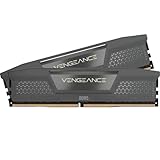
 CORSAIR Vengeance RGB DDR5 RAM 32GB
- Disclaimer: Maximum Speed requires overclocking/PC BIOS adjustments
- Dynamic Ten-Zone RGB Lighting: Illuminate your system with…
- Onboard Voltage Regulation: Enables easier, more finely-tuned, and…
 Lexar Thor Z RGB DDR5 RAM 32GB
- Unleash Next-Gen Dominance: Experience Lexar DDR5 RAM performance…
- Sleek & Robust Thermal Design: Engineered for both…
- Game in Style with Brighter RGB Lighting: Elevate…
 CORSAIR Vengeance RGB DDR5 RAM 32GB
- Disclaimer: Maximum Speed requires overclocking/PC BIOS adjustments
- Dynamic Ten-Zone RGB Lighting: Illuminate your system with…
- Onboard Voltage Regulation: Enables easier, more finely-tuned, and…
| Product | Key specs | |
|---|---|---|
| CORSAIR Vengeance RGB DDR5 RAM 32GB | Disclaimer: Maximum Speed requires overclocking/PC BIOS adjustments Dynamic Ten-Zone RGB Lighting: Illuminate your system with… Onboard Voltage Regulation: Enables easier, more finely-tuned, and… | Check price |
| Lexar Thor Z RGB DDR5 RAM 32GB | Unleash Next-Gen Dominance: Experience Lexar DDR5 RAM performance… Sleek & Robust Thermal Design: Engineered for both… Game in Style with Brighter RGB Lighting: Elevate… | Check price |
| CORSAIR Vengeance RGB DDR5 RAM 32GB | Disclaimer: Maximum Speed requires overclocking/PC BIOS adjustments Dynamic Ten-Zone RGB Lighting: Illuminate your system with… Onboard Voltage Regulation: Enables easier, more finely-tuned, and… | Check price |
 CORSAIR Vengeance RGB RS DDR5 32GB CORSAIR Vengeance RGB RS DDR5 32GB | Disclaimer: Maximum Speed requires overclocking/PC BIOS adjustments AMD EXPO & Intel XMP 3.0 Compatible Only:… Dynamic RGB Lighting: Individually addressable RGB lighting delivers… | Check price |
 Crucial 32GB DDR5 RAM Kit Crucial 32GB DDR5 RAM Kit | Boosts System Performance: 32GB DDR5 RAM laptop memory… Accelerated gaming performance: Every millisecond gained in fast-paced… Optimized DDR5 compatibility: Best for 12th Gen Intel… | Check price |
 CORSAIR Vengeance RGB RS DDR5 32GB CORSAIR Vengeance RGB RS DDR5 32GB | Disclaimer: Maximum Speed requires overclocking/PC BIOS adjustments AMD EXPO & Intel XMP 3.0 Compatible Only:… Dynamic RGB Lighting: Individually addressable RGB lighting delivers… | Check price |
 CORSAIR Vengeance DDR5 32GB CORSAIR Vengeance DDR5 32GB | Disclaimer: Maximum Speed requires overclocking/PC BIOS adjustments AMD EXPO & Intel XMP 3.0 Compatible Only:… Onboard Voltage Regulation: Enables easier, more finely-tuned, and… | Check price |
 CORSAIR Vengeance RGB DDR5 32GB CORSAIR Vengeance RGB DDR5 32GB | Disclaimer: Maximum Speed requires overclocking/PC BIOS adjustments AMD EXPO & Intel XMP 3.0 Compatible Only:… Dynamic Ten-Zone RGB Lighting: Illuminate your system with… | Check price |
As an Amazon Associate we earn from qualifying purchases at no extra cost to you.
⚡ Save on Your Next PC — Amazon Prime
Prime members get fast free shipping on the systems above, plus early access to Prime Day & Black Friday PC deals. New members get a 30-day free trial.
Watch: DDR5 vs DDR4 RAM: Does It Matter in 2026? — Video Review
Quick Verdict
If you’re building a new PC or upgrading a CPU in 2026, DDR5 is the only sensible answer — every current AMD AM5 and Intel Core Ultra platform requires it, and a good 6000 MHz CL36 kit like the Corsair Vengeance RGB RS DDR5 32GB delivers meaningfully better frame pacing in CPU-limited games. DDR4 remains a smart, cost-effective choice in exactly one scenario: you already own an AM4, LGA1200, or DDR4-based LGA1700 board and want more capacity without replacing your motherboard and CPU. Buying into a brand-new DDR4 platform today is a dead end.
Key Differences
- Bandwidth: DDR4 gaming kits typically top out around 3200–4000 MT/s, while mainstream DDR5 kits run 5600–6400 MT/s and beyond — roughly double the raw throughput.
- Latency: DDR4’s CAS numbers look far better on paper (CL16 vs CL36), but real latency in nanoseconds is now close. DDR5-6000 CL36 lands near 12 ns against roughly 8.9 ns for DDR4-3600 CL16 — DDR5 wins overall because bandwidth more than compensates.
- Architecture: Each DDR5 DIMM splits into two independent 32-bit sub-channels, which improves efficiency under the messy, parallel access patterns modern game engines generate.
- Power and regulation: DDR5 drops to 1.1V baseline (1.35V for XMP/EXPO kits) and moves voltage regulation onto the module itself via an on-board PMIC, alongside on-die ECC for improved stability at high densities.
- Capacity: DDR5 scales to 64GB per module, making 96GB and 128GB kits practical. DDR4 realistically caps at 32GB per stick on consumer boards.
- Compatibility: The notch position differs, so the two are physically incompatible. There is no adapter, no BIOS update, no workaround.
DDR5: The Default Choice in 2026
DDR5’s advantage shows up where it matters most for gaming: minimum frame rates and frame time consistency. In open-world titles, simulation-heavy strategy games, and competitive shooters running at high refresh rates, the extra bandwidth smooths out the stutters that average FPS charts hide. Pair that with modern CPUs — which increasingly rely on memory throughput to feed large core counts and integrated NPUs — and the difference is easy to feel. The sweet spot remains 32GB at 6000 MHz CL36, which is exactly what the Corsair Vengeance RGB RS DDR5 32GB kit targets in both grey and white, with AMD EXPO and Intel XMP 3.0 profiles that apply in a single BIOS toggle.
There’s genuine variety at this tier now. The Corsair Vengeance DDR5 32GB pushes to 6400 MHz CL36 for Intel builds that can hold a 1:1 memory controller ratio, while the Lexar Thor Z RGB DDR5 32GB kit at 6000 MHz CL38 offers on-die ECC, a PMIC, and RGB lighting for builders who want a different aesthetic. If you’re chasing a clean themed build, the Corsair Vengeance RGB DDR5 32GB in white is a straightforward drop-in. Laptop and mini-PC owners aren’t left out either — the Crucial 32GB DDR5 SODIMM kit at 5600 MHz is the standard upgrade for Ryzen 7000-series and modern Intel Core notebooks.
DDR4: Still Viable, but Only on Existing Hardware
Don’t let the spec sheets fool you into thinking DDR4 is unusable. A Ryzen 5 5600X or Core i5-12400 running 32GB of DDR4-3600 CL16 still plays every current game comfortably, and at 1440p or 4K — where the GPU is the bottleneck — the difference between DDR4 and DDR5 shrinks to low single-digit percentages. If you’re gaming at high resolution with a mid-range graphics card, memory standard is not what’s limiting you.
The problem is the future, not the present. DDR4 is end-of-life across the industry: manufacturers have shifted fab capacity to DDR5, availability of quality binned kits has thinned out, and prices no longer track downward the way discontinued tech usually does. More importantly, no current-generation CPU supports it. Buying a DDR4 board today means your only upgrade path is used parts. Adding a second 16GB kit to a rig you already own is sensible; starting fresh on DDR4 is not.
Which Should You Buy?
- For a new AM5 or Intel Core Ultra build: pick DDR5 — the Corsair Vengeance RGB RS DDR5 32GB at 6000 MHz CL36 is the reliable default for both platforms.
- For maximum Intel performance: pick the Corsair Vengeance DDR5 32GB rated up to 6400 MHz, which gives you headroom if your memory controller cooperates.
- For a white or RGB-themed build: pick the Corsair Vengeance RGB DDR5 32GB in white, or the Lexar Thor Z RGB DDR5 32GB for a different lighting profile.
- For a laptop, handheld, or mini-PC: pick the Crucial 32GB DDR5 SODIMM kit — SODIMM and desktop DIMMs are not interchangeable.
- For an existing AM4 or 11th/12th-gen rig: stay on DDR4, add capacity, and put the savings toward a GPU upgrade instead.
Frequently Asked Questions
Can I put DDR5 in a DDR4 motherboard?
No. The modules use different notch positions, different pin counts, and entirely different voltage regulation. They will not physically fit, and no adapter or firmware update changes that. Your motherboard determines which standard you can use.