Our Top Picks
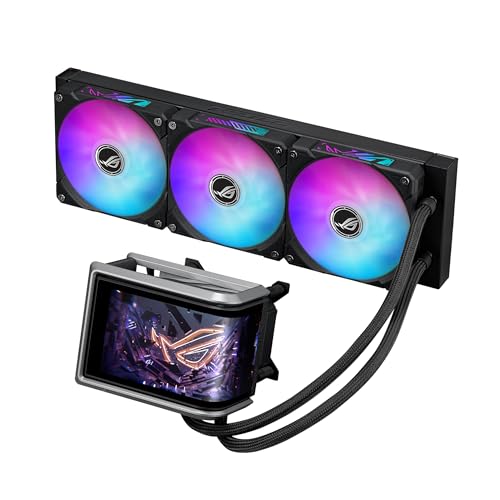 ASUS ROG Ryuo IV ARGB 360mm AMD/Intel Gaming360mm|Black15.7 x 4.7 x 1.2 Inches7 poundsCheck on Amazon
A liquid cooler for a high performance gaming build is not chosen the way a graphics card is chosen. Nobody should ask which logo looks best first; the first question is whether the radiator physically fits in the case, because a 360mm or 420mm radiator that will not mount at the top or front panel is just an expensive box. Only after that does the real contest begin: pump generation, fan behavior under sustained load, socket coverage for current Intel and AMD boards, and whether you want a screen on the pump head at all.
This guide is written for gamers running an unlocked, power-hungry processor who have outgrown a stock or mid-size air cooler, and for builders who want a sealed loop without the upkeep of a custom one. The eight coolers below span 240mm, 360mm and 420mm radiators, from a simple dual-fan unit to display-equipped flagships. Everything here is based on the listed specifications, so treat noise and temperature expectations as directional rather than measured.
Quick Picks
ASUS ROG Ryuo IV ARGB 360mm AMD/Intel Gaming Liquid CPU Cooler | 360mm AIO, curved 6.67" AMOLED display, Asetek Gen8 V2 pump, daisy-chained ARGB fans, Intel LGA1851/1700 & AMD AM5/AM4
One of the consumer electronics options compared in this guide.
View on Amazon
Noctua NL-LC1-36, High-Performance 360mm AIO CPU Cooler | Industry-Leading Quiet Cooling, 30mm Slim Radiator, Pump Noise Absorber, for Intel & AMD, 3x 120mm Fans, Rich Accessory Kit
One of the consumer electronics options compared in this guide.
View on Amazon
Antec Ultra 360 ARGB Liquid CPU Cooler, 3x120mm PWM Fans, High-Performance Pump, Intel LGA 1200/1851/20XX & AMD AM4/AM5
One of the consumer electronics options compared in this guide.
View on Amazon
ASUS ROG Ryujin III ARGB Extreme 360mm AMD/Intel Gaming Liquid CPU Cooler | 360mm AIO, Asetek Gen8 V2 pump, magnetic ARGB fans, 3.5" 640x480 LCD, VRM fan, Intel LGA1700/1851 & AMD AM4/AM5
One of the consumer electronics options compared in this guide.
View on Amazon
ARCTIC Liquid Freezer III Pro 360 - AIO CPU Cooler,3 x 120 mm Water Cooling | Cooler For LGA1851, LGA1700, AM4, AM5.
One of the consumer electronics options compared in this guide.
View on Amazon
Noctua NL-LC1-24, High-Performance 240mm AIO CPU Cooler | Industry-Leading Quiet Cooling, 30mm Slim Radiator, Pump Noise Absorber, for Intel & AMD, 2x 120mm Fans, Rich Accessory Kit
One of the consumer electronics options compared in this guide.
View on Amazon
Cooler Master Elite Liquid 240 AIO Liquid CPU Cooler, ARGB White | AMD AM5/AM4 & Intel LGA1851/1700 Support Cooler, 240mm, Dual-Chamber Pump, 2x Low-Noise ARGB PWM Fans, Easy Installation
One of the consumer electronics options compared in this guide.
View on Amazon
Noctua NL-LC1-42, High-Performance 420mm AIO CPU Cooler | Industry-Leading Quiet Cooling, 30mm Slim Radiator, Pump Noise Absorber, for Intel & AMD, 3x 140mm Fans, Rich Accessory Kit
One of the consumer electronics options compared in this guide.
View on Amazon| Product | Best for | Key spec from the title |
|---|---|---|
| ASUS ROG Ryuo IV 360 | Showcase builds with a pump screen | 360mm, curved 6.67 inch AMOLED display, Asetek Gen8 V2 pump |
| Noctua NL-LC1-36 | Quiet, slim 360mm cooling | 360mm, 30mm slim radiator, pump noise absorber |
| Antec Ultra 360 ARGB | Straightforward 360mm with a wide socket list | 3x120mm PWM fans, LGA 1200/1851 and AM4/AM5 |
| ASUS ROG Ryujin III Extreme 360 | Feature-heavy flagship | Asetek Gen8 V2 pump, magnetic ARGB fans, 3.5 inch 640×480 LCD |
| ARCTIC Liquid Freezer III Pro 360 | Plain 360mm for current sockets | 3x120mm, LGA1851, LGA1700, AM4, AM5 |
| Noctua NL-LC1-24 | Smaller cases that cannot take 360mm | 240mm, 30mm slim radiator |
| Cooler Master Elite Liquid 240 | White builds on a gentler tier | 240mm, dual-chamber pump, AM5/AM4 and LGA1851/1700 |
| Noctua NL-LC1-42 | Maximum radiator area | 420mm, 30mm slim radiator |
The 8 Best Options
ASUS ROG Ryuo IV ARGB 360mm
This is the pick for a builder whose case has a glass side panel and who wants the pump head to double as a small monitor. The listing describes a 360mm all-in-one loop with a curved 6.67 inch AMOLED display, an Asetek Gen8 V2 pump and daisy-chained ARGB fans, and it covers both AMD and Intel platforms. The daisy-chain detail matters in practice, because it means fewer separate cables to hide behind the radiator, which is half the battle in a showcase build where every wire is visible.
- Large curved AMOLED panel on the pump head, the biggest screen of any cooler on this list.
- Asetek Gen8 V2 pump, the same pump generation named on the Ryujin III.
- Daisy-chained ARGB fans reduce cable clutter and simplify lighting control.
- The display adds cost that buys looks, not extra cooling headroom over plainer 360mm units.
- A screen means extra software and a header connection to configure before it is useful.
Skip it if your case sits under a desk with a solid panel, since you would pay for a display nobody sees. Compared with the next pick, the Noctua NL-LC1-36, this ROG unit is about presentation, while the Noctua leans toward low noise and a slim radiator profile. Buyers choosing between them are really choosing between a statement piece and a quiet workhorse. Since the listing names a 360mm radiator and both AMD and Intel support, the practical checks are the same as for any three-fan loop: top or front mount clearance, a free header for the screen cable, and enough patience to configure the display software once.
Noctua NL-LC1-36 360mm
Buyers who care about how the machine sounds during a long session will be drawn to this one. The title highlights industry-leading quiet cooling, a 30mm slim radiator, a pump noise absorber and support for Intel and AMD. A thinner radiator is the sleeper feature here: it can leave room above memory modules and make a front-mounted fit easier in cases that struggle with chunkier radiators. For someone gaming in a small bedroom with the tower beside the desk, noise behavior often matters more than a few degrees.
- 30mm slim radiator eases clearance around tall RAM and tight panels.
- Pump noise absorber is called out directly in the listing, aimed at the pump whine some loops produce.
- Broad Intel and AMD compatibility without a screen or lighting premium.
- No display or lighting features are mentioned, so it will look plain beside ARGB-heavy parts.
- A slim radiator has less depth than chunkier designs, so confirm it suits your processor class.
Skip it if you want flashy lighting or a visible screen. Next on the list is the Antec Ultra 360, which swaps the quiet-first pitch for an ARGB look and a socket list that reaches back to older boards. If you are undecided between the two, ask whether you will ever see the cooler lit up; if the case lives under a desk, the quieter design earns more of your money.
Antec Ultra 360 ARGB
The Antec is the sensible middle path for a gamer who wants a three-fan radiator, some lighting and no extra gimmicks. Its title lists 3x120mm PWM fans, a high-performance pump, and mounting for Intel LGA 1200, 1851 and the 20XX family along with AMD AM4 and AM5. That is an unusually complete socket list in a single line, which helps anyone upgrading across platforms or moving a cooler from an old build into a new one.
- Spans older and newer sockets, including LGA 1200 and AM4, which suits a staged upgrade path.
- PWM fans allow the motherboard to adjust speed with temperature rather than running flat out.
- ARGB lighting without a display premium.
- The listing names no pump generation, so there is less to compare against the Asetek-based models.
- No noise-focused features are promoted, unlike the Noctua units.
Skip it if acoustics are your top priority and you would rather pay for a named noise-control design. Compared with the next pick, the ROG Ryujin III, it is the simpler and calmer choice, while the Ryujin throws in an LCD and magnetic fans. The Antec is the one to shortlist when value and socket flexibility outrank decoration. Because the three-fan layout is stated in the title, the Antec also gives you a clear picture of what the radiator will look like inside the case, and the PWM label tells you the fans can be tuned from the motherboard rather than left at a fixed speed.
ASUS ROG Ryujin III ARGB Extreme 360mm
Think of this as the gadget lover’s loop. The title names a 360mm AIO with an Asetek Gen8 V2 pump, magnetic ARGB fans and a 3.5 inch 640×480 LCD on the pump head, and it mentions VRM at the end of the visible text, a hint that the design addresses power-stage cooling around the socket. Magnetic fan attachment is the headline convenience, because it makes swapping or reseating fans less fiddly than screws or clips.
- Magnetic ARGB fans speed up assembly and later cleaning.
- The 3.5 inch LCD is a more modest screen than the Ryuo IV carries, which some buyers prefer.
- The VRM mention suggests attention to boards with exposed power stages near the socket.
- Premium positioning for features that do not change the radiator size.
- Screen and lighting add software overhead and more cables.
Skip it if you simply want the lowest sound and the easiest setup. Against the next pick, the ARCTIC Liquid Freezer III Pro 360, this is the showpiece while the ARCTIC is aimed at straightforward cooling for current sockets. Choose the Ryujin if you enjoy tinkering with settings; choose the ARCTIC if you would rather install it once and forget it. Also remember that a screen of any size relies on software to show anything useful, so the first evening with this cooler may involve more menus than a typical cooler installation.
ARCTIC Liquid Freezer III Pro 360
For builders who read spec lists the way mechanics read torque tables, this one has an honest title: a 360mm AIO CPU cooler with 3 x 120 mm water cooling fans, listed for LGA1851, LGA1700, AM4 and AM5. There is no screen or lighting pitch, so the product is judged on what it is: a three-fan radiator for current sockets. That clarity is useful when you are comparing against models wrapped in marketing language.
- Clear socket coverage that includes the newest Intel platform and both recent AMD ones.
- Three 120mm fans match the standard 360mm mounting layout in most large cases.
- A focused design with no display or accessory premium implied.
- Older Intel sockets such as LGA 1200 are not named in the title, so verify before pairing with an older board.
- Lighting and screen options are not listed, so it may look understated.
Skip it if you own a motherboard outside the listed sockets. Compared with the next pick, the 240mm Noctua NL-LC1-24, it offers more radiator area but needs a case that can mount three fans. If your case supports it, the extra area is the more future-proof choice for a processor upgrade. The ARCTIC also makes sense for buyers who swap platforms every few years, since the socket list leads with the newest Intel and AMD options and keeps AM4 as a fallback for an older board.
Noctua NL-LC1-24 240mm
This is the smaller-case answer. A 240mm radiator fits in far more cases than a 360mm unit, and the listing keeps the Noctua formula: industry-leading quiet cooling, a 30mm slim radiator, a pump noise absorber and support for Intel and AMD, with two fans. It targets gamers with a mid-tower or compact case whose top panel only takes two fans, and who still want a sealed loop instead of a bulky tower cooler.
- Fits cases that cannot accommodate three-fan radiators.
- Slim 30mm radiator leaves more clearance above the motherboard.
- The same noise-focused pump design called out on the larger sibling.
- Less radiator area than a 360mm, which matters most with very hot processors.
- Minimal visual flair for glass-panel builds.
Skip it if your processor sits among the highest-power options on the market and your case can take a 360mm. Next is the Cooler Master Elite Liquid 240, which targets the same radiator size with a lighting-friendly white design, so the choice comes down to quiet engineering versus color matching. A 240mm radiator is also easier to route tubes around in a compact case, and it asks for only two fan headers or one splitter, which keeps the build tidy.
Cooler Master Elite Liquid 240 ARGB White
This pick suits a white-themed build that needs a two-fan radiator at a gentler tier. The title lists a 240mm cooler with ARGB lighting, a dual-chamber pump, two low-noise fans, and support for AMD AM5 and AM4 plus Intel LGA1851 and LGA1700. The dual-chamber pump is the distinguishing feature mentioned, a design that separates sections inside the pump housing. It makes sense for someone assembling a lighter-colored case who does not want black components breaking the look.
- White ARGB finish matches light-colored cases and components.
- Covers the current AMD and Intel mainstream sockets in the title.
- An entry into liquid cooling without flagship positioning.
- 240mm area limits headroom with the hottest processors.
- Older sockets such as LGA 1200 are not listed.
Skip it if you want the strongest cooling you can fit rather than the best color match. Against the next pick, the Noctua NL-LC1-42, it sits at the opposite end: smaller radiator, lighter ambitions, easier case fit, and a brighter appearance. Gamers who run a mainstream processor and want a clean white look without paying flagship prices are the natural audience, and the listing’s two low-noise fans suggest it was built for calm everyday use rather than records.
Noctua NL-LC1-42 420mm
The 420mm radiator is the largest on this list and the obvious choice for builders who have the case space and want maximum surface area. The title repeats the Noctua pitch of quiet cooling, a 30mm slim radiator and a pump noise absorber, with a three-fan layout. Slim thickness paired with extra length is an interesting trade, since it adds area without adding depth, and it keeps clearance over memory manageable.
- Largest radiator area among the eight options.
- Slim profile helps clearance despite the long form factor.
- Quiet-focused design carried through from the smaller models.
- Few cases support a 420mm radiator, so fitment is the main obstacle.
- Understated look with no lighting or screen features listed.
Skip it if you have not confirmed 420mm support in your case manual, because returning a cooler over a few millimeters is a headache. As the last pick, it offers more area than any other model but demands the most case space, so it ends the list where the Ryuo IV began: a cooler that rewards a case chosen for it. If you are designing the build around the cooler, pick the case first with a 420mm-capable top or front mount, then treat this unit as the centerpiece of a quiet, high-airflow machine.
Who Needs a Liquid Cooler for High Performance Gaming
Not every gamer does. A mid-range processor under a decent air cooler runs fine for years. The buyers who benefit from a sealed loop are the ones pushing sustained high power who want the processor to stay in its boost range without fans screaming over the game audio. Three profiles stand out.
Owners of unlocked, high-wattage processors
If your chip draws a lot of power under all-core loads, such as streaming or encoding while gaming, a 360mm or 420mm loop gives the heat a larger surface to leave through than most air towers. That is the group the three-fan and 420mm models serve, and it is the reason the smaller 240mm units are better matched to mainstream chips.
Builds where airflow is already busy
In a crowded case with a hot graphics card, mounting the radiator on the roof lets processor heat exit directly while the card keeps its own airflow path. An AIO also frees the area around the socket, which helps with tall memory kits and large motherboard heatsinks. Compact cases with limited height are another case in point: a tower cooler may not fit under the side panel, while a radiator mounted at the edge sidesteps the problem entirely.
People who value noise over raw numbers
If your desk sits next to your ears, large slow-turning fans on a big radiator are the quieter path. The slim Noctua radiators are built around that idea, and the pump noise absorber addresses the other common source of irritation, the pump itself. Competitive players who need to hear footsteps and teammates over a headset often fall into this group, as do streamers whose microphones sit close to the case.
How to Choose
Radiator size and case support
Match the radiator to your case manual first. A 240mm unit needs a 2x120mm mount, a 360mm needs 3x120mm, and a 420mm needs 3x140mm. Also check whether the mount is at the top or front, since top mounts can collide with memory or motherboard heatsinks. A 30mm slim radiator buys back clearance, but confirm the fan thickness too, because the fans add to the total depth.
A practical rule is to leave at least a thumb’s width between the radiator, fans and the nearest component. Check the front panel as well: a mesh front gives a radiator breathing room, while a solid or tinted front can starve it of air no matter how good the unit is. If your case lists support only for 280mm or 140mm formats, the 240mm and 360mm units here will not mount cleanly, so read the radiator support chart rather than the marketing summary.
Socket and platform support
Verify the cooler lists your socket: LGA1851 or LGA1700 for recent Intel, AM5 or AM4 for AMD. Do not assume. The ARCTIC and Cooler Master titles name exact sockets, while the Antec stretches back to LGA 1200. If your board is older than the sockets listed, the cooler may arrive without the right bracket. Many buyers pair a new cooler with a new processor generation, so check whether the socket changed between your old and new chip. A mounting kit that fit your last board is not guaranteed to fit the next one, and the contact frame pressure on newer Intel sockets is one reason brands publish exact socket lists.
Pump generation and noise
Pump design shapes the baseline sound. Look for named pump generations such as Asetek Gen8 V2 or noise-absorbing features like the Noctua absorber. Treat phrases such as high-performance pump with less weight than named features, since they cannot be compared across brands. Pump noise tends to be a steady tone rather than a changing one, which is why it can be more irritating than fan noise that rises and falls with load. If you are noise-sensitive, look for coolers whose listing speaks directly to pump sound, and remember that a pump running at a fixed speed will not slow down when the processor idles unless the header allows control.
Fan quality and control
PWM fans are the minimum, since they let the motherboard vary speed with temperature. Three 120mm fans on a 360mm radiator can spin slower than two fans on a 240mm for similar airflow, which lowers noise. Check that your motherboard has enough fan and ARGB headers, or plan for a hub. For 3x120mm radiators, a fan curve that stays near idle speeds until the processor passes a sensible temperature keeps the machine calm during desktop work and light games. Ignore claims that quote a single top speed; what matters is the range of speeds the fans can hold smoothly and whether they stay quiet at the lower end.
Display, lighting and software
Screens and ARGB are cosmetic. They add software, header connections and cost. If you value a clean build, ignore them; if you want a showcase, budget for the extras and the cable work. Remember that always-on background software is one more thing to update. A pump screen also needs a data cable to the motherboard, and in a crowded case that cable competes with front-panel and fan connections. What to ignore: lighting effect counts, marketing names for fan blade shapes, and any promise of silence that is not backed by a named feature such as a pump absorber.
Warranty and where budget models cut corners
Entry-level AIOs often trim fan quality, pump noise control and mounting hardware. Look at the listed warranty length, favor brands with a reputation for replacing failed pumps, and be wary of unnamed pumps with vague claims. Sealed loops also lose performance over the years as coolant slowly permeates the tubing, so a longer warranty is a useful hedge. Thin tubing, flimsy brackets and fans without PWM are typical places where corners get cut. A sensible checklist before you buy: a radiator size your case lists explicitly, a socket list that names your exact socket, PWM fans, a warranty measured in years rather than months, and a pump with either a named generation or a named noise feature. If a listing cannot satisfy at least four of those five, keep shopping.
Air Cooling vs AIO Liquid Cooling for Gaming
Most buyers of this keyword are really deciding whether to leave a large air tower behind. The table sums up the practical differences before the two short sections that follow.
| Factor | Large air cooler | AIO liquid cooler |
|---|---|---|
| Failure points | One fan, no pump | Pump plus fans |
| Case clearance | Tall, can block RAM and panels | Radiator mounts at the case edge |
| Sustained high power | Capable with a big tower | Bigger radiator area available |
| Look | Plain heatsink | Pump head, lighting, screens |
| Maintenance | Dusting | Dusting, plus aging coolant |
When air still wins
If you run a mid-range chip and care about the fewest moving parts, a large air cooler is hard to beat. It has no pump to fail and no coolant to age, and a good tower can match a 240mm AIO in many builds. It is also simpler to move between cases, and a failed fan is a ten-minute swap rather than a warranty claim. The trade is physical size: tall towers can crowd the first memory slot and push against a glass panel.
When an AIO makes sense
Pick liquid when the processor draws serious power, the case supports a 360mm or 420mm radiator, or you want a clean look around the socket. The larger the radiator you can fit, the more thermal headroom you buy, and the slower the fans can run for the same result. A loop also moves the heat to the edge of the case, which keeps the area around the socket tidy and gives memory and power-stage heatsinks more room. The cost is another component that can age, so read the warranty before you commit to a design you cannot easily service.
Setup, Compatibility and Upgrade Tips
What to check before buying
Confirm the radiator size supported by your case, the exact socket on your motherboard, and the clearance between the radiator and memory. Look at which fan headers and USB headers are free, especially for models with screens or software control. Measure the distance from the mount to the processor so the tubes reach without strain. If you plan to swap the processor within a year, note which socket the next one uses so the bracket you need is on hand.
What to upgrade first
If your case airflow is poor, add intake and exhaust fans before spending on a flagship pump. A modest AIO in a well-ventilated case outperforms an elite AIO choked by a solid front panel. Dust filters and cable routing also matter more than most buyers assume. After airflow, the next sensible spend is a better fan curve in the motherboard settings, which costs nothing and often removes the need for a bigger cooler. Memory and graphics card upgrades come after that, since they change heat output rather than removal.
Common compatibility traps
Do not assume an older socket is covered; titles for newer coolers list specific sockets. Watch for tube length in tall cases, the orientation of the pump relative to the radiator, and mounting brackets that differ between Intel and AMD. Install the radiator so the pump is not the highest point in the loop, which keeps trapped air in the radiator rather than the pump. Tighten the mounting screws in a diagonal pattern and stop when the springs bottom out, because uneven pressure is a common reason a good cooler performs badly. Finally, peel the protective film from the cold plate and use only the pre-applied paste or a thin line of your own, never both.
Which One Fits Your Situation
You want the quietest build you can assemble
Go with the Noctua NL-LC1-36 if your case takes a 360mm radiator, or the Noctua NL-LC1-24 if it takes only two fans. Both carry the pump noise absorber named in their listings, which is the feature most relevant to a quiet room or a streaming microphone placed near the case.
You are building a showcase PC with a glass panel
The ASUS ROG Ryuo IV ARGB 360mm gives the biggest display, while the ROG Ryujin III Extreme adds magnetic fans and a smaller LCD for builders who enjoy adjusting every detail.
You have a big case and a hot processor
The Noctua NL-LC1-42 gives the most radiator area, provided the case supports 420mm. If it does not, the ARCTIC Liquid Freezer III Pro 360 is the straightforward alternative with three 120mm fans. Either way, confirm the top panel or front bracket before ordering, since the whole choice hinges on that measurement.
You are upgrading an older platform or building in white
The Antec Ultra 360 ARGB lists LGA 1200 and AM4 support for older boards, while the Cooler Master Elite Liquid 240 suits a white build on the current AM5, LGA1851 or LGA1700 platforms.
Common Mistakes
- Buying a radiator before confirming the case supports its size and mount position.
- Assuming every cooler fits every socket, then discovering a missing bracket.
- Paying for a display when the case has a solid side panel.
- Placing the pump at the highest point of the loop, which can trap air around it.
- Ignoring fan header counts and hubs when adding lighting and screens.
- Skipping case airflow, then blaming the cooler for hot internals.
Related guides
- Gaming Chair Accessories And Replacement Parts
- All In One Desktop For Small Business
- Headphone Stands For Gaming Headsets
Frequently Asked Questions
Is a 360mm always better than a 240mm?
A larger radiator has more surface area, which usually means more thermal headroom or lower fan speeds. It only helps if your case fits it and your processor draws enough power to use that headroom.
Do I need a screen on the pump?
No. The display is cosmetic, and it adds software and cable work. It suits showcase builds with glass panels, not cooling performance.
Are slim 30mm radiators weaker?
A thinner radiator has less depth, but it buys clearance for tall memory and tight cases. The listings position the Noctua models around quiet cooling rather than raw thickness, so judge them on noise and fit.
Will these coolers fit older sockets?
Only some. The Antec lists LGA 1200 and AM4, while others list newer sockets only. Always confirm your exact socket in the product title or the manufacturer’s compatibility chart.
Can I mount the radiator at the front?
Many cases allow it, but check the manual. Front mounts can pull in cooler air, while top mounts help exhaust heat; either way the pump should not be the highest point of the loop.
How long do AIO coolers last?
Sealed loops slowly lose coolant through permeation, so lifespans vary. A longer warranty and a well-known brand are the best signals available before purchase.
Final Words
For 2026 builds, the simplest rule is to let your case decide the radiator size, your motherboard decide the socket, and your taste decide the extras. The Noctua models fit buyers who prioritize quiet operation, the ASUS ROG pair serves showcase builds, the ARCTIC and Antec units cover the straightforward three-fan route, and the Cooler Master offers a white 240mm entry point. Confirm clearance before ordering, double-check the socket list, and the cooling will follow without drama. If you are still torn after reading the picks, narrow the field with two questions: how large a radiator does the case allow, and how much do you care whether the cooler is seen or heard? The answers usually point to one or two models here.