Key takeaways
-
Input latency and consistency in independent testing.
-
Switch technology, including conventional mechanical, Hall effect, TMR, and optical designs.
-
Adjustable actuation, Rapid Trigger, and other competitive features.
-
Wired and wireless connectivity, including 2.4GHz receiver performance.
-
Construction materials, stabilizers, keycaps, and typing characteristics.
-
Layout, available keys, media controls, and customization software.
-
US-market pricing and the relationship between cost and practical benefits.
The best gaming keyboards for under $700 do not necessarily cost anywhere near that amount. In fact, several excellent options deliver competitive gaming performance, customizable switches, and premium build quality for less than $250. The Wooting 80HE+ is a standout choice for players who want adjustable actuation and Rapid Trigger, while the NuPhy WH80 offers similar high-performance features with wireless connectivity. For buyers who prefer conventional mechanical switches, the Keychron K2 Ultra 8K and Corsair K70 CORE offer more practical alternatives. This roundup also includes a premium ASUS option for enthusiasts who value construction and typing feel.
Quick picks: Best gaming keyboards for under $700
The right keyboard depends on your preferred layout, switch technology, and whether wireless connectivity matters. These seven models cover competitive gaming, general PC use, compact setups, and premium mechanical typing.
| Keyboard | Best for | Layout and switches | Main advantage | Main trade-off |
|---|---|---|---|---|
| Wooting 80HE+ | Best overall competitive option | 80%, magnetic Hall effect | Rapid Trigger, adjustable actuation, mature software | Wired only; current revision has limited test coverage |
| Corsair K70 CORE | Best budget mechanical | Full-size, MLX Red mechanical | Strong gaming performance and media controls | No adjustable actuation or wireless |
| MonsGeek FUN60 Ultra TMR | Best compact value | 60%, magnetic/mechanical compatibility | Aluminum case, wireless, Rapid Trigger | Very compact layout; availability varies |
| NuPhy WH80 | Best wireless performance | 80%, magnetic Hall effect | 8,000Hz wireless polling and Rapid Trigger | Higher price and one-year warranty |
| Keychron K2 Ultra 8K | Best everyday wireless mechanical | 75%, mechanical | Tri-mode connectivity and hot-swappable switches | No Rapid Trigger |
| Razer Huntsman V3 Pro 8KHz | Best competitive Razer alternative | TKL, analog optical | Adjustable actuation, Snap Tap, Rapid Trigger | Wired only and switches are not hot-swappable |
| ASUS ROG Azoth Extreme | Best premium construction | 75%, mechanical | Aluminum chassis, OLED touchscreen, adjustable gasket | Expensive without a corresponding gaming-performance advantage |
Prices are US-market reference listings researched on October 31, 2026. Some are promotional or manufacturer-announced prices. Check the exact configuration and checkout price before purchasing.
The Wooting is the strongest starting point for competitive players who want advanced switch control. The Corsair is a more sensible purchase for someone who simply needs a reliable full-size mechanical keyboard. Meanwhile, the MonsGeek and Keychron offer different approaches to affordable wireless gaming.
One important distinction: spending $500 or more does not automatically make a keyboard faster or more competitive. The ASUS model is included for its premium construction and typing experience, not because it outperforms every less expensive gaming keyboard.
How we selected the keyboards
Gaming keyboards should be evaluated by their actual input performance, switch behavior, layout, and everyday usability rather than RGB lighting or marketing claims.
This roundup considers the following factors:
-
Input latency and consistency in independent testing.
-
Switch technology, including conventional mechanical, Hall effect, TMR, and optical designs.
-
Adjustable actuation, Rapid Trigger, and other competitive features.
-
Wired and wireless connectivity, including 2.4GHz receiver performance.
-
Construction materials, stabilizers, keycaps, and typing characteristics.
-
Layout, available keys, media controls, and customization software.
-
US-market pricing and the relationship between cost and practical benefits.
RTINGS was the primary source for independent performance testing. Its keyboard laboratory evaluates hundreds of models and measures gaming latency, typing characteristics, build quality, and wireless performance. Tom’s Hardware, PC Gamer, and PCWorld provided additional product and design context.
Manufacturer documentation was used to verify configurations, switch types, connectivity, and advertised features.
No direct detailed research was supplied for this article. Accordingly, the recommendations distinguish manufacturer specifications from independent measurements and do not claim personal testing experience.
The $700 limit is treated as a maximum spending allowance rather than a target. The selection prioritizes models that deliver a meaningful gaming or usability advantage at their actual price.
The seven best gaming keyboards for different needs
Why the Wooting 80HE+ leads the best gaming keyboards for under $700
The Wooting 80HE is one of the strongest gaming keyboard platforms available, especially for players who spend a lot of time in competitive shooters and rhythm games.
Its defining feature is magnetic Hall effect switches. Unlike conventional mechanical switches that rely on physical electrical contacts, Hall effect switches use magnetic sensing to determine how far a key has moved.
This allows users to customize actuation distances and reset behavior through Wooting’s software.
The current product update is the Wooting 80HE+. It retains the core features of the original 80HE while introducing revised switches and a different switch plate.
Key specifications:
| Feature | Specification |
|---|---|
| Layout | 80% |
| Switch technology | Magnetic Hall effect |
| Switches | Lekker Tikken Medium on 80HE+ |
| Polling rate | True 8,000Hz |
| Actuation | Adjustable |
| Rapid Trigger | Yes |
| Analog input | Yes |
| Connectivity | Wired USB |
| Warranty | Four years, with separate LED coverage |
The most important gaming feature is Rapid Trigger. It lets a key reset when you begin lifting your finger rather than waiting until it reaches a fixed mechanical reset point.
This is useful in games where rapid directional changes matter. For example, players can repeatedly activate movement keys with less physical travel, which can help with counter-strafing in tactical shooters.
Adjustable actuation is another practical advantage. You can configure frequently used gaming keys to register with a shallow press while keeping other keys deeper to reduce accidental inputs.
Wootility, the company’s configuration software, is particularly important. It supports per-key actuation, profiles, analog controller input, SOCD behavior, and Dynamic Keystroke features.
The original Wooting 80HE received a strong independent assessment from RTINGS, including exceptionally low latency, consistent input performance, and effective use of its 8,000Hz polling capability. PC Gamer also praised its flexible software and gaming features.
There is an important version distinction, however. Wooting introduced the 80HE+ with Lekker Tikken Medium switches and an FR4 switch plate, replacing the original version’s Lekker L60 V2 switches and polycarbonate plate. The manufacturer lists the 80HE+ at $199.99 for the ABS version and $289.99 for the zinc version.
Independent test results for the original 80HE should not automatically be presented as measurements of the updated 80HE+ configuration. The two share the core layout and software capabilities, but the revised hardware deserves its own testing.
The board also has some practical limitations. It is wired, and it lacks a traditional full-size layout. Its compact design keeps the arrow keys and function row but removes the dedicated number pad.
Pros:
-
Adjustable actuation for individual keys.
-
Rapid Trigger and advanced gaming customization.
-
True 8,000Hz polling.
-
Strong independent performance results for the original platform.
-
Four-year warranty, excluding the separate LED coverage.
Cons:
-
Wired-only connectivity.
-
No dedicated number pad.
-
Updated 80HE+ hardware does not have the same independent test history as the original.
-
Advanced settings may be unnecessary for casual gamers.
Buy if: You play competitive FPS or rhythm games and want precise control over how keys activate and reset.
Skip if: You primarily play casual games, need wireless connectivity, or prefer a traditional mechanical typing experience.
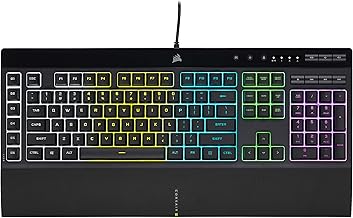
Corsair K70 CORE — Best budget full-size mechanical keyboard
The Corsair K70 CORE makes a strong case for spending less rather than paying extra for specialized magnetic switches.
It is a conventional full-size mechanical keyboard with linear MLX Red switches, per-key RGB lighting, and a multifunction control dial.
The important advantage is its straightforward gaming performance. You get a familiar mechanical layout with responsive linear switches without having to learn advanced actuation settings or configure competitive features.
Key specifications:
| Feature | Specification |
|---|---|
| Layout | Full-size |
| Switches | Corsair MLX Red linear mechanical |
| Connectivity | Wired |
| Lighting | Per-key RGB |
| Control | Multifunction rotary dial |
| Software | Corsair iCUE |
| Hot-swappable switches | No |
| Number pad | Yes |
RTINGS’ independent testing identifies the K70 CORE as a strong budget gaming keyboard. Its measured single-key and multi-key latency are very good, and its performance is suitable for both casual and competitive gaming.
That is worth emphasizing because a high polling rate is not the only way to achieve responsive keyboard performance.
The K70 CORE operates at an effective 1,000Hz update rate, but its independent testing shows that this does not prevent it from delivering strong gaming responsiveness.
The factory-lubricated switches and internal sound-dampening materials also improve the overall typing experience compared with basic mechanical keyboards.
Another practical benefit is the control dial. It can be configured through iCUE for volume adjustment and other supported functions, making it useful beyond gaming.
At the time of research, Best Buy listed the gray K70 CORE at approximately $79.99. Other configurations, including black versions with and without a palm rest, can have different prices.
However, this model is not designed for enthusiasts who want to replace switches frequently. Its PCB is not hot-swappable, and the keyboard does not offer adjustable actuation, wireless connectivity, or Rapid Trigger.
The primarily plastic construction is also less premium than the aluminum cases found on much more expensive keyboards.
Pros:
-
Excellent measured gaming latency for a conventional mechanical keyboard.
-
Full-size layout with a dedicated number pad.
-
Lightweight linear switches.
-
Per-key RGB lighting.
-
Programmable control dial.
Cons:
-
No Rapid Trigger or adjustable actuation.
-
Wired-only connectivity.
-
Switches are not hot-swappable.
-
Mostly plastic construction.
Buy if: You want an affordable full-size mechanical keyboard with dependable gaming performance and useful media controls.
Skip if: You need wireless connectivity, advanced magnetic-switch features, or extensive hardware customization.
MonsGeek FUN60 Ultra TMR — Best compact wireless value
The MonsGeek FUN60 Ultra TMR demonstrates that competitive gaming features do not have to come from expensive flagship keyboards.
It combines a compact 60% layout, aluminum construction, magnetic switch technology, and wireless connectivity.
Its unusual selling point is MagMech compatibility. The TMR version supports both magnetic switches and conventional five-pin mechanical switches, allowing users to customize the board beyond the limitations of many Hall effect gaming keyboards.
Key specifications:
| Feature | Specification |
|---|---|
| Layout | 60% |
| Sensor | TMR |
| Switch compatibility | Magnetic and conventional mechanical on TMR version |
| Connectivity | USB-C, 2.4GHz, Bluetooth |
| Polling rate | Up to 8,000Hz |
| Rapid Trigger | Supported |
| SOCD | Supported |
| Case | Aluminum |
| Price range | $64.99–$89.99 for TMR configurations |
RTINGS tested a wireless FUN60 Ultra with TMR sensors and found exceptionally low and consistent latency. Its gaming evaluation also highlights strong build quality, adjustable actuation, and support for advanced functions such as Rapid Trigger and SOCD.
An especially useful detail is the combination of a relatively accessible price and an aluminum chassis. Many keyboards at this price rely on lightweight plastic housings.
However, the 60% layout is a significant compromise.
It removes the dedicated function row, arrow keys, and number pad. Some functions remain available through modifier layers, but players who regularly use navigation keys or productivity shortcuts may find the layout inconvenient.
There are also multiple FUN60 Ultra configurations, and choosing the correct one matters.
The TMR version supports the MagMech functionality that allows both magnetic and mechanical switch compatibility. The Hall effect version is restricted to compatible magnetic switches. Furthermore, RTINGS tested the wireless TMR configuration, so its findings should not be treated as exact measurements of every variation in the series.
The official MonsGeek listings showed TMR configurations around $64.99–$89.99. However, some configurations displayed limited availability during research, so verify stock and the exact sensor version before buying.
Pros:
-
Very competitive gaming performance in independent testing.
-
Aluminum case at a relatively low price.
-
Wired, Bluetooth, and 2.4GHz connectivity.
-
Rapid Trigger and adjustable actuation.
-
TMR version supports both mechanical and magnetic switches.
Cons:
-
Missing dedicated arrow keys and function row.
-
Compact layout requires modifier combinations.
-
Software takes some time to learn.
-
Warranty is shorter than Wooting’s.
-
Availability varies by configuration.
Buy if: You want advanced gaming features and wireless flexibility without spending several hundred dollars.
Skip if: You frequently use a number pad, dedicated arrow keys, or a traditional full-size layout.
NuPhy WH80 — Best wireless gaming performance
The NuPhy WH80 is a strong choice for gamers who want the flexibility of wireless connectivity without giving up the advanced features associated with wired Hall effect keyboards.
It uses magnetic switches with adjustable actuation and Rapid Trigger. Unlike many traditional wireless gaming keyboards, it supports an 8,000Hz polling rate over its 2.4GHz receiver connection.
Key specifications:
| Feature | Specification |
|---|---|
| Layout | 80%, 83 keys |
| Switches | Magnetic Jade Dragon-N |
| Technology | Hall effect |
| Polling rate | Up to 8,000Hz |
| Connectivity | 2.4GHz, Bluetooth 5.0, USB-C |
| Rapid Trigger | Yes |
| Switch replacement | Supported |
| Battery life | Up to 500 hours advertised |
| Case | Plastic with aluminum accents |
| US price | $249.95 |
RTINGS describes the WH80 as an outstanding wireless gaming keyboard. Its testing found exceptionally low latency and consistent wireless performance, making it suitable for competitive gaming.
Its build quality also deserves attention.
The keyboard uses multiple layers of acoustic materials, pre-lubricated switches, and stabilizers to create a more refined typing experience. It also has a relatively rigid gasket-mounted construction.
For people who use a single keyboard for gaming and everyday computer work, that combination makes the WH80 more appealing than a board designed exclusively around competitive gaming features.
Bluetooth connectivity supports pairing with multiple devices, which is helpful when switching between a PC, laptop, or other compatible device.
However, the 2.4GHz receiver or wired USB-C connection is the better choice for gaming. Bluetooth uses a lower polling rate and is intended more for general device connectivity.
There are two meaningful drawbacks.
First, the WH80 costs more than the Keychron K2 Ultra 8K and many wired alternatives. Second, NuPhy provides a one-year warranty, compared with Wooting’s four-year coverage.
The keyboard’s profile is also relatively tall. A wrist rest may be useful for people who prefer lower hand positioning during long sessions.
Pros:
-
Exceptional measured wireless gaming latency.
-
8,000Hz polling through 2.4GHz.
-
Adjustable actuation and Rapid Trigger.
-
Bluetooth multi-device pairing.
-
Good typing quality and acoustic dampening.
Cons:
-
More expensive than many wireless alternatives.
-
One-year warranty.
-
Tall profile may require a separate wrist rest.
-
No dedicated number pad.
Buy if: You want a premium wireless gaming keyboard with competitive-grade magnetic switches.
Skip if: You are comfortable using a wired keyboard or want to minimize spending.
Keychron K2 Ultra 8K — Best everyday wireless mechanical keyboard
The Keychron K2 Ultra 8K is a useful alternative for players who want a wireless gaming keyboard without magnetic switches or complicated competitive settings.
It combines a 75% layout with conventional mechanical switches, 2.4GHz wireless connectivity, Bluetooth, and wired USB-C operation.
Key specifications:
| Feature | Specification |
|---|---|
| Layout | 75% |
| Switches | Keychron Apex Red, Brown, or Banana |
| Switch type | Conventional mechanical |
| Polling rate | Up to 8,000Hz |
| Connectivity | 2.4GHz, Bluetooth 5.2, wired |
| Hot-swappable | Yes |
| Keycaps | Double-shot PBT |
| Battery | 4,000mAh |
| Advertised battery life | Up to 760 hours |
| Price | $119.99 |
The biggest reason to consider this keyboard is balance.
Its 75% layout retains the function row, arrow keys, and a compact navigation arrangement while removing the number pad. This creates more room for mouse movement than a full-size keyboard without sacrificing as many dedicated keys as a 60% design.
The mixed aluminum and plastic construction also gives it a more substantial feel than many inexpensive wireless mechanical keyboards.
RTINGS tested the K2 Ultra 8K with Apex Banana switches and found remarkably low latency and consistent performance. Its testing supports its suitability for both casual and competitive gaming.
The 8,000Hz polling rate is available through wired and 2.4GHz connections. Bluetooth is more appropriate for general wireless use and multi-device switching.
The biggest difference between the K2 Ultra 8K and the WH80 is the switch technology.
Keychron uses conventional mechanical switches. These can provide excellent gaming performance, but they do not offer magnetic adjustable actuation or Rapid Trigger.
This is not necessarily a disadvantage for most players. Many games do not require specialized switch reset behavior, and conventional mechanical switches are familiar and straightforward to customize.
The hot-swappable PCB is another advantage. You can replace compatible switches without soldering if your preferred typing feel changes later.
One limitation is the lack of shine-through legends on the stock keycaps. RGB lighting can illuminate the keyboard, but the legends themselves are harder to read in a dark room.
Keychron advertises up to 760 hours of battery life, but that figure should be understood as a manufacturer-rated maximum under specified conditions, not a guaranteed gaming runtime with RGB enabled.
Pros:
-
Competitive-level measured latency.
-
Wired, 2.4GHz, and Bluetooth connectivity.
-
Up to 8,000Hz polling over wired and receiver modes.
-
Hot-swappable mechanical switches.
-
Compact but practical 75% layout.
-
Available in linear and tactile switch options.
Cons:
-
No Rapid Trigger or adjustable actuation.
-
No shine-through keycap legends.
-
Less premium construction than the NuPhy WH80.
-
No number pad.
Buy if: You want a versatile wireless mechanical keyboard that works for gaming, typing, and multiple devices.
Skip if: Your main objective is maximizing magnetic-switch features for competitive FPS games.
Razer Huntsman V3 Pro 8KHz — Best competitive alternative
The Razer Huntsman V3 Pro 8KHz is a premium wired gaming keyboard built around Razer’s analog optical switch technology.
It is particularly attractive to players who prefer Razer’s software ecosystem and want advanced actuation controls without choosing a Wooting keyboard.
Key specifications:
| Feature | Specification |
|---|---|
| Recommended configuration | Tenkeyless |
| Switch technology | Razer Analog Optical Gen-2 |
| Actuation range | 0.1–4.0mm |
| Polling rate | Up to 8,000Hz |
| Rapid Trigger | Yes |
| Snap Tap | Yes |
| Dynamic Keystroke | Yes |
| Connectivity | Wired USB |
| US manufacturer price | $219.99 |
The main advantage of the Huntsman V3 Pro is its adjustable optical switch system.
Users can customize the distance required to register a keypress, while Rapid Trigger changes the reset behavior to support faster repeated inputs.
Snap Tap is designed to prioritize the latest input between selected directional keys. This can be useful in competitive games that reward quick directional changes, although players should check individual game rules and tournament policies before using advanced input features.
RTINGS’ independent testing found very low and consistent latency, excellent actuation accuracy, and strong gaming performance.
An interesting detail is that the measured effective update rate is capped at 4,000Hz despite Razer advertising 8,000Hz polling. RTINGS considers this a minor limitation, and its testing found that the keyboard remains highly responsive.
That distinction is worth understanding: an advertised polling rate does not automatically translate into a directly noticeable gameplay advantage.
The keyboard also includes shine-through keycaps, customizable RGB lighting, and dedicated onboard adjustments.
Its biggest weakness is hardware customization. Unlike some mechanical keyboards, the analog optical switches are not hot-swappable. If you want to experiment with different mechanical switch types, this is not the right product.
It is also wired-only, and independent testing notes that the keyboard is relatively loud.
Pros:
-
Very low and consistent measured latency.
-
Adjustable optical actuation.
-
Rapid Trigger, Snap Tap, and Dynamic Keystroke.
-
Customizable RGB lighting.
-
Useful onboard adjustments.
Cons:
-
Wired-only.
-
Switches are not hot-swappable.
-
Relatively loud typing experience.
-
More expensive than conventional mechanical alternatives.
Buy if: You play competitive games and want advanced input customization within the Razer ecosystem.
Skip if: Wireless connectivity, quieter typing, or mechanical switch replacement is important to you.
ASUS ROG Azoth Extreme — Best premium construction and typing experience
The ASUS ROG Azoth Extreme is the most expensive keyboard in this selection, but its appeal is primarily its construction and typing experience rather than specialized competitive switch technology.
It is a 75% mechanical gaming keyboard with a full aluminum alloy chassis, carbon fiber positioning plate, adjustable gasket mount, and customizable OLED touchscreen.
Key specifications:
| Feature | Specification |
|---|---|
| Layout | 75%, 81 keys |
| Switches | ROG NX Snow linear or NX Storm clicky |
| Switch technology | Conventional mechanical |
| Connectivity | USB-C, 2.4GHz, Bluetooth |
| Polling rate | Up to 8,000Hz with ROG Polling Rate Booster |
| Hot-swappable | Yes |
| Display | Color OLED touchscreen |
| Construction | Aluminum alloy chassis, carbon fiber plate |
| Wrist rest | Included |
| US manufacturer price | $499.99 |
The construction is the standout feature.
Unlike the mostly plastic housings of conventional gaming keyboards, ASUS uses a full aluminum chassis and carbon fiber positioning plate. The adjustable gasket mount also lets users switch between two typing-feel settings.
Its OLED screen and three-way control knob provide additional customization. The display can show system information and other configurable elements, while the knob gives access to settings without relying entirely on software.
Wireless connectivity is another significant advantage. The keyboard can connect through Bluetooth or 2.4GHz, while USB-C offers a wired alternative. ASUS also includes its ROG Polling Rate Booster for supported high-polling-rate operation.
RTINGS’ independent testing found very low latency in wired and wireless modes, strong build quality, and an excellent typing experience.
However, the Azoth Extreme has an important limitation when compared with the Wooting and Razer.
Its ROG NX switches are conventional mechanical switches, not Hall effect or analog optical switches. Consequently, it does not provide the same adjustable actuation and Rapid Trigger functions found in those competitive gaming alternatives.
That does not make it a poor gaming keyboard. Its responsiveness is excellent. It simply means the additional $250 or more over several alternatives primarily pays for materials, sound, customization, and overall construction rather than a proportionate improvement in gaming performance.
At $499.99, it is a luxury purchase rather than a value recommendation for most players.
Pros:
-
Premium full-aluminum chassis.
-
Carbon fiber positioning plate.
-
Adjustable gasket mount.
-
Excellent measured wireless and wired latency.
-
OLED touchscreen and control knob.
-
Hot-swappable switches and included wrist rest.
Cons:
-
High purchase price.
-
No Hall effect or Rapid Trigger features.
-
Heavy and relatively bulky.
-
Many premium features may be unnecessary for gaming alone.
Buy if: You want a high-end wireless mechanical keyboard with premium materials, strong acoustics, and extensive customization.
Skip if: Your primary goal is competitive gaming performance per dollar.
How to choose the right gaming keyboard
A $700 budget gives you access to premium mechanical keyboards, custom builds, and advanced magnetic-switch models. However, the most useful decision is identifying which features genuinely improve your gaming experience.
Understand mechanical, Hall effect, TMR, and optical switches
The switch technology determines how a keyboard registers keypresses and what customization options are available.
| Switch type | How it works | Main advantage | Main limitation |
|---|---|---|---|
| Mechanical | Physical electrical contacts register keypresses | Familiar feel and wide switch selection | Fixed actuation behavior |
| Hall effect | Magnetic sensing tracks key movement | Adjustable actuation and Rapid Trigger | Limited compatibility with conventional switches |
| TMR | Magnetic sensing using tunnel magnetoresistance | High-precision input and flexible configurations on some models | More limited product selection |
| Analog optical | Optical sensing detects key movement | Adjustable actuation and advanced gaming features | Often proprietary switch compatibility |
Mechanical keyboards remain excellent choices for most gamers. They offer different switch feels, straightforward operation, and many customization options.
Hall effect keyboards are particularly useful for competitive gaming because they can change how individual keys activate and reset. Rapid Trigger is especially useful for games involving repeated movement inputs.
TMR keyboards introduce another approach to magnetic sensing. Some models, including the MonsGeek FUN60 Ultra TMR, combine magnetic and conventional mechanical switch compatibility.
Optical keyboards such as the Razer Huntsman V3 Pro use light-based sensing rather than conventional mechanical contacts. Razer’s implementation offers adjustable actuation and Rapid Trigger without requiring Hall effect switches.
There is no universal winner. Choose based on the games you play, how much customization you need, and whether you prefer the feel of conventional mechanical switches.
Pick a layout that matches your gaming habits
Keyboard size affects more than appearance. It determines which dedicated keys remain available and how much space you have for mouse movement.
| Layout | Typical characteristics | Best for |
|---|---|---|
| Full-size (100%) | Includes function row, navigation keys, and number pad | General gaming and productivity |
| 96% | Retains most full-size keys in a compressed arrangement | Users who need a number pad but want a smaller board |
| TKL (80%) | Removes the number pad but retains dedicated function and navigation keys | Competitive gaming and general use |
| 75% | Compact arrangement with function row and arrow keys | Mixed gaming and productivity |
| 65% | Usually retains arrow keys but removes the function row | Compact gaming setups |
| 60% | Removes dedicated function, arrow, and number-pad sections | Players who prioritize mouse space |
A TKL or 75% keyboard is often the most practical choice for PC gaming.
Removing the number pad gives your mouse more room, especially when playing shooters with low mouse sensitivity. Meanwhile, retaining the arrow keys and function row avoids the inconvenience of relying on multiple key combinations.
The Wooting 80HE+, Razer Huntsman V3 Pro TKL, and NuPhy WH80 are worth considering if you want a compact gaming layout without abandoning important dedicated keys.
Decide whether wireless connectivity is worth paying for
Wireless gaming keyboards have improved substantially. Modern 2.4GHz receivers can provide very responsive input, while Bluetooth is useful for connecting multiple devices.
There are three main connection options:
-
Wired USB: Simple, consistent connectivity without battery charging.
-
2.4GHz wireless: The preferred wireless option for responsive PC gaming.
-
Bluetooth: Better suited to general typing and switching between compatible devices.
The NuPhy WH80 and Keychron K2 Ultra 8K support all three connection types.
The Wooting 80HE+ and Razer Huntsman V3 Pro 8KHz are wired-only models.
Do not assume Bluetooth and 2.4GHz deliver identical gaming performance. Bluetooth generally operates at a lower polling rate, and latency characteristics can differ substantially.
Wireless convenience is worth paying for when you regularly move between devices or prefer a cleaner desk. Otherwise, a wired keyboard can offer excellent performance at a lower cost.
Understand why polling rate is not everything
Polling rate describes how frequently a keyboard reports its input state to the connected computer.
A 1,000Hz polling rate means the keyboard can report up to 1,000 times per second. At 8,000Hz, that theoretical interval becomes eight times shorter.
However, this specification alone does not determine overall responsiveness.
Switch behavior, internal scanning, firmware, communication latency, and signal processing also influence the result.
For example, RTINGS found that the Razer Huntsman V3 Pro 8KHz has an effective update rate capped at 4,000Hz despite its advertised 8,000Hz polling rate. The independent review nevertheless found excellent overall gaming responsiveness.
A well-performing 1,000Hz mechanical keyboard such as the Corsair K70 CORE can still be an excellent gaming purchase.
Do not spend extra solely to move from 1,000Hz to 8,000Hz. Consider the entire input system instead.
Check software, customization, and compatibility
Gaming keyboards often rely on dedicated configuration software.
Wooting uses Wootility, Razer uses Synapse, Corsair uses iCUE, and ASUS uses Armoury Crate.
These programs let users adjust RGB effects, remap keys, create profiles, configure macros, and modify supported gaming features.
Software quality matters because advanced features are only useful when they are easy to configure and operate.
For magnetic keyboards, check whether the software supports per-key actuation, Rapid Trigger, SOCD, and other features you actually intend to use.
Also consider operating-system compatibility. Some keyboards provide different software features or shortcuts on Windows and macOS, even when basic typing works across both systems.
Hot-swappable switches deserve particular attention if you enjoy modifying your keyboard. They allow compatible switches to be replaced without soldering, but mechanical and magnetic switches are not universally interchangeable.
Check the manufacturer’s switch-compatibility documentation before purchasing additional switches.
Is spending $500–$700 on a gaming keyboard worth it?
For most PC gamers, no.
The ASUS ROG Azoth Extreme demonstrates what a premium keyboard can offer: a full aluminum chassis, carbon fiber plate, OLED touchscreen, adjustable gasket mount, wireless connectivity, and carefully tuned mechanical components.
Those features improve construction, customization, and typing experience. However, they do not necessarily make the keyboard substantially faster in games.
A $200 magnetic-switch keyboard can provide more relevant competitive features through adjustable actuation and Rapid Trigger.
The difference becomes clearer when considering what you actually use.
| Spending range | What to prioritize | Suitable choices |
|---|---|---|
| Under $100 | Reliable mechanical performance or entry-level magnetic features | Corsair K70 CORE, MonsGeek FUN60 Ultra TMR |
| $100–$200 | Wireless functionality, better construction, and customization | Keychron K2 Ultra 8K, Wooting 80HE+ ABS |
| $200–$300 | Advanced competitive features and premium wireless performance | Razer Huntsman V3 Pro 8KHz, NuPhy WH80 |
| $300–$500 | Premium construction and enthusiast customization | Wooting zinc configuration, ASUS ROG Azoth Extreme |
| $500–$700 | Specialized custom builds and luxury materials | Enthusiast-oriented custom configurations |
These are purchasing categories rather than fixed market-wide price bands. Individual configurations, promotions, and customizations can change the final cost.
For a competitive FPS setup, a Wooting or Razer keyboard is generally a more targeted investment than a $500 conventional mechanical keyboard.
For someone who values typing feel, premium materials, and wireless connectivity as much as gaming, the ASUS may make more sense.
The important point is that the extra spending should buy something you will actually use.
Frequently asked questions
What is the best gaming keyboard for most PC gamers?
The Wooting 80HE platform is a strong recommendation for competitive gaming because it combines adjustable actuation, Rapid Trigger, low latency, and extensive software customization.
For everyday gaming without the need for advanced magnetic-switch features, the Corsair K70 CORE is a more economical alternative.
Are Hall effect keyboards better than mechanical keyboards?
Hall effect keyboards offer additional gaming features, including adjustable actuation and Rapid Trigger.
However, conventional mechanical keyboards are still excellent for gaming. A well-designed mechanical model can deliver responsive input without requiring specialized switches or configuration software.
The better option depends on whether you will benefit from those additional features.
Is an 8,000Hz keyboard worth buying?
An 8,000Hz polling rate can reduce the theoretical interval between input reports, but its practical benefit depends on the complete keyboard implementation.
Most casual gamers will not notice a meaningful difference between a well-performing 1,000Hz keyboard and an 8,000Hz model.
For competitive players, measured latency and consistency are more useful purchasing criteria than polling rate alone.
Are wireless gaming keyboards good enough for competitive gaming?
Yes. Modern 2.4GHz wireless gaming keyboards can provide excellent gaming performance.
The NuPhy WH80 is a particularly relevant example because independent testing found exceptionally low wireless latency.
Bluetooth is generally better reserved for general typing and multi-device connectivity rather than competitive gaming.
Should I choose a 60%, 75%, or TKL gaming keyboard?
A 75% or TKL model is usually the most versatile option.
A 60% keyboard maximizes mouse space but requires key combinations for functions that larger keyboards provide directly.
Choose 60% if compactness is your main priority. Choose 75% or TKL if you regularly use arrow keys, function keys, and navigation controls.
Can I use a gaming keyboard for everyday work?
Yes. Most gaming keyboards also support ordinary desktop typing, shortcuts, and productivity applications.
The main considerations are switch feel, typing noise, ergonomics, layout, and software compatibility.
A mechanical keyboard with conventional switches may be more comfortable for users who do not need advanced gaming features.
Do gaming keyboards work with PS5 and Xbox?
Some wired USB and wireless keyboards work with supported console games, but keyboard support varies by game and console.
A keyboard connecting successfully does not guarantee that every game accepts keyboard and mouse input.
Check the individual game’s supported input devices and the manufacturer’s compatibility documentation before purchasing specifically for console gaming.
Final verdict
The Wooting 80HE+ is the strongest choice for competitive PC gamers who value adjustable actuation, Rapid Trigger, and extensive customization. The Corsair K70 CORE offers more practical value for everyday mechanical gaming, while the MonsGeek FUN60 Ultra TMR brings advanced magnetic features to a much smaller budget. For wireless users, the NuPhy WH80 and Keychron K2 Ultra 8K cover different performance and switch preferences. The ASUS ROG Azoth Extreme is a luxury option for enthusiasts, but most players do not need to approach the $700 spending limit to get an excellent gaming keyboard.