Key takeaways
- Resolution: For most users, 1080p (Full HD) is the standard for clear video. Gamers and streamers who prioritize detail might consider 4K for superior image quality, especially if their audience has 4K displays.
- Frame Rate (FPS): 30fps is adequate for general use and video conferencing. For smoother motion, particularly during fast-paced gaming or dynamic streams, aim for 60fps or higher.
- Autofocus & Light Correction: These features are vital for maintaining a sharp image and a well-lit appearance, even in challenging lighting conditions. Look for webcams with advanced autofocus and auto-light correction for a consistently professional look.
- Field of View (FOV): A wider FOV (e.g., 90° or more) is beneficial for showing more of your surroundings, ideal for gaming setups or group calls. A narrower FOV might be better for solo streaming where only your face is the focus.
- Microphone Quality: While an external microphone is often recommended for serious content creation, a good built-in microphone can suffice for casual calls and basic streaming, offering convenience.
What's inside
Navigating the vast landscape of webcams in 2026 can feel like a quest in itself. Whether you’re a budding streamer aiming for crystal-clear gameplay commentary, a remote worker needing to make a professional impression on video calls, or a content creator looking to elevate your production quality, the right webcam is crucial. With an overwhelming array of resolutions, features, and price points, it’s easy to get lost in the technical jargon and end up with a device that doesn’t quite meet your needs.
This guide cuts through the noise to bring you the best webcam options available in 2026, specifically curated for a gaming gear enthusiast’s perspective. We’ll cover everything from essential specifications to advanced features, helping you make an informed decision that balances performance, features, and value. Get ready to upgrade your visual presence and connect with your audience like never before.
As an Amazon Associate we earn from qualifying purchases at no extra cost to you.


🎮 Get More From Your Setup — Free
Prime Gaming gives you free PC games every month, in-game loot, and a free Twitch channel sub — plus fast free shipping on all the gear above. New members get a 30-day free trial.
Watch: Best Webcam Websites — Video Review
How to Choose a Webcam (2026)
- Resolution: For most users, 1080p (Full HD) is the standard for clear video. Gamers and streamers who prioritize detail might consider 4K for superior image quality, especially if their audience has 4K displays.
- Frame Rate (FPS): 30fps is adequate for general use and video conferencing. For smoother motion, particularly during fast-paced gaming or dynamic streams, aim for 60fps or higher.
- Autofocus & Light Correction: These features are vital for maintaining a sharp image and a well-lit appearance, even in challenging lighting conditions. Look for webcams with advanced autofocus and auto-light correction for a consistently professional look.
- Field of View (FOV): A wider FOV (e.g., 90° or more) is beneficial for showing more of your surroundings, ideal for gaming setups or group calls. A narrower FOV might be better for solo streaming where only your face is the focus.
- Microphone Quality: While an external microphone is often recommended for serious content creation, a good built-in microphone can suffice for casual calls and basic streaming, offering convenience.
The Best Webcam Options (2026) Reviewed
Logitech Brio Ultra HD 4K Webcam
The Logitech Brio Ultra HD offers stunning 4K resolution, making it a top choice for those who demand the absolute best in image clarity. Its advanced features like auto-light correction and a wide viewing angle ensure you always look your best, whether streaming or in crucial meetings.
Logitech MX Brio Ultra HD 4K Webcam
Building on the Brio’s success, the MX Brio enhances collaboration and streaming with its premium build and intelligent features. The Show Mode is particularly innovative for content creators, allowing for easy presentation of physical objects.
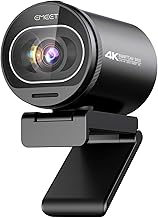
EMEET NOVA 4K Webcam
For a powerful 4K experience with excellent autofocus and dual microphones, the EMEET NOVA stands out. It’s an ideal solution for high-end business meetings and live streaming, offering professional-grade performance at a competitive price point.
Logitech C920x HD Pro PC Webcam
A perennial favorite, the Logitech C920x continues to impress with its reliable 1080p video quality and clear audio. It’s a fantastic all-rounder that works seamlessly across various platforms and is a solid choice for most users.
Logitech Brio 101 Full HD 1080p Webcam
The Brio 101 brings the premium Logitech experience to a more accessible price point. It delivers excellent 1080p video with smart auto-light correction, making it a great option for streamers and professionals on a budget.
Frequently Asked Questions
What is the best resolution for streaming?
For most streaming platforms and audiences, 1080p at 30 or 60fps is the sweet spot. 4K streaming is possible but requires a very strong internet connection and a more powerful PC.
Do I need a separate microphone for streaming?
While many webcams have decent built-in microphones, an external microphone is highly recommended for professional-sounding audio quality, especially for voice-over work and immersive streaming.
How important is the field of view (FOV)?
The FOV determines how much of your surroundings the webcam captures. A wider FOV is great for showing your gaming setup or including multiple people in a call, while a narrower FOV focuses more on your face.
Are privacy shutters important?
Yes, privacy shutters offer a physical way to ensure your webcam is off and not recording when you don’t want it to be, providing peace of mind.
Final Thoughts
For unparalleled visual fidelity, the Logitech Brio Ultra HD 4K Webcam and Logitech MX Brio Ultra HD 4K Webcam are top-tier choices. If you’re looking for a robust 4K option with excellent audio, the EMEET NOVA 4K Webcam is a strong contender, while the reliable Logitech C920x HD Pro PC Webcam remains a budget-friendly powerhouse for everyday use.