
Our Top Picks
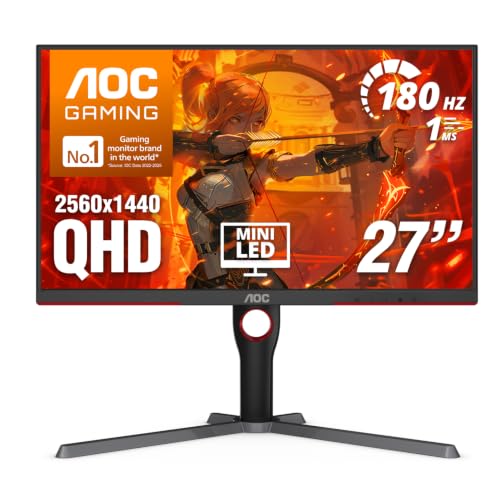 AOC 27 Inch Gaming Monitor QHD 180Hz Mini-LED27" 180Hz Mini-LED10.19 x 23.82 x 20.94 inches15.6 poundsCheck on Amazon
 LG 27GM950B-B 27-inch Ultragear evo Mini-LED IPS 5K9.8 x 24.2 x 21.1 inches18.7 poundsCheck on Amazon
If you want punchy HDR and no burn-in worry, a mini LED gaming monitor is the strongest alternative to OLED: the KTC M27T6 suits budget 4K buyers, the LG 27GM950B suits anyone who wants a 5K 27-inch panel, and the Acer XV325QK V3 suits those who prefer a 32-inch 4K screen. Ultrawide fans should look at the Acer Predator X34 X0 or the Samsung Odyssey Neo G9 family. This guide compares the 2026 field using maker-listed specs and the findings of reviewers such as DisplayNinja, WePC and PC Guide, without quoting prices.
Why choose mini LED over OLED or standard IPS
Mini LED monitors use a backlight made of thousands of small LEDs grouped into local dimming zones. More zones generally mean less blooming around bright objects on dark backgrounds. Compared with a standard edge-lit IPS screen, mini LED gives much higher peak brightness and deeper contrast. Compared with OLED, reviewers say it wins on sustained HDR brightness and has no burn-in risk for desktop use with static taskbars, while OLED keeps the edge in perfect blacks, pixel response and motion clarity.

Acer Nitro MG275U X2biippx 27" QD-MiniLED 2560 x 1440 IPS Gaming Monitor | AMD FreeSync Premium | Up to 210Hz Refresh Rate | Up to 0.5ms | HDR1000 | AdobeRGB 95% | 1 x Display Port 1.4 & 2 x HDMI 2.1
Chosen because it specifies AMD FreeSync Premium and Up to 210Hz Refresh Rate.
View on AmazonAOC 27 Inch Gaming Monitor QHD 180Hz Mini-LED HDR1000, Q27G3XMN | 3440×1440 Computer Monitor, 0.3ms, HDR400, USB 3.2, DP 1.4, HDMI 2.1, Height Adjustable Stand, Audio Out, VESA Mount
Chosen because it specifies Q27G3XMN and 3440×1440 Computer Monitor.
View on AmazonLG 27GM950B-B 27-inch Ultragear evo Mini-LED IPS 5K 165Hz Gaming Monitor | (5120 x 2880), NVIDIA G-Sync, AMD FreeSync Premium, DisplayHDR1000, AI Upscaling, HDMI, DP, USB-C, Tilt/Height/Swivel/Pivot
Chosen because it specifies (5120 x 2880) and NVIDIA G-Sync.
View on AmazonThe trade-off is blooming: a bright cursor on a dark page can show a faint halo, because a zone is larger than a single pixel. Zone count, the dimming algorithm and the panel type (IPS or VA) decide how noticeable this is.
At a glance
| Monitor | Best for | Key stated specs | Limits |
|---|---|---|---|
| KTC M27T6 | Budget mini LED value | 27 inch, 1152 dimming zones, peak highlights up to about 1800 nits claimed by the maker | Maker nit claims are peak figures; build and stand are basic |
| KTC and KOORUI 27-inch 4K dual-mode models | Switching between 4K and fast 1080p | 160Hz at 4K or 320Hz at 1080p, 1152 zones, HDR1400 listing | Lower resolution mode looks softer; brand support is lighter |
| LG 27GM950B | Sharpness-first 5K at 27 inches | 5K IPS, 165Hz, 2304-zone mini LED backlight | Needs a strong GPU to run 5K in games |
| Acer XV325QK V3 | Large 4K screen | 32 inch 4K mini LED | Pixel density is lower than 27-inch 4K |
| Innocn 32M2V | 32-inch 4K with many zones | 2304 zones listed | Smaller brand; check warranty terms |
| AOC Q27G3XMN | 1440p from a major brand | 27 inch mini LED 1440p high refresh | Fewer zones than 4K flagship models |
| Acer Predator X34 X0 | Ultrawide | 34 inch ultrawide | Premium tier; demands a strong GPU |
| Samsung Odyssey Neo G9 | Super-ultrawide immersion | Very wide curved mini LED | Large footprint; early generations had HDR quirks |
The picks in detail
KTC M27T6: the budget entry
Budget Loadout and several other outlets point to the M27T6 as a value choice. The maker lists 1152 local dimming zones and strong peak brightness, which gives affordable access to real HDR highlights. Expect basic ergonomics and a simple stand, and judge the brightness claim as a peak rather than full-screen figure. Buyers who care about a long manufacturer warranty from a large brand may prefer an AOC or LG option.
KTC and KOORUI 4K dual-mode models
These 27-inch panels run 4K at 160Hz or drop to 1080p at 320Hz. That suits players who want a sharp screen for single-player games and a very high refresh rate for competitive shooters. The 1080p mode is scaled, so text looks softer there. A mid-range graphics card handles the 1080p mode easily but needs more power for the 4K mode.
LG 27GM950B: 5K at 27 inches
DisplayNinja highlights this monitor for combining a 5K IPS panel, a 165Hz refresh rate and a 2304-zone mini LED backlight. The pixel density is very high, which is excellent for mixed work and play. Running modern games natively at 5K needs a high-end GPU, though upscaling features help.
Acer XV325QK V3 and Innocn 32M2V: 32-inch 4K
DisplayNinja calls the Acer one of the more impressive 32-inch mini LED gaming monitors. The Innocn lists 2304 zones. A 32-inch screen suits a deeper desk and viewing distance and feels more immersive, but pixels are larger than on a 27-inch 4K screen.
AOC Q27G3XMN: the major-brand 1440p option
For gamers who do not want to push a 4K load, a 1440p mini LED model from AOC offers high refresh rates with easier GPU demands and the support network of a large brand.
Ultrawides: Acer Predator X34 X0 and Samsung Odyssey Neo G9
DisplayNinja suggests the Predator X34 X0 for ultrawide play, while PC Guide picks the Odyssey Neo G9. These are premium-tier screens built for racing and flight sims, and they need desk depth and a capable GPU.
What to check before buying
- Zone count: Higher counts usually reduce blooming, but algorithm quality matters as much as the number.
- HDR certification: A DisplayHDR 1000 or 1400 listing is a better sign than a bare “HDR support” label.
- Panel type: IPS gives wide viewing angles and fast response; VA gives deeper native contrast but can smear in dark scenes.
- Connections: For 4K at 160Hz you need DisplayPort 1.4 or HDMI 2.1. Check that your GPU has the port.
- GPU load: 4K and 5K need strong graphics hardware. A 1440p panel suits mid-range cards.
- Desk fit: A 32-inch or ultrawide screen needs deeper desks; confirm VESA mount support for arms.
Budget tiers
- Budget: KTC and KOORUI 27-inch models, plus the AOC 1440p. Good HDR for the class, simpler stands and warranty support.
- Mid-range: The Acer 32-inch 4K and Innocn 32M2V, with more zones and larger screens.
- Premium: LG 27GM950B, Predator X34 X0 and Odyssey Neo G9, aimed at enthusiasts with strong GPUs.
Pick X if…
| If you want… | Choose |
|---|---|
| The cheapest route to real HDR highlights | KTC M27T6 |
| 4K for single-player games and fast 1080p for shooters | KTC or KOORUI dual-mode 27-inch |
| Maximum sharpness at 27 inches | LG 27GM950B |
| A big, immersive 4K screen | Acer XV325QK V3 |
| A lighter GPU load with a trusted brand | AOC Q27G3XMN |
| Ultrawide immersion | Acer Predator X34 X0 or Samsung Odyssey Neo G9 |
Alternatives
- Cooler Master Tempest GP27Q: Named by WePC as a value mini LED option, though that list is older, so check whether it is still sold.
- OLED gaming monitors: Choose these if inky blacks and the fastest motion response matter more than full-screen HDR brightness, and you can accept burn-in care routines.
- TCL mini LED gaming monitors: TCL promotes its own range as a mini LED alternative; compare specs and warranty terms against the picks above.
Settings and setup notes
Mini LED monitors reward a few minutes of setup. Turn on HDR in Windows and in the game, then run the Windows HDR calibration tool so the game knows the monitor’s peak brightness. Many monitors offer several local dimming levels; if bright cursors or subtitles bloom on dark backgrounds, lower the dimming strength or pick a mode designed for desktop use. Some models turn local dimming off in SDR by default, so check the on-screen menu.
For 4K at 160Hz, use the DisplayPort cable supplied by the maker, because cheap cables may limit bandwidth. If you plan to connect a console, check that the HDMI port supports 4K at 120Hz and variable refresh rate, since not every port on a budget monitor does.
Who should wait or skip
If you mainly play in a dark room and care most about perfect blacks and fast pixel response, an OLED panel may suit you better, accepting the burn-in precautions. If your graphics card is more than a few years old, a 1440p mini LED model avoids the heavy load of 4K and 5K, and still gives a big HDR upgrade over a standard IPS screen. Finally, if you work with colour-critical content, check reviewer measurements of colour accuracy, because gaming-oriented factory calibration varies.
Frequently Asked Questions
Is mini LED better than OLED for gaming?
It depends on your priorities. Reviewers say mini LED delivers brighter HDR and avoids burn-in concerns, while OLED has perfect blacks and faster pixel response. Mixed use with static windows or very bright rooms often favours mini LED.
Does mini LED have burn-in?
Mini LED backlights use inorganic LEDs behind an LCD panel, so the permanent image retention seen on OLED is not a typical concern. Check the maker’s warranty terms for any panel-related exclusions.
What is blooming and can I avoid it?
Blooming is a halo around bright objects on dark backgrounds because a whole dimming zone lights up. More zones and good firmware reduce it, and most monitors let you lower the local dimming strength if the halo distracts you.
How many dimming zones do I need?
There is no magic number. Budget models list around a thousand zones, and higher-end monitors list over two thousand. Reviewer comments on blooming matter more than the raw figure.
Can my graphics card drive a 4K or 5K mini LED monitor?
Mid-range cards can handle 4K with upscaling in many titles, but native 4K or 5K at high frame rates needs a high-end card. If your GPU is modest, a 1440p mini LED screen or a dual-mode monitor that drops to 1080p is a safer choice.
Is the nit figure on the box what I will see?
Usually the figure is a peak brightness on a small portion of the screen in HDR mode. Sustained full-screen brightness is lower, so read reviews that measure it rather than relying on the headline number.
FAQ
Is mini LED better than OLED for gaming?
Does mini LED have burn-in?
What is blooming and can I avoid it?
How many dimming zones do I need?
Can my graphics card drive a 4K or 5K mini LED monitor?
Is the nit figure on the box what I will see?
More from Amazon
Programs that pair well with the guide above. Offers and eligibility are set by Amazon and may change.
Set up recurring deliveries of everyday items on eligible products. Terms and savings are set by Amazon.
Explore Subscribe & SaveFree shipping on eligible items, Prime Video and more. Eligible new members can start with a free trial.
Start a Prime free trialA Prime membership for ages 18-24 with a trial period. Eligibility is set by Amazon.
See Prime for Young AdultsAudiobooks and podcasts to listen to on the go. Eligible new members can start with a free trial.
Try Audible freeAs an Amazon Associate we earn from qualifying purchases.




