Our Top Picks
 PRAISUN 47.2 Inch Gaming Desk with LED Lights47.2 Inch18.9 x 47.2 x 29 inches30.9 poundsCheck on Amazon
 ODK 53" L Shaped Gaming Desk with Shelves53 Inch53.15 x 39.37 x 58.27 inches46.1 poundsCheck on Amazon
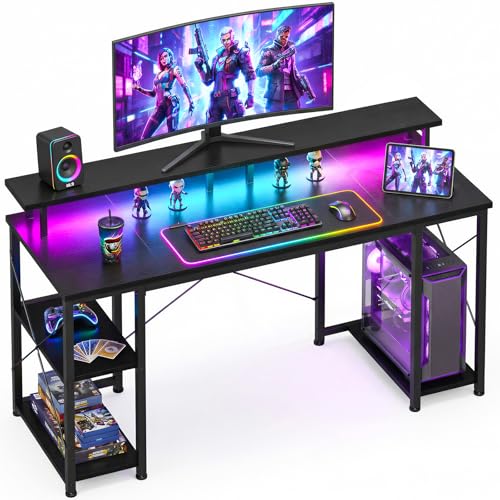


The PRAISUN 47.2 inch gaming desk is the best overall pick among these gaming desks with LED lights: its listing pairs a reversible layout and a PC display shelf with a charging station of 4 AC outlets, 2 USB ports and 1 USB-C port, plus an RGB strip with 12 preset modes and app control. If you want something smaller, the Korfile and Lufeiya 40 inch desks fit tighter rooms, and the ODK 53 inch L-shape is the choice for two monitors. “LED lights” here means a built-in RGB strip, usually under a monitor riser or along the desk, that you control by remote or app.
Quick List
- PRAISUN 47.2″ Gaming Desk – best for the most outlets and the most flexible lighting control
- ODK 48″ Gaming Desk – best for a compact desk with a raised monitor stand and storage shelves
- OLIXIS 47″ L-Shaped Desk – best for corner rooms that need a drawer and a remote-controlled lit riser
- ODK 53″ L-Shaped Desk – best for dual-monitor setups with shelves, outlets and lighting
- Korfile 40″ Gaming Desk – best for small rooms, with a carbon-fiber look and two desks that can join into a U-shape
- Lufeiya 40″ Gaming Desk – best for students who want outlets, USB charging and hooks in a small footprint
Which One Is Right for You?
| If you… | Choose |
|---|---|
| run a PC, two monitors and several chargers and want app-controlled lighting | PRAISUN 47.2″ Gaming Desk |
| have a corner and want a drawer plus a remote-controlled riser | OLIXIS 47″ L-Shaped Desk |
| need a straight desk with shelves and a CPU stand in about four feet | ODK 48″ Gaming Desk |
| have room for a wide L-shaped surface | ODK 53″ L-Shaped Desk |
| have a small room and like a carbon-fiber finish and an app-controlled strip | Korfile 40″ Gaming Desk |
| need a basic lit desk for a bedroom or dorm with USB charging | Lufeiya 40″ Gaming Desk |
Decide on width before lighting. A 40 inch desk handles one monitor and a laptop; 47 to 48 inches suits a monitor plus speakers; 53 inches is where dual monitors become comfortable. Then compare outlet counts, since the lights are only part of what the electrical hardware has to cover.
All 6 Picks in Detail
1. ODK 48″ Gaming Desk – Best Compact Straight Desk with Shelves
As an Amazon Associate we earn from qualifying purchases at no extra cost to you.

This ODK is a straight desk, not an L-shape, and it is built around a raised monitor stand and reversible storage shelves. Its lighting is a strip with 10 static colors, 8 brightness levels and 10 dynamic modes, with a memory function that restores your last setting. It is aimed at small spaces such as bedrooms and dorms, and the listing mentions a larger 55 inch size in the same line.
- 47.24 inches wide, about 19.6 inches deep and 34 inches high with the stand
- LED strip with 10 static colors, 8 brightness levels and 10 dynamic modes
- Reversible storage shelves and a CPU stand
- Reinforced steel frame, thick engineered wood top and X-shaped crossbar
- About 35.9 pounds
Pros
- Simple layout that fits against a wall
- Larger 55 inch version available in the same line
Cons
- The listing does not mention built-in outlets or USB ports
- Shelves are on a single side
Choose it over the Lufeiya if you want shelves and a CPU stand, and over the PRAISUN if you plan to supply your own power strip.
If you like a clean look, this is the model to choose, because the lighting is the only extra and everything else is about the surface and the shelves. The listing describes a reinforced steel frame with thick engineered wood, so the desk should feel more solid than its compact width suggests, but without a stated load limit, spread heavy equipment across the surface instead of stacking it at one end.
The memory function means the strip returns to your last mode after the desk is unplugged, which is convenient if you turn off the surge protector at night.
2. Lufeiya 40″ Gaming Desk – Best Basic Lit Desk for Students

The Lufeiya is the simplest desk here. It offers a built-in power strip with 2 outlets and 2 USB ports, an RGB LED strip with 7 adjustable colors, 4 dynamic modes and 16 static types, and a monitor stand said to hold two monitors or laptops. It is made of thick particle board with a scratch-resistant, waterproof surface and comes with a removable storage bag and two headphone hooks. It suits a dorm or a first gaming setup.
- About 19.7 inches deep, 39.4 inches wide and 33.4 inches high with the stand
- Power strip with 2 outlets and 2 USB ports
- RGB strip with 7 colors, 4 dynamic modes and 16 static types
- Monitor stand for two monitors or laptops
- Removable storage bag and 2 headphone hooks
Pros
- Compact, with outlets, USB and hooks included
- Monitor stand keeps the screens at eye level
Cons
- Shallow depth of about 19.7 inches limits large monitors
- Weight and load capacity are not stated
Compared with the Korfile, it is shallower and has fewer outlets, but its listing is clear about the included hooks and storage bag.
The monitor stand is the other highlight, since it puts screens at a more natural height and leaves space beneath for a keyboard or notes. The two headphone hooks and the removable storage bag keep small items off the surface, and because both are removable you can rearrange them as your setup changes. Assembly is described as simple, with a manual and the tool included.
Check the power strip’s wattage limit on the product page and avoid plugging a space heater or other high-draw device into it.
3. PRAISUN 47.2″ Gaming Desk – Best for Power and Lighting Control

PRAISUN’s listing is the most detailed on both power and lighting. The charging station has 4 AC outlets, 2 USB ports and 1 USB-C port, while the RGB strip offers 12 preset modes on a controller and a phone app with more than 60,000 colors, timers and music sync. The desk is reversible, with a raised platform and a side area that can display a tower up to 21.7 inches tall. It suits players who want one desk to hold the whole setup.
- 47.2 inches wide, about 18.9 inches deep and 29 inches high
- 4 AC outlets, 2 USB ports, 1 USB-C port
- 12 preset lighting modes, app control, timer and music sync
- Large fabric drawer, open shelf, under-desk PC shelf and 3 removable S-hooks
- Particleboard top on a steel frame with corner brackets and dual X-braces, about 30.9 pounds
Pros
- Most outlets and ports in the group, including USB-C
- Two monitor-stand heights and a dedicated area for showing off a PC
Cons
- The listing does not state a weight capacity
- Particleboard tops can swell if liquid is left to sit
Next to the ODK 48 inch desk, it adds many more outlets and an app, which is useful if your lighting preferences change often. Because the listing mentions a display area for a tower, check that your case fits the stated 21.7 inch height limit.
The storage is where this desk earns its place: the drawer, open shelf and under-desk PC shelf give controllers, cables and a tower their own homes, and the three removable S-hooks hold a headset, a bag or a controller. Assembly is described as straightforward, with numbered parts, clear instructions and included tools, which is welcome on a desk with this many components.
The app and controller are separate paths, so you can set a favorite mode on the controller and use the app only for timers or music sync. Keep the controller box in a drawer so it does not get lost.
4. OLIXIS 47″ L-Shaped Desk – Best Corner Desk with a Lit Monitor Riser

OLIXIS lights the monitor riser rather than the desk edge, using adjustable RGB strips that you control by remote. It is a reversible 47 inch L-shape with a drawer and several open shelves, and the power hub includes 2 AC outlets, a USB port and a Type-C port on a 4.92 foot cord. It suits corner spaces where you want lighting behind your screens.
- Reversible L-shape, 47.24 inches wide and 33.86 inches deep as listed
- Detachable riser with RGB strips in 7 colors, adjustable brightness and flashing speed
- Remote control for lighting modes
- Power hub with 2 AC outlets, 1 USB port and 1 Type-C port
- MDF top on a metal frame, about 39.2 pounds
Pros
- Lighting sits at screen height, where it softens the contrast with a dark wall
- Includes a drawer and USB-C
Cons
- Seven colors is fewer than the app-controlled models offer
- Only two AC outlets
Compared with the ODK 53 inch, it is smaller and adds a drawer but offers fewer outlets and no CPU stand mentioned.
The detachable riser can be removed if you do not want lighting, and the listing calls the tabletop smooth, waterproof and easy to wipe with a damp cloth, which suits a desk used for snacks and drinks. The extra-long power cord gives flexibility in where you place the desk relative to the wall outlet, but avoid routing it across a walkway.
The listing says clips hold the LED strip on the riser, which prevents it from slipping off over time; check that they are firmly seated after assembly and again after you move the desk.
5. ODK 53″ L-Shaped Desk – Best for Dual Monitors and Lots of Lighting Modes

This is the biggest desk in the group and the one best equipped to run two monitors. The listing gives a 53 inch main surface, side modules that can go left or right, and an X-shaped steel frame with adjustable feet. The strip has 10 color presets, 8 brightness grades and 10 dynamic modes with memory, and the electrical side has 3 AC outlets and 2 USB ports.
- 53 inches wide, 29.8 inches high, 18.9 inches deep as listed
- Reversible side modules
- 3 AC outlets and 2 USB ports
- RGB strip with presets, brightness steps and a memory function
- Dual shelves, CPU stand, accessory hook, tool bag; about 46.1 pounds
Pros
- Room for dual monitors and desktop speakers
- Adjustable foot pads for uneven floors
Cons
- Needs a large corner or wall
- Lighting offers presets but no app control is mentioned
Pick it over the PRAISUN if you need the extra width and an L-shaped layout, and over the OLIXIS if you value more outlets than a drawer.
The side modules can be placed left or right, so decide which wall the shelf side should face before you assemble. The listing also names cable-management channels, which keep cords from the three AC outlets out of sight during long sessions. If you game for hours at a time, the adjustable foot pads are worth setting carefully, since an uneven floor can make a long desk rock whenever you lean on the corner.
Because the lighting has memory and several brightness steps, you can dim it for movie nights without losing your favorite color.
6. Korfile 40″ Gaming Desk – Best Small Desk with App-Controlled Lighting

Korfile keeps the footprint small and the styling bold. The listing describes an MDF top with a carbon-fiber texture, an RGB light strip with app control, 3 AC sockets and 2 USB charging ports, plus a cup holder, headphone holder and a long monitor stand said to hold two 24 inch monitors. It is reversible, and the listing says two desks can be combined into a U-shape. It suits small bedrooms and shared setups.
- About 25.6 inches deep, 39.4 inches wide and 29.5 inches high
- MDF with carbon-fiber texture
- RGB strip with app control
- 3 AC sockets and 2 USB ports
- Cup holder, headphone holder and long monitor stand
Pros
- More depth than most 40 inch desks, which helps with monitor distance
- Three AC outlets in a small footprint
Cons
- Weight and load capacity are not stated
- A two-desk U-shape needs buying a second desk
It offers more outlets than the Lufeiya and a deeper surface, so it is the stronger choice among the 40 inch pair.
The carbon-fiber texture is a printed finish on MDF, not real carbon fiber, so treat it as a styling choice. The listing describes the finish as smooth, scratch-resistant and easy to clean. It positions the desk as a gift for gaming enthusiasts, which fits its bold look and its straightforward set of included features.
Two 24 inch monitors need about 42 inches of width, so the stated stand capacity probably assumes narrow bezels and little room for speakers; measure your own monitors against the 39.4 inch width.
Specs Compared
| Model | Width | Layout | Outlets / USB | Lighting | Storage | Weight |
|---|---|---|---|---|---|---|
| PRAISUN 47.2″ | 47.2″ | Reversible (confirm shape on listing) | 4 AC, 2 USB, 1 USB-C | RGB, 12 modes, app, music sync | Drawer, shelf, PC shelf, S-hooks | 30.9 lb |
| ODK 48″ | 47.24″ | Straight, raised stand | Confirm on listing | 10 colors, 10 dynamic modes | Reversible shelves, CPU stand | 35.9 lb |
| OLIXIS 47″ | 47.24″ | Reversible L | 2 AC, 1 USB, 1 USB-C | RGB riser, 7 colors, remote | Drawer, open shelves | 39.2 lb |
| ODK 53″ | 53″ | Reversible L | 3 AC, 2 USB | 10 presets, 8 brightness steps | 2 shelves, CPU stand, hook, bag | 46.1 lb |
| Korfile 40″ | 39.4″ | Reversible L-shape | 3 AC, 2 USB | RGB, app control | Cup and headphone holders | Confirm on listing |
| Lufeiya 40″ | 39.4″ | Straight with stand | 2 AC, 2 USB | RGB, 7 colors, 4 modes | Storage bag, 2 hooks | Confirm on listing |
How We Chose These
We built this list from research, not from using the desks. Starting from the six products supplied, we read each listing’s title, bullet points and dimension and weight fields, comparing width, depth, layout, lighting controls, outlet and USB counts, storage and construction. We gave credit to listings that name specific control methods and port counts, and we marked values as unconfirmed whenever a listing left them out. Because outlets and lighting are electrical features, we also relied on general safe-use practices and recommend reading each product’s own instructions.
What to Look For
Lighting type and controls
Most gaming desks use an RGB LED strip, but control methods vary. A simple controller or remote gives presets and brightness steps. An app adds more colors, timers and music sync, but it depends on your phone and the app’s quality. A memory function restores the last mode when power returns. Consider where the light sits: strips on a monitor riser, as on the OLIXIS, cast light on the wall behind your screens, while strips along the desk edge light your keyboard area. Keep brightness low in a dark room so it does not compete with the game. Lighting placed behind the screens, rather than shining toward you, tends to be easier to live with, and a timer helps if you like to fall asleep with the desk still plugged in. Also check how the strip is attached: adhesive backing can lose grip over time, so clips or channels are the more reliable fixings.
Outlets, USB ports and electrical safety
A US wall circuit usually provides 15 amps at 120 volts, or 1,800 watts, and continuous loads should stay under roughly 1,440 watts. A gaming PC may draw several hundred watts, and monitors and chargers add less. That fits a desk with 3 or 4 outlets, but the strip is only as good as its own wattage limit, so check it on the product page. Plug the desk directly into the wall, never into another power strip, and keep cords free from furniture that can pinch them. Neither space heaters nor other high-wattage appliances belong on a desk strip.
Width, depth and monitor setup
A 40 inch desk handles a single monitor, keyboard and mouse. At 47 to 48 inches there is room for speakers or a second small screen. At 53 inches, two 27 inch monitors fit side by side. Depth matters as much: aim for at least 24 inches for a 27 inch monitor, since shallow desks put the screen too close. Raised monitor stands lift the screen toward eye level and free desktop space underneath for a keyboard or notebook.
Frame and surface
Look for a steel frame with X-braces or corner brackets, adjustable feet and clear assembly instructions. MDF and particleboard are standard at this level; they resist scratches but can swell if water sits on them, so wipe spills promptly. A stated weight capacity is helpful, but only the model listings that name one should be treated as reliable. Heavier desks resist wobble better, and a typing-heavy or aggressive-mouse style benefits from a stable base.
Finally, consider how you will cool and cable the setup. Leave a few inches between the back of a tower and the wall or shelf so air can move, and route the cables from the monitors, PC and chargers into the power strip rather than leaving a loose bundle on the floor where the chair rolls over it.
A worked example
A worked example
Imagine a PC drawing around 500 watts, two monitors at 40 watts each and a few chargers. Total draw is around 650 watts, well under what a 15 amp circuit can carry, so a desk with 3 outlets works. Pair that with a 47 inch desk 24 inches deep, and you have room for one 27 inch monitor, a keyboard and speakers. If you plan to add a second 27 inch monitor, jump to the 53 inch ODK.
Questions
Are desk LED lights bright enough to distract while gaming?
They can be at full brightness. Most strips offer several brightness steps, and the PRAISUN and Korfile add app control so you can set a low level or a timer.
Can I turn off the lighting completely?
Controller and app systems normally include an off setting. The ODK listings mention switching and memory functions, so confirm that off is one of the options before buying.
Do I need a surge protector with built-in outlets?
The listings do not clearly say the built-in strips are surge protected. If you want that protection, add a certified surge protector between the wall and the desk or choose a product that states it.
What size gaming desk is best for two monitors?
Aim for about 53 inches wide and 24 inches deep. The ODK 53 inch L-shaped desk is the widest here, while the PRAISUN works for two smaller screens.
Are L-shaped desks better than straight ones?
They give more surface area in a corner but need more floor space. Reversible models let you choose the side when you assemble them.
Is MDF a good desk material?
It is common and affordable, resists scratches and has a smooth finish. It is not waterproof, so wipe spills immediately and avoid heavy loads beyond the stated capacity.
Update History
- October 14, 2026 – Initial publication; product set drawn from current catalog listings.
- Check the product page for current specifications and availability before buying.
Sources
- Retailer listing titles, feature bullets, dimension and weight fields for each product