Our Top Picks
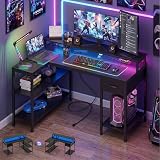
 Lufeiya Gaming Desk with Power Outlets and LED39.4"19.7 x 39.4 x 33.4 Inches20.4 PoundsCheck on Amazon
The HLDIRECT 44 inch gaming desk is the best overall pick for most players who want built-in power, because its listing combines power outlets, LED lights, a reversible layout, a built-in monitor stand and fabric storage in one mid-size footprint. A gaming desk with built-in power outlets has a power strip or outlet panel mounted on the desk itself, so a monitor, PC, console and chargers plug in at the desktop instead of behind it. This guide covers six options, from compact 40 inch desks to an L-shaped corner design and one electric standing desk that is not styled as a gaming desk. Confirm outlet counts, ratings and safety markings on each product page.
Quick List
- Lufeiya 40 inch Gaming Desk with Outlets and LED – best for small rooms and dorms that still need charging at the desk.
- Lufeiya 47 inch Gaming Desk with Power Outlet – best for teens and students who need a wider surface for study and play.
- Huuger 47 x 24 inch Electric Standing Desk – best for sit-stand use with outlets and a USB-C port (a standing desk, not a gaming-styled one).
- HLDIRECT 44 inch Gaming Desk – best overall for outlets, LED, a monitor stand and reversible setup.
- Korfile 40 inch L-Shaped Gaming Desk – best for a compact corner with three tiers of storage.
- AODK 53 inch L-Shaped Gaming Desk – best for the largest surface with a shelf and storage bag.
Which One Is Right for You?
| If you… | Choose |
|---|---|
| Want the most complete feature list in a mid-size desk | HLDIRECT 44 inch Gaming Desk |
| Need the largest L-shaped workspace for multiple monitors | AODK 53 inch L-Shaped Gaming Desk |
| Live in a dorm or bedroom with limited floor space | Lufeiya 40 inch Gaming Desk with Outlets and LED |
| Want to alternate sitting and standing | Huuger 47 x 24 inch Electric Standing Desk |
| Are buying for a teen who studies and games at the same desk | Lufeiya 47 inch Gaming Desk with Power Outlet |
| Want shelves in a small corner footprint | Korfile 40 inch L-Shaped Gaming Desk |
The first question is room size. A 40 inch desk fits tight corners but offers little room for a keyboard, mouse and two monitors. A 47 inch or 53 inch desk gives breathing space, and an L-shaped design uses a corner for extra reach. The second question is power: count what you plug in. Add the wattage of the PC, monitors and chargers to judge whether the desk’s built-in outlets can handle them.
Lufeiya Gaming Desk with Power Outlets and LED Lights, 40 Inch Gamer Desk Table with Charging Station, Home Office Computer Desks with Monitor, Black
Chosen because it specifies 40 Inch Gamer Desk Table with Charging Station and Home Office Computer Desks with Monitor.
View on Amazon
Lufeiya Gaming Desk with Power Outlet, 47 inch Teen Study Table Home Office Work Writing Computer Desks with Charging Station Outlets Built in, Black
Chosen because it specifies Black.
View on Amazon
Huuger 47 X 24 Inch Electric Standing Desk with Power Outlets and USB-C Port, Height Adjustable Desk, Sit Stand Desk for Home Office, Computer & Gaming Desk with 3 Presets, Stable Steel Frame, Black
Chosen because it specifies Height Adjustable Desk and Sit Stand Desk for Home Office.
View on Amazon
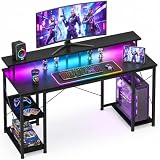
HLDIRECT 44 Inch Gaming Desk with Power Outlets & LED Lights, Black | Reversible gaming computer desk with built-in monitor stand, 3 fabric drawers & 4 side hooks, 2 AC outlets & 3 USB ports
Chosen because it specifies Black and Reversible gaming computer desk with built-in monitor stand.
View on Amazon
Korfile 40 Inch Gaming Desk with Power Outlet, LED, Carbon Fiber Black | L Shaped Computer Gaming Table, Corner Gamer Table, with 3 Tiers Storage Shelves, with Moniter Stand, for Small Space
Chosen because it specifies LED and Carbon Fiber Black.
View on Amazon
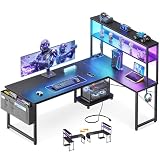
AODK L Shaped Desk Gaming Desk with LED Light & Power Outlet | 53 Inch Black Reversible L Shaped Computer Table with Shelf & Storage Bag & Hook for Home Office
Picked as a relevant option in this category.
View on AmazonAll 6 Picks in Detail
1. Lufeiya 40 inch Gaming Desk with Outlets and LED – Best for Small Spaces
As an Amazon Associate we earn from qualifying purchases at no extra cost to you.
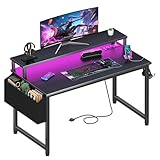
This Lufeiya desk is a 40 inch gaming desk with power outlets, LED lights and a charging station, and the listing title also appears to mention a monitor-related feature (confirm on the product page). At 40 inches it is a good match for a bedroom corner or dorm. It puts a small outlet panel at the desk edge so phones, controllers and a headset base can charge close to where you sit. Because the surface is limited, it works best for a single monitor setup.
- 40 inch width, per the listing title
- Power outlets plus a charging station
- LED lights
- Monitor-related feature appears in the listing title; confirm on listing
- Outlet count, USB ports, cord length and safety markings: confirm on listing
Before you plug in a large PC, check the outlet panel’s rated load, since small desk panels are meant for modest equipment such as a monitor, a laptop charger and small devices.
In a small room, the layout around the desk matters as much as the desk. Slide it into a corner so the outlet panel faces the wall socket, and keep headphones within reach. Because the top is limited, a monitor on a riser frees space for a keyboard and a notebook below. Students often pair a desk this size with a laptop and a single external display.
Pros
- Compact enough for tight rooms
- Charging close at hand
Cons
- Little room for a multi-monitor setup
- Surface depth is not stated in the listing name
It is the smaller sibling of the 47 inch Lufeiya in this list, trading width for footprint.
2. Lufeiya 47 inch Gaming Desk with Power Outlet – Best for Study and Play

The 47 inch Lufeiya is described as a gaming desk with a power outlet, built-in charging station and outlets, aimed at teens and students for study, writing and home office use. The extra width gives space for a laptop and a second screen, or for schoolbooks beside a keyboard. For a family that wants one desk to cover homework and gaming, this is a sensible mid-size choice.
- 47 inch width, per the listing title
- Power outlet and charging station
- Described as suitable for study and home office use
- Teen-friendly positioning
- Outlet count, USB ports and LED details: confirm on listing
Keep the desk’s cable routing in mind. Route the power cord to a wall outlet with slack, and avoid tucking it under a chair’s wheel path.
Teens often use the same desk for homework, video calls and gaming, so look at how the surface handles each. A larger top lets you keep books on one side and a keyboard on the other. Make sure the chair slides fully under the desk and that your knees clear any panel or bracket. A parent can also use the charging station as a way to keep phones and controllers in one visible spot.
Pros
- Wider surface for study and gaming
- Built-in charging keeps the desktop tidy
Cons
- Feature details are thinner in the title than for the HLDIRECT
- Assembly details are not stated
Choose it over the 40 inch version if you need elbow room.
3. Huuger 47 x 24 Inch Electric Standing Desk – Best for Sit-Stand (Not Gaming-Styled)

The Huuger is an electric, height-adjustable standing desk, 47 by 24 inches, with power outlets and a USB-C port. It is a sit-stand home office desk rather than a gaming-styled one, so we treat it as an alternative for people who value adjustability over gaming looks. The 24 inch depth is moderate, so a large monitor may sit close to your face unless you pull the desk away from the wall.
- 47 by 24 inches, per the listing title
- Electric height adjustment
- Power outlets and a USB-C port
- Sit-stand design for home office use
- Height range, weight capacity and memory presets: confirm on listing
Standing desks add a motor, so leave slack in every cable so nothing is pulled when the desk rises, and keep the power supply and surge protection separate from liquids.
If you decide on a standing desk, check the height range against your own body before you set it up. A typical comfortable seated height puts the elbows at about 90 degrees, and standing height is usually a few inches above that. Many users change position every 30 to 60 minutes. Mount monitors on arms or risers so the top edge stays near eye level at both heights, and leave slack in cables so none is pulled during a lift.
Pros
- Height adjustment for sitting and standing
- USB-C port for modern devices
Cons
- Not styled or marketed as a gaming desk
- Depth of 24 inches may feel shallow for a large monitor
It is the only motorized desk here, so it suits a different buyer than the LED-lit gaming designs.
4. HLDIRECT 44 Inch Gaming Desk – Best Overall

The HLDIRECT is a 44 inch black gaming desk with power outlets, LED lights, a reversible layout, a built-in monitor stand and three fabric items (confirm what they are on the product page). The reversible design means the shelf and storage can go on the left or right, which is helpful in rooms where the door and the window decide the layout. Of the straight desks in this list, its listing states the most features, which is why it leads.
- 44 inch width, per the listing title
- Power outlets and LED lights
- Reversible design
- Built-in monitor stand
- Three fabric items, per the listing; confirm type
Think about the monitor stand height. A stand that raises the screen a few inches helps bring the display to eye level, and the space under it can hold a keyboard or a small drive.
Reversible desks reward careful planning. Decide which side your wall outlet, door and window sit on, then build the shelf and storage on the side that keeps cords short. The fabric pieces mentioned in the listing are usually soft bins or drawers, so keep heavy items on the desk or floor rather than in them, and confirm exactly what is included on the product page.
Pros
- Strong feature set for a mid-size desk
- Reversible layout suits many rooms
Cons
- Outlet type and count are not in the listing name
- Fabric items vary in sturdiness
Compared with the Lufeiya 47 inch, it stores more but has a slightly narrower top.
5. Korfile 40 Inch L-Shaped Gaming Desk – Best for a Small Corner with Shelves

The Korfile is a 40 inch L-shaped corner desk in carbon fiber black with a power outlet, LED lighting and three tiers of storage. The L shape lets you tuck it in a corner and still have a wing for a second monitor or notes. At 40 inches it is on the small side for an L-shaped desk, so check the exact arm lengths on the product page.
- 40 inch size, per the listing title
- L-shaped corner layout
- Power outlet and LED lighting
- Carbon fiber black finish
- Three tiers of storage
Corner desks can make it harder to reach the outlet panel. Place the panel on the side nearest your wall socket so the supply cord does not stretch across the floor.
Corner desks work well when you can sit with your back to the room and both wings within reach. Put the main monitor on the long arm, and use the short arm for a controller, notes or a console. If the three tiers are open shelves, they are good for small items like game cases or a router, but avoid loading them with heavy weight on the top tier, which can make the desk top-heavy.
Pros
- Corner footprint with shelving
- Carbon fiber finish looks like a gaming desk
Cons
- Arm lengths and depth are not in the listing name
- Storage tiers add weight and visual bulk
Next to the AODK, it is smaller and more shelf-focused.
6. AODK 53 Inch L-Shaped Gaming Desk – Best for the Largest Surface

The AODK is a 53 inch L-shaped, reversible black desk with LED light, a power outlet, a shelf and a storage bag. It offers the widest working area in this guide, enough for a keyboard, mouse and two monitors, plus a corner for a laptop or a console. The reversible design lets you flip the wing to the left or right.
- 53 inch size, per the listing title
- L-shaped, reversible layout
- LED light and power outlet
- Shelf and storage bag; confirm other accessories
- Surface depth, outlet count and weight capacity: confirm on listing
A bigger desk needs more room to assemble and place. Measure the wall space and leave a gap behind the desk for cables.
With a desk this size, plan your cable path before assembly. Decide where the PC will sit, where the outlet panel will face and how the power cord will reach the wall. The shelf can hold small speakers or a router. Allow extra space at the corner so you can reach the back, and check that the room door still swings freely after the desk is in place.
Pros
- Largest workspace in the set
- The shelf and storage bag help with organization
Cons
- Takes up a lot of floor space
- Longer assembly than a straight desk
It is the roomy alternative to the compact Korfile.
Specs Compared
| Desk | Size | Shape | Power | LED | Storage or extras |
|---|---|---|---|---|---|
| Lufeiya 40 inch | 40 inch | Straight | Outlets and charging station | Yes | Confirm on listing |
| Lufeiya 47 inch | 47 inch | Straight | Outlet and charging station | Confirm on listing | Confirm on listing |
| Huuger Electric Standing | 47 x 24 inches | Straight, height-adjustable | Outlets and USB-C | Confirm on listing | Electric lift |
| HLDIRECT 44 inch | 44 inch | Straight, reversible | Outlets | Yes | Monitor stand, 3 fabric items (confirm) |
| Korfile 40 inch | 40 inch | L-shaped | Outlet | Yes | 3 storage tiers |
| AODK 53 inch | 53 inch | L-shaped, reversible | Outlet | Yes | Shelf, storage bag |
How We Chose These
We drew this list from current catalog listings for desks that state built-in power outlets, then compared the sizes, shapes and extras that each product name and description gives. We read retailer specification fields and manufacturer pages where available, and we flagged any value that the listing leaves out, such as outlet counts and weight capacity, for confirmation. One electric standing desk is included because it states outlets and a USB-C port, and we say plainly that it is not gaming-styled. We favored clear sizes, stated power features and practical storage. We make no claims about assembly or durability beyond what the listings say.
What to Look For
Understand what the built-in outlets are
Desk outlets are generally a small power strip fixed to the desk, connected to the wall by a single cord. Everything plugged into it shares that one cord’s capacity. In the United States a standard household outlet circuit is commonly 15 amps at 120 volts, which is about 1,800 watts in total, and a continuous load should stay well below that. Add up the rated wattage on the labels of your equipment. A gaming PC may draw several hundred watts under load, monitors add 30 to 60 watts each, and chargers add a little more. Check the strip’s own rating on the product page and look for a recognized safety listing.
Safe use of desk power
Do not daisy-chain one power strip into another, and do not plug a space heater or other high-draw appliance into a desk outlet. Keep the strip off the floor where liquids may spill, and keep cords free of sharp bends and chair wheels. If the strip includes surge protection, the listing usually states a joule rating, and if it does not, add a separate surge protector at the wall. If a cord feels warm, a plug loosens or the desk smells of hot plastic, unplug it and stop using it until it is inspected.
Size, shape and ergonomics
A common rule is a desk depth of at least 24 inches, with 30 inches being comfortable for a monitor viewed at arm’s length. Width depends on the setup: 40 to 44 inches fits one monitor, 47 to 55 inches gives space for two screens or a laptop alongside. L-shaped desks add reach but need corner space. Standard desk height is about 29 to 30 inches, and a keyboard works best when your elbows rest near 90 degrees. Monitor stands help raise screens, but the top of the display should sit near eye level.
Stability, weight capacity and assembly
Weight capacity matters when you add a PC tower, multiple monitors and shelves. Many gaming desks list a capacity in the range of 100 to 200 pounds, though some do not state it. Check for adjustable feet, since uneven floors cause wobble. Steel frames with cross braces tend to feel stiffer than thin tube frames. Expect to spend one to two hours assembling most desks, and have a helper for larger L-shaped models.
LED lights and cable management
LED lighting adds atmosphere but also adds a power draw and a controller. Check whether the lights have a remote or buttons and whether you can turn them off. Cable trays, grommet holes and hooks keep cords out of sight and off the floor. As a worked example, a setup with a 300 watt PC, two 40 watt monitors and a 20 watt charger totals about 400 watts, well below a typical 1,800 watt circuit limit, but you should still confirm the strip’s own rating.
Choosing between straight and L-shaped
Straight desks are easier to place and to move. They suit rooms where the desk sits against one wall. L-shaped desks use a corner to add a second work surface, so they suit players with a PC, a laptop and a console, or someone who keeps notes and drawing tools beside the keyboard. Before ordering, tape the desk outline on the floor with painter tape and sit in your chair. Check that you can walk past it, open doors and reach the wall socket. That small step prevents the most common regret, which is a desk that is too big for the room.
Questions
Are built-in desk outlets safe for a gaming PC?
They can be when the total load stays within the strip’s rating and the strip carries a recognized safety listing. Check the wattage of your PC and monitors, avoid daisy-chaining and consider a separate surge protector.
How many outlets do I need?
Count your devices: PC, monitors, speakers, chargers and any console. Add a few spare outlets for future gear. If the desk offers fewer than you need, use a rated power strip instead of overloading the desk panel.
What size gaming desk should I choose?
For one monitor, 40 to 44 inches is workable. For two monitors, look at 47 inches and up. L-shaped designs are best when you have a corner and want extra surface.
Is an electric standing desk a good gaming desk?
It can be if you value sit-stand flexibility, though it is not styled for gaming. Check the depth, weight capacity and height range, and leave slack in all cables.
Do LED lights draw a lot of power?
LED strips use a small amount of power compared with a PC or monitor. They still add a controller and a plug, so check the product page for details.
Can I flip a reversible desk later?
Reversible means you choose left or right layout during assembly. Changing later usually means partial disassembly, so decide on the layout before you build it.
Update History
- October 20, 2026 – Initial publication; product set drawn from current catalog listings.
- Check the product page for current specifications and availability before buying.
Sources
- Retailer listing titles and specification fields for all six products
- Manufacturer product pages where available