Key takeaways
- GPU and VRAM: At this budget you’re realistically looking at an RTX 3050, 4050, 5050, or 5060. Prioritize at least 8GB of VRAM — modern titles at 1080p with textures turned up will exceed 6GB regularly, and VRAM limits cause harsher stutter than raw GPU horsepower ever will.
- RAM capacity over CPU tier: 16GB of DDR5 should be your floor in 2026. An 8GB configuration will bottleneck you in open-world games and background-heavy workflows, and while RAM is often upgradeable, doing so eats into your savings. A mid-tier CPU with 16GB beats a faster chip with 8GB nearly every time.
- Display refresh and resolution: A 144Hz or faster 1080p/1200p panel is the sweet spot. Higher resolutions look great in screenshots but budget GPUs can’t drive them at playable frame rates in demanding titles, and you’ll end up lowering resolution anyway.
- Thermal design and chassis: Sustained performance matters more than peak benchmarks. Larger 16-inch chassis generally offer better airflow and quieter fans than cramped 15-inch shells running the same silicon, which translates to higher average frame rates over a long session.
- Storage and expandability: A 1TB Gen 4 SSD is ideal, but 512GB is workable if the laptop has a second M.2 slot. Check for user-accessible RAM and storage before buying — a machine you can upgrade in two years is worth more than one that’s sealed shut.
Shopping for a gaming laptop under $1,000 in 2026 means navigating a market where spec sheets look increasingly similar but real-world performance varies wildly. Manufacturers know this price bracket is where volume lives, so they load configurations with impressive-sounding GPU model numbers while quietly cutting corners on VRAM, memory capacity, panel quality, or thermal headroom. The result is that two laptops with nearly identical listings can deliver dramatically different frame rates once you’re an hour into a demanding session and the cooling system starts throttling.
This guide cuts through that noise. We’ve focused on machines that genuinely land under the $1,000 mark rather than aspirational configurations that only hit the price during rare sales, and we’ve prioritized the components that actually matter for gaming longevity: GPU VRAM, RAM capacity, display refresh rate, and sustained thermal performance. Below you’ll find our top picks, a practical buying framework, and answers to the questions we hear most often from readers building their first gaming setup.
Our top picks


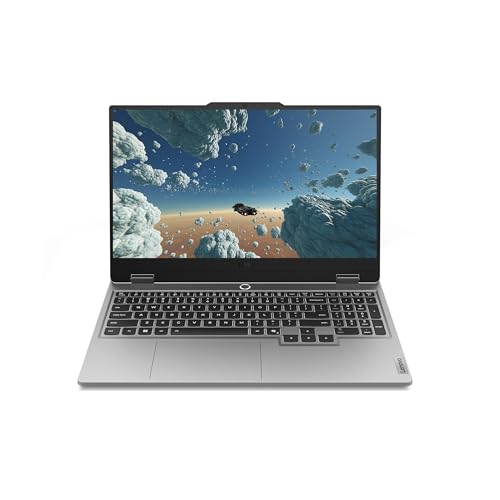

As an Amazon Associate we earn from qualifying purchases at no extra cost to you. Ratings are shown as listed on Amazon.
⚡ Save on Your Next PC — Amazon Prime
Prime members get fast free shipping on the systems above, plus early access to Prime Day & Black Friday PC deals. New members get a 30-day free trial.
Watch: Best Gaming Laptop Under $1000 — Video Review
How to Choose Gaming Laptop Under $1000
- GPU and VRAM: At this budget you’re realistically looking at an RTX 3050, 4050, 5050, or 5060. Prioritize at least 8GB of VRAM — modern titles at 1080p with textures turned up will exceed 6GB regularly, and VRAM limits cause harsher stutter than raw GPU horsepower ever will.
- RAM capacity over CPU tier: 16GB of DDR5 should be your floor in 2026. An 8GB configuration will bottleneck you in open-world games and background-heavy workflows, and while RAM is often upgradeable, doing so eats into your savings. A mid-tier CPU with 16GB beats a faster chip with 8GB nearly every time.
- Display refresh and resolution: A 144Hz or faster 1080p/1200p panel is the sweet spot. Higher resolutions look great in screenshots but budget GPUs can’t drive them at playable frame rates in demanding titles, and you’ll end up lowering resolution anyway.
- Thermal design and chassis: Sustained performance matters more than peak benchmarks. Larger 16-inch chassis generally offer better airflow and quieter fans than cramped 15-inch shells running the same silicon, which translates to higher average frame rates over a long session.
- Storage and expandability: A 1TB Gen 4 SSD is ideal, but 512GB is workable if the laptop has a second M.2 slot. Check for user-accessible RAM and storage before buying — a machine you can upgrade in two years is worth more than one that’s sealed shut.
The Best Picks Reviewed
ASUS ROG Strix G16 (2025)
The RTX 5060 paired with an Intel Core i7-14650HX makes this the most capable performer on the list, and the 16:10 165Hz panel gives you meaningfully more vertical workspace than standard 16:9 displays. With 16GB DDR5, a 1TB Gen 4 SSD, and Wi-Fi 7 already included, it’s the pick if your budget stretches to the top of this range and you want headroom for the next few years.
Acer Nitro V 16 (Core 7 240H)
Acer’s 16-inch Nitro V hits an excellent balance: an RTX 5050, 16GB DDR5, a 1TB Gen 4 SSD, and a 180Hz WUXGA panel that’s genuinely fast enough for competitive shooters. The larger chassis handles heat better than most machines at this price, making it our value-per-dollar standout.
ASUS TUF Gaming A16
The Ryzen 7 7445HS and RTX 4050 combination remains a reliable 1080p performer, and the TUF chassis carries ASUS’s military-spec durability testing — worthwhile if the laptop will travel. The 512GB SSD is the main compromise, though the 16GB of DDR5 and 145Hz display keep it competitive.
Alienware 16 Aurora
Alienware’s entry-level Aurora brings the brand’s build quality and thermal engineering to a genuinely accessible price, pairing an RTX 5050 with a Core 7 240H. You’re paying a small premium for the design and keyboard, but the chassis quality is a clear step above typical budget offerings.
Acer Nitro V 15.6″
The 15.6-inch Nitro V trades screen real estate for a lower price while keeping the RTX 5050 with 8GB of GDDR7 VRAM and 16GB of RAM intact. The i5-13420H is the weakest CPU here, but for GPU-bound gaming at 1080p that matters far less than the spec gap suggests.
Frequently Asked Questions
Can a laptop under $1,000 handle modern AAA games in 2026?
Yes, at 1080p with medium to high settings and upscaling enabled. An RTX 5050 or 5060 with DLSS will comfortably exceed 60fps in most current releases, though you’ll need to lower ray tracing settings or disable them entirely in the most demanding titles.
Is it worth buying a renewed gaming laptop to save money?
Renewed units can offer real savings and typically come with a limited warranty, but you’re inheriting unknown thermal paste condition and battery wear. They make sense if the specs are a clear step up from new alternatives at the same price — otherwise, buy new for the full warranty.
How much RAM do I actually need for gaming?
16GB is the practical minimum in 2026. Games are increasingly built around 16GB systems, and 8GB configurations will force you to close background applications and still encounter texture streaming hitches in open-world titles.
Should I prioritize a better GPU or a better CPU?
The GPU, almost always. At 1080p gaming the graphics card is the primary bottleneck, and a mid-tier CPU paired with a stronger GPU will outperform the reverse in nearly every title. Reserve CPU spending for streaming or content creation workloads.
Final Thoughts
If you want maximum performance and can push toward the top of this budget, the ASUS ROG Strix G16 with its RTX 5060 and 1TB drive is the clear performance leader. For the best overall value, the 16-inch Acer Nitro V delivers nearly everything that matters — 16GB DDR5, 1TB Gen 4 storage, and a 180Hz panel — at a noticeably lower price. Buyers who prioritize durability and travel-readiness should look closely at the ASUS TUF Gaming A16, which trades a little raw speed for a chassis built to survive daily transport.