Key takeaways
- Set a 90-day reminder: A quick quarterly blowout prevents the heavy buildup that forces a full teardown.
- Use magnetic filters on intakes only: Adding mesh to exhaust fans just chokes airflow without catching much dust.
- Keep the PC off the floor: Carpet and floor-level air carry the most dust; a desk riser cuts intake grime dramatically.
- Positive pressure helps: Running slightly more intake than exhaust airflow means dust enters mainly through filtered vents.
Dust is the silent killer of gaming performance. As fans pull air through your case, they also pull in a steady film of dust that coats blades, clogs filters, and blankets heatsinks, and within six months an uncleaned rig can run 8 to 12 degrees Celsius hotter than it did on day one. Those extra degrees push your GPU and CPU into thermal throttling, which quietly shaves frames off every game you play.
The fix is a 30-minute cleaning routine you can do with a screwdriver, a can of compressed air, and a set of magnetic dust filters like the MoKo 400x300mm DIY PC Case Dust Mesh kit to keep dust out afterward. This guide covers how to clean fans safely, what not to do, and how to keep the whole system breathing for the long haul.
Our top picks
 ThreeBulls 12 Pcs 120mm PVC Black PC
- 100% brand new and high quality Suitable for.
- For the home computer chassis fan dust, speaker…
- Help to keep your PC and PC components…
 IMSurQltyPrise 120mm Computer Fan Filter Grills
- Brand New PC Case Fan Vent Filter Finger…
- Black Color
- Compatible with: Most of Standard 120mm Fan /…
 MoKo 400x300mm DIY PC Case Dust Mesh
- 400 x 300mm DIY Filter: This DIY PC…
- 8 x 400mm Magnetic Strips: Come with 8…
- Dustproof and Ventilation: 1mm hole not only prevent…
| Product | Key specs | |
|---|---|---|
| ThreeBulls 12 Pcs 120mm PVC Black PC | 100% brand new and high quality Suitable for. For the home computer chassis fan dust, speaker… Help to keep your PC and PC components… | Check price |
| IMSurQltyPrise 120mm Computer Fan Filter Grills | Brand New PC Case Fan Vent Filter Finger… Black Color Compatible with: Most of Standard 120mm Fan /… | Check price |
| MoKo 400x300mm DIY PC Case Dust Mesh | 400 x 300mm DIY Filter: This DIY PC… 8 x 400mm Magnetic Strips: Come with 8… Dustproof and Ventilation: 1mm hole not only prevent… | Check price |
 Dust Filter PC 120mm for Computer Cooler/PSU/Routers Dust Filter PC 120mm for Computer Cooler/PSU/Routers | 【DELIVERY LIS】YIMATEECO Provides: 2 x 120*120mm PC Dust… 【PRODUCT DESIGN】Weak magnetic design, Easy to install and… 【CHOICE OF PETS FAMILIES】The ultra-small aperture as low… | Check price |
 MoKo 400x300mm DIY PC Case Dust Mesh MoKo 400x300mm DIY PC Case Dust Mesh | 400x300mm DIY Filter: This DIY PC case dust… 16 x 400mm Magnetic Strips: Come with 16… Dustproof and Ventilation: 1mm hole not only prevent… | Check price |
| ThreeBulls 12 Pcs 140mm PVC Black PC | 100% brand new and high quality Suitable for. For the home computer chassis fan dust, speaker… Help to keep your PC and PC components… | Check price |
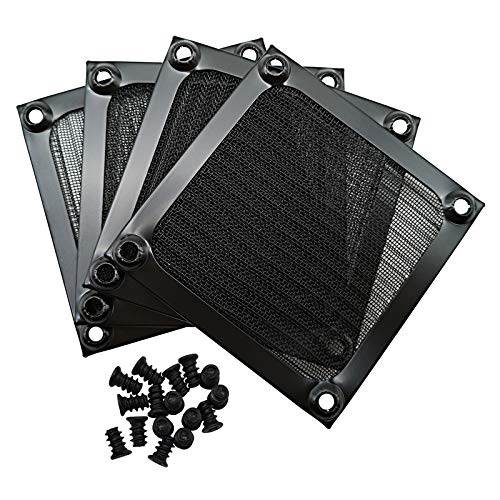 IMSurQltyPrise 80mm Computer Fan Filter Grills IMSurQltyPrise 80mm Computer Fan Filter Grills | Brand New PC Case Fan Vent Filter Finger… Black Color Compatible with: Most of Standard 80mm Fan /… | Check price |
 Adyoney 4 Pcs 120mm Black Square Plastic Adyoney 4 Pcs 120mm Black Square Plastic | 【Packaging & Size】: Our 4 Pcs Black Cooling… 【Unique Design】: These fan filters feature a unique… 【High-Quality Materials】: Made from durable plastic materials, these… | Check price |
As an Amazon Associate we earn from qualifying purchases at no extra cost to you.
⚡ Save on Your Next PC — Amazon Prime
Prime members get fast free shipping on the systems above, plus early access to Prime Day & Black Friday PC deals. New members get a 30-day free trial.
Watch: How to Clean Your PC Fans and Filters — Video Review
Gather the Right Tools
You don’t need much, but a few items make the job far cleaner. Grab a can of compressed air (or an electric air duster), a microfiber cloth, and a soft brush. Most importantly, prepare a set of pre-cut fan filters such as the ThreeBulls 12 Pcs 120mm PVC dust filter pack or the IMSurQltyPrise 120mm filter grills, because trapping dust at the intake is far easier than scrubbing it off blades every month. Measure your fans first: 120mm is by far the most common size, with 140mm on larger radiators and 80mm on some older cases.
Power Down and Open Safely
Shut the PC fully down, flip the power supply switch to off, and unplug the wall cable. Press the power button once to drain residual charge, then move the case to a well-ventilated area or outdoors, since blowing dust indoors just relocates the problem. Touch a bare metal part of the chassis to discharge any static before you reach inside.
Clean the Fans Without Wrecking the Bearings
Here is the one rule people get wrong: never let compressed air spin the fan freely. A fan spun backward at high RPM acts as a generator and can send a voltage spike back into the motor, and over-spinning wears the bearing. Hold each blade still with a finger or a cotton swab, then blow short bursts from behind the fan to push dust out the front. Wipe stubborn film off the blades with a lightly dampened microfiber cloth, and use the soft brush to loosen caked dust in the corners.
Do the Filters, Heatsink, and PSU
Pop off any front and top intake filters, rinse the washable ones under water, and let them dry completely before reinstalling. Blow dust out of the CPU tower cooler and GPU heatsink fins, working with the fin direction so you don’t bend them. Give the power supply intake a few bursts too, holding its fan still. If your case lacks proper filtration, this is the moment to add magnetic mesh like the MoKo DIY dust filter, which snaps onto steel case panels without screws.
Tips
- Set a 90-day reminder: A quick quarterly blowout prevents the heavy buildup that forces a full teardown.
- Use magnetic filters on intakes only: Adding mesh to exhaust fans just chokes airflow without catching much dust.
- Keep the PC off the floor: Carpet and floor-level air carry the most dust; a desk riser cuts intake grime dramatically.
- Positive pressure helps: Running slightly more intake than exhaust airflow means dust enters mainly through filtered vents.
Frequently Asked Questions
How often should I clean my PC fans?
Every three months for most homes, monthly if you have pets or the machine sits on carpet. Filters can be rinsed more often since they’re quick to remove.
Can I use a vacuum cleaner instead of compressed air?
Avoid standard vacuums; they generate static that can damage components. If you want suction, use an anti-static electronics duster or a dedicated PC blower, and always immobilize the fan blades first.
Do dust filters reduce airflow?
Fine mesh costs a small amount of airflow, but the tradeoff is worth it because a clean heatsink cools far better than a dust-choked one. Nylon and PVC filters like the ThreeBulls packs strike a good balance.
Why is my PC still loud after cleaning?
Loud fans usually mean high temperatures, so if noise persists, check that heatsinks are truly clean and that thermal paste hasn’t dried out. Worn bearings also whine and may need the fan replaced.
Final Thoughts
Cleaning your fans is the cheapest performance upgrade you’ll ever make. A quarterly blowout plus a proper set of intake filters keeps temperatures low, fans quiet, and your hardware running at full clock speed. Spend half an hour now and your gaming rig will thank you with cooler, faster, and longer-lived components.