Key takeaways
- Do not hold the up and down buttons randomly while the desk is displaying an error.
- Do not reset with a person, pet, or child underneath the desktop.
- Do not exceed the listed lifting capacity, especially with a large monitor arm or multiple displays.
- Do not use an extension cord as a permanent solution if the manufacturer requires a direct wall connection.
- Do not spray lubricant into electric leg columns unless the manual specifically recommends it.
- Do not continue operating the desk if one leg is more than about 1 inch out of alignment with the other.
- Do not unplug the desk while it is moving unless there is an immediate safety hazard.
A standing desk reset error code usually means the control box has detected a height mismatch, overload, obstruction, loose connection, or power interruption. The fix is often simple, but rushing the process can make the problem worse. For example, repeatedly pressing the buttons while the desk is jammed may overheat the motor, erase a saved height, or cause the legs to move unevenly. Unplugging the desk while it is moving can also leave the control system out of sync.
This guide explains how to safely reset a standing desk, clear common error codes, and determine whether the problem is electrical, mechanical, or a sign that a component needs replacement. The procedure applies to many electric sit-stand desks and desk converters, although button combinations vary by brand. If your owner’s manual specifies a different reset sequence, follow it first.
Our top picks
 farexon 55x24 Inch Electric Standing Desk with
- 【Oversized Desktop & Practical Mouse Pad】The large 55"…
- 【Height Adjustable Standing Desk】Farexon height adjustable standing desk…
- 【Work Efficiently and Healthily】The excellent standing desk to…
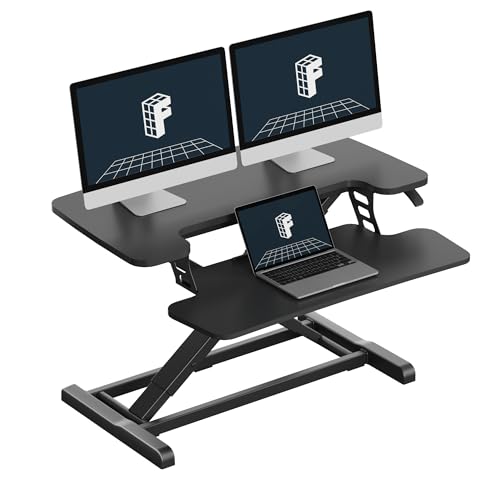 FLEXISPOT 32" Standing Desk Converter
- Patented Pending Spring Lift System: Featuring a mechanical…
- Ergonomic for Healthy Work: Upgrade your workspace with…
- Heavy-Duty Structure with Enhanced Stability: Built with a…
As an Amazon Associate we earn from qualifying purchases at no extra cost to you.
What You Need
| Item | Why | Optional? |
|---|---|---|
| Desk owner’s manual | Identifies the exact error code and reset button combination | No |
| Power outlet | Provides a direct, stable power source during our research | No |
| Flashlight | Helps you inspect cables, leg columns, and obstructions under the desktop | Yes |
| Small screwdriver or hex key | Useful for tightening a loose control-box, motor, or handset connection | Yes |
| Soft cloth | Protects the desktop if you need to turn the desk on its side | Yes |
| Clear floor space | Allows the desk to travel without striking a wall, chair, cabinet, or cable | No |
Remove heavy items before testing. A typical home office desk may be rated for approximately 150 to 300 pounds, but that figure includes the desktop, monitor arms, computer equipment, and accessories. Do not assume the motor can safely lift the maximum rated load continuously. If you are shopping for a replacement, basic electric desks commonly cost about $140 to $350, while manual or powered converters often range from $110 to $250. For reference, a farexon 55-by-24-inch electric standing desk with a mouse pad is listed around $140 to $150, while a FLEXISPOT 32-inch standing desk converter is listed around $110 to $120.
Step-by-Step
-
Read the code and stop pressing buttons (2 minutes)
Write down the exact display message, including letters, numbers, or flashing symbols. Common displays include codes such as E01, E02, E07, ASR, or RST, but the same code can mean different things on different control systems. Stop pressing the handset when the desk is not responding. Listen for buzzing, clicking, or a motor that continues running after the desktop stops. These details can help identify a jammed column or a control-box fault.
-
Clear the desk’s movement path (5 minutes)
Lower or raise the desk only if it still responds normally. Look beneath the desktop for a chair, filing cabinet, power strip, wall, baseboard, or storage bin blocking the legs. Check that monitor cables, laptop chargers, and cord-management trays have enough slack for the full travel range. Leave at least 1 to 2 inches of clearance around moving leg sections whenever possible. Remove computers, printers, and other heavy equipment before resetting if the desk appears overloaded.
-
Check every cable connection (5 minutes)
Unplug the desk from the wall. With the power disconnected, press each motor cable firmly into the control box and inspect the handset cable at both ends. Look for bent pins, crushed insulation, loose plugs, or a cable pulled tight against the frame. Confirm that the control box is attached securely underneath the desktop and that the power cord is not damaged. Do not open the control box or attempt to repair a frayed power cord.
-
Perform a complete power cycle (10 minutes)
Disconnect the power cord from the outlet and leave the desk unplugged for at least 60 seconds. During this pause, keep your hands and feet away from the leg columns. Plug the desk directly into a wall outlet rather than a smart plug, surge protector, or extension cord for the first test. Wait another 30 seconds before touching the handset. A full power cycle can clear a temporary control-box fault, but it will not repair a damaged motor, broken wire, or mechanical obstruction.
-
Run the standard bottom-position reset (2 minutes)
Make sure the desktop is clear and the area underneath is open. Press and hold the down button. If the desk begins moving, continue holding the button until it reaches its lowest position. After it stops, keep holding the down button for approximately 5 to 15 seconds. Many desks beep, flash, or move slightly to confirm calibration. Release the button, wait a few seconds, and test the up button briefly.
If the display shows “RST,” the desk may require this bottom-position procedure before normal movement returns. Some models instead require holding the down button until the display changes from RST to a height reading. Never force the desktop downward or lift it by hand while the motor is engaged.
-
Try the manual’s alternate reset sequence (3 minutes)
If the standard reset does not work, consult the manual for the specified combination. Depending on the handset, the sequence may involve holding the down button, holding two arrow buttons together, or pressing a reset button with a paper clip. Hold buttons only for the period stated by the manufacturer, commonly 5 to 20 seconds. Do not guess at a combination if the desk is making grinding sounds or if one side is visibly higher than the other.
-
Test travel in short increments (5 minutes)
After a successful reset, move the desk upward for 2 to 3 seconds, then stop. Check that both sides rise evenly and that no cable becomes taut. Lower it again in another short test. If the desk works at one height but displays an error near the top or bottom, inspect for a physical obstruction or a height-limit setting. If it stops repeatedly, allow the motor to cool for 20 to 30 minutes before trying once more. Motors can enter thermal protection after repeated cycles.
-
Reprogram memory buttons and restore accessories (5 minutes)
Once the desk moves normally, set a comfortable sitting height and standing height. Follow the handset instructions to save those positions. Reattach monitor arms, computers, and other equipment gradually rather than all at once. Keep the total load within the manufacturer’s rating, and place heavy items near the center of the desktop. Test the complete range again after routing cables.
Mistakes to Avoid
- Do not hold the up and down buttons randomly while the desk is displaying an error.
- Do not reset with a person, pet, or child underneath the desktop.
- Do not exceed the listed lifting capacity, especially with a large monitor arm or multiple displays.
- Do not use an extension cord as a permanent solution if the manufacturer requires a direct wall connection.
- Do not spray lubricant into electric leg columns unless the manual specifically recommends it.
- Do not continue operating the desk if one leg is more than about 1 inch out of alignment with the other.
- Do not unplug the desk while it is moving unless there is an immediate safety hazard.
How Often
Most standing desks do not need a scheduled electronic reset. Reset the desk after moving it, disconnecting the control box, experiencing a power interruption, or noticing uneven travel. Inspect cables and the area around the legs every one to three months. Wipe dust from the frame and check that fasteners remain tight. If you frequently change the desk’s load or relocate it, perform a brief low-and-high travel check afterward. Avoid running the desk through its entire range repeatedly; one test cycle is usually enough.
When to Call a Pro or Replace
Contact the manufacturer or a qualified repair technician if the error returns immediately after a correct reset, the control box smells burned, the power cord is damaged, or the desk trips the circuit breaker. Stop using it if a leg twists, grinds, jerks, or rises substantially faster than the other leg. A replacement control box or handset may solve a persistent electronic fault, but use only parts approved for that desk’s voltage, motor count, and connector type.
Replacement is often more practical when the frame is bent, a motor is unavailable, the desk is several years old and has multiple failing parts, or repair costs approach half the price of a new unit. A powered converter may be a sensible alternative for a lighter workstation, while a full electric frame is better for a larger 55-by-24-inch desktop and heavier monitor setup. Before buying, verify desktop dimensions, minimum and maximum height, lifting capacity, noise information, warranty coverage, and whether the replacement includes the control box and handset.
FAQ
What does “RST” mean on a standing desk?
“RST” commonly indicates that the desk needs to be reset or recalibrated at its lowest position. Clear the area, hold the down button until the desk reaches the bottom, and continue holding it for approximately 5 to 15 seconds. Check the manual because the exact confirmation signal varies.
Why does my standing desk show an error but still move?
The control system may have detected an overload, uneven leg position, obstruction, or recent power interruption. Remove heavy items, inspect the travel path and cables, power-cycle the desk, and complete the bottom-position reset. If the error returns during normal movement, stop using it and contact the manufacturer.
Can I reset a standing desk with weight on it?
It is safer to remove monitors, computers, and other heavy equipment before resetting. A light keyboard or empty desk organizer may be acceptable if the manufacturer permits it, but the reset should never be performed with a person leaning on the desktop or anything underneath the frame.
How long should a standing desk last before replacement?
Service life depends on construction, daily cycles, load, and maintenance. Replace or repair the desk when it develops repeated errors, severe wobbling, grinding, bent components, or unsafe cable damage—not solely because it reaches a particular age. Compare the repair quote with the cost of a new desk, which commonly ranges from about $140 to $350 for basic home-office models.