Key takeaways
- Wide model range: FHD to 4K, standard to 120Hz gaming and touchscreen.
- Great value: strong specs for less than premium rivals.
- Slim and portable: thin metal builds with included cases.
- Flexible connectivity: USB-C, HDMI, and VESA support on most units.
UPERFECT has become one of the most recognizable names in portable monitors, and for good reason: the brand offers an enormous range of travel screens at prices that consistently undercut the competition. Whether you want a simple 1080p second display for your laptop or a 4K touchscreen panel for gaming on the go, there’s a UPERFECT model built for it. The question is whether the value comes with compromises.
I spent time with several UPERFECT panels, from the everyday 15.6″ FHD model to the high-resolution 16″ 2K 120Hz and 4K options, to find out how they perform in real use. Here’s an honest look at where UPERFECT excels and what to watch for before buying.
Our top picks
 UPERFECT Portable Monitor
- Versatile Digital Connection: Versatile Digital Connection with Standard…
- FHD 1080 P IPS Screen: HDR portable monitor…
- Single Type-C Connect to Signal & Power: Portable…
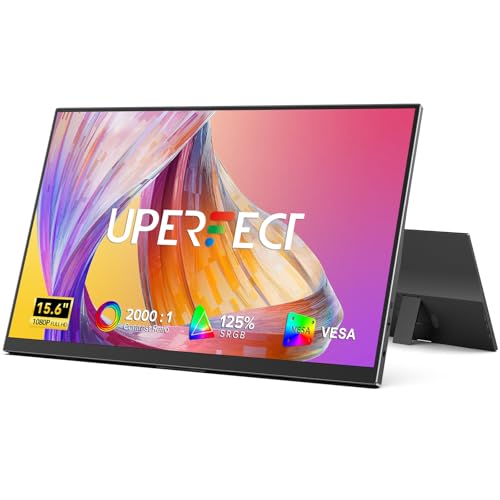 UPERFECT Portable Monitor
- 【Ultra-Slim & Lightweight for Travel】The UPERFECT 15.6" portable…
- 【Plug & Play, Broad Compatibility】Simply connect your device…
- 【Ultra-Narrow Bezels & 16:9 Aspect Ratio】This portable computer…
| Product | Key specs | |
|---|---|---|
| UPERFECT Portable Monitor | Versatile Digital Connection: Versatile Digital Connection with Standard… FHD 1080 P IPS Screen: HDR portable monitor… Single Type-C Connect to Signal & Power: Portable… | Check price |
 UPERFECT 16" 2K 120Hz Portable Monitor UPERFECT 16" 2K 120Hz Portable Monitor | Check price | |
| UPERFECT Portable Monitor | 【Ultra-Slim & Lightweight for Travel】The UPERFECT 15.6" portable… 【Plug & Play, Broad Compatibility】Simply connect your device… 【Ultra-Narrow Bezels & 16:9 Aspect Ratio】This portable computer… | Check price |
 UPERFECT Portable Monitor 4K 16" 1200 Nits UPERFECT Portable Monitor 4K 16" 1200 Nits | 1200 Nits True Brightness: This 4K portable monitor… 4K-145%sRGB True Color Immersion: The 4K UHD (3840x2400)… Recyclable Aluminum Material: Our monitors use high-quality aluminum… | Check price |
 UPERFECT 18.5" 120Hz Portable Monitor UPERFECT 18.5" 120Hz Portable Monitor | Check price | |
 UPERFECT 4K Portable Monitor Touchscreen UPERFECT 4K Portable Monitor Touchscreen | Check price | |
 UPERFECT 24" 144Hz Portable Monitor UPERFECT 24" 144Hz Portable Monitor | Innovative 24” QLED Portable Monitor: Experience vibrant, true-to-life… 144Hz High Refresh Rate: Enjoy ultra-smooth gameplay and… Lightweight Travel Monitor: Weighing just 5.37 pounds, UPERFECT… | Check price |
 UPERFECT Portable Monitor UPERFECT Portable Monitor | Check price |
As an Amazon Associate we earn from qualifying purchases at no extra cost to you.
🎮 Get More From Your Setup — Free
Prime Gaming gives you free PC games every month, in-game loot, and a free Twitch channel sub — plus fast free shipping on all the gear above. New members get a 30-day free trial.
Watch: Uperfect Portable Monitor Review — Video Review
Design & Build
UPERFECT’s portable monitors are impressively thin and light, designed to slip into a laptop bag. The 15.6″ IPS 1080P model includes a case and dual speakers, while the 16″ 2K 120Hz gaming monitor steps up to a 400-nit panel with FreeSync, HDR, and a cover. Premium options like the 4K 16″ 1200-nit and 15.6″ 4K touchscreen add higher brightness and wide color coverage. Construction is mostly metal and feels more premium than the price suggests, though the built-in kickstands vary in sturdiness across models. Connectivity typically covers USB-C and mini/full HDMI, with VESA mounting on many units.
Performance
These panels punch above their weight. The standard FHD models deliver crisp, accurate IPS images ideal for productivity and a second workspace, while the 2K 120Hz and 4K panels bring genuinely impressive sharpness and, in the gaming models, smooth high-refresh performance with FreeSync. Color coverage on the better units (125% sRGB and up) is strong enough for casual creative work. Brightness ranges from adequate on the base models to excellent on the 1200-nit 4K panel, which stays visible even in bright rooms. USB-C single-cable operation works cleanly with compatible laptops, phones, and consoles, making these versatile travel companions.
Pros & Cons
- Wide model range: FHD to 4K, standard to 120Hz gaming and touchscreen.
- Great value: strong specs for less than premium rivals.
- Slim and portable: thin metal builds with included cases.
- Flexible connectivity: USB-C, HDMI, and VESA support on most units.
- Kickstand quality varies: some built-in stands feel less sturdy.
- USB-C power draw: single-cable use needs a laptop that supplies enough power.
Alternatives to Consider
Within UPERFECT’s own range, gamers should choose the 16″ 2K 120Hz or the large 18.5″ 120Hz model for smooth motion, while creative users benefit most from the high-brightness 4K 16″ 1200-nit panel. If you want touch input for a console or tablet-style use, the 15.6″ 4K touchscreen is the pick. For pure productivity on a budget, the base 15.6″ 1080P covers the essentials well.
Frequently Asked Questions
Can I run one with a single USB-C cable?
Yes, if your laptop or phone’s USB-C port supports video output and enough power delivery. Otherwise you may need the included power adapter or a second cable. Consoles typically need HDMI plus power.
Are the higher-resolution models worth it?
For gaming and creative work, the 2K and 4K panels offer noticeably sharper images and, in gaming models, smoother refresh. For simple productivity, the standard 1080P version is perfectly adequate and cheaper.
Do they work with game consoles?
Yes. Via HDMI, UPERFECT monitors work with consoles like the Switch, PlayStation, and Xbox. The gaming-focused models with higher refresh and FreeSync give the best experience for console play.
Is the built-in stand stable enough?
It depends on the model; some kickstands are sturdier than others. For a permanent or demanding setup, using the VESA mount with a stand or arm gives the most stability.
Verdict
UPERFECT portable monitors deliver excellent value across a remarkably broad lineup. For most people, the 15.6″ FHD model is a great-value second screen, while gamers should reach for the 16″ 2K 120Hz and creatives for the bright 4K panel. Watch the kickstand and power requirements, but overall these are among the smartest portable-monitor buys for the money.