Key takeaways
- Prioritize VRAM over raw GPU tier: An RTX 5060 with 8GB will outlast an RTX 5050 with 8GB, but in 2026 texture budgets are climbing fast. If two laptops are close in price, take the one with more video memory — it’s the single biggest predictor of whether you’ll still be playing at high settings in three years.
- Check the GPU’s total graphics power (TGP), not just the model name: Manufacturers configure the same chip anywhere from 45W to 115W. A well-cooled 115W RTX 5060 can outperform a thermally throttled higher-tier card, so look for chassis with dual fans, multiple heat pipes, and rear-facing exhaust.
- 16GB RAM is the floor, and dual-channel is mandatory: Single-channel configurations can cost you 15-20% of your frame rate in CPU-bound titles. Verify you’re getting 2x8GB rather than 1x16GB, and confirm the laptop has a second SODIMM slot for future expansion.
- Don’t overpay for resolution you can’t drive: At this price, a 1080p or 1200p panel at 144-165Hz is the sweet spot. QHD looks fantastic, but only pair it with a laptop that has the GPU headroom to feed it — otherwise you’ll be running upscaling permanently just to hit refresh.
- Budget for storage from day one: A 512GB SSD is roughly four AAA installs. Either buy a 1TB configuration outright or confirm there’s an empty M.2 slot, since adding a second drive later is usually the cheapest upgrade you’ll ever make.
The $1,500 gaming laptop bracket is simultaneously the best and most confusing place to shop in 2026. It’s where RTX 50-series mobile silicon finally becomes affordable, but it’s also where manufacturers cut corners in ways that don’t show up on a spec sheet — 8GB VRAM ceilings, anemic 45W GPU power limits, single-channel memory, and 512GB drives that fill up after four modern installs. Two laptops with identical GPU names can differ by 25% in sustained frame rates purely because of cooling and wattage.
This guide cuts through that. We’ve focused on machines that hold their clocks under load, ship with at least 16GB of DDR5, and pair their GPUs with panels worth looking at — 144Hz minimum, IPS, and increasingly 16:10 for the extra vertical working space. Below you’ll find our top picks, a short buying checklist, and answers to the questions we get asked most often about this budget tier.
Our top picks




As an Amazon Associate we earn from qualifying purchases at no extra cost to you. Ratings are shown as listed on Amazon.
⚡ Save on Your Next PC — Amazon Prime
Prime members get fast free shipping on the systems above, plus early access to Prime Day & Black Friday PC deals. New members get a 30-day free trial.
Watch: Best Gaming Laptop Under $1500 — Video Review
How to Choose Gaming Laptop Under $1500
- Prioritize VRAM over raw GPU tier: An RTX 5060 with 8GB will outlast an RTX 5050 with 8GB, but in 2026 texture budgets are climbing fast. If two laptops are close in price, take the one with more video memory — it’s the single biggest predictor of whether you’ll still be playing at high settings in three years.
- Check the GPU’s total graphics power (TGP), not just the model name: Manufacturers configure the same chip anywhere from 45W to 115W. A well-cooled 115W RTX 5060 can outperform a thermally throttled higher-tier card, so look for chassis with dual fans, multiple heat pipes, and rear-facing exhaust.
- 16GB RAM is the floor, and dual-channel is mandatory: Single-channel configurations can cost you 15-20% of your frame rate in CPU-bound titles. Verify you’re getting 2x8GB rather than 1x16GB, and confirm the laptop has a second SODIMM slot for future expansion.
- Don’t overpay for resolution you can’t drive: At this price, a 1080p or 1200p panel at 144-165Hz is the sweet spot. QHD looks fantastic, but only pair it with a laptop that has the GPU headroom to feed it — otherwise you’ll be running upscaling permanently just to hit refresh.
- Budget for storage from day one: A 512GB SSD is roughly four AAA installs. Either buy a 1TB configuration outright or confirm there’s an empty M.2 slot, since adding a second drive later is usually the cheapest upgrade you’ll ever make.
The Best Picks Reviewed
ASUS ROG Strix G16 (2025)
The Strix G16 is the most complete package on this list: a 165Hz 16:10 FHD+ panel, RTX 5060 graphics, a 14-core i7-14650HX, and a full 1TB Gen 4 SSD with 16GB of DDR5 — a configuration most rivals make you choose between. ROG’s cooling is the real differentiator here, holding GPU clocks steady through long sessions where thinner chassis start shedding frames.
MSI Katana 15
The Katana 15 is the pick for anyone who wants maximum GPU for the money, pairing an RTX 4070 with a 165Hz QHD display — a genuinely uncommon combination at this price. The i7-13620H is a generation behind, but Cooler Boost 5 keeps that 4070 fed, and in GPU-limited titles this machine will beat pricier RTX 5050 laptops outright.
GIGABYTE Gaming A16
GIGABYTE’s A16 hits a similar note to the Strix — RTX 5060, 16GB DDR5, 1TB SSD, and a 165Hz 1920×1200 WUXGA panel — usually for a little less money. It’s the value play if you want current-gen graphics and generous storage without paying the ROG brand premium, though the chassis is plainer and the keyboard less refined.
Lenovo LOQ 15.6″
The LOQ pairs an RTX 5060 with AMD’s Ryzen 7 250 in one of the better-built budget chassis on the market, and Lenovo’s thermals here are genuinely good for the price. The 144Hz FHD panel and 512GB drive are the compromises — plan on adding a second SSD, which the LOQ makes easy.
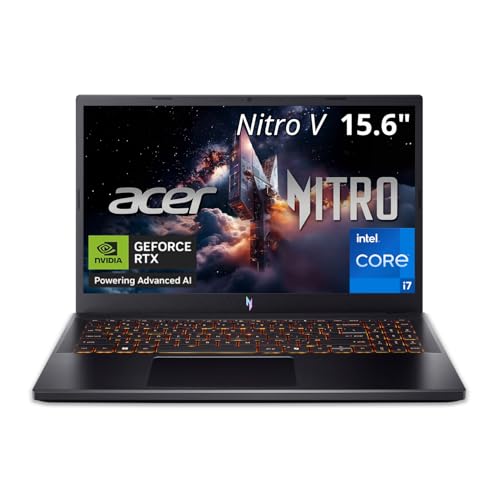
Acer Nitro V 15
The Nitro V is the entry point to this list, with an RTX 5050 and 8GB of GDDR7 backed by a 165Hz IPS display and 16GB of RAM. It’s comfortably capable at 1080p with settings tuned, and the standout feature is upgradability — accessible RAM and M.2 slots mean the 512GB drive isn’t a permanent limitation.
Frequently Asked Questions
Is an RTX 5060 enough for 1080p gaming in 2026?
Yes, comfortably. An RTX 5060 with adequate power delivery will hold 60fps or better in most 2026 releases at high settings, and DLSS 4 with frame generation pushes competitive titles well past 144fps. The 8GB VRAM buffer is the main long-term concern, particularly with ray tracing enabled at high texture settings.
Should I buy a last-gen RTX 40-series or a current RTX 50-series laptop?
It depends on the specific tier. A 40-series card one or two rungs higher — like the RTX 4070 in the Katana 15 — will generally outperform an entry-level 50-series card in raw rasterization. Current-gen chips win on efficiency and access to the latest DLSS features, so weigh whether you value the newer feature set or the extra raw horsepower more.
How much does the display refresh rate actually matter?
Significantly, and it’s the upgrade most buyers underrate. Moving from 60Hz to 144Hz is immediately noticeable in motion clarity and input responsiveness, especially in shooters. Going beyond 165Hz delivers diminishing returns unless you’re playing esports titles competitively.
Can I upgrade a gaming laptop in this price range later?
Partially. RAM and storage are almost always user-replaceable — most of these models have a second M.2 slot and accessible SODIMM slots — but the CPU and GPU are soldered. Buy the GPU you want for the machine’s full lifespan, and treat memory and storage as the things you can fix cheaply down the road.
Final Thoughts
For most buyers, the ASUS ROG Strix G16 is the one to get — it’s the rare sub-$1500 laptop that doesn’t force a compromise between GPU, storage, display, and cooling. If you’re chasing the highest possible frame rates and don’t mind a last-generation CPU, the MSI Katana 15 and its RTX 4070 offer the best pure performance-per-dollar here, while the GIGABYTE Gaming A16 is the smart middle ground for anyone who wants a current-gen RTX 5060 and 1TB of storage without paying for the badge.