Key takeaways
- Understand integrated vs. discrete graphics: Nearly every laptop in this bracket uses integrated graphics. That’s fine for League of Legends, CS2, Valorant, Rocket League, and emulation — but expect to run demanding modern AAA titles at 720p–1080p with low settings and upscaling enabled.
- Prioritise dual-channel memory: Integrated GPUs share system RAM, so memory bandwidth directly affects frame rates. A 16GB or 24GB dual-channel DDR5 configuration can deliver noticeably better gaming performance than the same chip with single-channel RAM.
- Check the CPU generation, not just the clock speed: “Up to 4.9GHz” tells you little on its own. An 8-core, 16-thread Ryzen 7 with modern Radeon graphics will outperform an older chip advertised with similar numbers. Look for core counts and architecture, not headline frequencies.
- Insist on a real 1080p IPS panel: A 15.6″ or 16″ FHD IPS display with decent brightness makes a bigger day-to-day difference than most spec-sheet upgrades. Avoid TN panels and anything that doesn’t clearly state its resolution.
- Confirm storage and upgradeability: 512GB NVMe is the practical minimum in 2026 — a single modern game can consume 100GB. Check whether the machine has a spare M.2 slot or accessible RAM, since cheap upgrades extend a budget laptop’s useful life considerably.
Shopping for a gaming laptop under $800 in 2026 is genuinely difficult, and not because there aren’t options — it’s because there are too many, and many of them aren’t what they claim to be. Listings routinely use the word “gaming” as a marketing label rather than a hardware description, pairing modern-sounding CPU names with integrated graphics, slow single-channel memory, or dim 45% NTSC panels. The result is a category where two laptops at the same price can deliver wildly different real-world frame rates.
This guide cuts through that. Below you’ll find budget machines that are honestly assessed for what they actually are: capable everyday laptops with enough headroom for esports titles, older AAA games at reduced settings, emulation, and light creative work. We’ll cover what specifications genuinely matter at this price, review the strongest picks currently available, and answer the questions buyers ask most often before committing.
Our top picks



 Gaming Laptop with AMD Ryzen 7 H255
- Product Group: Personal Computer
- Binding: Personal Computers


As an Amazon Associate we earn from qualifying purchases at no extra cost to you. Ratings are shown as listed on Amazon.
⚡ Save on Your Next PC — Amazon Prime
Prime members get fast free shipping on the systems above, plus early access to Prime Day & Black Friday PC deals. New members get a 30-day free trial.
Watch: Best Gaming Laptop Under $800 — Video Review
How to Choose Gaming Laptop Under $800
- Understand integrated vs. discrete graphics: Nearly every laptop in this bracket uses integrated graphics. That’s fine for League of Legends, CS2, Valorant, Rocket League, and emulation — but expect to run demanding modern AAA titles at 720p–1080p with low settings and upscaling enabled.
- Prioritise dual-channel memory: Integrated GPUs share system RAM, so memory bandwidth directly affects frame rates. A 16GB or 24GB dual-channel DDR5 configuration can deliver noticeably better gaming performance than the same chip with single-channel RAM.
- Check the CPU generation, not just the clock speed: “Up to 4.9GHz” tells you little on its own. An 8-core, 16-thread Ryzen 7 with modern Radeon graphics will outperform an older chip advertised with similar numbers. Look for core counts and architecture, not headline frequencies.
- Insist on a real 1080p IPS panel: A 15.6″ or 16″ FHD IPS display with decent brightness makes a bigger day-to-day difference than most spec-sheet upgrades. Avoid TN panels and anything that doesn’t clearly state its resolution.
- Confirm storage and upgradeability: 512GB NVMe is the practical minimum in 2026 — a single modern game can consume 100GB. Check whether the machine has a spare M.2 slot or accessible RAM, since cheap upgrades extend a budget laptop’s useful life considerably.
The Best Picks Reviewed
KAIGERR 2026 Gaming Laptop (Ryzen 7 H255, 24GB DDR5)
This is the most complete package in the group: an 8-core/16-thread Ryzen 7 H255 boosting to 4.9GHz, 24GB of DDR5, and Radeon RX Vega 8 graphics on a 16-inch panel. The generous memory allocation genuinely helps integrated gaming performance, and the backlit keyboard and WiFi 6 are welcome extras at this price.
Ryzen 7 H255 Gaming Laptop (24GB DDR5, 512GB NVMe)
Essentially the same silicon and memory configuration as our top pick, making it a strong alternative if it’s cheaper or in stock when the KAIGERR isn’t. Expect comparable results in esports titles and solid multitasking headroom from the 24GB of DDR5.
NIMO 15.6″ Ryzen 5 6600H
The Ryzen 5 6600H remains one of the best value gaming CPUs in the budget bracket, and NIMO pairs it with a proper 15.6″ IPS FHD display rather than a washed-out budget panel. It’s the pick for buyers who care most about screen quality and consistent frame pacing over raw core count.
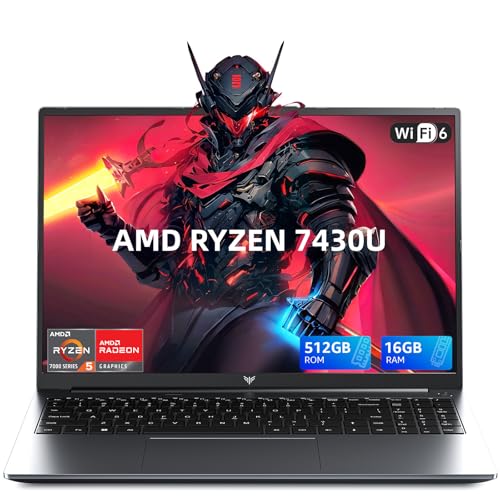
Light Gaming Laptop (Ryzen 7 7430U, 16GB RAM)
The 7430U is a low-power mobile chip, so this is best understood as a highly portable everyday laptop that handles lighter games competently rather than a true gaming machine. Battery life and thermals are its real strengths.
Tunhail 15.6″ Laptop (16GB RAM, Win 11 Pro)
A straightforward 15.6″ FHD machine with 16GB of RAM, 512GB of storage, and Windows 11 Pro included. It’s aimed squarely at students and commuters who want occasional casual gaming alongside coursework, not demanding titles.
Frequently Asked Questions
Can a laptop under $800 run modern AAA games?
Some, at reduced settings. Titles built for integrated graphics or with aggressive upscaling support will run at playable frame rates at 1080p low; the newest, most demanding releases generally will not. Esports and older AAA games are where these machines shine.
Is 16GB of RAM enough, or should I get 24GB?
16GB is workable, but on systems with integrated graphics the extra memory in a 24GB DDR5 configuration is meaningfully useful — it gives the GPU more headroom and keeps background applications from squeezing your games.
Do these laptops support external monitors and peripherals?
Yes. All the models here offer standard HDMI and USB connectivity, and pairing one with an external 1080p monitor, mechanical keyboard, and mouse is a cost-effective way to build a desk setup.
Should I wait for a sale?
Budget laptop pricing fluctuates significantly around major sales events, and a model that’s $780 today may be $650 during a promotion. If you’re not in a hurry, tracking the price for a few weeks is worthwhile.
Final Thoughts
For most buyers, the KAIGERR 2026 Gaming Laptop is the smartest use of an $800 budget, combining an 8-core Ryzen 7 H255 with 24GB of DDR5 and a larger 16-inch display. If you’d rather prioritise panel quality and proven gaming silicon, the NIMO 15.6″ Ryzen 5 6600H is an excellent alternative, while the Light Gaming Laptop with the Ryzen 7 7430U suits anyone who values portability and battery life over raw performance.