Key takeaways
- Front, top or side. Check which radiator sizes the case maker lists for each location. Many mid towers support 360mm in the front but only 280mm or 240mm on top.
- Clearance over RAM and motherboard. Top-mounted radiators can collide with tall memory or VRM heatsinks. The case manual usually lists maximum heights.
- Tube length. Make sure the tubes reach the CPU from your radiator position without kinking.
- Orientation. Follow the cooler maker’s guidance on pump placement relative to the radiator so air does not collect in the pump.
- Micro ATX and compact cases. Many compact cases accept 240mm or smaller only. Read the case specification rather than assuming.
A 360mm AIO cools better than a 240mm, but the gap is modest for mid-range processors and large for hot ones. If you run a high-power chip such as a Ryzen 9 or Core Ultra 9, or want quieter fans at the same temperature, the 360mm is the better pick. For mainstream gaming CPUs, a good 240mm is usually enough and fits in more cases.
What the Sizes Mean
An all-in-one liquid cooler (AIO) pairs a pump block on the CPU with a radiator that releases heat into the air. The size name refers to the radiator length and fan count. A 240mm radiator holds two 120mm fans. A 360mm holds three. Reviewers commonly note that the 360mm has roughly 50 percent more radiator surface area, which gives it more capacity to dump heat.
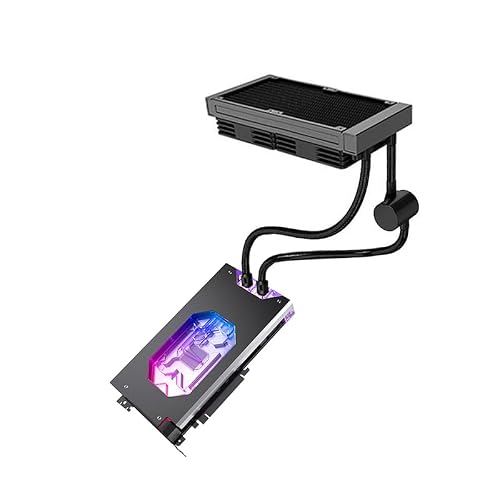
360mm 240mm AIO GPU Cooler,Copper Water Cooling Kit, with Pump Fan (240MM for Asus TUF RTX 5080 O16G Gaming)
Chosen because it specifies Copper Water Cooling Kit and with Pump Fan (240MM for Asus TUF RTX 5080 O16G Gaming).
View on Amazon
360mm 240mm AIO GPU Cooler,Copper Water Cooling Kit, with Pump Fan (240MM for Asus Prime GeForce RTX 5070 12GB OC)
Chosen because it specifies Copper Water Cooling Kit.
View on Amazon
360mm 240mm AIO GPU Cooler,Copper Water Cooling Kit, with Pump Fan (360MM for Gigabyte RTX 5090 D Gaming OC 32G)
Chosen because it specifies Copper Water Cooling Kit and with Pump Fan (360MM for Gigabyte RTX 5090 D Gaming OC 32G).
View on AmazonQuick Comparison Table
| Factor | 240mm AIO | 360mm AIO |
|---|---|---|
| Fans | Two 120mm | Three 120mm |
| Radiator surface area | Baseline | Roughly 50 percent more |
| Cooling on mid-range CPUs | Good | Slightly better |
| Cooling on high-power CPUs | Can run hot under all-core loads | Noticeably better headroom |
| Noise at same temperature | Fans may need higher speed | Can run slower and quieter |
| Case support | Wide, including many mATX cases | Needs a case with 360mm mounting |
| Installation difficulty | Easier | More clearance and tube routing needed |
| RAM and VRM clearance | Usually simple | Check radiator and tube clearance |
How Big Is the Real Difference?
Sources disagree on exact numbers, which is normal because results depend on the CPU, case airflow, fans and room temperature. Review roundups commonly report a small gap on mid-range loads, in the low single digits of degrees Celsius, and a larger gap, around five to eight degrees, with chips drawing 200 watts or more under sustained all-core work. One test of a Ryzen 9 9950X reported the 240mm settling in the mid 90s Celsius and the 360mm in the low to mid 80s. Cooler makers sometimes publish larger gaps, so independent reviews are the better guide.
The key point: the bigger radiator mostly buys headroom. It lets a hot chip hold its boost clocks longer, or lets the fans spin slower.
Gaming vs Heavy Workloads
Games rarely load every core. A Ryzen 7 9800X3D, for example, has a modest power limit compared with 16-core desktop chips, and a quality 240mm can handle it in a well-ventilated case. Heavy workloads like video rendering, 3D rendering and code compiling push all cores, and that is where a 360mm earns its keep.
Check the processor maker’s published power numbers: PPT for AMD and the maximum turbo power for Intel. Reviewers and cooler makers often suggest matching the cooler to those figures rather than the listed TDP. A 240mm is commonly described as suitable for processors with sustained power up to about 125 W, with 360mm recommended above that.
Noise, Fans and Pump
A 360mm cooler can reach the same temperature as a 240mm with fans at lower speed, which often means less noise. The reverse is also true: at the same fan speed, the 360mm generally runs cooler. Pump speed and block quality matter too. A well-built 240mm can beat a cheaper, poorly designed 360mm, and a cramped case can limit either size.
Case Fit and Mounting
- Front, top or side. Check which radiator sizes the case maker lists for each location. Many mid towers support 360mm in the front but only 280mm or 240mm on top.
- Clearance over RAM and motherboard. Top-mounted radiators can collide with tall memory or VRM heatsinks. The case manual usually lists maximum heights.
- Tube length. Make sure the tubes reach the CPU from your radiator position without kinking.
- Orientation. Follow the cooler maker’s guidance on pump placement relative to the radiator so air does not collect in the pump.
- Micro ATX and compact cases. Many compact cases accept 240mm or smaller only. Read the case specification rather than assuming.
Who Should Pick Which
Pick 240mm if
- You use a mainstream or X3D gaming CPU with moderate power limits.
- Your case is compact or lacks 360mm mounting points.
- You are building to a budget and want strong cooling without the extra cost and bulk.
- You are fine with moderate fan noise under heavy loads.
Pick 360mm if
- You run a high-power 16-core or Core Ultra 9 class processor.
- You do rendering, streaming and gaming on the same machine.
- You want lower fan noise at the same temperatures.
- You intend to tweak power limits or overclock within the maker’s guidance.
By budget tier
Entry-level builders usually do well with a quality air cooler or a 240mm AIO. Mid-range builders can pick either, deciding by case and noise preference. Enthusiast builders with hot chips tend to choose 360mm.
Common Myths
- Bigger is always cooler. Only if the case airflow, block and fans support it.
- A 360mm is required for any modern CPU. Not for most gaming chips.
- AIOs always beat air coolers. A large air cooler can match a small AIO and has no pump to fail.
- More fans mean more noise. Three slower fans can be quieter than two faster ones.
Practical Recommendation
Check three things before buying: the processor’s maximum power, the radiator sizes your case supports and how much noise you will tolerate. If the chip is a gaming-focused model and the case is mid-sized, a 240mm is sensible. If the chip runs hot or the machine does heavy sustained work, a 360mm provides comfortable headroom. Whichever you choose, follow the cooler maker’s mounting instructions, apply thermal paste or use the pre-applied paste as directed and confirm socket compatibility.
Installation and Maintenance Notes
Both sizes need the same basic care. Mount the radiator with fans pushing or pulling air as the cooler maker describes, connect the pump to the header the manual specifies, and give the system a few minutes after the first boot to settle. Listen for gurgling or pump whine, which can indicate trapped air; follow the maker’s guidance on orientation and contact support if it persists. Dust builds up on radiator fins over time, so power down, unplug the PC and clean the fins and filters gently every few months. Never open the sealed loop. A 360mm unit is heavier, so make sure the case mounting points and screws are secure, and double-check that the tubes are not stretched when the case is moved. If a pump failure is suspected, temperatures will climb rapidly at idle; shut the system down and contact the maker rather than continuing to run it.
Frequently Asked Questions
How many degrees cooler is a 360mm AIO than a 240mm?
Published results vary. Many reviews report a few degrees on mid-range chips and larger gaps on high-power processors under all-core loads. Case airflow and fan quality change the result.
Is a 240mm AIO enough for a Ryzen 7 9800X3D?
Generally yes, as it has a modest power limit relative to high-core-count chips. Check the cooler maker’s compatibility and rating for the AM5 socket.
Will a 360mm AIO fit in my case?
Only if the case maker lists 360mm support at the location you plan to use. Also check clearance for memory and motherboard heatsinks.
Is a 360mm quieter?
Often it is, because its fans can run slower for the same temperature. The pump and fan models also affect noise.
How long do AIO coolers last?
Makers list warranty periods, often several years. Lifespan depends on the pump and usage. If the pump stops or temperatures spike, shut down and contact the maker.
Should I choose 280mm instead?
A 280mm sits between the two in surface area and is a good option if your case supports it but not 360mm.