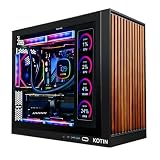
Finding the best gaming pc for the money means looking beyond the processor name, RGB lighting, or advertised discounts. The graphics card, memory capacity, storage, cooling, power supply, and overall configuration determine whether a prebuilt desktop deserves its price. For most buyers, an RTX 5070 system with 32GB of RAM is a sensible mainstream target, while less expensive RTX 5060 and Radeon RX 9060 XT desktops can cover more modest gaming needs. This roundup compares six US-market gaming PCs across different budgets, highlighting their strengths, limitations, and the configurations worth considering.
Quick verdict: Which gaming PC offers the best value?
Price snapshots checked October 31, 2026. Prices and availability can change.
For most mainstream buyers, the CyberPowerPC GXi3800BSTV2 is the strongest all-around starting point. Its Core Ultra 7 270K Plus processor, RTX 5070, 32GB DDR5, and 2TB SSD make a balanced combination at its checked $1,999.99 promotional price.
However, the other options make more sense under specific conditions. The ABS Cyclone Aqua is the lower-cost Nvidia choice, the Skytech KING 95 offers a gaming-focused X3D processor, and the iBUYPOWER RDY Element 9 Pro R08 is a stronger step-up option for buyers interested in AMD graphics.
| Gaming PC | Best for | Key configuration | Checked price |
|---|---|---|---|
| ABS Cyclone Aqua | Lower-cost gaming | Core i5-14400F, RTX 5060, 32GB DDR4, 1TB | $1,199.99 |
| Skytech KING 95 | Gaming-focused value | Ryzen 7 7800X3D, RTX 5070, 32GB DDR5, 1TB | $1,859.99 |
| CyberPowerPC GXi3800BSTV2 | Best overall balance | Core Ultra 7 270K Plus, RTX 5070, 32GB DDR5, 2TB | $1,999.99 |
| Acer Nitro 65 N65-100-UB17 | AMD GPU performance | Ryzen 9 9900X, RX 9070 XT, 32GB DDR5, 1TB | $2,299.99 |
| iBUYPOWER RDY Element 9 Pro R08 | High-performance AMD gaming | Ryzen 7 7800X3D, RX 9070 XT, 32GB DDR5, 2TB | $2,499 |
| Corsair Vengeance a7500 | Premium Nvidia gaming | Ryzen 7 9800X3D, RTX 5070 Ti, 32GB DDR5, 1TB | $2,999.99 |
The price of the CyberPowerPC includes a promotional discount shown in the retailer listing. The Skytech price is location-dependent, with pickup availability rather than general shipping. The Corsair system was listed on backorder with an expected November 6–21 shipping window.
These are price snapshots, not guaranteed checkout prices. The products also differ in warranty coverage, component disclosure, and availability, so the lowest price is not automatically the best purchase.
How we selected the best gaming PCs for the money
The selection focuses on complete gaming desktops available through US retailers or directly from manufacturers. The goal is to identify configurations that offer a reasonable combination of gaming hardware, storage, memory, and ownership support rather than simply choosing the most expensive GPU.
We considered several factors.
Graphics performance: The GPU receives the most attention because it has a major influence on gaming performance, particularly at 1440p and 4K resolutions. We considered current RTX 50-series and Radeon RX 9000-series configurations.
Processor suitability: The CPU needs to complement the graphics card. A premium processor paired with an entry-level GPU does not necessarily make a desktop a better gaming purchase.
Memory and storage: We favored 32GB of RAM and at least a 1TB SSD. Systems with only 16GB remain relevant at lower budgets, but buyers should account for potential memory upgrades.
Cooling and power: We considered disclosed cooling arrangements and PSU specifications. Missing specifications are treated as purchasing limitations rather than assumptions about component quality.
Upgrade potential: Standardized components, accessible storage expansion, and reasonable power capacity can make a desktop more useful over several years.
Price and support: We checked US retailer and manufacturer listings and considered the stated warranty and availability. Promotional pricing is treated as temporary rather than a permanent product value.
There was no supplied hands-on test data for this article. Independent reviews were consulted where a sufficiently close system configuration had been reviewed, but their results were not presented as original testing or transferred to unrelated configurations.
The best gaming PCs for different budgets
ABS Cyclone Aqua – Best lower-cost Nvidia gaming desktop
Model: C1A45N56R2 | Retailer: Newegg
The ABS Cyclone Aqua is an option for buyers who want a dedicated gaming GPU without moving into the $1,800–$2,000 price range. Its configuration combines an Intel Core i5-14400F with an Nvidia GeForce RTX 5060, 32GB of DDR4 memory, and a 1TB NVMe SSD.
The combination is practical for a desktop focused primarily on 1080p gaming. The Core i5-14400F has 10 cores, comprising six performance cores and four efficiency cores, while the RTX 5060 includes 8GB of GDDR7 video memory. The graphics card also supports Nvidia’s current DLSS feature set.
The component selection is reasonably balanced for its price category. Having 32GB of system memory is particularly welcome because buyers do not immediately need to budget for a RAM upgrade. The 1TB SSD also provides a reasonable starting capacity for a gaming library.
Verified configuration:
| Component | Specification |
|---|---|
| Processor | Intel Core i5-14400F |
| Graphics | MSI GeForce RTX 5060 8GB GDDR7 |
| Memory | 32GB G.Skill Ripjaws V DDR4-3200 |
| Storage | 1TB MSI M461 PCIe 4.0 NVMe SSD |
| Motherboard | ASRock B760M-C/D4 |
| CPU cooling | Cooler Master Hyper 212 PRO ARGB |
| Power supply | 650W, 80 Plus Gold |
| Connectivity | Wi-Fi 5 and Bluetooth |
| Operating system | Windows 11 Home |
| Listed price | $1,199.99 |
The component disclosure is a useful advantage. Newegg identifies the motherboard, SSD, memory, and graphics card for this specific configuration rather than relying only on generic marketing descriptions.
The trade-off is the older DDR4 platform. The system does not have the same memory-generation flexibility as the DDR5 alternatives in this roundup. Its RTX 5060 also has less video memory than the 16GB Radeon options, which matters when considering demanding games and higher-resolution texture settings.
Buy if: You want a relatively affordable Nvidia gaming desktop with 32GB of RAM and a known component configuration.
Skip if: You want a more substantial 1440p or 4K graphics configuration, a newer DDR5 platform, or more room for demanding future games.
Skytech KING 95 – Best gaming-focused RTX 5070 value
Model: ST-KING95-3215-W-BU | Retailer: Best Buy
The Skytech KING 95 is an interesting alternative for gamers who prioritize gaming performance over workstation-style CPU specifications. Its combination of the AMD Ryzen 7 7800X3D and GeForce RTX 5070 targets the mainstream-to-high-end gaming segment without moving into an expensive RTX 5070 Ti or RTX 5080 configuration.
The Ryzen 7 7800X3D has eight cores and 16 threads, with AMD’s 3D V-Cache technology. This processor is particularly relevant to games that benefit from larger CPU cache capacity, especially when targeting high frame rates at lower resolutions.
The RTX 5070 brings 12GB of GDDR7 memory and Nvidia’s DLSS features. Compared with the RTX 5060 system above, this configuration provides a more substantial graphics tier for players interested in 1440p gaming.
Verified configuration:
| Component | Specification |
|---|---|
| Processor | AMD Ryzen 7 7800X3D |
| Graphics | NVIDIA GeForce RTX 5070 |
| Memory | 32GB DDR5-6000 |
| Storage | 1TB NVMe SSD |
| Operating system | Windows 11 Home |
| Listed price | $1,859.99 |
Its main advantage is the processor and graphics combination. The 7800X3D is a gaming-focused CPU, while 32GB of DDR5 provides a good starting point for current games and multitasking.
There are two important purchasing considerations, however.
First, storage capacity is limited to 1TB. Large modern games can consume a substantial portion of that space, so buyers who maintain several installed games may eventually want another SSD.
Second, the checked Best Buy listing showed pickup availability but no shipping availability. The actual price and ability to collect the PC depend on the local store.
The configuration is attractive at its checked price, but it should not be confused with another KING 95 desktop featuring a different processor, GPU, or memory configuration. Skytech sells multiple systems under closely related product names.
Buy if: You prioritize gaming-focused CPU performance, want an RTX 5070, and can access the listed local pickup offer.
Skip if: You need 2TB of storage immediately or require reliable nationwide shipping.
CyberPowerPC GXi3800BSTV2 – Best overall balance for the money
Model: GXi3800BSTV2 | Retailer: Best Buy
The CyberPowerPC GXi3800BSTV2 is the most balanced option in this selection for buyers who want a capable graphics card, a modern processor, plenty of system memory, and more storage without stepping into premium pricing.
Its Intel Core Ultra 7 270K Plus processor is paired with an RTX 5070 featuring 12GB of GDDR7 memory. The system also includes 32GB of DDR5 and a 2TB SSD.
That 2TB drive is an important distinction. Compared with otherwise attractive configurations that provide only 1TB, it gives the owner more room for multiple large games, applications, and personal files before a storage upgrade becomes necessary.
Verified configuration:
| Component | Specification |
|---|---|
| Processor | Intel Core Ultra 7 270K Plus |
| Graphics | NVIDIA GeForce RTX 5070 12GB GDDR7 |
| Memory | 32GB DDR5 |
| Storage | 2TB SSD |
| Operating system | Windows 11 |
| Model | GXi3800BSTV2 |
| Listed price | $1,999.99 |
This configuration is particularly appealing for someone who uses the same PC for gaming, streaming, and everyday productivity. The 24-core processor offers considerable multitasking capacity, while the RTX 5070 supplies the graphics capability needed for a mainstream 1440p gaming build.
The system also includes a keyboard and mouse, although buyers should consider replacing these basic accessories if they have specific gaming preferences.
There is one limitation worth investigating before ordering: the manufacturer indicates in its retailer Q&A that the exact motherboard and graphics-card manufacturers can vary depending on available components. The accessible listing also does not provide a sufficiently detailed power-supply specification.
That makes it important to ask CyberPowerPC for the exact PSU model, motherboard, GPU manufacturer, and upgrade limitations before purchasing. The advertised processor and GPU do not tell the entire story of a prebuilt desktop.
The promotional listing showed $1,999.99, reduced from $2,229.99, with the deal scheduled to end November 1, 2026. That makes the discount time-sensitive.
Buy if: You want a balanced RTX 5070 desktop with 32GB DDR5 and 2TB of storage at around $2,000.
Skip if: You require a fully disclosed component list before ordering or prefer a PC with a clearly documented, standardized component selection.
Acer Nitro 65 N65-100-UB17 – Best for an AMD graphics upgrade
Model: N65-100-UB17 | Retailer: Best Buy
The Acer Nitro 65 is worth considering for buyers who want to step beyond the mainstream RTX 5070 category without spending the full amount required for a premium enthusiast desktop.
This particular configuration combines an AMD Ryzen 9 9900X with an AMD Radeon RX 9070 XT. It also includes 32GB of DDR5 and a 1TB SSD.
The RX 9070 XT is an important part of the selection. Its 16GB of GDDR6 video memory gives it more VRAM capacity than the RTX 5070’s 12GB and RTX 5060’s 8GB. That can be useful when playing demanding titles with higher-resolution textures or working with graphics-heavy applications.
The Ryzen 9 9900X is also a capable processor for workloads beyond gaming. Its 12 cores and 24 threads make the configuration relevant to users who combine gaming with demanding multitasking and productivity applications.
Verified configuration:
| Component | Specification |
|---|---|
| Processor | AMD Ryzen 9 9900X |
| Graphics | AMD Radeon RX 9070 XT 16GB |
| Memory | 32GB DDR5 |
| Storage | 1TB SSD |
| Operating system | Windows 11 Home |
| Model | N65-100-UB17 |
| Listed price | $2,299.99 |
The main attraction is the graphics and processor combination. Buyers get a higher-end Radeon GPU and a 12-core CPU without immediately moving into the $3,000 price category.
The main drawbacks are storage and the need to consider cooling. A 1TB SSD is relatively modest for a desktop at this price. You should also consider that the Nitro 65 family has received some criticism for fan noise in independent testing.
Tom’s Hardware reviewed an RTX 5070-equipped Nitro 65 configuration and reported audible fan noise under load. That is a different graphics configuration from this exact RX 9070 XT SKU, so the measured results should not be treated as a direct review of the model listed here.
The listed price is also fairly substantial. Before choosing it, compare the current offer against the iBUYPOWER system below, which offers the same RX 9070 XT GPU tier, 2TB storage, and a longer stated standard warranty.
Buy if: You want a Ryzen 9 processor, 16GB Radeon graphics, and a system suitable for both gaming and heavier productivity workloads.
Skip if: You want a quieter system based on independently verified noise testing, need 2TB of storage out of the box, or prioritize a long warranty.
iBUYPOWER RDY Element 9 Pro R08 – Best high-performance AMD package
Model: RDY Element 9 Pro R08 | Retailer: iBUYPOWER
The iBUYPOWER RDY Element 9 Pro R08 is a stronger option for buyers who are comfortable spending approximately $2,500 on a prebuilt gaming desktop.
Its main components include the AMD Ryzen 7 7800X3D, Radeon RX 9070 XT, 32GB of DDR5-6000 memory, and a 2TB NVMe SSD.
This combination is particularly appealing for gaming because the 7800X3D is designed around high gaming performance, while the RX 9070 XT supplies a more substantial graphics configuration than the entry-level choices.
The 16GB of graphics memory also gives the system additional capacity for demanding graphics workloads.
Verified configuration:
| Component | Specification |
|---|---|
| Processor | AMD Ryzen 7 7800X3D |
| Graphics | AMD Radeon RX 9070 XT 16GB GDDR6 |
| Memory | 32GB DDR5-6000 |
| Storage | 2TB PCIe Gen 4 NVMe SSD |
| Motherboard | ASUS B650EM Max Gaming |
| CPU cooling | 360mm addressable RGB liquid cooler |
| Power supply | 850W 80 Plus Gold, non-modular |
| Wireless | Wi-Fi 6E |
| Operating system | Windows 11 Home |
| Standard warranty | 3 years parts and labor |
| Listed price | $2,499 |
The warranty is one of the system’s biggest advantages. iBUYPOWER lists three years of parts and labor coverage, which is more substantial than the two-year standard warranty supplied with the Corsair option.
The 2TB SSD is also useful for someone who installs multiple demanding games. The 360mm liquid cooler and 850W Gold-rated power supply are additional disclosed components that help buyers understand what they are paying for.
However, there is an unusual purchasing detail: iBUYPOWER ships the graphics card separately rather than installing it inside the computer.
That arrangement reduces the risk of GPU damage during shipping, but it means the buyer must install the card after delivery. The company provides an installation guide, and the installation requirement should be understood before ordering.
The power supply is also non-modular. This is not automatically a performance problem, but it can make cable management less convenient than with a modular PSU.
PC Gamer independently reviewed the closely related RDY Element 9 Pro R07 configuration, which also used a Ryzen 7 7800X3D, RX 9070 XT, 32GB RAM, and 2TB SSD. Its review provides useful context for the platform, but it should not be mistaken for independent testing of this exact R08 SKU.
Buy if: You want a powerful AMD gaming configuration, 2TB storage, a 360mm cooler, and three years of stated parts and labor coverage.
Skip if: You want a completely assembled GPU configuration on arrival or prefer a modular power supply.
Corsair Vengeance a7500 – Best premium Nvidia-focused option
Model: Vengeance a7500 CS-9050159-NA | Retailer: Corsair
The Corsair Vengeance a7500 is a premium choice for gamers who specifically want an Nvidia graphics card and a gaming-focused AMD processor.
The checked configuration combines an AMD Ryzen 7 9800X3D with a GeForce RTX 5070 Ti, 32GB of DDR5 memory, and a 1TB NVMe SSD.
Its graphics card has 16GB of GDDR7 memory, placing it above the RTX 5070 configuration in the mainstream segment. The Ryzen 7 9800X3D also provides a strong gaming-focused CPU foundation.
Verified configuration:
| Component | Specification |
|---|---|
| Processor | AMD Ryzen 7 9800X3D |
| Graphics | NVIDIA GeForce RTX 5070 Ti 16GB |
| Memory | 32GB DDR5 (2 x 16GB) |
| Storage | 1TB NVMe SSD |
| CPU cooling | CORSAIR NAUTILUS 240mm liquid cooler |
| Case | CORSAIR 3500X mid-tower |
| Operating system | Windows 11 Home |
| Standard warranty | 2 years |
| Listed price | $2,999.99 |
Corsair’s use of its own components and a coordinated chassis, cooling, and memory ecosystem is part of the appeal. The 240mm liquid cooler is a practical match for the Ryzen 7 9800X3D, and the two-year warranty provides more coverage than a typical one-year prebuilt warranty.
Tom’s Hardware has independently reviewed the Vengeance a7500 family, reporting strong gaming performance and good build quality. That review is useful supporting evidence, although buyers should still confirm that the tested configuration matches the exact SKU they intend to order.
The biggest problem is price. At nearly $3,000, this is not the strongest cost-conscious purchase in the roundup. The iBUYPOWER option costs $500 less, offers 2TB rather than 1TB of storage, and has a longer stated standard warranty. They also use different GPUs, so buyers who specifically value Nvidia’s software and rendering features may still prefer the Corsair.
Another important consideration is availability. Corsair showed this exact RTX 5070 Ti configuration as backordered, with estimated shipping between November 6 and November 21, 2026.
Corsair also states that the memory brand or appearance may vary due to memory supply conditions. Buyers should therefore distinguish between the listed capacity and the specific memory components they will receive.
Buy if: You specifically want a Ryzen 7 9800X3D and RTX 5070 Ti combination, Corsair’s component ecosystem, and a two-year warranty.
Skip if: You prioritize the lowest cost per performance, want 2TB storage, or need immediate delivery.
How to choose the best gaming pc for the money
A prebuilt desktop should be selected according to the games you play, the monitor you own, and how much you expect to upgrade over time. Spending more does not automatically produce a better experience, particularly when the additional cost goes toward a processor or cosmetic feature that does little to improve gaming.
Start with the graphics card and target resolution
The GPU should be one of the first specifications you compare. It has a direct effect on how demanding games render, especially when increasing resolution, enabling ray tracing, or using high-resolution textures.
These are useful starting categories for choosing a graphics card:
| Gaming target | GPU category to consider | What to prioritize |
|---|---|---|
| 1080p gaming | RTX 5060, RX 9060 XT | Affordable performance and reasonable graphics memory |
| Mainstream 1440p | RTX 5070 | A balanced combination of graphics performance and cost |
| More demanding 1440p | RX 9070 XT, RTX 5070 Ti | Higher graphics capability and 16GB VRAM |
| High-end 4K | Higher-tier GPUs, including RTX 5080-class systems | More graphics headroom, suitable VRAM, and upscaling support |
These are purchasing categories, not guaranteed frame-rate targets. Actual performance depends on the game, graphics settings, ray tracing, driver version, and whether upscaling or frame generation is enabled.
For example, the RTX 5070’s 12GB of GDDR7 can suit a broad range of modern games, but that does not mean every demanding 4K title will run at maximum settings without compromises.
The RX 9070 XT offers 16GB of GDDR6 memory, which can be attractive for games with demanding textures. Nvidia’s RTX options, meanwhile, appeal to buyers who prioritize DLSS, supported ray-tracing features, and the wider Nvidia software ecosystem.
Do not compare graphics cards using VRAM capacity alone. More memory does not automatically mean a faster GPU.
Choose a processor that complements the GPU
The CPU matters, but its importance changes depending on the type of games you play.
Competitive titles such as shooters and esports games can benefit from strong CPU performance when targeting high refresh rates. Simulation games, strategy titles, and large multiplayer environments can also place substantial workloads on the processor.
The Ryzen 7 7800X3D is particularly attractive for buyers who prioritize gaming. Its 3D V-Cache technology is designed to improve performance in suitable games, although the benefit varies by title.
The Ryzen 7 9800X3D is another premium gaming-focused option. It is a reasonable choice when paired with a powerful GPU, but buying it alongside a less capable graphics card may not provide the best overall value.
Intel Core Ultra processors can also make sense, especially when gaming is only one part of the desktop’s workload. The Core Ultra 7 270K Plus in the CyberPowerPC configuration provides substantial multicore capacity for users who multitask or run demanding applications.
A practical rule is to avoid paying a large processor premium while compromising on the graphics card. For most gaming-focused desktops, a balanced CPU and GPU combination is preferable to an expensive CPU paired with a relatively modest graphics card.
Look for 32GB of RAM when possible
Memory capacity is another specification that can significantly affect the ownership experience.
For a new gaming desktop, 32GB is a sensible target. It provides more room for modern games, background applications, browser tabs, voice chat, and streaming software.
A 16GB system can still be appropriate when the purchase budget is tight. However, check whether its motherboard supports additional memory and whether an upgrade requires replacing the existing modules.
Also pay attention to the memory generation.
| Memory configuration | Purchasing consideration |
|---|---|
| 16GB DDR4 | Acceptable for a low-cost configuration, but limited headroom |
| 32GB DDR4 | More capacity, although based on an older memory generation |
| 16GB DDR5 | Newer platform, but consider upgrading capacity |
| 32GB DDR5 | A good starting configuration for a new gaming desktop |
| 64GB DDR5 | Useful for heavier productivity workloads, not essential for most gamers |
Dual-channel memory configurations, such as 2 x 16GB, are preferable to assuming that a larger capacity automatically means better performance.
The exact memory speed and supported configuration should also be checked against the motherboard specifications.
Do not underestimate storage capacity
Gaming desktops with 1TB SSDs can be perfectly usable, but storage fills up faster than many first-time buyers expect.
Modern games can occupy substantial amounts of space, and installing multiple large titles alongside Windows, applications, and personal files can quickly consume the available capacity.
A useful purchasing distinction is:
-
1TB: A reasonable starting point for someone with a smaller installed game library.
-
2TB: More convenient for players who keep several large games installed.
-
4TB: Worth considering for very large libraries, game recording, and additional media storage.
Prioritize an NVMe SSD rather than paying extra for RGB lighting or decorative accessories.
Also check whether the motherboard has additional M.2 slots. An extra available slot makes it easier to increase storage without replacing the original SSD.
Check the power supply and cooling system
The power supply is easy to overlook because retailer listings often emphasize the CPU and GPU instead.
A good gaming desktop should have a power supply with appropriate capacity, suitable connectors, and credible quality information. A high wattage number alone does not establish build quality.
For example, the iBUYPOWER RDY Element 9 Pro R08 specifies an 850W 80 Plus Gold unit. This is more useful purchasing information than a listing that simply advertises a powerful gaming processor and graphics card without disclosing the PSU.
Cooling also deserves attention. A desktop with powerful components can generate substantial heat during extended gaming sessions.
Look at the following:
-
Whether the system uses air or liquid CPU cooling.
-
How many case fans are installed and where they are positioned.
-
Whether the case has adequate intake and exhaust ventilation.
-
Whether the GPU has sufficient clearance and airflow.
-
Whether independent reviews have measured noise and temperatures.
A 360mm liquid cooler may look impressive, but radiator size alone does not prove that a complete desktop runs quietly or performs better in games.
For noise-sensitive buyers, transparent independent testing is more useful than manufacturer claims about optimized cooling.
Consider the motherboard and future upgrades
Buying a prebuilt computer does not mean you should ignore its internal components.
A desktop with a standardized motherboard, accessible memory slots, additional M.2 storage capacity, and a well-sized PSU can be easier to maintain and upgrade.
Check whether the case provides enough physical clearance for a larger graphics card. Some high-performance GPUs are considerably longer and thicker than entry-level models.
Also verify the motherboard’s CPU socket and supported processor generations. Do not assume that every motherboard from the same manufacturer supports every CPU in a processor family.
Proprietary components deserve additional scrutiny. Some OEM desktops use unique motherboards, power connectors, cases, or cooling layouts that make later upgrades more complicated.
That does not automatically make a proprietary desktop a bad purchase, but it changes the long-term cost calculation.
Compare warranty coverage and customer support
A prebuilt gaming PC comes with more than hardware. You are also paying for assembly, support, and a manufacturer’s responsibility for the complete system.
Before purchasing, compare:
| Warranty consideration | What to check |
|---|---|
| Parts coverage | How long major hardware components are covered |
| Labor coverage | Whether troubleshooting and repairs are included |
| Shipping | Whether you pay to send the PC for repair |
| Technical support | Available support channels and operating hours |
| Replacement policy | How defective components or systems are handled |
| Warranty exclusions | Whether upgrades or user-installed components affect coverage |
The iBUYPOWER R08’s stated three-year parts and labor coverage is a notable advantage in this roundup. Corsair’s two-year warranty is also worth considering, although its higher price and smaller SSD make it less attractive for cost-conscious buyers.
Read the complete warranty conditions before ordering. A stated warranty duration does not explain every repair, shipping, or damage-related exclusion.
How much should the best gaming pc for the money cost?
The right budget depends on how demanding your games are and whether you already own a monitor and accessories.
The following ranges are planning guidelines rather than guaranteed market prices:
| Budget | What to look for | Best suited to |
|---|---|---|
| Around $1,000–$1,300 | Entry-level dedicated GPU, 16–32GB RAM, 1TB SSD | Budget-conscious 1080p players |
| Around $1,500–$2,000 | RTX 5070-class or comparable GPU, 32GB RAM | Mainstream gaming and 1440p |
| Around $2,000–$2,500 | RX 9070 XT or higher GPU tier, 32GB RAM, better storage | Demanding gaming and heavier multitasking |
| Around $2,500–$3,000+ | Premium GPU, gaming-focused CPU, stronger cooling and support | Enthusiast gaming |
These ranges overlap because promotional pricing, component shortages, and specific configurations can change the value equation.
For example, a discounted RTX 5070 desktop with 32GB DDR5 and 2TB storage can be a better buy than a more expensive system with the same graphics card but only 16GB RAM and a 1TB SSD.
Always compare the exact configurations rather than using the advertised product family or original retail price.
Common mistakes when buying a gaming desktop
Several purchasing mistakes can make an otherwise reasonable gaming PC unnecessarily expensive.
Prioritizing the CPU over the GPU: A premium processor cannot compensate for a graphics card that is inadequate for the games and resolution you want.
Paying for unnecessary RAM: Going from 32GB to 64GB may be useful for demanding productivity applications, but it is not an essential upgrade for most gaming-only buyers.
Ignoring video memory: An attractive GPU name does not tell you how much VRAM it has. Check the exact card specification.
Assuming every component is premium: A prebuilt desktop can contain a powerful processor and GPU while using an entry-level power supply or motherboard.
Buying based on a percentage discount: A large advertised discount is not proof of good value. Compare the current selling price against similarly equipped alternatives.
Ignoring upgrade limitations: A case with poor airflow, an undersized power supply, or proprietary connections can create additional costs later.
Forgetting the rest of the setup: A gaming tower does not include everything needed for a complete gaming station in every configuration. Budget separately for your monitor, keyboard, mouse, headset, and other accessories.
How to choose the best gaming pc for the money for your needs
The best choice depends on what you prioritize rather than which desktop has the highest overall specifications.
| Your priority | Recommended choice | Why |
|---|---|---|
| Spend as little as practical | ABS Cyclone Aqua | RTX 5060, 32GB RAM, and 1TB SSD |
| Prioritize gaming performance around $1,800–$1,900 | Skytech KING 95 | Ryzen 7 7800X3D and RTX 5070 |
| Get a balanced system for everyday use and gaming | CyberPowerPC GXi3800BSTV2 | RTX 5070, 32GB DDR5, and 2TB SSD |
| Choose an AMD graphics configuration | Acer Nitro 65 | Ryzen 9 9900X and RX 9070 XT |
| Get better storage and warranty coverage | iBUYPOWER RDY Element 9 Pro R08 | 2TB SSD and three-year parts and labor coverage |
| Choose a premium Nvidia configuration | Corsair Vengeance a7500 | Ryzen 7 9800X3D and RTX 5070 Ti |
For most buyers, the CyberPowerPC offers the most balanced specification sheet at its checked price. The Skytech is worth considering when its local pickup offer is available, while the iBUYPOWER is a stronger step-up purchase for people who want more graphics capacity, storage, cooling, and warranty coverage.
There is little reason to spend nearly $3,000 on the Corsair unless you specifically want its Nvidia GPU configuration and premium component ecosystem.
Frequently asked questions
Is $1,000 enough for a good gaming PC?
Yes, although expectations should remain realistic.
At approximately $1,000, you can look for a desktop with an entry-level dedicated graphics card, a modern midrange processor, 16GB of RAM, and an NVMe SSD.
The ABS Cyclone Aqua is an example of a configuration near the $1,200 mark. It includes an RTX 5060, 32GB RAM, and a 1TB SSD.
A budget desktop is most suitable for 1080p gaming and may require reduced graphics settings in particularly demanding games.
Is an RTX 5070 gaming PC worth buying?
An RTX 5070 desktop can be a good purchase for mainstream gamers who want to play at 1440p.
The GPU has 12GB of GDDR7 memory and supports Nvidia’s DLSS technology. It is also a more substantial graphics option than the RTX 5060.
However, the total desktop price matters. An RTX 5070 system with 32GB of RAM and 2TB storage may be a better purchase than an expensive configuration offering the same graphics card with little additional value.
Should I get an AMD or Nvidia gaming PC?
Both manufacturers offer capable gaming graphics cards, but the better choice depends on your priorities.
Nvidia is attractive to buyers who value DLSS, supported ray-tracing features, and Nvidia’s software ecosystem.
AMD Radeon desktops can be appealing when you want substantial graphics performance and higher VRAM capacity for the purchase price.
Compare complete desktop configurations rather than choosing exclusively by GPU brand.
Is 32GB RAM necessary for gaming?
No, but it is a sensible target for a new gaming desktop.
A 16GB configuration can still run many games, especially when you are not running demanding applications simultaneously. However, 32GB gives you more room for modern games, background programs, browsers, and streaming software.
For a desktop you intend to keep for several years, 32GB is a more comfortable starting point.
Is a 1TB SSD enough for a gaming PC?
A 1TB SSD is sufficient for a smaller game library, but it can fill up quickly if you regularly install large modern titles.
A 2TB SSD is more convenient for gamers who maintain multiple installed games and applications.
Check the motherboard’s available M.2 slots before buying if you plan to upgrade storage later.
Should I buy a prebuilt gaming PC or build one myself?
A prebuilt gaming PC is appropriate when you value convenience, manufacturer support, and a single system warranty.
Building your own PC can offer more control over individual components, cooling, and upgradeability. It can also help you avoid spending money on components you do not need.
However, a prebuilt can be a competitive purchase when it is discounted and includes a well-balanced configuration.
Compare the complete cost of the components, operating system, assembly, and support before deciding.
What should I upgrade first on a budget gaming PC?
The graphics card is often the most meaningful performance upgrade when gaming performance is limited by the GPU.
However, the right upgrade depends on the system. A PC with only 16GB RAM may benefit from additional memory, while a desktop with limited storage may need another SSD.
Before upgrading the GPU, check the PSU’s wattage, connectors, physical clearance, and cooling capacity. Also verify motherboard compatibility and available expansion slots.
Conclusion
The CyberPowerPC GXi3800BSTV2 is the most balanced choice in this roundup, combining an RTX 5070, Core Ultra 7 270K Plus, 32GB DDR5, and 2TB storage at its checked promotional price. The ABS Cyclone Aqua is a more affordable starting point, while the Skytech KING 95 is attractive for gaming-focused buyers. For higher performance, the Acer Nitro 65 and iBUYPOWER RDY Element 9 Pro R08 offer Radeon RX 9070 XT graphics. Ultimately, prioritize the GPU, memory, storage, and warranty over cosmetic extras or impressive processor names.