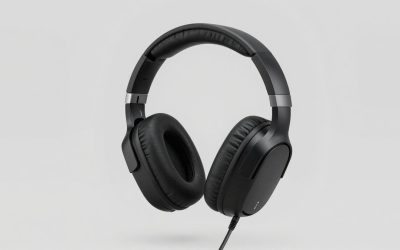
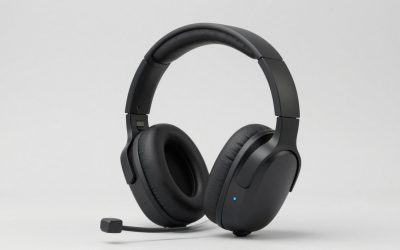
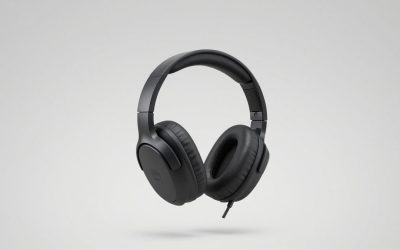
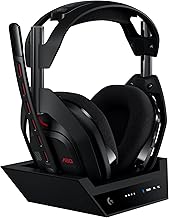
Microsoft Xbox is the best headset brand for Xbox One for most players who want wireless game audio and party chat with minimal setup. The Xbox Wireless Headset pairs directly with the console, keeps the USB ports free, and gives you a dial for balancing teammates against game sound. HyperX is the first brand to check if you prefer a wired connection and a removable microphone. SteelSeries and Turtle Beach make more sense if you want a wireless headset that can move between your Xbox and other devices. Check the exact model and connection before buying, especially if you still use an original Xbox One controller.
The best headset brand for Xbox One at a glance
Choose Microsoft’s Xbox Wireless Headset if you mainly play on Xbox and often adjust party-chat volume mid-game. Choose the HyperX CloudX if you want a controller-powered headset with a removable boom mic. If you’re shopping for an older console, verify the headset’s Xbox One support and the controller’s audio jack before comparing extras.
| Brand and exact model | Best for | Xbox One connection | Standout feature | Main trade-off |
|---|---|---|---|---|
| Microsoft Xbox Wireless Headset, up-to-20-hour revision | Most Xbox One players who want wireless | Direct Xbox Wireless pairing | Dedicated game/chat mix dial and simultaneous phone pairing | Requires charging |
| HyperX CloudX, black/silver Xbox edition | Wired play with a removable mic | 3.5 mm controller jack | Detachable boom and inline controls | Cable stays connected to the controller during play |
| SteelSeries Arctis Nova 5X Wireless | Xbox and multiplatform play with a retractable mic | Included USB wireless dongle in Xbox mode | Retractable boom and Bluetooth quick switching | Phone and game audio use separate listening modes |
| Turtle Beach Stealth 600 Gen 3 for Xbox | Wireless play with fewer charging breaks | Included Xbox-compatible USB transmitter | Manufacturer-rated 80-hour battery life and flip-to-mute mic | Uses a console USB port and switches between wireless and Bluetooth sources |
| Razer BlackShark V2 X, Xbox Licensed | Lightweight wired play with earcup controls | 3.5 mm controller jack | Listed at about 8.5 oz, with earcup volume and mute | Boom mic stays attached |
| Corsair HS35 v2, analog model | Fabric ear pads and simple wired controls | 3.5 mm controller jack | Soft fabric ear pads and onboard controls | Requires a compatible controller jack or adapter |
How we selected these Xbox One headsets
Xbox One compatibility was the first requirement. For wireless models, the deciding details were the exact Xbox edition and the hardware that carries game audio and chat. For wired models, the focus was a 3.5 mm headset connection and the hardware needed on the controller. Each pick solves a specific problem, such as adjusting party chat quickly, getting the mic out of the way, or keeping another device connected.
The recommendations are based on manufacturer specifications and setup documentation. Battery figures are manufacturer ratings, and the picks reflect connection and control features. Sound quality, microphone performance, and comfort were outside the scope of detailed research for this roundup.
Six headset brands worth considering for Xbox One
Microsoft is the best headset brand for Xbox One wireless simplicity
The Xbox Wireless Headset pairs straight to the Xbox One through Xbox Wireless. That matters if your console’s USB ports are already occupied or if you’d rather keep track of one fewer accessory. The earcup dials let you adjust overall volume and change the balance between game sound and party chat. If you often turn up your teammates during a loud match, that physical control is the main reason to choose it.
Microsoft also supports pairing the headset with a phone over Bluetooth while it remains paired with the console. That makes it a better fit than a quick-switch model if you want to keep your game connection while taking a call. Microsoft lists up to 20 hours per charge for the revision covered here. When buying used, match that battery specification to the listing if the revision matters to you.
Buy if you play mostly on Xbox and want direct pairing plus an easy way to adjust chat balance. Skip if you prefer a controller-powered headset or need more time between charges.
HyperX CloudX for wired play with a detachable mic
The Xbox-licensed CloudX connects to a compatible controller through 3.5 mm and has inline audio controls. Its removable boom is particularly useful if the same headset serves two roles. Leave it attached for party chat, then take it off when you’re playing solo or using the headset for listening. The analog connection also keeps charging and wireless setup out of your routine.
The control layout is the biggest difference from the Razer pick below. HyperX puts the controls on the cable, while Razer puts volume and mic mute on the earcup. Think about where the cable sits when you hold the controller. Inline controls are easy to find if the cable falls across your lap, while an earcup control may be easier to reach if the cable hangs off to one side.
Buy if you want a straightforward wired Xbox headset and expect to remove the microphone regularly. Skip if you want to set the controller down and move away without a cable following it.
SteelSeries Arctis Nova 5X Wireless for Xbox and other devices
The Nova 5X uses an included USB-C wireless dongle and a USB-A adapter cable for Xbox setup. Set the dongle to Xbox mode before connecting it to the console. The model also has a retractable boom, so you can tuck the microphone away for solo use without finding a place to store a detached part. If you switch between Xbox and a Bluetooth device, the headset’s Quick-Switch button gives you a direct way to change modes.
The 5X suffix is the detail worth checking on both the listing and the box. SteelSeries sells other Nova 5 variants, and Xbox compatibility here applies to the 5X. Also consider how you use phone audio. Quick switching suits someone who moves between sources. If you want your phone and console paired to the headset at the same time during play, the Microsoft pick better matches that priority.
Buy if you want an Xbox-compatible wireless headset with a retractable mic and a separate Bluetooth mode. Skip if you want to leave the Xbox USB ports free or listen to both sources together.
Turtle Beach Stealth 600 Gen 3 for fewer charging breaks
The Xbox version of the Stealth 600 Gen 3 comes with a USB wireless transmitter and carries an 80-hour manufacturer battery rating. Its flip-to-mute microphone gives you a quick way to mute yourself during a party without finding a button. The included transmitter handles the Xbox connection, and QuickSwitch lets you change to a Bluetooth device.
Battery life is the reason to pick this model over Microsoft’s first-party headset. The figures come from the manufacturers, so treat them as a guide to the difference in charging priorities and expect actual runtime to depend on use. Check both Gen 3 and Xbox when you order. A listing may show several platform options on the same page, and the transmitter is especially important if you buy used.
Buy if you want a long rated battery life and prefer flipping the boom up to mute. Skip if you want direct pairing with the console or concurrent phone and game audio.
Razer BlackShark V2 X for lightweight wired play
Razer lists the Xbox Licensed BlackShark V2 X at about 8.5 ounces. It uses an analog 3.5 mm plug and puts a volume knob and mic mute button on the earcup. That combination suits players who want a published weight they can compare with a headset they already own and who prefer adjusting volume at the headset. Razer also lists Windows Sonic support on Xbox One for this version.
Weight is only one part of fit. Razer’s published inner earcup opening is about 2.48 by 1.69 inches, a useful reference if your ears touch the pads on your current headset. The mic stays attached, so choose HyperX if you regularly remove the boom. Check for the Xbox Licensed wording and the 3.5 mm plug before ordering, especially on listings that group several BlackShark models together.
Buy if you want a wired headset with a low listed weight and controls within easy reach on the earcup. Skip if you prefer a detachable boom or wireless movement.
Corsair HS35 v2 for fabric pads and simple wired controls
The analog HS35 v2 has soft fabric ear pads, an adjustable boom, and onboard volume and mute controls. It connects through a 3.5 mm plug. This is the Corsair model to compare when fabric is a priority and you want a basic headset that draws audio from the controller. Fabric is a material preference. The feel still depends on earcup shape, headband adjustment, and how the headset sits around your glasses.
Corsair’s manual notes that some Xbox controllers may need a Microsoft adapter. Check the controller you actually use before buying, since you may have replaced it since purchasing the console. Compare the HS35 v2 with Razer if earcup controls are important, or with HyperX if you also want the mic to come off.
Buy if you prefer fabric pads and already have a compatible controller connection. Skip if you want wireless Xbox play or a removable microphone.
What to check before buying an Xbox One headset
Check the controller jack before buying wired
Turn over the controller you use and look for a round 3.5 mm headset jack along the bottom edge. Some early Xbox One controllers lack it. If yours does, factor in a compatible Xbox One Stereo Headset Adapter or a controller with a built-in jack. Compare the full cost of the wired setup before deciding. A headset that looks like the cheaper purchase can require another piece of hardware.
For both game audio and voice chat, use the headset’s combined audio-and-microphone plug. The TV’s headphone jack, if it has one, can be useful for listening, but the controller or an Xbox-compatible wireless connection is what you want when teammates need to hear your microphone.
Match the wireless connection to your setup
There are two wireless paths in this roundup. Microsoft’s headset pairs directly through Xbox Wireless. The SteelSeries and Turtle Beach picks use their own Xbox-compatible USB hardware. For a replacement or used purchase, confirm that the matching transmitter is included and that the seller has identified the exact Xbox version.
Also decide what you want Bluetooth to do. If you mainly pause console audio and switch over to your phone, a quick-switch model fits that routine. If you want the headset paired to both while you play, Microsoft’s simultaneous pairing is the relevant feature. A Bluetooth logo by itself tells you little about whether the headset can carry Xbox One game audio or chat.
Choose controls around your usual chat habits
If your squad’s voices regularly disappear under game audio, look for a dedicated game/chat balance control. A master volume knob changes the overall listening level, so it solves a different problem. If you mostly play solo and talk occasionally, a physical mute button or flip-to-mute boom may be the control you use most.
Try fit during the seller’s return window with the headset adjusted as you would wear it during a full session. If you wear glasses, check where the pads press against the frames. If you share a room, ask a party member whether they can hear your voice clearly at a normal speaking level. That check can tell you more about your setup than a microphone’s advertised frequency range.
Frequently asked questions
Can regular Bluetooth headphones connect directly to Xbox One?
Bluetooth alone does not provide a direct Xbox One game-audio and microphone connection. On these wireless headsets, Bluetooth is for another supported device, such as a phone. Use direct Xbox Wireless pairing or the headset’s Xbox-compatible USB transmitter for the console. A compatible wired headset can connect through the controller instead.
Will an Xbox Series X|S headset also work on Xbox One?
Check the exact model’s compatibility list for Xbox One. All six picks here have a documented Xbox connection that fits the use described, but product families can include multiple platform versions. With a wired headset, check the controller jack as well. With a USB wireless model, verify that the specific transmitter supports Xbox and comes with the headset.
Conclusion
Choose Microsoft’s Xbox Wireless Headset if you want direct Xbox One pairing, quick party-chat balance, and the ability to pair your phone at the same time. Choose HyperX CloudX if you prefer controller-powered audio and want to remove the microphone for solo play. SteelSeries is a better fit for switching between devices with a retractable mic, while Turtle Beach makes sense if charging less often is your priority. Razer and Corsair round out the wired choices for players who favor a lighter listed weight or fabric ear pads. Confirm the exact variant and controller connection before paying.
More from Amazon
Programs that pair well with the guide above. Offers and eligibility are set by Amazon and may change.
Set up recurring deliveries of everyday items on eligible products. Terms and savings are set by Amazon.
Explore Subscribe & SaveFree shipping on eligible items, Prime Video and more. Eligible new members can start with a free trial.
Start a Prime free trialA Prime membership for ages 18-24 with a trial period. Eligibility is set by Amazon.
See Prime for Young AdultsAudiobooks and podcasts to listen to on the go. Eligible new members can start with a free trial.
Try Audible freeAs an Amazon Associate we earn from qualifying purchases.