Our Top Picks
 JOTO 4 Pack Cable Management Sleeve 19-20 Inches4 Pack, 20 Inches9 x 4 x 0.8 Inches0.18 PoundsCheck on Amazon
The best PC gaming cable sleeves are PET braided sleeves for most desktop builds, neoprene for quiet, flexible cable bundles, and tightly woven decorative braid for short, visible runs where appearance matters more than maximum expansion.
The right choice depends less on the color of your case than on three measurements: the diameter of the cable bundle, the sleeve’s usable diameter, and the amount of heat near the graphics card, CPU cooler, or power supply. A sleeve that looks tidy on an empty desk can become difficult to install, trap heat around a dense bundle, or pull against connectors once the side panel is fitted.

N NOROCME 192 PCS Cable Management Kit 4 Wire Organizer Sleeve | 11 Cable Holder,35Cord Clips 10+2 Roll Cable Organizer Straps,100 Fastening Cable Ties,for Computer TV Under Desk
Picked as a relevant option in this category.
View on Amazon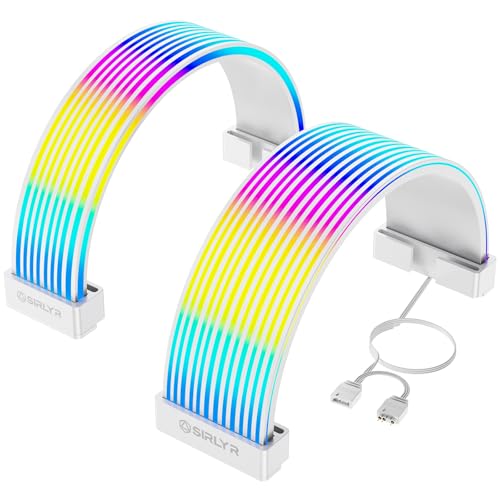
Sirlyr White ARGB Sleeves for PSU Cables, 8Pin/12VHPWR & ATX 24Pin, 5V 3Pin | Flexible LED Strips/Cover,Manage GPU/MB Cables,Hide Messy Wires,Decorate PC Case with ARGB Lighting
Chosen because it specifies 8Pin/12VHPWR & ATX 24Pin and 5V 3Pin.
View on Amazon
Sirlyr Black ARGB Sleeves for GPU/ATX Cables, 8Pin/12VHPWR & 24Pin | Flexible cover/manage GPU/ATX cables,hide wires,decorate PC case with ARGB lighting,5V 3Pin SYNC,includes SATA controller
Chosen because it specifies 8Pin/12VHPWR & 24Pin.
View on AmazonJOTO 4 Pack Cable Management Sleeve 19-20 Inches -Black | Cord Organizer System with Zipper for TV Computer Office Home Entertainment, Flexible Wrap Cover Wire Hider System
Picked as a relevant option in this category.
View on AmazonQuick picks by setup
| Situation | Best sleeve type | Useful size | Why it fits |
|---|---|---|---|
| Standard mid-tower gaming PC | PET braided sleeve | 6–10 mm for one cable; 10–16 mm for a bundle | Good expansion, abrasion resistance, and clean routing |
| Large tower with many cables behind the motherboard tray | Expandable PET braid | 16–25 mm bundle capacity | Accommodates several power and front-panel cables without forcing the door |
| Small-form-factor PC or compact desk setup | Thin PET braid or neoprene | 4–8 mm | Works around tight bends and reduces cable clutter near the desk |
| Visible cables between a desk and a monitor arm | Decorative braided sleeve | 8–15 mm | Looks polished, but should not be stretched beyond its rated range |
| Rental, shared room, or frequently moved setup | Neoprene sleeve with zipper or hook-and-loop closure | 15–25 mm | Can be opened and reused without disconnecting every cable |
Braided vs. PET vs. neoprene: what is actually different?
“Braided” describes the construction, not always the material. A PET sleeve is usually a braided, expandable tube made from polyethylene terephthalate. Decorative fabric sleeves may use nylon, polyester, or other woven fibers and may expand less. Neoprene sleeves are generally solid, flexible tubes or wraps rather than an open braid.
PET braided sleeves: the best all-rounder
PET braid is the safest default for a desktop PC. It expands when you push a cable bundle through it, then contracts around the cables for a relatively slim finish. Many expandable PET products cover a range such as 6–12 mm or 10–20 mm, although the exact minimum and maximum vary by manufacturer.
PET handles the temperatures normally found around PC cable routes, but it should not be pressed directly against a hot heatsink, exhaust outlet, or exposed component. As a practical rule, leave at least 25 mm between a sleeve and a high-temperature surface whenever the case layout allows it. PET is also better suited than soft fabric to the sharp edges around expansion-slot covers and cable-management cutouts, though edge grommets are still important.
Its main disadvantages are fraying at cut ends and a slightly translucent appearance in lighter colors. Use heat-shrink tubing, cable ties, or purpose-made end caps to keep the braid from unraveling.
Decorative braided sleeves: neat, but less forgiving
Fabric or tightly woven braided sleeves can give monitor, keyboard, and desk cables a more finished appearance. They are useful when the cable is already assembled and only needs to be grouped. They often have less expansion than PET, so a nominal 10 mm sleeve may be uncomfortable around a 10 mm bundle once the cable bends.
Choose this style when the sleeve will remain visible and relatively straight. Avoid using it as a universal solution behind a compact motherboard tray, where cables need to spread around connectors and make tight turns. The weave can also collect dust more readily than a smooth neoprene wrap.
Neoprene sleeves: flexible and reusable
Neoprene is a strong choice for a group of mixed cables that may need to be removed later. Zippered, hook-and-loop, and split-tube versions can be installed around already-connected HDMI, USB, power, and Ethernet cables. That makes them especially useful for renters, standing desks, and gaming stations that move between rooms.
Neoprene is soft against furniture and resists minor rubbing, but it is not as visually slim as PET. A 20 mm neoprene sleeve can look bulky when routed along a desk leg, and thick versions may make a side panel harder to close. It also provides less ventilation around a tightly packed bundle. Keep it away from hot exhaust zones and do not use it to bind cables directly against a power supply or graphics-card backplate.
Match sleeve diameter to cable-bundle thickness
Measure the bundle at its thickest point rather than measuring each cable separately. A caliper gives the best result; otherwise, wrap a strip of paper around the bundle, mark the circumference, and divide that measurement by 3.14.
For a non-expandable sleeve, select an internal diameter at least 2–3 mm larger than the measured bundle. For expandable PET, select a sleeve whose working range includes the bundle near its middle, not at the extreme maximum. A sleeve rated for 10–20 mm will generally be easier to install around a 14–16 mm bundle than around a full 20 mm.
| Measured bundle diameter | Recommended PET sleeve range | Recommended neoprene internal width | Typical use |
|---|---|---|---|
| 3–5 mm | 4–8 mm | 8–10 mm | Mouse, keyboard, audio, or single display cable |
| 6–9 mm | 6–12 mm | 10–14 mm | One power cable or two to three peripheral cables |
| 10–15 mm | 10–20 mm | 16–22 mm | Several desk cables or one modular power-cable group |
| 16–22 mm | 16–25 mm | 24–30 mm | Multiple PC power leads behind a large case |
| 23–30 mm | 25–35 mm | 32–40 mm | Very large bundles; check door and grommet clearance first |
Heat resistance is about placement, not just the material label
Temperature ratings can be difficult to compare because manufacturers may quote continuous-use, short-term, or laboratory figures. Instead of choosing solely from a high number, inspect the route. A sleeve over cables beside the rear intake is a lower-risk application than one touching a graphics-card exhaust area.
- Keep cable sleeves clear of fans, fan blades, and radiator surfaces.
- Do not cover ventilation openings in a power supply or case.
- Use separate sleeves for cables that must bend sharply at a graphics-card connector.
- Leave slack near connectors; a tight sleeve can transfer pulling force into the plug.
- Inspect the sleeve after installation for melting, discoloration, flattening, or hardened sections.
PET is usually the preferred option for warm internal PC routing. Neoprene is better for low-temperature external cable management. Decorative fabric braid belongs on visible, cooler runs unless its specification clearly supports the intended location.
Case size and cable-routing clearance
In a compact case, the sleeve’s outside diameter matters as much as its internal capacity. Behind a motherboard tray, 15–20 mm of usable clearance is common, but some slim cases provide less than 10 mm once the cables are installed. A bundle that measures 14 mm bare may become 18–20 mm after sleeving and bending.
Measure from the cable channel to the side-panel frame at several points. If the sleeve plus its bend is within 2–3 mm of the available space, choose a smaller bundle or a thinner sleeve. For a full-size tower, a 25 mm sleeve can work behind a broad cable channel, but it may still collide with a narrow tempered-glass panel near the front edge.
For a 10-by-12-foot room, external sleeves are most useful when the PC sits beside or under a desk and cables must travel 1–2 metres to a monitor, outlet, or powered hub. A slim 10–15 mm sleeve is usually easier to hide along a desk leg than a 25 mm tube. If the desk is height-adjustable, leave an additional 150–250 mm of looped slack for the full travel range.
Installation steps that prevent common failures
- Plan the route. Separate cables by destination: monitor, peripherals, network, and PC power. Do not combine cables that need to move in opposite directions.
- Measure the thickest section. Include ferrite blocks, right-angle plugs, and cable joins. If a connector cannot pass through the sleeve, select a split or hook-and-loop design.
- Allow bend room. Add roughly 10–20 percent to the measured length for bends and strain relief.
- Protect the ends. Cut PET braid with a hot knife or carefully seal the end using an appropriate method. Secure it before inserting cables.
- Install without stretching excessively. Over-expanded braid can contract later and pull on connectors. Push the sleeve along the cable instead of dragging hard from one end.
- Check the side panel and furniture clearance. Close the case panel and slide the desk or chair through its normal range before final fastening.
Final buying recommendation
Choose expandable PET braid when you want the best PC gaming cable sleeves for internal routing, larger bundles, and a tidy result that can accommodate different case sizes. Choose neoprene when cables are already connected, need frequent removal, or run along furniture where a soft exterior is helpful. Choose decorative braided fabric for visible desk cables that are already close to the sleeve’s ideal diameter.
Before buying, confirm the sleeve’s usable diameter range, material, cut-end treatment, closure style, and maximum temperature guidance. A correctly sized 10–16 mm sleeve will usually outperform an oversized 25 mm sleeve: it occupies less clearance, bends more naturally, and keeps the finished gaming setup cleaner.