Gaming laptops are notorious for shipping with just enough RAM to run smoothly out of the box and not a byte more, which means the moment you start streaming while raiding, or keep forty Chrome tabs open next to your game client, you feel the stutter. Upgrading your memory is one of the cheapest, highest-impact changes you can make, but only if you buy a kit that actually matches your laptop’s generation, speed, and slot configuration.
This guide breaks down the best laptop RAM kits for gaming in 2026, covering both DDR5 options for newer rigs and DDR4 kits for the millions of gaming laptops still running the previous generation. We’ll help you pick the right capacity, speed, and timing for your setup, then review our top picks in detail.
Our top picks
 Crucial 32GB DDR5 RAM Kit
- Boosts System Performance: 32GB DDR5 RAM laptop memory…
- Accelerated gaming performance: Every millisecond gained in fast-paced…
- Optimized DDR5 compatibility: Best for 12th Gen Intel…
 Crucial 16GB DDR4 RAM
- Boosts System Performance:16GB DDR4 laptop memory that operates…
- Easy Installation: Upgrade your laptop RAM with ease—no…
- Compatibility Guaranteed: Ensure seamless compatibility with your laptop…
| Product | Key specs | |
|---|---|---|
| Crucial 32GB DDR5 RAM Kit | Boosts System Performance: 32GB DDR5 RAM laptop memory… Accelerated gaming performance: Every millisecond gained in fast-paced… Optimized DDR5 compatibility: Best for 12th Gen Intel… | Check price |
| Crucial 16GB DDR4 RAM | Boosts System Performance:16GB DDR4 laptop memory that operates… Easy Installation: Upgrade your laptop RAM with ease—no… Compatibility Guaranteed: Ensure seamless compatibility with your laptop… | Check price |
 CORSAIR Vengeance SODIMM DDR4 RAM 16GB CORSAIR Vengeance SODIMM DDR4 RAM 16GB | Check price | |
 PUSKILL DDR4 Laptop RAM 32GB Kit PUSKILL DDR4 Laptop RAM 32GB Kit | Check price | |
 【DDR4 RAM Laptop Only】 GIGASTONE 32GB Kit 【DDR4 RAM Laptop Only】 GIGASTONE 32GB Kit | Check price | |
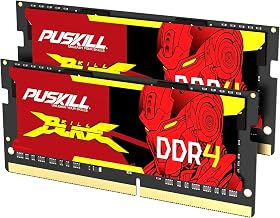 PUSKILL DDR4 Laptop RAM 16GB Kit PUSKILL DDR4 Laptop RAM 16GB Kit | Check price | |
 PNY XLR8 Gaming 32GB PNY XLR8 Gaming 32GB | Extreme performance DDR4 notebook memory for laptop gamers… Superior gaming with quicker response times and better… XMP 2.0 support delivers easy overclocking once activated,… | Check price |
 A-Tech 64GB Kit A-Tech 64GB Kit | A-Tech RAM Memory compatible for select DDR5 Laptop,… 64GB RAM Kit (2 x 32GB Modules) NON-ECC Unbuffered | Check price |
As an Amazon Associate we earn from qualifying purchases at no extra cost to you.
🎮 Get More From Your Setup — Free
Prime Gaming gives you free PC games every month, in-game loot, and a free Twitch channel sub — plus fast free shipping on all the gear above. New members get a 30-day free trial.
Watch: Best RAM For Gaming Laptop — Video Review
How to Choose RAM For a Gaming Laptop (2026)
- DDR Generation: Check whether your laptop uses DDR4 or DDR5 SODIMM slots before buying — the two are not interchangeable, and installing the wrong type simply won’t fit.
- Capacity: 16GB is the minimum for modern AAA titles, but 32GB (2x16GB) is the sweet spot in 2026 if you multitask, stream, or run background apps while gaming.
- Speed (MHz): Higher MHz (e.g., 3200MHz DDR4 or 5600MHz DDR5) improves frame consistency, but only if your laptop’s chipset actually supports that speed — check your manual or manufacturer spec sheet first.
- Dual-Channel Kits: Always prefer a matched 2x8GB or 2x16GB kit over a single stick of double capacity; dual-channel memory delivers noticeably better gaming performance than single-channel.
- CAS Latency (CL): Lower CL numbers mean faster response times. It’s a secondary factor next to speed and capacity, but worth comparing between similarly priced kits.
The Best RAM For Gaming Laptop (2026)s Reviewed
Crucial 32GB DDR5 Kit (CT2K16G56C46S5)
If your gaming laptop supports DDR5, this is the kit to buy — Crucial’s reputation for rock-solid compatibility with both Intel Core and AMD Ryzen 7000 platforms makes it a low-risk, high-reward upgrade. The 2x16GB dual-channel configuration at up to 5600MHz gives newer laptops real headroom for demanding titles and heavy multitasking alike.
Crucial 16GB DDR4 (CT16G4SFRA32A)
A dependable single-stick upgrade for DDR4 laptops that need a quick capacity boost without breaking the bank. It runs at up to 3200MHz with CL22 timings, and Crucial’s compatibility testing across 13th Gen Intel and Ryzen 7000 chipsets gives buyers extra confidence it’ll just work.
CORSAIR Vengeance SODIMM 16GB (CMSX16GX4M1A3200C22)
Corsair’s Vengeance line has long been a favorite among PC builders, and this laptop-focused SODIMM version brings the same reliability at 3200MHz. It’s a solid single-module pick for gamers who want a recognizable, well-reviewed brand without paying for RGB or gimmicks they can’t use in a laptop anyway.
PUSKILL 32GB DDR4 Kit (2x16GB)
This is a budget-friendly way to hit the 32GB sweet spot on a DDR4 gaming laptop, running at 3200MHz with CL22 timings and 1.2V operation for efficient power draw. It’s a straightforward plug-and-play dual-channel kit for gamers who want maximum capacity without paying premium-brand pricing.
GIGASTONE 32GB DDR4 Kit (2x16GB)
Gigastone’s kit matches the specs of pricier competitors — 3200MHz, CL22, unbuffered non-ECC SODIMM — while typically undercutting them on price. It’s a smart pick for budget-conscious gamers upgrading an older DDR4 laptop to a full 32GB dual-channel setup.
Frequently Asked Questions
How much RAM do I actually need for gaming in 2026?
16GB is still playable for most titles, but 32GB is increasingly the recommended baseline, especially if you stream, use Discord, or run mods alongside your game.
Can I mix DDR4 and DDR5 RAM in my laptop?
No. DDR4 and DDR5 modules are physically and electrically incompatible, and your laptop’s memory controller only supports one type — check your model’s spec sheet before purchasing.
Will faster RAM actually improve my gaming FPS?
Faster RAM helps most with CPU-bound titles and frame time consistency, but the gains are modest compared to upgrading your GPU or adding more capacity if you’re currently RAM-starved.
Do I need to buy RAM in matched pairs?
Yes, whenever possible. Running two identical sticks in dual-channel mode gives a meaningful performance boost over a single stick of the same total capacity.
Final Thoughts
For most gamers upgrading in 2026, the Crucial 32GB DDR5 kit is the top pick if your laptop supports it, while the PUSKILL and GIGASTONE 32GB DDR4 kits offer excellent value for older systems still running DDR4.