Key takeaways
- Refresh rate of at least 144Hz for competitive titles; 165Hz–240Hz if you play fast-paced shooters
- IPS or Nebula-style panels for accurate color and wide viewing angles
- Resolution matched to GPU power — 1080p/1200p for RTX 5050/5060 tiers, 1440p-class panels for RTX 5070 and above
- 16:10 aspect ratio for extra vertical space, useful for both gaming and productivity
Buying a gaming laptop in 2026 means navigating a market flooded with confusing specs, misleading “AI TOPS” marketing, and price tags that swing wildly for machines that look nearly identical on paper. Get it right and you’ll have a portable rig that handles new releases at high settings for years. Get it wrong and you’ll be stuck with thermal throttling, a dim screen, or a battery that dies in forty minutes.
This guide breaks down exactly what matters — GPU tier, display quality, cooling, and memory — so you can cut through the spec sheets and pick a laptop that actually fits how you play. Below are a few current standouts worth considering before we dig into the details.
Our top picks
 ASUS ROG Strix G16
- Unleash power with Windows 11 Home, an Intel…
- Multitask seamlessly with 16GB of DDR5-5600MHz memory and…
- Immerse yourself in stunning visuals with the smooth…
 Acer Nitro V 16S AI Gaming Laptop
- AI-Powered Performance: The AMD Ryzen 7 260 CPU…
- Game Changer: Powered by NVIDIA Blackwell architecture, GeForce…
- Supreme Speed
 Delca Customized Laptop Made with Acer Nitro
- Notice: Brand New Computer has been resealed to…
- 【Powerful AMD Ryzen Performance】: AMD Ryzen 7 260…
- 【Strong Graphics and Display】: 16" WUXGA (1920x1200) IPS…
| Product | Key specs | |
|---|---|---|
| ASUS ROG Strix G16 | Unleash power with Windows 11 Home, an Intel… Multitask seamlessly with 16GB of DDR5-5600MHz memory and… Immerse yourself in stunning visuals with the smooth… | Check price |
| Acer Nitro V 16S AI Gaming Laptop | AI-Powered Performance: The AMD Ryzen 7 260 CPU… Game Changer: Powered by NVIDIA Blackwell architecture, GeForce… Supreme Speed | Check price |
| Delca Customized Laptop Made with Acer Nitro | Notice: Brand New Computer has been resealed to… 【Powerful AMD Ryzen Performance】: AMD Ryzen 7 260… 【Strong Graphics and Display】: 16" WUXGA (1920x1200) IPS… | Check price |
 ASUS ROG Strix G16 ASUS ROG Strix G16 | Experience next-level performance with Windows 11 Home, an… Multitask seamlessly with 32GB of DDR5-5600MHz memory and… Immerse yourself in stunning visuals with the ultra-fast… | Check price |
 HP OMEN 16" Gaming Laptop Computer HP OMEN 16" Gaming Laptop Computer | Check price | |
 ASUS TUF Gaming F16 ASUS TUF Gaming F16 | Dive headfirst into gaming on Windows 11 powered… The TUF Gaming F16 maintains its classic design,… The TUF Gaming F16’s FHD+ 165Hz display with… | Check price |
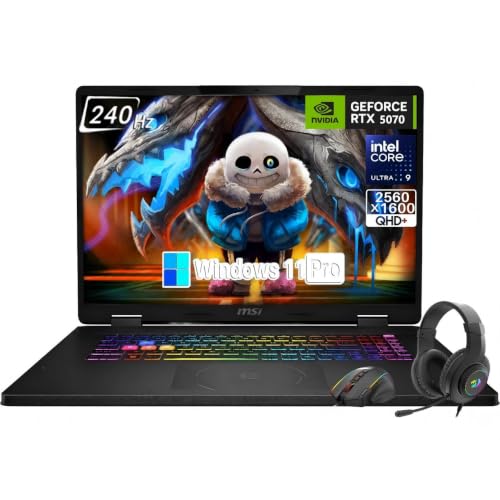 msi Crosshair 18 HX AI 18" Gaming msi Crosshair 18 HX AI 18" Gaming | Game-Dominating Processor: The MSI Crosshair 18 gaming laptop… Next-Level RTX Graphics: Powered by the NVIDIA GeForce… Blazing Memory and Storage: With 16GB DDR5 5600MHz… | Check price |
 Gaming Laptop with AMD Ryzen 7 H255 Gaming Laptop with AMD Ryzen 7 H255 | [AMD Ryzen 7 H255 Processor with a Powerful… [24GB DDR5 Memory & 4TB Expandable Storage]: Equipped… [16 Inch IPS Display and Portable All-Metal Chassis]-Equipped… | Check price |
As an Amazon Associate we earn from qualifying purchases at no extra cost to you.
🎮 Get More From Your Setup — Free
Prime Gaming gives you free PC games every month, in-game loot, and a free Twitch channel sub — plus fast free shipping on all the gear above. New members get a 30-day free trial.
Watch: Gaming Laptop Buying Guide 2026 — Video Review
Start With the GPU, Not the CPU
The graphics card determines your frame rate more than any other component, so shop by GPU tier first. Entry-level cards like the RTX 5050 handle 1080p gaming well but struggle at higher resolutions or with ray tracing enabled. The RTX 5060 is the current sweet spot for 1080p-to-1440p gaming at high settings, while the RTX 5070 and 5070 Ti step up for 1440p high-refresh play and light 4K work. Don’t get distracted by CPU core counts alone — a strong CPU paired with a weak GPU still bottlenecks your frame rate in most games.
Display Quality Matters as Much as Resolution
A high refresh rate is wasted if the panel itself is mediocre. Look for these traits together:
- Refresh rate of at least 144Hz for competitive titles; 165Hz–240Hz if you play fast-paced shooters
- IPS or Nebula-style panels for accurate color and wide viewing angles
- Resolution matched to GPU power — 1080p/1200p for RTX 5050/5060 tiers, 1440p-class panels for RTX 5070 and above
- 16:10 aspect ratio for extra vertical space, useful for both gaming and productivity
RAM and Storage: Don’t Skimp Here
16GB of DDR5 is the minimum for modern games in 2026, but 32GB is increasingly the recommended baseline if you stream, multitask, or plan to keep the laptop for several years. For storage, a 1TB Gen 4 PCIe SSD is the practical sweet spot — fast load times with enough room for a modern game library, since many current titles alone exceed 100GB. If your budget model ships with 512GB, budget for an upgrade or an external drive.
Cooling and Chassis Design
Powerful components generate heat, and a laptop that can’t dissipate it will throttle performance mid-session, no matter how good the specs look on paper. Larger 16-inch chassis generally have more room for vapor chambers, multiple fans, and exhaust vents than slimmer 14-inch designs. If you’re comparing two laptops with the same GPU, check independent thermal reviews or benchmarks before assuming they perform identically under sustained load.
Connectivity and Future-Proofing
Wi-Fi 7 offers lower latency and better performance in crowded wireless environments compared to Wi-Fi 6E or Wi-Fi 6, which matters if you play competitively online. Also check for USB-C with high-wattage charging or display output, since it simplifies connecting external monitors and docks. These details rarely show up in headline marketing but affect daily usability for years.
Tips
- Match your GPU tier to your actual monitor and resolution goals — don’t overspend on a 5070 Ti if you’ll only ever game at 1080p
- Check reviews for sustained (not just peak) performance, since thermal throttling is common under long gaming sessions
- If a model offers customizable RAM/storage configurations, buy the base model and upgrade RAM/SSD yourself when possible to save money
- Prioritize battery life and weight if you’ll carry the laptop often; prioritize cooling and screen size if it stays on a desk
Frequently Asked Questions
Is 16GB of RAM enough for gaming in 2026?
It’s enough for most current titles at recommended settings, but 32GB gives meaningful headroom for streaming, background apps, and future game requirements. If longevity matters to you, prioritize 32GB or a model with upgradeable RAM slots.
Do I need an Intel Core Ultra or AMD Ryzen AI chip, or is a standard processor fine?
For pure gaming performance, a standard high-core-count CPU like the i7-14650HX performs excellently and often costs less. AI-branded chips add on-device AI acceleration, which mainly benefits creative workloads, some upscaling features, and future software rather than raw gaming frame rates today.
How much does display refresh rate actually matter?
It matters most in competitive, fast-paced games where lower input lag and smoother motion translate to a real gameplay advantage. For single-player or slower-paced titles, 144Hz is already smooth enough, and chasing 240Hz offers diminishing returns unless your GPU can consistently push those frame rates.
Should I buy a customized/configurable laptop instead of a fixed model?
Configurable options can be worthwhile if you know exactly how much RAM and storage you need, since you avoid paying for capacity you won’t use or upgrading later. Just confirm the base chassis, cooling, and display specs match a trusted, reviewed model before customizing.
Conclusion
The best gaming laptop for you comes down to matching GPU tier, display quality, and memory to how and where you actually play, rather than chasing the highest number on a spec sheet — get those fundamentals right and any of the picks above will deliver strong performance for years to come.