Key takeaways
- Prioritize the GPU: At this budget, the graphics card determines roughly 70% of your gaming performance. An RTX 5060 Ti or RTX 5070 paired with a mid-range CPU will outperform a top-tier CPU paired with entry-level graphics every time.
- Don’t overpay for RAM you won’t use: 16GB of DDR5 is sufficient for virtually all 2026 titles. A 32GB configuration is nice future-proofing, but not worth sacrificing a GPU tier to get — and RAM is the easiest component to upgrade later.
- Check the power supply and cooling: Budget prebuilts frequently cut corners here. Look for at least a 550W unit with an 80 Plus rating, and be wary of cramped cases with a single exhaust fan, which will throttle sustained performance.
- Match the machine to your monitor: If you’re gaming at 1080p/144Hz, an RTX 5060 or 5060 Ti is plenty. Only step up to a 5070 if you’re targeting 1440p or plan to upgrade your display soon.
- Verify storage is NVMe, not SATA: A 512GB SATA SSD will feel noticeably slower on load times than a 1TB M.2 NVMe drive, and modern games routinely exceed 100GB each. Treat 1TB NVMe as the practical floor.
Shopping for a gaming desktop under $1,000 in 2026 means navigating a market where GPU pricing swings week to week and where two machines with nearly identical spec sheets can perform very differently. The temptation is to chase the biggest number on the box — an RTX 5070 badge, a 32GB RAM figure — without checking whether the power supply, cooling, and CPU pairing can actually sustain it. Meanwhile, genuinely well-balanced builds often get overlooked because their headline specs read a little quieter.
This guide cuts through that. Below you’ll find our current picks for the best gaming PCs under $1,000, drawn from builds that deliver real 1080p and 1440p performance rather than spec-sheet theater. We cover what to prioritize at this budget, review each system’s strengths and compromises honestly, and answer the questions buyers ask most. Prices in this category move constantly, so treat any listing above your cap as one to watch rather than one to write off.
Our top picks
 msi Codex Z2 Gaming Desktop: AMD R7-8700F
- Product Group: Personal Computer
- Binding: Personal Computers


As an Amazon Associate we earn from qualifying purchases at no extra cost to you. Ratings are shown as listed on Amazon.
⚡ Save on Your Next PC — Amazon Prime
Prime members get fast free shipping on the systems above, plus early access to Prime Day & Black Friday PC deals. New members get a 30-day free trial.
Watch: Best Gaming PC Under $1000 — Video Review
How to Choose Gaming PC Under $1000
- Prioritize the GPU: At this budget, the graphics card determines roughly 70% of your gaming performance. An RTX 5060 Ti or RTX 5070 paired with a mid-range CPU will outperform a top-tier CPU paired with entry-level graphics every time.
- Don’t overpay for RAM you won’t use: 16GB of DDR5 is sufficient for virtually all 2026 titles. A 32GB configuration is nice future-proofing, but not worth sacrificing a GPU tier to get — and RAM is the easiest component to upgrade later.
- Check the power supply and cooling: Budget prebuilts frequently cut corners here. Look for at least a 550W unit with an 80 Plus rating, and be wary of cramped cases with a single exhaust fan, which will throttle sustained performance.
- Match the machine to your monitor: If you’re gaming at 1080p/144Hz, an RTX 5060 or 5060 Ti is plenty. Only step up to a 5070 if you’re targeting 1440p or plan to upgrade your display soon.
- Verify storage is NVMe, not SATA: A 512GB SATA SSD will feel noticeably slower on load times than a 1TB M.2 NVMe drive, and modern games routinely exceed 100GB each. Treat 1TB NVMe as the practical floor.
The Best Picks Reviewed
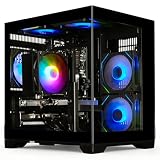
MSI Codex Z2 (R7-8700F / RTX 5070 / 32GB)
This is the strongest overall configuration on the list, pairing an RTX 5070 with a capable Ryzen 7 and a genuinely generous 32GB of DDR5 plus a 2TB NVMe drive. It regularly drifts above the $1,000 line depending on stock, so set an alert — at or near budget, it’s the clear value leader for 1440p gaming.
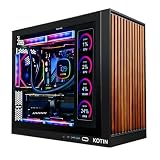
KOTIN Prebuilt RTX 5070 / Ryzen 7 9700X
The 9700X is a newer, more efficient CPU than most builds at this price offer, and it pairs well with the RTX 5070 for high-refresh 1440p play. The 1TB SSD is the main compromise, but it’s a straightforward upgrade and the core components are where your money should be going anyway.
Alienware Aurora (RTX 5070 / Core Ultra 7 265F)
Alienware’s advantage here is build quality, thermal engineering, and warranty support — areas where boutique budget builders often disappoint. Expect to pay a premium for that, and expect a more restrictive upgrade path, but this is the safest buy for anyone who doesn’t want to troubleshoot their own machine.
MSI Codex Z2 (R7-8700F / RTX 5060 Ti / 16GB)
The more attainable Codex configuration trades the 5070 for an RTX 5060 Ti and halves the RAM and storage, which comfortably brings it under budget. For 1080p high-refresh gaming it gives up very little, and MSI’s cooling and power delivery remain a step above generic builds at this tier.
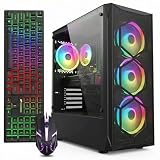
YAWYORE Ryzen 7 5700X / RTX 5060
The RTX 5060 is a solid 1080p card and the 5700X still holds up for gaming, making this a reasonable entry point if your budget sits well below $1,000. Just know you’re buying an older platform — check the PSU rating and plan on RAM being your first upgrade.
Frequently Asked Questions
Can you get a genuinely good gaming PC for under $1,000 in 2026?
Yes, though expectations should be calibrated to 1080p and entry-level 1440p rather than 4K. A build with an RTX 5060 Ti or better will run virtually every current title at high settings above 60fps, and often well above 100fps at 1080p.
Is a prebuilt worse value than building it myself?
Not necessarily anymore. Prebuilt manufacturers buy GPUs at volume pricing that individual buyers can’t access, which frequently offsets the assembly markup. Building your own still wins on component selection and upgradeability, but the raw price gap has narrowed considerably.
Should I choose 16GB or 32GB of RAM?
16GB is adequate for gaming in 2026. Choose 32GB if you stream, run heavy multitasking alongside games, or do content creation work. Otherwise, put that money toward the GPU — you can add RAM in a few minutes for far less than the configuration premium.
How long will one of these builds stay current?
Expect three to four years of comfortable 1080p gaming from an RTX 5060 Ti-class card, and slightly longer from a 5070 if you’re willing to lower settings over time. The CPUs listed here will all outlast their paired GPUs, which is exactly the balance you want.
Final Thoughts
If you can catch it at or near $1,000, the MSI Codex Z2 with the RTX 5070 and 32GB of DDR5 is the best-rounded machine here and the one we’d buy ourselves. The RTX 5060 Ti version of the same chassis is the smarter pick for strict budgets and 1080p displays, delivering nearly the same experience for meaningfully less. And for buyers who value warranty support and thermal reliability over raw specs, the Alienware Aurora justifies its premium — just be honest with yourself about whether you’ll ever open the case.