macOS and mechanical keyboards are a natural fit, but there’s a catch: most gaming boards ship with a Windows layout, so your Command and Option keys land in the wrong place and media keys don’t map. The best Mac mechanical keyboards either include Mac-legend keycaps and a dedicated Mac mode, or use QMK/VIA firmware so you can remap everything yourself. Get that right and you gain tactile typing, hot-swap switches and proper Cmd-based shortcuts.
We focused on boards that play nicely with Apple systems, from Keychron’s Mac-first lineup to Logitech’s MX Mechanical, plus hot-swap options from AULA and Kisnt for tinkerers. Below is what to check before buying, then five picks spanning full-size, 75% and low-profile so you can match the board to your desk and typing style.
Our top picks
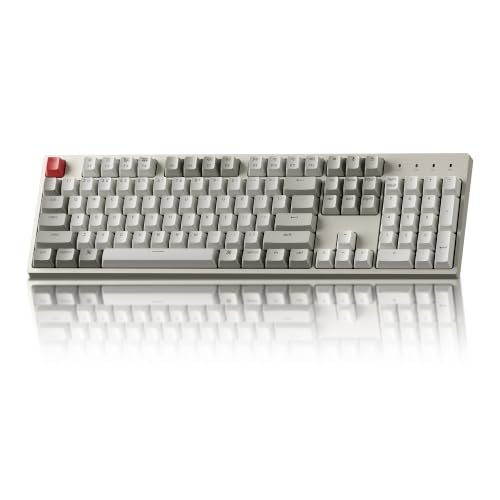 Keychron C2 Full Size Wired Mechanical Keyboard
- The Keychron C2 (non-backlight version) is a 104…
- With a layout optimized for Mac, the C2…
- Designed with reliability in mind, the C2 comes…
 Keychron K3 Version 2 QMK 75% Wireless
- Keychron K3, a compact 75% layout ultra-slim wireless…
- Be ready to multitask without missing a beat…
- With a unique Mac layout, the K3 has…
 Logitech MX Mechanical Wireless Illuminated Keyboard Tactile
- Tactile Quiet mechanical key switches with a satisfying…
- Low-profile keys, more comfort: A keyboard layout designed…
- Smart illumination: Backlit keys light up the moment…
| Product | Key specs | |
|---|---|---|
| Keychron C2 Full Size Wired Mechanical Keyboard | The Keychron C2 (non-backlight version) is a 104… With a layout optimized for Mac, the C2… Designed with reliability in mind, the C2 comes… | Check price |
| Keychron K3 Version 2 QMK 75% Wireless | Keychron K3, a compact 75% layout ultra-slim wireless… Be ready to multitask without missing a beat… With a unique Mac layout, the K3 has… | Check price |
| Logitech MX Mechanical Wireless Illuminated Keyboard Tactile | Tactile Quiet mechanical key switches with a satisfying… Low-profile keys, more comfort: A keyboard layout designed… Smart illumination: Backlit keys light up the moment… | Check price |
 Kisnt KN85 Wireless Mechanical Keyboard Kisnt KN85 Wireless Mechanical Keyboard | 【75% Space‑saving Layout】The KN85 series is a compact… 【Tri-Mode Connectivity for Multi-Device Workflow】Connect via USB‑C, 2.4GHz… 【Creamy Thocky Typing Sound】The gasket mount absorbs harsh… | Check price |
 AULA 99 Key Keyboard AULA 99 Key Keyboard | Computer Keyboards 3 Connection Modes: AULA s99 full… Cool Keyboard RGB Backlit: This LED keyboard features… Full Size Keyboard: This 96% layout typewriter keyboard… | Check price |
 Logitech Alto Keys K98M Wireless Mechanical Gasket Logitech Alto Keys K98M Wireless Mechanical Gasket | Immersive typing with UniCushion: Enjoy a clicky mechanical… Seamlessly smooth typing: This mechanical keyboard features hot-swappable… Bright ideas, day or night: Non-RGB, white backlighting… | Check price |
 Keychron K10 Max QMK Wireless Custom Mechanical Keychron K10 Max QMK Wireless Custom Mechanical | 108 Keys QMK Wireless Keyboard: The K10 Max… 2.4 GHz and Bluetooth Connection: The 2.4 GHz… Program with QMK & web app: Simply connect… | Check price |
 AULA F75 Pro Wireless Mechanical Keyboard AULA F75 Pro Wireless Mechanical Keyboard | Tri-mode Connection Keyboard: AULA F75 Pro wireless mechanical… Hot-swap Custom Keyboard: This custom mechanical keyboard with… Advanced Structure and PCB Single Key Slotting: This… | Check price |
As an Amazon Associate we earn from qualifying purchases at no extra cost to you.
⚡ Save on Your Next PC — Amazon Prime
Prime members get fast free shipping on the systems above, plus early access to Prime Day & Black Friday PC deals. New members get a 30-day free trial.
Watch: Best Mechanical Keyboard for Mac — Video Review
How to Choose
- Mac layout and mode: Look for included Mac keycaps and a Mac/Windows toggle so Command, Option and media keys work without third-party remappers.
- QMK/VIA support: Boards with QMK or VIA let you remap any key and build macros, the cleanest way to get a perfect Mac layout on any keyboard.
- Connectivity: Bluetooth multi-device pairing is handy for switching between a Mac and iPad; check for a low-latency 2.4GHz dongle if you also game.
- Switch feel: Tactile browns suit typing and coding, linear reds suit gaming; hot-swap sockets let you change your mind later.
- Profile and size: Low-profile boards match the modern Mac aesthetic and reduce wrist strain; 75% saves desk space while keeping arrows.
The Best Picks Reviewed
Keychron K3 V2 (Best for Mac Overall)
A 75% low-profile wireless board with QMK, hot-swap switches and Mac keycaps in the box. The slim profile mirrors Apple’s own keyboards, and Bluetooth pairs with up to three devices, making it the most Mac-native option here.
Logitech MX Mechanical (Best Productivity)
Tactile switches, per-key backlighting and Logi Options+ with proper Mac support. It’s built for coders and writers who want mechanical feel with clean multi-device switching between a Mac, iPad and PC.
Keychron K10 Max (Best Full-Size)
A full-size QMK wireless board with a number pad, ideal for spreadsheet and finance work on a Mac. Deep customization via VIA means you can remap the Windows-style keys to a flawless Mac layout.
Keychron C2 (Best Wired Value)
A full-size wired board with brown switches and a retro look. No wireless frills, but it includes Mac support and delivers reliable tactile typing at a friendly price.
AULA F75 Pro (Best Hot-Swap Tinkerer Pick)
A 75% hot-swap board with pre-lubed switches, a control knob and tri-mode connectivity. It ships Windows-oriented, but with VIA-style remapping you can build a custom Mac layout and enjoy its creamy sound signature.
Frequently Asked Questions
Will any mechanical keyboard work with a Mac?
Yes, macOS recognizes them, but the Command and Option keys may be swapped. Boards with a Mac mode or remappable firmware fix this without extra software.
Do I need Mac-specific keycaps?
Not strictly, but they label Command, Option and Control correctly so your muscle memory matches the legends. Otherwise you can remap and ignore the printed caps.
Are low-profile keyboards better for Mac?
Many Mac users prefer them because they resemble Apple’s own keyboards and reduce wrist extension. It’s a comfort preference, not a requirement.
Can I use these for gaming too?
Absolutely. Boards with a 2.4GHz dongle or hot-swap linear switches game well; just switch to Mac mode for daily work.
Final Thoughts
For most Mac users the Keychron K3 V2 is the standout, blending a low-profile Apple-like feel with QMK remapping and hot-swap flexibility. Full-size fans should look at the Keychron K10 Max, while the Logitech MX Mechanical wins for pure productivity. Prioritize Mac-mode support and you’ll avoid the layout headaches that plague generic boards.