Key takeaways
- Footprint: A full-size board typically runs 44–46cm wide; a TKL lands closer to 35–36cm, freeing roughly a hand’s width of mousing room.
- Number pad: Full-size keeps a dedicated 17-key numeric cluster for data entry, calculators, and Alt-code shortcuts. TKL removes it entirely — the number row remains, but rapid numeric input slows considerably.
- Ergonomics: With a TKL, your mouse hand sits closer to your body’s centreline, reducing shoulder abduction over long sessions. Full-size boards push the mouse further right.
- Portability: TKL boards weigh less and fit standard backpacks. Models like the G PRO TKL with a detachable cable are built for LAN and tournament travel; full-size boards rarely are.
- Binding headroom: Full-size layouts give sim, strategy, and MMO players extra physical keys for macros without stacking modifiers.
- Price and availability: TKL versions are often slightly cheaper than their full-size siblings, and renewed listings such as the Apex 3 TKL (Renewed) push entry costs lower still.
Few peripheral decisions shape a gaming setup as quietly — or as permanently — as keyboard size. A full-size board gives you every key the PC platform has ever defined, from the number pad to the dedicated navigation cluster. A tenkeyless (TKL) board deletes the number pad, shaving roughly 15–20% off the width and handing that space back to your mouse. Both layouts type identically under your left hand; the argument is entirely about what happens to the right of the arrow keys.
That argument matters more in 2026 than it did five years ago. Low-sensitivity aiming has become the norm in tactical shooters, desks have shrunk to fit smaller apartments and hybrid work setups, and manufacturers now ship TKL versions of nearly every flagship — meaning you no longer sacrifice features, switch quality, or RGB to go compact. Choosing between the two is now a genuine workflow decision rather than a compromise, and the right answer depends on whether you crunch numbers, sweep your mouse in wide arcs, or need one board to do both.
Our top picks
 SteelSeries Apex 3 TKL RGB Gaming Keyboard
- The compact tenkeyless design is the most popular…
- Our whisper quiet gaming switches with anti-ghosting technology…
- Designed with IP32 Water & Dust Resistant for…
 Logitech G PRO Mechanical TKL Tenkeyless Gaming
- Built with and for esports athletes for competition-level…
- Durable GX Blue Click switches deliver an audible…
- Ultra-portable compact ten keyless design frees up table…
 Corsair K55 CORE TKL RGB Gaming Keyboard
- More Room to Make Big Plays: A compact,…
- Eight Zone RGB Backlighting: Create personalized lighting as…
- 300ml Spill Resistance: K55 CORE TKL is built…
| Product | Key specs | |
|---|---|---|
| SteelSeries Apex 3 TKL RGB Gaming Keyboard | The compact tenkeyless design is the most popular… Our whisper quiet gaming switches with anti-ghosting technology… Designed with IP32 Water & Dust Resistant for… | Check price |
| Logitech G PRO Mechanical TKL Tenkeyless Gaming | Built with and for esports athletes for competition-level… Durable GX Blue Click switches deliver an audible… Ultra-portable compact ten keyless design frees up table… | Check price |
| Corsair K55 CORE TKL RGB Gaming Keyboard | More Room to Make Big Plays: A compact,… Eight Zone RGB Backlighting: Create personalized lighting as… 300ml Spill Resistance: K55 CORE TKL is built… | Check price |
 Logitech G413 TKL SE Mechanical Gaming Keyboard Logitech G413 TKL SE Mechanical Gaming Keyboard | Take your gaming skills to the next level:… PBT keycaps: Heat- and wear-resistant, this computer gaming… Tactile mechanical switches: Uncompromising performance is always within… | Check price |
 Razer Ornata V3 TKL Gaming Keyboard Razer Ornata V3 TKL Gaming Keyboard | With slimmer keycaps and shorter switches, enjoy natural… Fusing the snappy, clicky feedback of a mechanical… More durable than regular keycaps, the UV coating… | Check price |
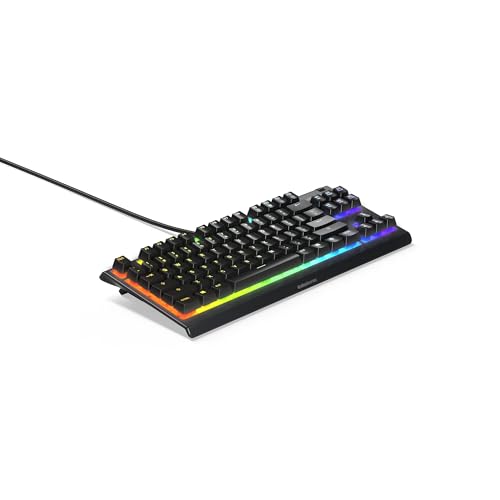 SteelSeries Apex 3 TKL RGB Gaming Keyboard SteelSeries Apex 3 TKL RGB Gaming Keyboard | The compact tenkeyless design is the most popular… Our whisper quiet gaming switches with anti-ghosting technology… Designed with IP32 Water & Dust Resistant for… | Check price |
 Razer Huntsman V3 Pro TKL Esports Gaming Razer Huntsman V3 Pro TKL Esports Gaming | CHOSEN BY PRO’S FOR ADVANCED FPS MOVEMENT Prioritize the latest input between two selected keys… A step up from traditional mechanical or optical… | Check price |
 Cherry KC 200 MX Wired Mechanical Office Cherry KC 200 MX Wired Mechanical Office | Wired, mechanical office keyboard with anodized metal plate:… CHERRY MX2A BROWN switches: Precise and noticeable typing… Practical: Tasteful white status LEDs in the CAPS… | Check price |
As an Amazon Associate we earn from qualifying purchases at no extra cost to you.
⚡ Save on Your Next PC — Amazon Prime
Prime members get fast free shipping on the systems above, plus early access to Prime Day & Black Friday PC deals. New members get a 30-day free trial.
Watch: Full-Size vs TKL Keyboard: 2026 Comparison — Video Review
Quick Verdict
Buy a full-size keyboard if you regularly enter numeric data, play sims or MMOs that benefit from a large bank of bindable keys, or simply want every key present without thinking about layers and shortcuts. Buy a TKL if you play mouse-intensive shooters at low DPI, work on a desk under about 120cm wide, or travel with your gear — boards like the Logitech G PRO TKL and the SteelSeries Apex 3 TKL exist specifically to free up mouse space without giving up mechanical feel or per-zone lighting.
Key Differences
- Footprint: A full-size board typically runs 44–46cm wide; a TKL lands closer to 35–36cm, freeing roughly a hand’s width of mousing room.
- Number pad: Full-size keeps a dedicated 17-key numeric cluster for data entry, calculators, and Alt-code shortcuts. TKL removes it entirely — the number row remains, but rapid numeric input slows considerably.
- Ergonomics: With a TKL, your mouse hand sits closer to your body’s centreline, reducing shoulder abduction over long sessions. Full-size boards push the mouse further right.
- Portability: TKL boards weigh less and fit standard backpacks. Models like the G PRO TKL with a detachable cable are built for LAN and tournament travel; full-size boards rarely are.
- Binding headroom: Full-size layouts give sim, strategy, and MMO players extra physical keys for macros without stacking modifiers.
- Price and availability: TKL versions are often slightly cheaper than their full-size siblings, and renewed listings such as the Apex 3 TKL (Renewed) push entry costs lower still.
Full-Size Keyboards
The full-size layout remains the default for a reason: it assumes nothing about how you’ll use the machine. Spreadsheet work, accounting, CAD, streaming software with numeric hotkeys, and flight or racing sims all lean on the number pad, and no amount of remapping makes a number row feel as fast as a dedicated 10-key grid. If your PC is a genuine do-everything workstation that happens to game, the number pad earns its width every single day.
The cost is desk real estate and posture. On a 100–120cm desk shared with a monitor stand, speakers, and a mug, a full-size board can push your mouse pad into an awkward angle — and low-sensitivity shooter players will hit the keyboard’s edge mid-flick. Some players solve this by angling the board 10–15 degrees counter-clockwise, which recovers a little sweep room, but it’s a workaround rather than a fix. If you find yourself constantly repositioning your mouse pad, the layout is telling you something.
TKL Keyboards
TKL has become the competitive default because the space it returns goes exactly where shooter players need it. The 2026 lineup makes the case cleanly: the Logitech G PRO TKL offers clicky mechanical switches and Lightsync RGB in a tournament-ready chassis, the G413 TKL SE swaps in tactile switches with a stripped-back aluminium-topped build, and the Razer Ornata V3 TKL uses low-profile mecha-membrane keys with a magnetic wrist rest for a softer, quieter feel. Nothing here is a compromised version of a bigger board.
Budget-focused TKLs are equally strong. The SteelSeries Apex 3 TKL brings IP32 water and dust resistance, whisper-quiet switches, and 8-zone RGB — a sensible pick for shared or snack-adjacent desks — while the Corsair K55 CORE TKL adds spill resistance, dedicated media keys, and 1000Hz polling on quiet membrane switches. The main adjustment is muscle memory: expect a week of reaching for a number pad that isn’t there, plus a small learning curve for Fn-layer shortcuts on some models.
Which Should You Buy?
- For competitive FPS at low DPI: Pick TKL. The extra mousing width is the single cheapest aim upgrade available — the G PRO TKL is the reference choice.
- For spreadsheets, finance, or CAD alongside gaming: Pick full-size. The number pad pays for its footprint in daily productivity.
- For small desks and dorm setups: Pick TKL. The Apex 3 TKL or Corsair K55 CORE TKL fits comfortably where a full-size board won’t.
- For LAN events and travel: Pick TKL with a detachable cable — the G PRO TKL is purpose-built for it.
- For the tightest budget: Pick a value TKL such as the G413 TKL SE, the Ornata V3 TKL, or a renewed Apex 3 TKL.
Frequently Asked Questions
Does a TKL keyboard actually improve aim?
Indirectly, yes. It doesn’t change your sensor or sensitivity, but it removes the physical obstacle that forces cramped, wrist-driven flicks at low DPI. Players who use large arm sweeps notice the difference immediately; high-sensitivity players may not.
What if I need the number pad occasionally?
Most operating systems support an Fn-layer number pad on the right-hand letter keys, and a separate USB numpad costs little and can sit on the left side of your desk — arguably better ergonomics than a full-size board.
Are membrane TKLs worth buying over mechanical?
They can be. Quiet membrane and mecha-membrane boards like the Corsair K55 CORE TKL and Razer Ornata V3 TKL suit shared spaces, late-night sessions, and voice chat, and both include useful extras such as media keys and spill resistance.
Is a renewed keyboard a safe buy?
Generally yes, provided it’s a reputable renewed listing with a return window. A renewed Apex 3 TKL is a reasonable way to test the layout before committing to a premium board.
Final Verdict
If your desk doubles as an office and you touch numbers daily, stay full-size — the number pad is a real tool, not dead weight. For everyone else, and especially for shooter players in 2026, TKL is the smarter default: same typing experience, same switch and lighting technology, meaningfully more room to aim, and a lineup strong enough that you can choose by switch feel and budget rather than settling for whatever compact board exists.